
1. Okwu mmalite
This manual provides essential information for the safe and efficient use of your CANDY Smart Inverter Washer Dryer, model CSWS496TWMRRE/FR. Please read these instructions carefully before installing, operating, or performing maintenance on the appliance. Keep this manual for future reference.
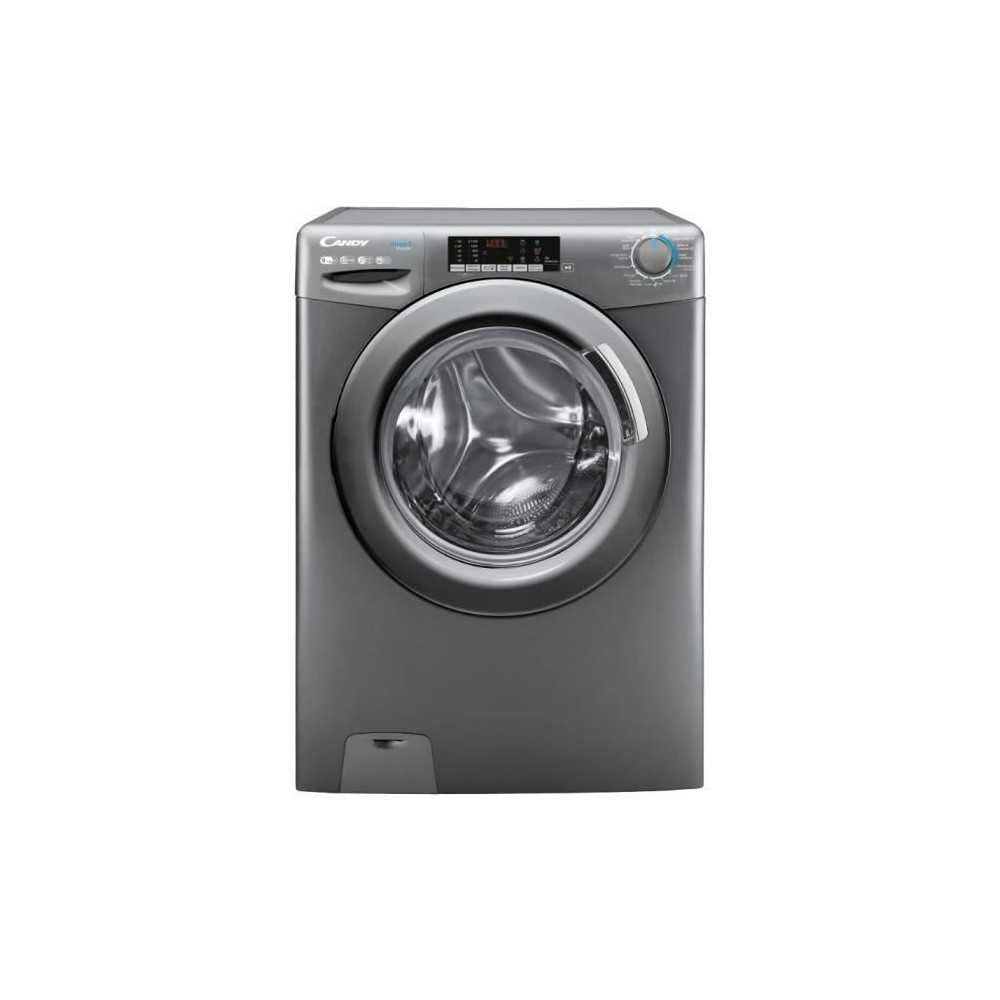
Foto 1.1: N'ihu view of the CANDY Smart Inverter Washer Dryer.
2. Ozi nchekwa
Na-agbaso ihe ndị dị mkpa gbasara nchekwa mgbe niile mgbe ị na-eji ngwa eletriki iji belata ihe egwu nke ọkụ, ujo eletriki, na mmerụ ahụ nye mmadụ. Ngwa a bụ maka ojiji n'ụlọ naanị.
- Gbaa mbọ hụ na etinyere ngwaọrụ ahụ nke ọma.
- Ekwela ka ụmụaka jiri akụrụngwa gwuo egwu ma ọ bụ rụọ ngwa.
- Ejikwala aka mmiri emetụ ngwa ahụ aka.
- Kwupu ngwa ahụ tupu ihicha ma ọ bụ ịrụ ọrụ ọ bụla.
- Asachala ma ọ bụ kụọ ihe emerela n'ime ya, saa ya, tinye ya, ma ọ bụ ihe ọkụ ọkụ ma ọ bụ ihe mgbawa hụrụ.
- Keep the area around the exhaust opening free from the accumulation of lint, dust, and dirt.
3. Ngwaahịa gafereview
3.1. Akụrụngwa
- Ogwe njikwa: Features a program selector dial, digital display, and touch buttons for various functions.
- Drawer ihe nchacha: Located on the top left, for adding detergent and fabric softener.
- Ịgba: Stainless steel interior for washing and drying clothes.
- Ọnụ ụzọ: Front-loading door with a secure latch.
- iyo: Located at the bottom front, for collecting lint and foreign objects.
3.2. Ogwe njikwa

Foto 3.1: Zuru ezu view nke njikwa njikwa.
The control panel allows you to select wash and dry programs, adjust settings, and monitor the cycle status. Key elements include:
- Ọkpọ oku Nhọrọ Mmemme: Used to choose from 15 available wash and dry programs.
- Ngosipụta Digital: Na-egosi oge fọdụrụ, koodu mperi na nhọrọ ahọpụtara.
- Nhọrọ okpomọkụ: Adjusts wash water temperature.
- Nhọrọ Ọsọ Ọsọ: Modifies the spin cycle speed up to 1400 rpm.
- Mmalite igbu oge: Sets a delayed start time for the cycle (1-24 hours).
- Options Buttons: Activates special functions like Steam, Mix Power System, and quick cycles.
3.3. Drawer ncha
The detergent drawer has compartments for pre-wash detergent, main wash detergent, and fabric softener. Refer to the markings on the drawer for correct placement.
3.4. Drum Interior

Image 3.2: Interior of the washer dryer drum.
The stainless steel drum is designed for effective washing and drying. Ensure no foreign objects are left inside before starting a cycle.
4. Nwụnye
4.1. Iwepu ngwongwo
- Wepu ihe niile nkwakọ ngwaahịa, gụnyere polystyrene base na ihe ọ bụla ntinye na drum.
- Remove the transport bolts from the rear of the appliance. Keep these bolts for future transport.
4.2. Ndokwa
- Debe ngwa ahụ n'ala siri ike ma dị larịị.
- Adjust the feet to ensure the machine is stable and level.
- Ensure there is adequate space around the appliance for ventilation.

Foto 4.1: Ọpụample of washer dryer placement in a domestic environment.
4.3. Mmiri na Njikọ eletrik
- Jikọọ eriri ntinye mmiri na mgbata mmiri oyi.
- Debe eriri mmiri ahụ n'ime ọkpọkọ ma ọ bụ sink, hụ na edobere ya nke ọma ka ọ ghara ịkwaga mgbe ọ na-arụ ọrụ.
- Tinye eriri ọkụ n'ime oghere eletrik gbadoro ụkwụ (230 Volts).
5. Ntuziaka ọrụ
5.1. Tupu Mbụ Jiri
Run a short wash cycle without laundry and detergent to clean the drum and remove any manufacturing residues.
5.2. Na-ebunye akwa akwa
- Open the door and load laundry into the drum, ensuring not to overload (max 9 kg for wash, 6 kg for dry).
- Mechie ọnụ ụzọ ahụ nke ọma.
5.3. Ịtinye nchacha na ihe nro
Pull out the detergent drawer and add appropriate amounts of detergent and fabric softener to their respective compartments. Close the drawer.
5.4. Nhọrọ mmemme
- Turn the program selector dial to choose the desired wash or dry program. The appliance offers 15 programs, including 7 quick cycles.
- Ngosipụta dijitalụ ga-egosi ntọala ndabara maka mmemme ahọpụtara.
5.5. Adjusting Settings and Special Functions
- Okpomọkụ: Press the temperature button to adjust the wash temperature (e.g., 20°, 30°, 40°, 60°, 90°).
- Ọkpụkpụ Spin: Press the spin speed button to select the desired spin speed (e.g., 400, 800, 1000, 1400 rpm).
- Mmalite igbu oge: Press the delay start button repeatedly to set a delay from 1 to 24 hours.
- Ọrụ Steam: Activates the steam option to reduce wrinkles and refresh clothes.
- Mix Power System: Ensures thorough cleaning by pre-mixing water and detergent.
- Usoro ngwa ngwa: Select one of the 7 rapid cycles, including a full load program in 59 minutes.
5.6. Ịmalite okirikiri
Pịa bọtịnụ Malite/Nkwụsịtụ iji malite mmemme ahọpụtara. Ihe ngosi ahụ ga-egosi oge fọdụrụ.
5.7. Ọgwụgwụ okirikiri
At the end of the cycle, the appliance will signal with an audible alert and/or a message on the display. Open the door and remove the laundry.
6. Nlekọta
6.1. Na-ehicha Drawer Detergent
Regularly clean the detergent drawer to prevent residue buildup. Remove the drawer, rinse it under running water, and clean any stubborn deposits with a brush. Reinsert the drawer.
6.2. Na-ehicha Drum
Use the dedicated 'Drum Cleaning' program (if available) or run an empty hot wash cycle with a descaling agent or white vinegar to maintain drum hygiene.
6.3. Na-ehicha ihe nzacha
Periodically clean the drain pump filter to ensure proper drainage. Place a shallow container under the filter cover, unscrew the filter, remove any lint or debris, and then securely replace it.
6.4. Mpụga ihicha
Jiri ihe dị nro, d hichaa elu mpụta nke ngwa ahụ.amp akwa . Ejila ihe nchacha abrasive ma ọ bụ ihe mgbaze.
7. Nchọpụta nsogbu
If you encounter issues with your appliance, consult the table below for common problems and solutions. If the problem persists, contact customer support.
| Nsogbu | Ihe nwere ike ime | Ngwọta |
|---|---|---|
| Ngwa anaghị ebido | Power cord unplugged; door not closed; program not selected; Start/Pause button not pressed. | Lelee njikọ ike; hụ na agbachiwo ọnụ ụzọ; họrọ mmemme; pịa Malite/kwụsịtụ. |
| Enweghị mmiri iri | E mechiri ọkpọ mmiri; a gbagọrọ agbagọ na paịpụ mmiri; a kpọchiri ihe nzacha mmiri. | Mepee ọkpọkọ mmiri; dozie paịpụ mmiri; nzacha mmiri dị ọcha. |
| Mmiri adịghị agbapụta | A gbagọrọ agbagọ ma ọ bụ kpọchie paịpụ mmiri; a kpọchiri nzacha mmiri mmiri. | Mee ka paịpụ draịva dị larịị ma ọ bụ dị ọcha; hichaa nzacha paịpụ draịva. |
| Oke ịma jijiji | Ngwaọrụ anaghị adị larịị; anaghị ewepụ blọt njem; ibu na-adịghị nhata. | Adjust leveling feet; remove transport bolts; redistribute laundry. |
| Uwe anaghị akpọnwụ nke ọma | Overloaded; incorrect drying program; lint filter blocked. | Belata ibu; họrọ mmemme nkụcha kwesịrị ekwesị; hichaa nzacha lint. |
8. Nkọwapụta
| Njirimara | Nkọwapụta |
|---|---|
| Aha Nlereanya | C SWS496TWMRRE/FR |
| Ụdị | Swiiti |
| Akụkụ ngwaahịa (D x W x H) | 54P x 60lx 86H cm |
| Ịsa ikike | 9 kilogram |
| Ike akọrọ | 6 kilogram |
| Ọsọ ọsọ Max | 1400 rpm |
| Ọnụọgụ nke Mmemme | 15 |
| Energy Class (Wash) | A |
| Ọkwa mkpọtụ | 76 dB |
| Voltage | 230 volts |
| Material (Drum) | Igwe anaghị agba nchara |
| Ibu | 65 kilogram |
| Ụdị nwụnye | Ntighari |
| Ụdị njikwa | Metụ aka |
9. Akwụkwọ ikike na nkwado
9.1. Akwụkwọ ikike Ozi
This CANDY appliance comes with a Akwụkwọ ikike onye nrụpụta afọ 2. Please retain your proof of purchase for warranty claims. The warranty covers defects in materials and workmanship under normal domestic use.
9.2. Nkwado ndị ahịa
For technical assistance, spare parts, or to schedule a service appointment, please contact CANDY customer support. Refer to the contact information provided in the separate warranty card or on the official CANDY websaịtị.
The user manual is included with the product for detailed instructions and further support.