
Okwu mmalite
Thank you for choosing the Billboard Soul Advance True Wireless Stereo (TWS) Earbuds. These earbuds are designed to provide a superior audio experience with Active Noise Cancellation (ANC), Environmental Noise Cancellation (ENC), and a comfortable, splash-resistant design. This manual will guide you through the setup, operation, and maintenance of your new earbuds.
Ozi nchekwa
- Do not expose the earbuds or charging case to extreme temperatures or direct sunlight for extended periods.
- Zere ịdaba ma ọ bụ tinye ike karịrị akarị na ngwaọrụ.
- Keep the earbuds and charging case away from water and liquids, except for light splashes as per IPX4 rating. Do not submerge.
- Agbalịla ịgbasa ma ọ bụ gbanwee ngwaahịa ahụ. Nke a ga-eme ka akwụkwọ ikike ahụ ghara ịdị irè.
- Jiri naanị eriri nchaji enyere ma ọ bụ ihe dabara adabara.
- Listening at high volumes for prolonged periods can cause hearing damage. Adjust volume to a safe level.
Ihe ngwugwu
- Billboard Soul Advance TWS Earbuds (Left and Right)
- Nchaji case
- Igwe nchaji USB
- Akwụkwọ ntuziaka onye ọrụ
Ngwaahịa gafereview
Familiarize yourself with the components of your Billboard Soul Advance TWS Earbuds and charging case.
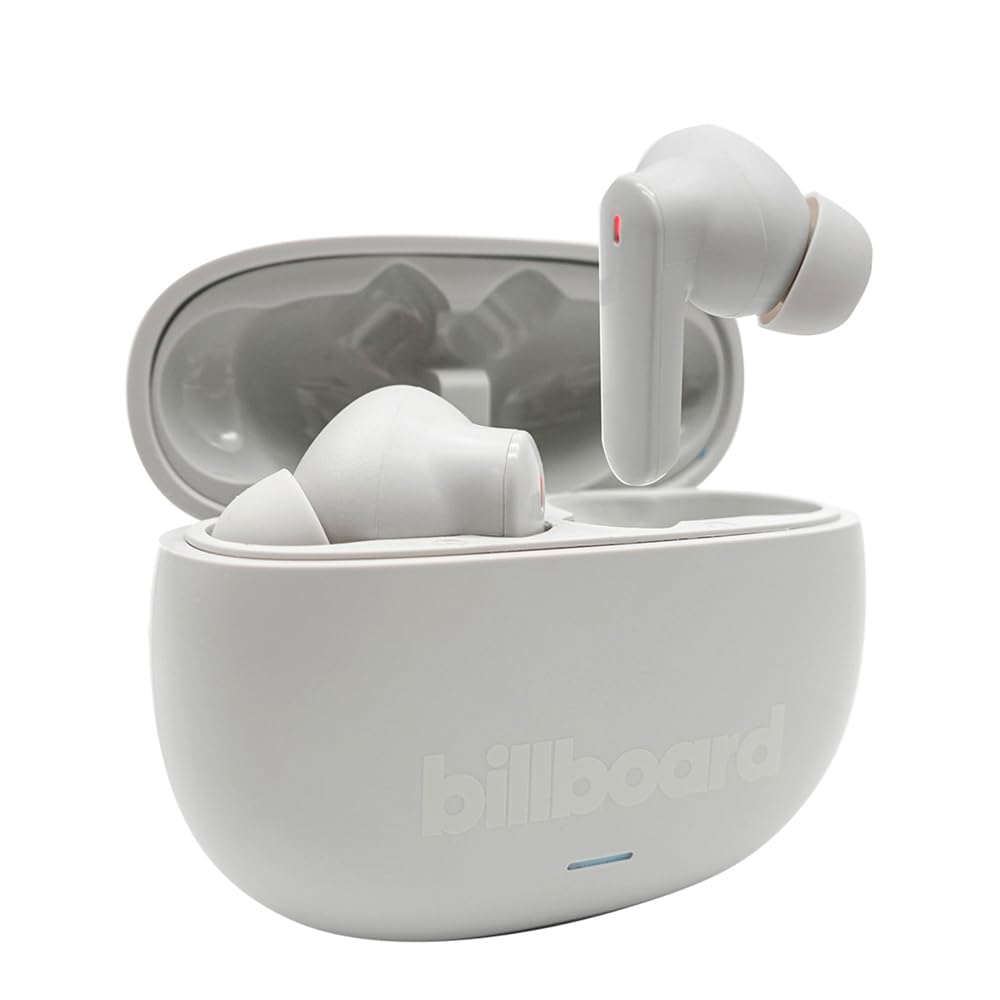
Image: The Billboard Soul Advance TWS Earbuds resting inside their open charging case. The earbuds are grey with red indicator lights visible, and the case is also grey with the 'billboard' logo embossed on the front.

Image: The Billboard Soul Advance TWS Earbuds charging case in a closed position. The case is grey with the 'billboard' logo embossed on the front and a small indicator light at the bottom.
Image: A person holding a single Billboard Soul Advance TWS earbud and the open charging case, demonstrating the compact size and design.
Melite
1. Ịchaji ihe ntị na akpa
Tupu ojiji nke mbụ, chajie nke ọma ekwe ntị na akpa nchaji.
- Tinye ekweisi n'ime akpa chaja. Hụ na ha dị n'ọnọdụ kwesịrị ekwesị n'ebe ha dị.
- Connect the USB charging cable to the charging port on the case and to a USB power source (e.g., computer, wall adapter).
- The indicator light on the case will show charging status. Once fully charged, the indicator will change or turn off. A full charge takes approximately 5 hours for the case and earbuds.
2. Ijikọ na ngwaọrụ
To connect your earbuds to a smartphone or other Bluetooth-enabled device:
- Open the charging case. The earbuds will automatically enter pairing mode, indicated by flashing lights on the earbuds.
- On your device, go to Bluetooth settings and ensure Bluetooth is enabled.
- Chọọ maka available devices and select "Billboard Soul Advance" from the list.
- Ozugbo ejikọtara ya, ọkụ ihe ngosi ntị ga-akwụsị ịgbawa.
- Ekwe ntị ndị a ga-ejikọghachi na ngwaọrụ ikpeazụ ejikọtara na akpa ahụ ozugbo ewepụrụ ha na akpa ahụ, ọ bụrụ na Bluetooth agbanyere na ngwaọrụ ahụ.
Na-arụ ọrụ
Njikwa mmetụ
The earbuds feature touch-sensitive controls on their outer surface. Specific functions may vary slightly by device or app.
| Omume | Ọrụ |
|---|---|
| Otu mgbata (aka ekpe/aka nri) | Kpọọ/Kwụsịtụ egwu, zaa/Kwụsị oku |
| Pịa ugboro abụọ (aka nri) | Egwu na-esote |
| Pịa ugboro abụọ (aka ekpe) | Egwu gara aga |
| Pịa ugboro atọ (aka ekpe/aka nri) | Mee ka onye enyemaka olu rụọ ọrụ |
| Pịa ogologo (aka ekpe/aka nri) | Toggle ANC/Transparency Mode |
| Incoming Call Long Press | Jụ oku |
Active Noise Cancellation (ANC) & Environmental Noise Cancellation (ENC)
The Soul Advance earbuds feature both ANC and ENC for an optimized listening and calling experience.
- Nkagbu mkpọtụ mkpọtụ (ANC): Reduces external ambient noise, allowing for a more immersive audio experience. Activate/deactivate by long-pressing an earbud.
- Mkpuchi mkpọtụ gburugburu (ENC): Utilizes 4 built-in microphones to filter out background noise during calls, ensuring clearer conversations for both you and the listener. This feature is active automatically during calls.

Image: A graphic illustrating the concept of Ultra ANC (Active Noise Cancellation), showing sound waves being blocked by headphones, emphasizing a quiet listening experience.
Nlekọta
Nhicha
- Jiri nwayọ hichaa ntị ntị na chaja na akwa dị nro, kpọrọ nkụ, enweghị akwa.
- Ejila ihe mkpocha abrasive, mmanya, ma ọ bụ ihe mgbaze kemịkal.
- Ensure charging contacts on both earbuds and case are clean and dry for optimal charging.
Nchekwa
Mgbe ejighị ya, chekwaa earbuds n'ime akpa nchaji ha iji chebe ha ma debe ha ebubo.
Nchọpụta nsogbu
| Nsogbu | Ngwọta |
|---|---|
| Igwe ntị anaghị ejikọta ọnụ | Ensure earbuds are charged. Turn off and on your device's Bluetooth. Forget the device in Bluetooth settings and re-pair. |
| Naanị otu earbud na-arụ ọrụ | Place both earbuds back in the case, close it, then open again. Ensure both are charged. |
| Enweghị ụda | Check device volume. Ensure earbuds are connected. Try playing different audio. |
| Okwu ịchaji | Ensure charging cable is securely connected. Clean charging contacts. Try a different USB port or cable. |
Nkọwapụta
- Aha nlereanya: Soul Advance
- Teknụzụ Njikọta: Ikuku
- Ngwa gụnyere: Nchaji Ebe
- Ihe eji eme ihe: Outdoor activities, Sports
- Oge nchaji: Ihe dị ka awa 5
- Ngwa dakọtara: Ekwentị, Mbadamba
- Ọkwa Nguzogide mmiri: IPX4 (Ihe Na-eguzogide Mkpọsa)
- Nkezi Ndụ batrị: Awa 27 (ya na igbe nchaji)
- Ntinye ntị: N'ime ntị
- Ihe kpatara ụdị: N'ime ntị
- Njikwa mkpọtụ: Nkagbu mkpọtụ nọ n'ọrụ

Image: A graphic highlighting long battery life, showing headphones with '40H' and earbuds with '42H*' (battery + case), indicating extended usage times.
Vidiyo ngwaahịa ngwaahịa
Video: Product demonstration video (0:49 duration).
Video: Product feature overview (0:44 duration).
Video: Additional product details (0:44 duration).
Video: Short product highlight (0:24 duration).
Video: Product feature showcase (0:24 duration).
Video: Detailed product review/demonstration (1:57 duration).
Video: Quick product overview (0:34 duration).
Video: Comprehensive product guide (2:00 duration).
Akwụkwọ ikike na nkwado
Your Billboard Soul Advance TWS Earbuds come with a standard manufacturer's warranty. For detailed warranty information, please refer to the warranty card included in your package or visit the official Billboard website. For technical support or customer service, please contact the retailer or manufacturer directly.
For returns, a 30-day free return policy is available from the purchase date.