
Warm Audio WA-C1
Akwụkwọ ntuziaka onye ọrụ nke ụda ọkụ WA-C1 Analog Chorus Vibrato Pedal
Model: WA-C1
Okwu mmalite
The Warm Audio WA-C1 is an all-analog chorus and vibrato pedal designed to deliver classic modulated tones. This manual provides detailed instructions for setting up, operating, and maintaining your WA-C1 pedal to ensure optimal performance.
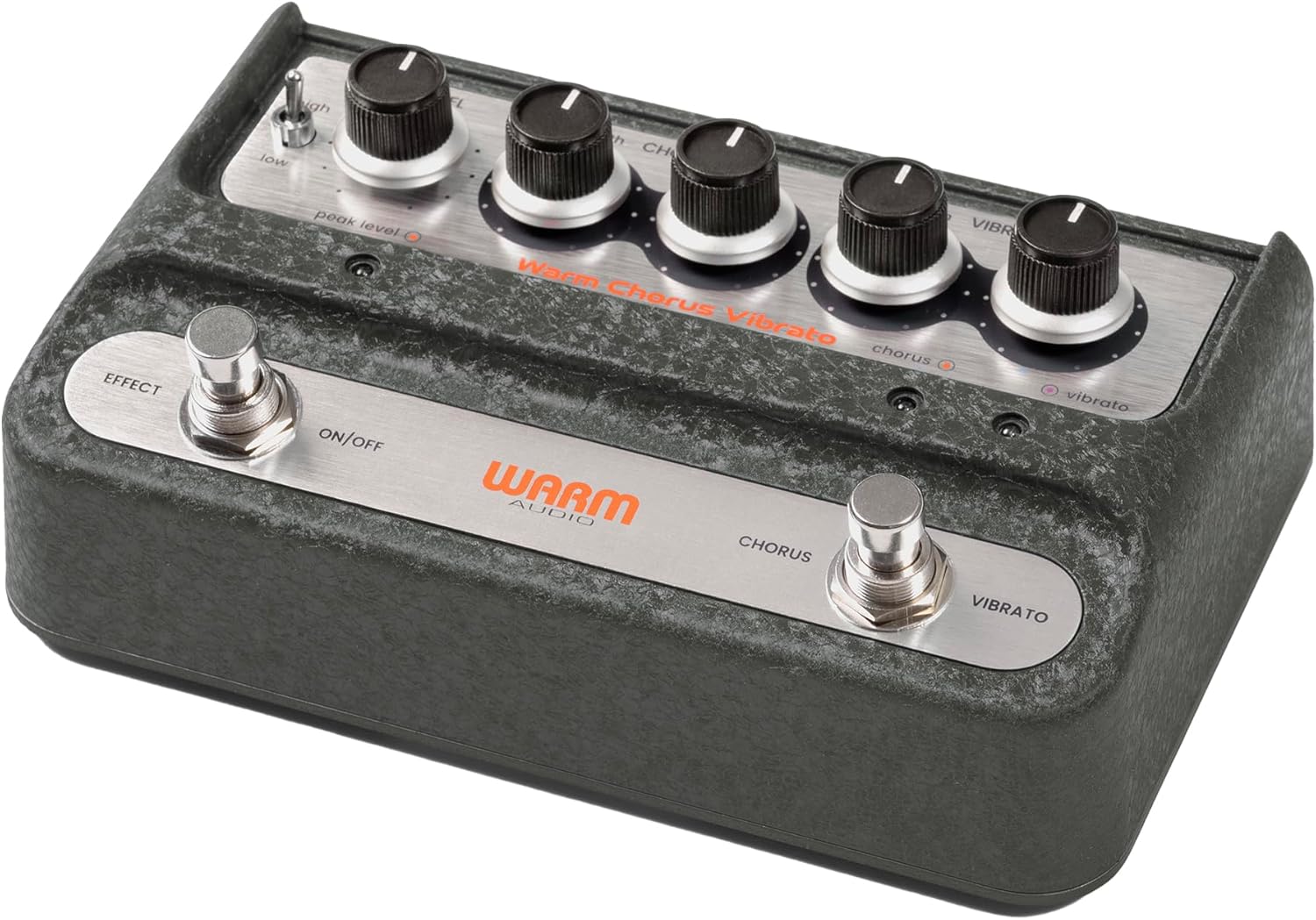
Foto: N'ozuzu view of the Warm Audio WA-C1 Analog Chorus Vibrato pedal.
Ntuziaka nchekwa dị mkpa
- Gụọ ntuziaka ndị a nke ọma tupu ojiji.
- Debe ntuziaka ndị a maka ntụnye aka n'ọdịnihu.
- Ṅaa ntị ịdọ aka ná ntị niile na ngwaahịa na n'akwụkwọ ntuziaka a.
- Ejila ngwa a n'akụkụ mmiri.
- Jiri akwa kpọrọ nkụ hichaa naanị.
- Akwụsịla oghere ikuku ikuku ọ bụla. Wụnye dị ka ntuziaka onye nrụpụta si dị.
- Awụnyela n'akụkụ ebe okpomọkụ ọ bụla dị ka radiators, ndekọ okpomọkụ, stovu, ma ọ bụ ngwa ndị ọzọ (gụnyere amplifiers) nke na-emepụta okpomọkụ.
- Jiri naanị mgbakwunye / ngwa ndị nrụpụta akọwapụtara.
- Kwupu ngwa a n'oge oke mmiri ozuzo ma ọ bụ mgbe ejighi ya ogologo oge.
- Tụtụ aka n'aka ndị ọrụ ruru eru. A na-achọ ọrụ mgbe ngwa ahụ mebiri emebi n'ụzọ ọ bụla, dị ka eriri ọkụ ma ọ bụ plọg mebiri emebi, mmiri mmiri wụfuru ma ọ bụ ihe dabara n'ime ngwa ahụ, ekpughere ngwa ahụ na mmiri ozuzo ma ọ bụ mmiri, anaghị arụ ọrụ nke ọma. , ma ọ bụ ahapụla ya.
Atụmatụ
- Faithful recreation of a classic all-analog chorus/vibrato circuit.
- Premium all-analog preamp for responsive tone.
- Independent Depth and Rate controls for Chorus.
- Authentic Vibrato section.
- Switchable Hi-Z input for optimizing guitar clarity.
- Mono and Stereo output options.
Njikwa na Njikọ
Njikwa Ogwe ihu

Foto: N'elu-ala view of the WA-C1 pedal's front panel, showing all control knobs and footswitches.
- Ọkwa akara: Adjusts the overall output volume of the pedal.
- DEPTH (Chorus) Knob: Controls the intensity or sweep range of the chorus effect.
- RATE (Chorus) Knob: Controls the speed of the chorus modulation.
- DEPTH (Vibrato) Knob: Controls the intensity or sweep range of the vibrato effect.
- RATE (Vibrato) Knob: Controls the speed of the vibrato modulation.
- EFFECT ON/OFF Footswitch: Engages or bypasses the entire pedal effect. The associated LED indicates the effect status.
- CHORUS/VIBRATO Footswitch: Toggles between Chorus and Vibrato modes when the effect is active. The associated LEDs indicate the selected mode.
- HIGH/LOW Switch: A two-position switch that adjusts the input gain, allowing for optimal signal handling from various instruments.
- PEAK LEVEL LED: Illuminates to indicate signal clipping or excessive input level. Adjust the HIGH/LOW switch or input signal to prevent clipping.
Njikọ Ogwe azụ

Foto: N'azụ view of the WA-C1 pedal, showing the power input, Hi-Z switch, input jack, and output jacks.
- POWER 9V Input: Connect a standard 9V DC power adapter (center negative, 2.1mm barrel connector). Ensure the power supply meets the pedal's requirements.
- HI-Z Switch: This switch adjusts the input impedance. Set to 'ON' for higher impedance instruments like guitars to enhance clarity in the high-end. Set to 'OFF' for lower impedance sources like keyboards.
- Tinye Jack: Connect your instrument (guitar, keyboard, etc.) to this 1/4-inch mono input.
- STEREO OUTPUT Jack: Use this 1/4-inch output for a stereo signal path, typically connecting to two amplifiers or a stereo effects loop.
- MONO OUTPUT Jack: Use this 1/4-inch output for a mono signal path, connecting to a single amplifier or the next pedal in your chain.
Melite
- Njikọ ike: Connect a compatible 9V DC (center negative) power adapter to the POWER 9V input on the rear panel. Do not use an incompatible power supply.
- Njikọ akụrụngwa: Connect your instrument to the INPUT jack on the rear panel using a standard 1/4-inch instrument cable.
- Njikọ mmepụta:
- For mono operation, connect the MONO OUTPUT jack to your amplifia ma ọ bụ pedal ọzọ dị na agbụ mgbama gị.
- For stereo operation, connect both the MONO OUTPUT and STEREO OUTPUT jacks to two separate amplifiers or a stereo input device.
- Mgbanwe Hi-Z: If using a guitar, set the HI-Z switch to 'ON' for optimal high-end clarity. For other instruments like keyboards, set it to 'OFF'.
- Ntọala mbụ: Start with all DEPTH and RATE knobs at their minimum (fully counter-clockwise) and the LEVEL knob at noon (12 o'clock) for initial sound adjustments.
Ntuziaka ọrụ
- Na-etinye Mmetụta: Press the EFFECT ON/OFF footswitch to activate the pedal. The corresponding LED will illuminate.
- Ụdị Nhọrọ: With the effect active, press the CHORUS/VIBRATO footswitch to toggle between Chorus and Vibrato modes. The respective LED will indicate the active mode.
- Adjusting Chorus: In Chorus mode, use the DEPTH (Chorus) and RATE (Chorus) knobs to dial in your desired modulation intensity and speed.
- Adjusting Vibrato: In Vibrato mode, use the DEPTH (Vibrato) and RATE (Vibrato) knobs to dial in your desired modulation intensity and speed.
- Mmepụta Ọkwa: Use the LEVEL knob to adjust the overall output volume of the pedal. Ensure it matches or slightly boosts your bypassed signal level.
- Ntinye ntinye: If your instrument's signal is too hot or too weak, use the HIGH/LOW switch to optimize the input gain. Monitor the PEAK LEVEL LED to avoid clipping.
Nlekọta
- Nhicha: Clean the pedal's exterior with a soft, dry cloth. Do not use liquid cleaners or solvents.
- Nchekwa: Debe pedal ahụ n'ebe kpọrọ nkụ ma dị jụụ, ebe anwụ na-anaghị anwụ kpọmkwem na oke okpomọkụ dị oke njọ.
- Ịnye ọkụ: Always use the correct 9V DC (center negative) power supply. Incorrect power can damage the unit and void the warranty.
- Footswitches and Jacks: Periodically check connections for any loose cables or debris.
Nchọpụta nsogbu
| Nsogbu | Ihe nwere ike ime | Ngwọta |
|---|---|---|
| Enweghị ụda mgbe pedal na-arụ ọrụ. |
|
|
| Effect is too subtle or too intense. |
|
|
| Distortion or unwanted noise. |
|
|
Nkọwapụta
- Ụdị: WA-C1
- Ụdị mmetụta: Analog Chorus / Vibrato
- Usoro akara: Analọg
- Achọrọ ike: 9V DC, Center Negative (Power adapter not included)
- Ntinye: 1/4-inch Mono Jack
- Nsonaazụ: 1/4-inch Mono Jack, 1/4-inch Stereo Jack
- Njikwa: Level, Chorus Depth, Chorus Rate, Vibrato Depth, Vibrato Rate, High/Low Switch, Hi-Z Switch
- Akụkụ: Ihe dị ka sentimita iri na itoolu na iri na isii na itoolu (Nha ngwugwu)
- Arọ: Ihe dị ka paụnd 2 (Ibu ihe)
Akwụkwọ ikike na nkwado
Warm Audio products are designed for reliability and performance. For warranty information and technical support, please refer to the official Warm Audio webma ọ bụ kpọtụrụ onye na-ere ahịa gị ikike. Debe risit ịzụrụ ihe gị dị ka ihe akaebe nke ịzụrụ ihe maka nkwupụta nkwa.
Maka enyemaka ọzọ, gaa na: www.warmaudio.com/support
Ask a question about this manual
Ask about setup, troubleshooting, compatibility, parts, safety, or missing instructions. Manuals+ will review the question and use this page’s manual context to help answer it.