
1. Okwu mmalite
Thank you for choosing the JUNJIEUNVO Q16 PRO Wireless Translation Earbuds. These earbuds are designed to provide a versatile audio experience, featuring real-time language translation, high-definition sound, and an open-ear design for comfort. This manual provides essential information for setting up, operating, and maintaining your device.
2. Ihe ngwugwu
- JUNJIEUNVO Q16 PRO Wireless Translation Earbuds (Left and Right)
- Charging Case with Smart Touch Screen
- Akwụkwọ ntuziaka onye ọrụ
- Ịchaji eriri (USB-C)
3. Ngwaahịa gafereview

Foto 3.1: JUNJIEUNVO Q16 PRO Wireless Translation Earbuds and Charging Case. This image displays the white and silver earbuds with their unique ear-hook design, alongside the charging case which features a digital display showing time and battery levels.
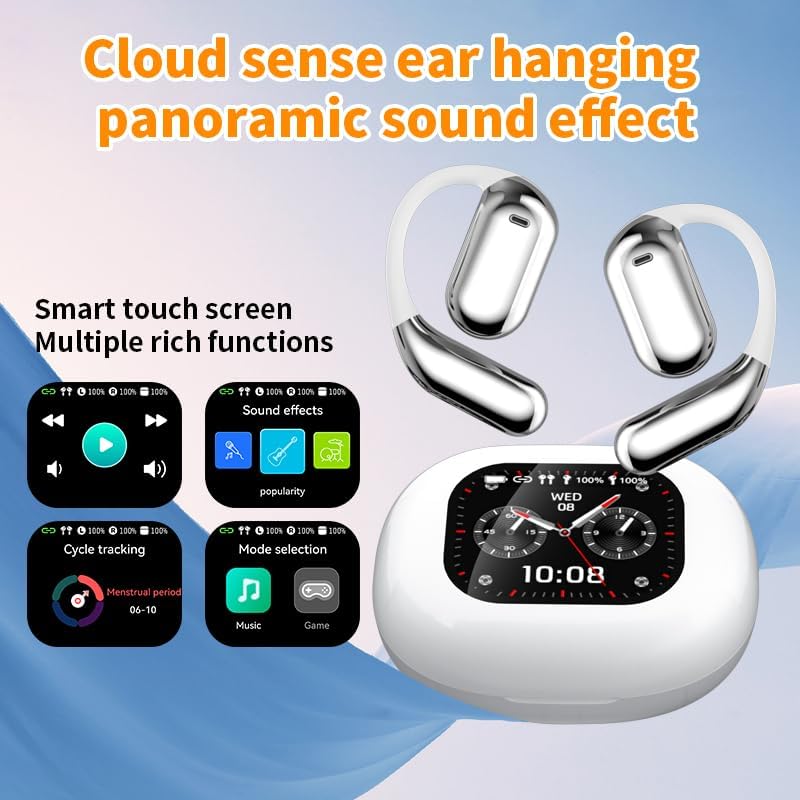
Foto 3.2: Smart Touch Screen Functions. This image highlights the charging case's smart touch screen, illustrating various functions such as media playback controls, sound effects, cycle tracking, and mode selection (music/game).

Foto 3.3: Environmental Noise Cancellation (ENC). This image depicts a person wearing the earbuds, with an overlay illustrating how the ENC technology reduces ambient noise by up to 99.44%, providing a clearer audio experience.

Foto 3.4: Open-Ear Design for Comfort. This image shows a person wearing the earbuds, emphasizing the open-ear design that offers comfort and allows for awareness of external sounds, protecting ear canal health.

Foto 3.5: Multiple Sound Adjustment Modes. This image displays the charging case's screen showing "Sound effects" with options for various music genres, indicating the ability to customize audio preferences.

Foto 3.6: Extended Battery Life and Rich Functions. This image showcases the earbuds and charging case, highlighting a 40-hour endurance with a 500mAh charging case capacity, along with a mention of multiple functions.

Foto 3.7: Earbuds and Charging Case (Open View). A detailed view of both earbuds and the open charging case, showing the internal design and charging contacts.

Foto 3.8: Earbuds in Charging Case. This image shows the earbuds securely placed within their charging case, ready for charging or storage.

Foto 3.9: Earbuds and Charging Case (Angled View). Another perspective of the earbuds and charging case, emphasizing their sleek design and compact form factor.
4. Nhazi
4.1 Ịchaji ntị na akpa
Tupu ojiji nke mbụ, chajie nke ọma ekwe ntị na akpa nchaji.
- Tinye ekweisi n'ime akpa chaja. Hụ na ha dị n'ọnọdụ ziri ezi n'ebe ha dị (L maka aka ekpe, R maka aka nri).
- Connect the charging cable to the USB-C port on the charging case and to a power source.
- The digital display on the charging case will indicate the charging status.
A full charge for the earbuds takes approximately 1.5 hours. The charging case has a 500mAh battery, providing extended use.
4.2 Ijikọ na ngwaọrụ
The earbuds use Bluetooth 5.4 for a stable connection up to 10 meters.
- Mepee igbe nchaji. Igwe ntị ga-abanye na ọnọdụ njikọta na-akpaghị aka.
- Na ngwaọrụ gị (smartphone, mbadamba, wdg), gbanye Bluetooth.
- Chọọ maka available Bluetooth devices and select "Q16 PRO" from the list.
- Ozugbo ejikọtara ya, ntị ntị ga-egosi njikọ na-aga nke ọma, ngwaọrụ ahụ ga-egosikwa ha dị ka ejikọtara.
Ekwe ntị ndị a ga-ejikọghachi na ngwaọrụ ikpeazụ ejikọtara na akpa ahụ ozugbo ewepụrụ ha na akpa ahụ, ọ bụrụ na Bluetooth agbanyere na ngwaọrụ ahụ.
5. Ntuziaka ọrụ
5.1 Smart Touch Screen Functions
The charging case features a smart touch screen for easy control of various functions. Navigate through options by swiping or tapping on the screen.
- Ndabere mgbasa ozi: Control music (play, pause, skip tracks) directly from the screen.
- Mmetụta ụda: Select from various sound modes.
- Nhọrọ ụdị: Switch between music and game modes.
- Ndepụta okirikiri: Access additional features if supported by the connected application.
5.2 Touch Controls (Earbuds)
The earbuds themselves also feature touch-sensitive areas for basic controls:
- Single Mgbata: Kpọọ/kwụsịtụ egwu, zaa/kwụsị oku.
- Pịa aka ekpe ugboro abụọ: egwu gara aga.
- Pịa ugboro abụọ (Aka nri): Egwu na-esote.
- Ogologo Pịa: Activate voice assistant, Reject call.
5.3 Translation Function
The Q16 PRO earbuds support real-time translation for up to 144 languages. This feature typically requires a dedicated application on your connected smartphone.
- Download and install the companion translation application (refer to the app store or product packaging for details).
- Open the application and follow the on-screen instructions to connect your earbuds.
- Select the desired source and target languages within the application.
- Use the earbuds as instructed by the application for real-time translation during conversations or audio playback.
5.4 Sound Adjustment Modes
Customize your audio experience through the charging case's smart touch screen. Available sound modes include:
- Nkịtị
- Pop
- Nkume
- Jazz
- Oge gboo
- Ndị mmadụ
- Custom (user-defined equalizer settings)
5.5 IPX5 Ọkwa Mmiri Na-anaghị Adọba Mmiri
The earbuds are rated IPX5 waterproof, meaning they are resistant to splashes and sweat. They are suitable for sports and outdoor activities but should not be submerged in water.
6. Nlekọta
- Nhicha: Use a soft, dry cloth to clean the earbuds and charging case. Avoid using abrasive materials or harsh chemicals.
- Nchekwa: Chekwaa ntị ntị n'akpa chaja ha mgbe anaghị eji ya iji chebe ha ma debe ya ebubo.
- Zere oke okpomọkụ: Do not expose the device to extreme heat or cold, as this can damage the battery and internal components.
- Mkpughe mmiri: While IPX5 rated, avoid prolonged exposure to water or high humidity. Ensure the charging port is dry before charging.
7. Nchọpụta nsogbu
| Nsogbu | Ngwọta enwere ike |
|---|---|
| Igwe ntị anaghị ejikọta ọnụ | Ensure earbuds are charged. Turn off and on Bluetooth on your device. Forget "Q16 PRO" from your device's Bluetooth list and re-pair. |
| Enweghị ụda sitere na otu ntị ntị | Check battery level of both earbuds. Place both earbuds back in the case, close it, then reopen to reset. Re-pair with your device. |
| Nchaji anaghị akwụ ụgwọ | Ensure the charging cable is securely connected. Try a different USB-C cable and power adapter. |
| Translation function not working | Ensure the companion app is installed and updated. Check app permissions (microphone, internet). Verify a stable internet connection. |
| Ogo ụda adịghị mma | Ensure earbuds are clean. Check the distance to your device (within 10m). Avoid obstacles between earbuds and device. |
8. Nkọwapụta
| Njirimara | Nkọwa |
|---|---|
| Aha Nlereanya | YYK-Q16 PRO |
| Ụdị Bluetooth | V5.4 + EDR |
| Chip | Blue Flood |
| Protocol akwadoro | AVRCP V1.6, A2DP V1.3, HFP V1.7, Simultaneous LE and BR / EDR |
| Usage/Playback Time | Ihe dị ka awa 8 (na olu 80%) |
| Oge Njikere | awa 80 |
| Oge Nchaji | Ihe dị ka awa 1.5 |
| Anya ikuku | 10 mita |
| Ike batrị earbud | 40mAh (ekwe ntị nke ọ bụla) |
| Ịchaji Ike batrị Case | 500mAh |
| Ngosi nke enweghị mmiri | IPX5 |
| Ibu Ibu | ounce 6.4 (mkpokọta) |
| UPC | 884613749637 |
| Onye nrụpụta | UNVO |
| Agba | White+Silver |
| Ntinye ntị | On Ear (Open-wear design) |
| Ụdị Ihe | Ezi ikuku |
9. Akwụkwọ ikike na nkwado
For warranty information and customer support, please refer to the documentation included with your purchase or contact the retailer/manufacturer directly. Keep your proof of purchase for any warranty claims.