
Okwu mmalite
Thank you for choosing the Belkin Portable 20,000 mAh Power Bank. This device is designed to provide reliable and fast charging for your mobile devices, featuring an integrated USB-C cable and 30W Power Delivery. Its compact and lightweight design makes it ideal for travel, ensuring your devices stay powered wherever you go. This manual provides essential information on how to set up, operate, maintain, and troubleshoot your power bank.

Image: The Belkin Portable 20,000 mAh Power Bank in blue, showcasing ya sleek imewe.
Atụmatụ igodo
- Eriri USB-C agbakwunyere: For convenient charging on the go.
- Nnyefe ike 30W: Enables fast charging for smartphones, tablets, and even some laptops like the MacBook Air.
- Ike 20,000mAh: Provides up to 87 hours of additional battery life for an iPhone 16 Pro, charging 0-50% in approximately 25 minutes.
- Nchaji n'otu oge: Charge up to three devices concurrently using the integrated USB-C cable, USB-C port, and USB-A port, with a shared output of 30W.
- Ihe ngosi LED: Displays the power bank's charging status.
- Ngafe-Site na Nchaji: Charge your devices while the power bank itself is being recharged.
- Lightweight and Travel-Friendly: Weighing less than 395 grams, it meets aviation safety standards for carry-on luggage.
- Nhazi na-adịgide adịgide: Made from 72% post-consumer recycled materials with 100% plastic-free packaging.
Melite
Nchaji Mbụ nke Ụlọ Nchekwa Ike
Before first use, fully charge your Belkin Power Bank. Connect the power bank to a wall charger using a compatible USB-C cable (not included for recharging the power bank itself, only the integrated cable is for output). The LED indicators will show the charging progress. A full charge typically takes up to 12 hours.

Image: The power bank connected to a wall outlet for recharging, simultaneously charging a smartphone via its integrated cable. This illustrates pass-through charging.
Ntuziaka ọrụ
Ịchaji ngwaọrụ gị
- Using the Integrated USB-C Cable: Extend the integrated USB-C cable from the power bank and connect it directly to your USB-C compatible device.
- Iji ọdụ ụgbọ USB-C: Connect your device's USB-C charging cable to the power bank's USB-C output port.
- Iji ọdụ ụgbọ USB-A: Connect your device's USB-A charging cable to the power bank's USB-A output port.

Image: The Belkin power bank connected to an iPhone via its integrated USB-C cable, demonstrating seamless high-speed charging.
Ịchaji ọtụtụ ngwaọrụ
The power bank supports charging up to three devices simultaneously with a combined output of 30W. You can use the integrated USB-C cable, the USB-C port, and the USB-A port at the same time.
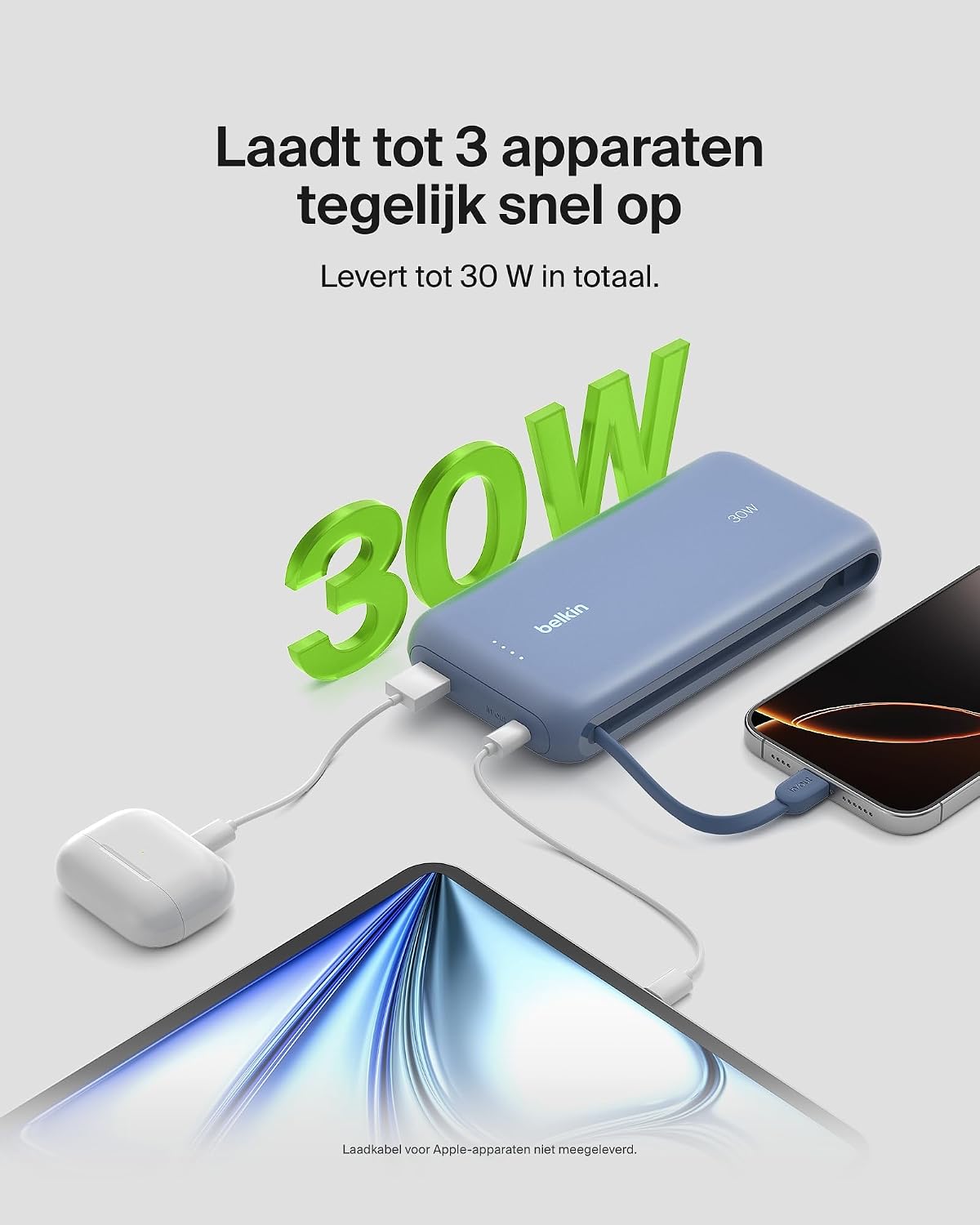
Image: The power bank simultaneously charging a smartphone, a tablet, and wireless earbuds, illustrating its capability to charge up to three devices with a total output of 30W.
Ngosipụta ọnọdụ batrị LED
The power bank features LED lights that indicate the remaining battery level and charging status. Refer to the table below for interpretation:
| Ọnọdụ LED | Pụtara |
|---|---|
| LEDs niile siri ike | Ebubo zuru oke |
| LEDs blinking sequentially | Ịchaji na-aga n'ihu |
| Fewer LEDs solid | Ike batrị fọdụrụnụ |
Nlekọta
- Nhicha: Jiri akwa dị nro dị nro hichaa ụlọ akụ ike. Zere iji kemịkalụ siri ike ma ọ bụ ihe na-emebi emebi.
- Nchekwa: Chekwaa ụlọ akụ ọkụ ahụ n'ebe dị jụụ, kpọrọ nkụ na-adịghị na ìhè anyanwụ kpọmkwem na oke okpomọkụ.
- Nlekọta batrị: To prolong battery life, avoid fully discharging the power bank regularly. Recharge it when the battery level is low.
- Integrated Cable Care: When not in use, ensure the integrated USB-C cable is properly stowed to prevent damage.
Nchọpụta nsogbu
Okwu na ngwọta nkịtị
- Ngwaọrụ anaghị akwụ ụgwọ:
- Ensure the power bank is charged. Check the LED indicators.
- Hụ na eriri chaja ahụ jikọtara nke ọma na ma ụlọ akụ ike ahụ ma ngwaọrụ gị.
- Nwaa eriri chaja ma ọ bụ ọdụ ụgbọ mmiri dị iche na akụ ike.
- Confirm your device is compatible with the power bank's charging specifications.
- Nchaji nwayọ:
- Ensure your device supports fast charging (Power Delivery) to utilize the 30W output.
- If charging multiple devices, the total 30W output is shared, which may result in slower charging for individual devices.
- Check if the cable used supports fast charging.
- Ike ụlọ akụ anaghị agbanyeghachi:
- Ensure the wall adapter and cable used for recharging the power bank are functional and properly connected.
- Try a different wall adapter or cable.
Belkin SmartProtect Safety Features
The Belkin Power Bank is equipped with SmartProtect technology, which includes multiple safety features to protect your devices and the power bank itself:
- Nchekwa oke ụgwọ
- Nchekwa na-agabiga ugbu a
- Nchekwa ike karịrị akarị
- Nchekwa obere okirikiri
- Mmepụta Overvoltage Nchedo
- Output High/Low Temperature Protection
- Input High/Low Temperature Protection
- Signal Interference Protection
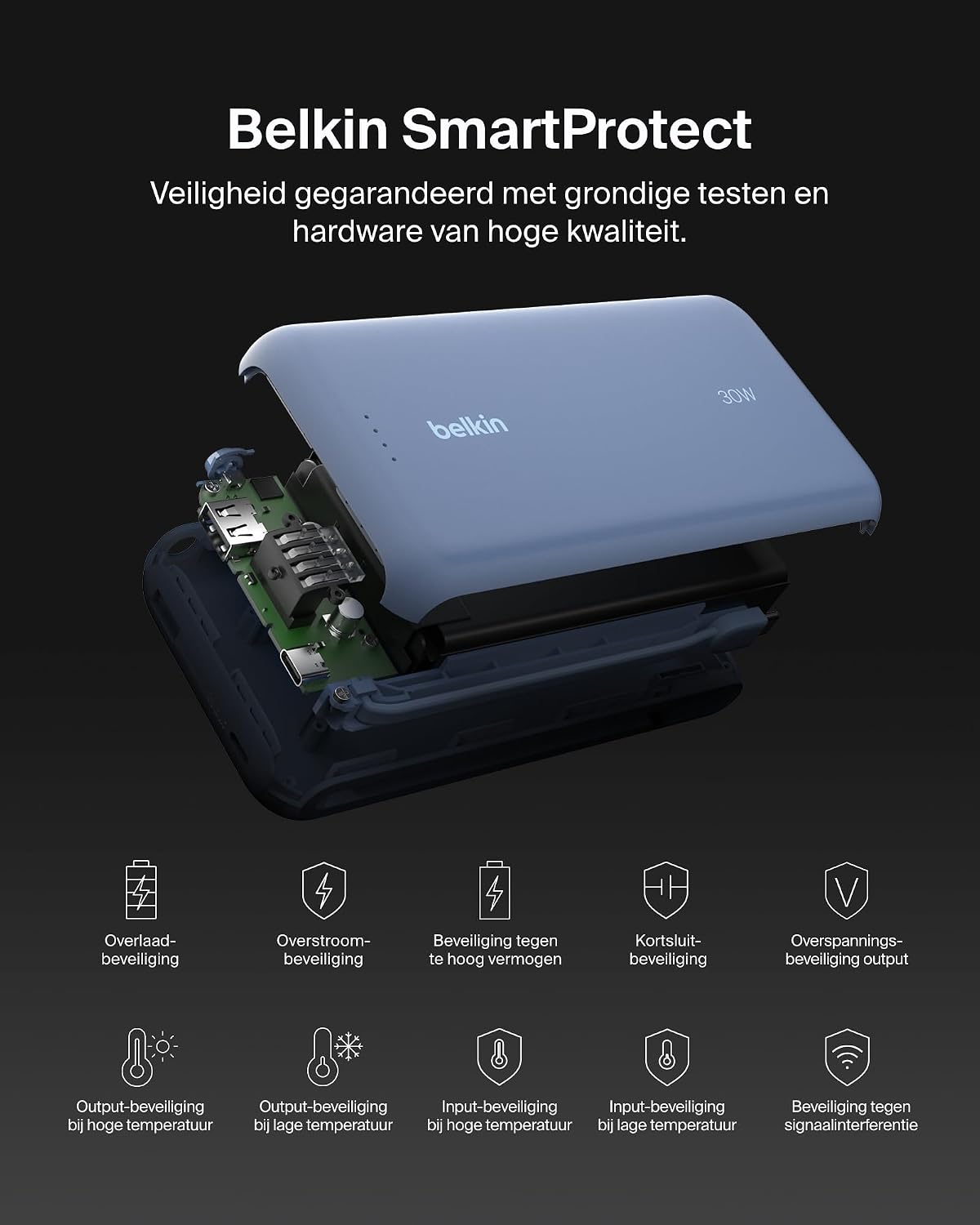
Foto: Ihe gbawara view of the Belkin Power Bank, highlighting its internal components and the comprehensive Belkin SmartProtect safety features, including protection against overcharge, overcurrent, and short-circuits.
Nkọwapụta
| Njirimara | Nkọwa |
|---|---|
| Nọmba nlereanya | BPB024hqBL |
| Ike batrị | 20,000 mAh |
| Ike mmepụta | Up to 30W Power Delivery (shared) |
| Ụdị njikọ | Integrated USB-C cable, 1x USB-C port, 1x USB-A port |
| Voltage | 5 volts |
| Ampoge | 3 Ampere |
| Oge Nchaji (Power Bank) | Ihe ruru. awa 12 |
| Akụkụ ngwaahịa | 15.4 x 7.62 x 2.51 cm |
| Ibu Ibu | 395 grams |
| Ngwakọta cell batrị | Lithium-ion |
| Ngwa dakọtara | Apple iPhone 16 series, iPhone 15 series, iPhone 14 series, iPhone 13 series, Samsung Galaxy S22/S23/S24/S25 series, iPad Pro, iPad Air, iPad, iPad Mini, and other USB-C/USB-A compatible devices. |
Akwụkwọ ikike na nkwado
Ozi akwụkwọ ikike
This Belkin Portable Power Bank comes with a Akwụkwọ ikike onye nrụpụta afọ 2. Additionally, it includes a Connected Equipment Warranty, providing peace of mind for your connected devices. Please retain your proof of purchase for warranty claims.
Nkwado ndị ahịa
For further assistance, technical support, or warranty inquiries, please visit the official Belkin support websaịtị ma ọ bụ kpọtụrụ ndị ọrụ nlekọta ndị ahịa ha. Ị nwere ike ịchọta ozi ndị ọzọ na www.belkin.com/support.