
1. Okwu mmalite
This manual provides detailed instructions for the Aokeo AK-58i Low Profile Microphone Boom Arm Stand. Please read this manual thoroughly before installation and use to ensure proper function and longevity of your product. This boom arm is designed to provide stable and flexible microphone positioning for various applications such as gaming, podcasting, recording, and streaming.
2. Ngwaahịa ọdịnaya
Chọpụta na ihe niile edepụtara n'okpuru dị na ngwugwu gị:
- Microphone Stand (Boom Arm) x1
- Ogige Clamp Isi x1
- 3/8" to 1/4" Adapter x1
- 3/8" to 5/8" Adapter x1
- Mkpụrụ x1
- Akwụkwọ ntuziaka x1
- Packing Box x1
Video: AK-58i Microphone Stand OverviewVidiyo a na-enye nkọwa zuru okeview of the AK-58i microphone stand and its components.
Video: Microphone Boom Arm Unboxing. This video demonstrates the unboxing process and shows what comes in the box.
3. Ntọala na nwụnye
- Tinye Desk Clamp: Chekwaa oche clamp base to a sturdy table or desk surface. Ensure the table thickness is less than 7cm (2.75 inches) for proper fit. Tighten the screw firmly to prevent movement.
- Tinye ogwe aka ọganihu: Insert the main vertical shaft of the boom arm into the hole on the desk clamp base. Use the provided knob to secure it in place.
- Assemble Arm Segments: Connect the two main arm segments by aligning the pins and holes. Tighten the adjustment knobs at each joint to secure the desired position.
- Attach Microphone Adapter: Screw the appropriate adapter (3/8" to 1/4" or 3/8" to 5/8") onto the microphone mounting thread at the end of the boom arm.
- Mount Your Microphone: Carefully screw your microphone or microphone shock mount onto the adapter. Ensure it is securely fastened.
- Njikwa USB: Utilize the integrated cable storage channels along the arm to route and secure your microphone cable, reducing clutter and preventing accidental pulling.

Image: Step-by-step installation guide for the Aokeo AK-58i boom arm, showing how to attach the microphone and secure cables.
Video: Microphone Boom Arm Setup. This video provides a quick and easy guide to installing the microphone boom arm.
4. Ọrụ na mmezi
The Aokeo AK-58i boom arm offers extensive flexibility for optimal microphone placement:
- Ọnọdụ mgbanwe: Both main arm segments can rotate 360 degrees, allowing for broad horizontal reach.
- Ndozi kwụ ọtọ: The arm section holding the microphone can swing up and down 180 degrees, enabling precise vertical positioning.
- Usoro mkpọchi: Each joint features a lock/unlock knob. Turn clockwise to lock the arm in position and counter-clockwise to unlock for adjustment.
- Njikwa USB: Use the integrated cable clips to keep your microphone cable neatly organized along the arm, preventing tangles and maintaining a clean workspace.
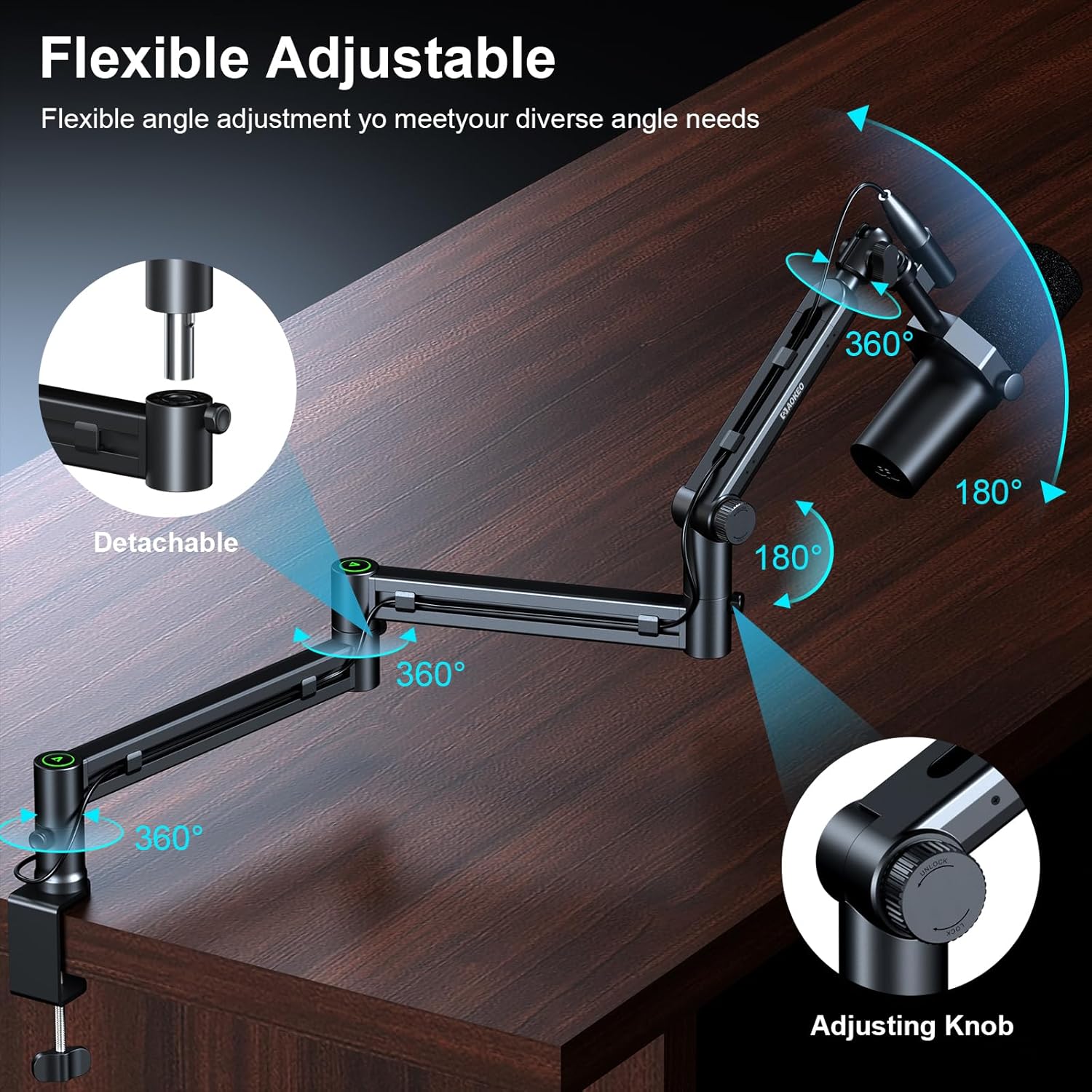
Image: Demonstrates the flexible adjustment capabilities of the Aokeo AK-58i, including 360-degree rotation and 180-degree vertical swing.

Image: Illustrates the integrated cable management system for a tidy desktop setup.
5. Nkọwapụta
| Njirimara | Nkọwapụta |
|---|---|
| Ụdị | Akeo |
| Nọmba nlereanya | AK-59 |
| Agba | AK-58i (Black) |
| Ihe onwunwe | Ọla |
| Ụdị | Pro dị alafile Enwere ike idozi |
| Ụdị ntọala | Flat (Desk Clamp) |
| Nkwanye ịdị arọ kacha | 2 Kilogram (4.4 lbs) |
| Ogologo kachasị elu | 30 sentimita asatọ |
| Mount Thread Sizes | 3/8", 5/8", 1/4" Inches (with included adapters) |
| Compatible Table Thickness | Less than 7cm (2.75 inches) |

Image: Details the load-bearing capacity and key dimensions of the boom arm.

Image: Shows the enhanced desk clamp and its compatibility with various table thicknesses.
6. Nlekọta
To ensure the longevity and optimal performance of your Aokeo AK-58i Microphone Boom Arm Stand, follow these maintenance guidelines:
- Nhicha mgbe niile: Wipe down the arm and clamp with a soft, dry cloth to remove dust and debris. Avoid abrasive cleaners or solvents that could damage the finish.
- Lelee ikesi ike: Periodically inspect all screws and knobs, especially the desk clamp and joint tension knobs, to ensure they remain tight. Re-tighten as necessary to maintain stability.
- mmanu mmanu: If any joints become stiff over time, a small amount of silicone-based lubricant can be applied to the pivot points. Avoid over-lubricating.
- Njikwa USB: Ensure cables are routed correctly through the cable channels to prevent pinching or excessive strain on the arm or cables.
7. Nchọpụta nsogbu
If you encounter any issues with your Aokeo AK-58i Microphone Boom Arm Stand, refer to the following common troubleshooting steps:
- Arm Sags or Drifts: Ensure all tension knobs at the joints are tightened sufficiently. The arm's maximum load capacity is 2KG; verify your microphone and accessories do not exceed this weight.
- Nkwụsi ahụ adịghị ike: Check that the desk clamp is securely fastened to a stable surface and fully tightened. Ensure the table thickness is within the compatible range (less than 7cm).
- Microphone Does Not Fit: Confirm you are using the correct adapter (3/8" to 1/4" or 3/8" to 5/8") for your microphone.
- Isi Ike Ịgbanwe Ogwe Aka: Loosen the tension knobs slightly before attempting to reposition the arm. Re-tighten once the desired position is achieved.
8. Akwụkwọ ikike na nkwado
This Aokeo AK-58i Microphone Boom Arm Stand comes with a 1-afọ akwụkwọ ikike. For any questions, technical support, or warranty claims, please contact Aokeo customer service through the retailer where you purchased the product or visit the official Aokeo websaịtị.