
Okwu mmalite
This manual provides essential information for setting up, operating, maintaining, and troubleshooting your Google Pixel 9 smartphone. The Pixel 9 is designed to offer a powerful and intuitive user experience, powered by the Google Tensor G4 processor and running on Android 14.
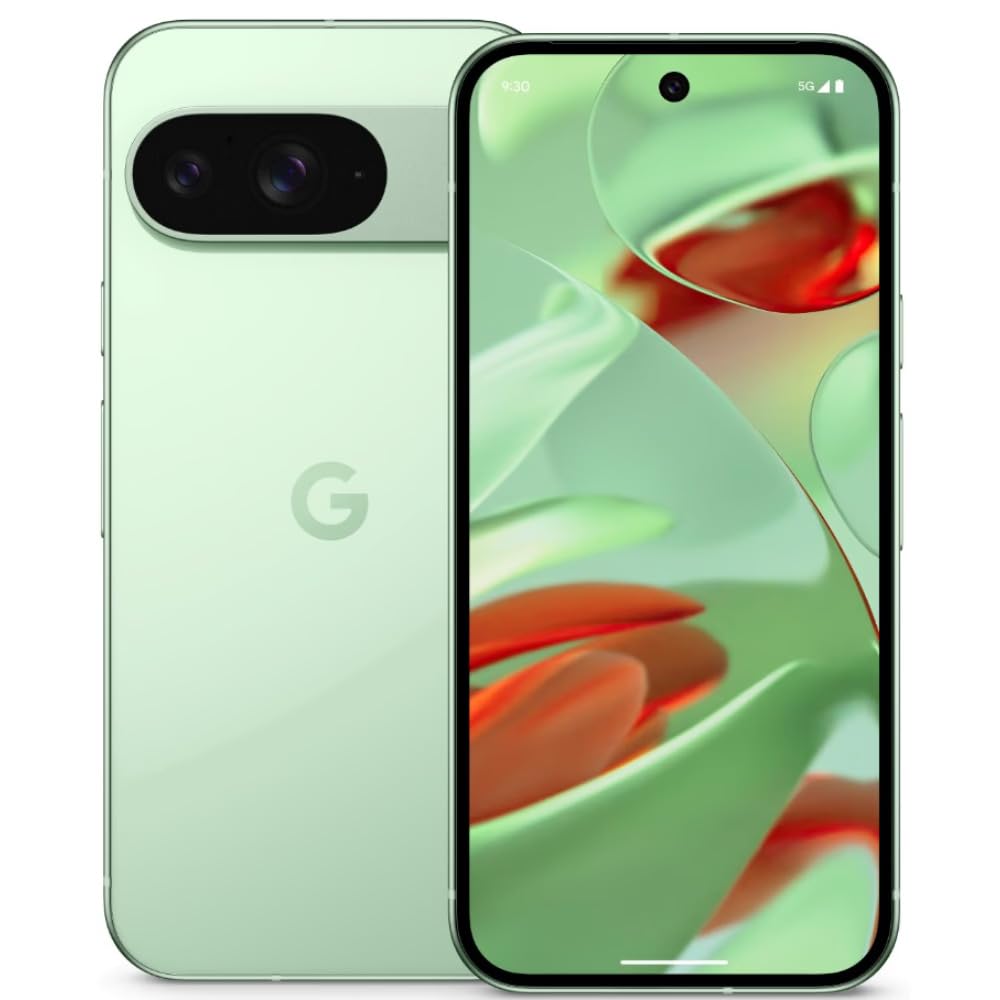
Image: Google Pixel 9 smartphone, rear view, in Wintergreen color.
Kedu ihe dị na Igbe ahụ
Upon unboxing your Google Pixel 9, verify that all standard components are present:
- Google Pixel 9 Smartphone
- USB-C na eriri USB-C
- Ngwá Ọrụ Ejector SIM Tray

Image: Contents of the Google Pixel 9 retail box.
Melite
1. Ịtinye kaadị SIM
- Locate the SIM card tray on the side of your Pixel 9.
- Fanye ngwaọrụ mkpagharị SIM tray n'ime obere oghere dị n'akụkụ tray ahụ wee pịasie ike ruo mgbe tray ahụ pụtara.
- Place your Nano SIM card(s) into the tray with the gold contacts facing down. The Pixel 9 supports Dual SIM functionality.
- Jiri nlezianya pịa tray ahụ n'ime oghere ahụ ruo mgbe ọ ga-adaba n'akụkụ ekwentị ahụ.
2. Ịgbanye / gbanyụọ
- Iji gbanye: Press and hold the Power button (located on the right side) until the Google logo appears.
- Iji gbanyụọ: Press and hold the Power button and Volume Up button simultaneously, then tap 'Power off' on the screen. Alternatively, swipe down from the top of the screen twice to open Quick Settings, then tap the power icon and select 'Power off'.
3. Ntọala ngwaọrụ mbụ
Follow the on-screen prompts to complete the initial setup process. This includes connecting to Wi-Fi, signing in with your Google account, setting up security features (Face Recognition), and transferring data from an old device.
Na-arụ ọrụ Pixel 9 gị
Ngosipụta atụmatụ
The Pixel 9 features a 6.3-inch OLED display with a 1080 x 2424 pixel resolution and a dynamic refresh rate up to 120Hz for smooth visuals. It offers up to 1800 nits brightness in HDR mode and peaks at 2700 nits for clear visibility in various lighting conditions.
Ojiji igwefoto
The device is equipped with a dual rear camera system: a 50 MP main sensor and a 48 MP ultrawide lens (123° field of view). The front camera is 10.5 MP. Advanced AI features enhance photography, allowing for detailed and expansive images.

Image: AI-enhanced camera features of the Google Pixel 9.
Arụmọrụ
Powered by Google's Tensor G4 processor and 12 GB of RAM, the Pixel 9 ensures efficient multitasking and fast performance for applications and gaming. It runs on Android 14, providing a secure and up-to-date operating environment.
Batrị na Nchaji
The Pixel 9 includes a 4700 mAh battery. It supports 45W USB-PD fast charging and 15W wireless charging for convenient power replenishment. Average battery life is approximately 24 hours, with up to 26.5 hours of phone talk time.
Njirimara AI
Leverage integrated AI features such as Gemini for assistance, Real Screenshots for enhanced screen capture, and Circle to Chọọ maka quick information retrieval directly from your screen.

Image: Google Pixel 9 showcasing AI capabilities.
Nlekọta
Ịdị ogologo
The Pixel 9 is built with Corning Gorilla Glass Victus 2 for display protection and features a water-resistant design, offering protection against spills and dust.
Mmelite ngwanrọ
Google provides a commitment of seven years of OS and security updates for the Pixel 9, ensuring long-term support and access to the latest features and security enhancements.
Nhicha Ngwaọrụ gị
To clean your Pixel 9, use a soft, lint-free cloth. Avoid abrasive materials or harsh chemicals. For stubborn smudges, slightly dampen the cloth with water. Ensure all ports are dry before charging.
Nchọpụta nsogbu
If you encounter issues with your Pixel 9, consider the following general troubleshooting steps:
- Malitegharịa ngwaọrụ ahụ: Malitegharịa ekwentị dị mfe nwere ike dozie ọtụtụ mpe mpe mpe akwa ngwanrọ.
- Lelee maka mmelite ngwanrọ: Ensure your device is running the latest software version. Go to Settings > System > System update.
- Kpochapụ cache ngwa: If a specific app is causing issues, try clearing its cache (Settings > Apps > See all apps > [App Name] > Storage & cache > Clear cache).
- Tọgharia Factory: As a last resort, if problems persist, you may need to perform a factory reset. Ịdọ Aka Na Ntị: Nke a ga-ehichapụ data niile dị na ngwaọrụ gị. Kwadobe data dị mkpa tupu ị gaa n'ihu. (Settings > System > Reset options > Erase all data (factory reset)).
- ekpo oke ọkụ: The device may experience increased temperature during intensive use or charging. If overheating becomes excessive or persistent, reduce usage of demanding applications and ensure proper ventilation.
Nkọwapụta
| Njirimara | Nkọwapụta |
|---|---|
| Ụdị | |
| Nlereanya | Pixel 9 |
| Sistemụ nrụọrụ | Android 14 |
| Nhazi | Google Tensor G4 |
| RAM | 12 GB |
| Nchekwa nke ime | 256 GB |
| Ngosipụta | 6.3-inch OLED, 1080 x 2424 pixels, 120Hz Refresh Rate |
| Igwefoto azụ | 50 MP Main, 48 MP Ultrawide |
| Igwefoto ihu | 10.5 MP |
| Ike batrị | 4700 mAh |
| Ịchaji | 45W USB-PD Fast Charging, 15W Wireless Charging |
| Ụdị kaadị SIM | Nano SIM (Dual SIM) |
| Njikọta | 5G, Wi-Fi, Bluetooth, GSM, LTE |
| Nchekwa | Nchọpụta ihu |
| Ịdị ogologo | Corning Gorilla Glass Victus 2, Water Resistant |
| Akụkụ | 7.2 x 0.8 x 15.2 centimita |
| Ibu | 198 grams |
Akwụkwọ ikike na nkwado
Ozi akwụkwọ ikike
The Google Pixel 9 comes with a 1-year manufacturer's warranty. This warranty covers defects in materials and workmanship under normal use. Please retain your proof of purchase for warranty claims.
Nkwado ndị ahịa
For further assistance, technical support, or warranty claims, please visit the official Google Support website or contact Google customer service. Refer to the documentation included with your device for specific contact details in your region.
Nkwado n'ịntanetị: support.google.com/pixelphone