
PGST PGST A107F
Sistemụ mkpu nchekwa ụlọ PGST A107F (Ngwa ngwa iri na isii) ntuziaka ntuziaka
Model: PGST A107F
1. Sistemụ gafereview
The PGST A107F Home Security Alarm System is designed to provide comprehensive protection for your property. This 16-piece kit includes a central control panel, various sensors, and accessories to monitor entry points and detect motion. The system offers real-time alerts via a smartphone application and supports integration with smart home platforms.
Atụmatụ gụnyere:
- Real-time notifications to your smartphone.
- No recurring monthly fees for basic operation.
- Customizable and expandable with additional sensors.
- One-click SOS function for emergency alerts.
- Simplified DIY installation process.
2. Ihe ngwugwu
The 16-piece kit typically includes the following components:
- 1x PGST A107F Alarm System Control Panel
- 2 x RFID Tags
- 2x Njikwa anya
- 4x PIR Motion Sensors
- 1x Siren
- 1x SOS Button
- Mmetụta Ọnụ Ụzọ/Window 6x

Figure 2.1: PGST Home Security Alarm System 16-piece kit components, including the main control panel, RFID tags, remote controls, PIR motion sensors, a siren, an SOS button, and door/window sensors.
3. Ntuziaka Nhazi
3.1 Nwụnye anụ ahụ
The PGST A107F system is designed for easy DIY installation. The main control panel and sensors can be mounted using screws in key areas of your home, such as near doors, windows, or in rooms requiring motion detection.
- Ogwe njikwa: Mount the control panel in a central location, preferably near a power outlet and within Wi-Fi range.
- Ihe mmetụta ọnụ ụzọ/ime windo: Install these sensors on doors and windows. Ensure the two parts of the sensor are aligned and close to each other when the door/window is closed.
- Ihe mmetụta ngagharị PIR: Position motion sensors in areas where intruders are likely to pass, avoiding direct sunlight or heat sources that could cause false alarms.
- Siren: Place the siren in a location where its sound can be heard effectively throughout the property.
- Bọtịnụ SOS: Keep the SOS button in an easily accessible location for emergencies.
3.2 Nhazi netwọkụ
The system supports 2.4GHz Wi-Fi networks only. It does not support 5G Wi-Fi. A 4G GSM card can also be used for cellular communication.
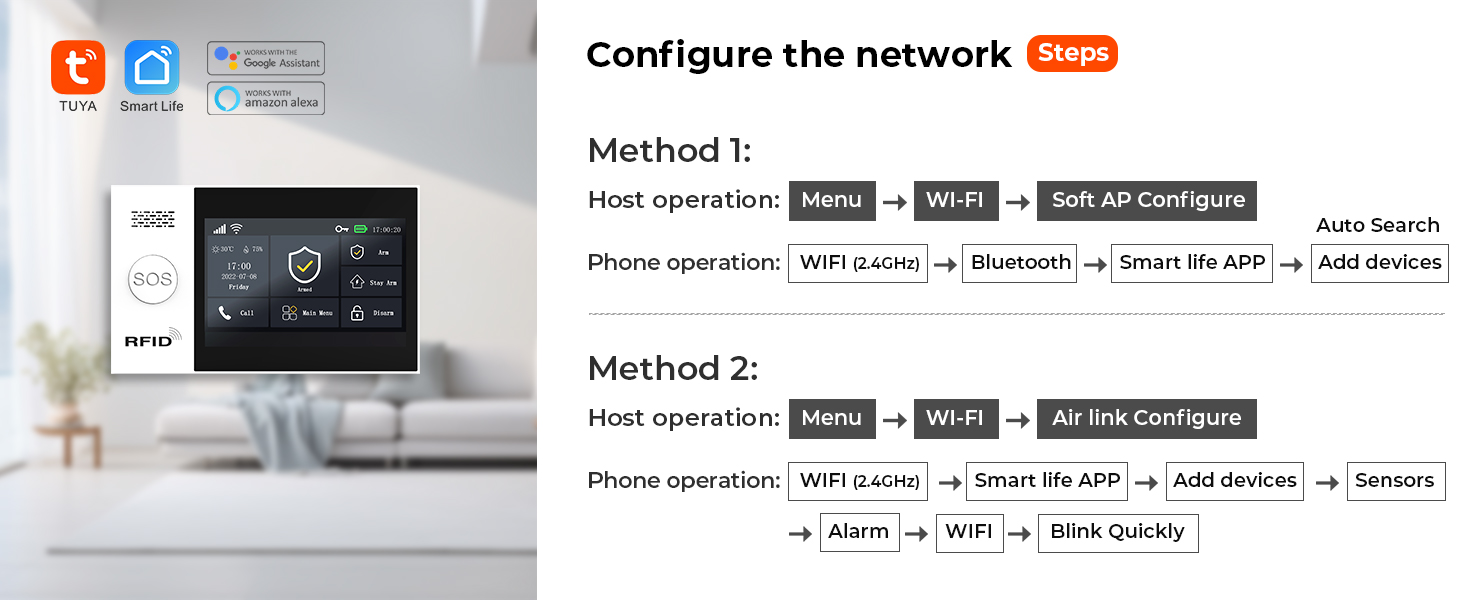
Figure 3.1: Diagram outlining two methods for configuring the network connection for the PGST alarm system, involving host and phone operations for Wi-Fi and app setup.
Method 1 (Soft AP Configure):
- On the host: Navigate to NchNhr > Wi-Fi > Nhazi AP dị nro.
- On your phone: Connect to the system's Wi-Fi (2.4GHz), then open the Smart Life APP, select Tinye ngwaọrụ.
Method 2 (Air Link Configure):
- On the host: Navigate to NchNhr > Wi-Fi > Air link Configure.
- On your phone: Connect to the system's Wi-Fi (2.4GHz), open the Smart Life APP, select Tinye ngwaọrụ > Ihe mmetụta > Oti mkpu > Wi-Fi, and confirm the indicator is blinking quickly.
3.3 Ngwa nwụnye
Download the free companion application (e.g., Tuya Smart or Smart Life) to your smartphone. Follow the in-app instructions to pair your alarm system with your device and configure settings.

Figure 3.2: User interacting with the 4.3-inch TFT colorful display screen of the PGST alarm system control panel.
4. Na-arụ ọrụ Sistemu
4.1 Na-eji ngwa agha na mwepu
The system can be armed or disarmed manually via the control panel, remote controls, or the smartphone application. You can also set schedules for automatic arming and disarming.

Figure 4.1: Four panels showing scheduled arming and disarming scenarios: automatic disarm upon waking up (7:00), automatic arm when leaving out (8:00), automatic disarm upon returning home (18:00), and automatic arm when sleeping (22:00).
4.2 Real-time Notifications
When motion is detected or a sensor is triggered, the system sends real-time notifications directly to your smartphone via the connected application. This allows you to monitor your home's security status remotely.
4.3 Ọrụ SOS
Activating the SOS button immediately sends a distress signal. This signal is transmitted to pre-designated emergency contacts, such as family members or local authorities, ensuring a rapid response.
4.4 Njikwa olu
The system supports voice control through Amazon Alexa and Google Assistant. You can arm or disarm your system using voice commands.

Figure 4.2: A user and a dog in a living room, demonstrating voice control compatibility with Amazon Alexa and Google Assistant for arming or disarming the system.
4.5 Preset Alarm Calls
The system allows you to preset up to five alarm call numbers. If an alarm is triggered, the system will dial these numbers in sequence until a connection is made, ensuring that alarm notifications are not missed.

Figure 4.3: Illustration of the 5 preset alarm call function, showing the alarm system dialing a sequence of contacts when an alarm is triggered.
4.6 Nkwado ọtụtụ asụsụ
The system supports 10 languages for menu display, voice operation prompts, and alarm SMS settings, allowing users to select their preferred language.

Figure 4.4: Illustration showing the PGST alarm system supporting 10 languages for menu display, voice operation prompts, and alarm SMS settings.
4.7 Anti-Demolition Alarm
The control panel features an anti-demolition alarm. If the device is removed from its mounting point, it will trigger an alarm and send a notification to the configured contacts.

Figure 4.5: Image demonstrating the anti-demolition alarm function, where removing the device from its mounting point triggers an alarm and sends a notification to the user's phone.
5. Nlekọta
5.1 Sensor Battery Replacement
The wireless sensors are powered by batteries. The system is designed to alert you when a sensor's battery is low. Upon receiving a low battery notification, replace the battery in the affected sensor promptly to ensure continuous protection.

Figure 5.1: Illustration demonstrating the wireless sensor low battery alert system, showing a door sensor, PIR motion sensor, and a smartphone displaying a low battery notification.
6. Nchọpụta nsogbu
- Okwu njikọ Wi-Fi: Ensure your Wi-Fi network is 2.4GHz. The system does not support 5G Wi-Fi. Verify the Wi-Fi signal strength at the control panel's location.
- SIM Card Not Working: If using a 4G GSM card, ensure it is properly inserted and activated with a compatible carrier. Some carriers may have specific requirements or limitations.
- No Alerts During Power Outage: The system relies on a continuous power supply and Wi-Fi for full functionality. For continued operation during a power outage, a 4G GSM card can provide cellular backup for alerts, though this may incur carrier fees.
- Nhazi ihe isi ike: If you encounter difficulties during setup, refer to the detailed instructions in the app or contact customer support for additional operational videos.
- Sensọ Anaghị aza: Check the battery level of the sensor. Ensure the sensor is within range of the control panel and that there are no obstructions interfering with the wireless signal.
7. Nkọwapụta
| Ụdị | PGST |
| Nọmba nlereanya | PGST A107F |
| Agba | Ọcha |
| Isi Iyi Ike | Igwe ọkụ eletrik |
| Ngwa dakọtara | Ekwentị mkpanaaka |
| Akụkụ ihe (L x W x H) | 6 x 8 x 4 sentimita asatọ |
| Teknụzụ Njikọta | Ikuku |
| Ụdị nwụnye | Ịkpọba-na |
| Rtdị Alert | Ọdịyo na Mmegharị |
| Usoro njikwa | Ngwa |
| Ngwakọta cell batrị | Alkaline |
| Ngwa gụnyere | 1x PGST107 ALARM SYSTEM (main unit) |
| Ọnụọgụ nkeji | 16.0 Count (for the kit) |
| Ihe Nchịkwa Ihe Nchịkwa | Sensọ ngagharị |
| Ụdị njikọ | USB Ụdị C |
| Ibu Ibu | 2.05 pound |
| UPC | 704444502556 |
8. Akwụkwọ ikike Ozi
The PGST A107F Home Security Alarm System comes with a 1-afọ akwụkwọ ikike site na ụbọchị ịzụrụ. Akwụkwọ ikike a na-ekpuchi ntụpọ nrụpụta na adịghị arụ ọrụ n'okpuru ojiji nkịtị. Biko dowe ihe akaebe nke ịzụrụ ihe maka akwụkwọ ikike.
9. Nkwado ndị ahịa
For any questions, technical assistance, or further operational videos, please feel free to contact PGST customer support. We are committed to providing assistance to ensure your satisfaction with the product.
Additional resources and support may be available through the official PGST website or the product's dedicated support channels.
Ask a question about this manual
Ask about setup, troubleshooting, compatibility, parts, safety, or missing instructions. Manuals+ will review the question and use this page’s manual context to help answer it.