
1. Okwu mmalite
Thank you for choosing the iClever BTH20 Active Noise Cancelling Headphones for Kids. These headphones are designed with your child's safety and comfort in mind, featuring an 80dBA volume limit and robust construction. Enjoy extended playtime, fast charging, and effective noise reduction for an immersive audio experience.
2. Kedu ihe dị na Igbe ahụ
- iClever BTH20 Noise na-akagbu ekweisi
- USB-C eriri USB
- 3.5mm Audio USB
- Akwụkwọ ntuziaka onye ọrụ
- Carrying Pouch (may vary by package)
3. Ngwaahịa gafereview
The iClever BTH20 headphones are designed for ease of use and durability. Key components include:
- Ihe mkpuchi isi nwere ike idozi: Features 10 levels of adjustment for a perfect fit for children aged 3 and up. Padded for comfort.
- Ntị ntị dị nro: 90° rotatable and made with pressure-reducing, skin-like texture for comfortable wear during extended periods.
- Njikwa kensinammuo: Large, easily accessible buttons for power, volume, and Active Noise Cancellation (ANC) modes.
- Njikọ ọdụ: Includes a USB-C port for charging and a 3.5mm audio jack for wired connection.
- Nhazi a na-agbanwe agbanwe: The headphones can be folded for compact storage and portability.
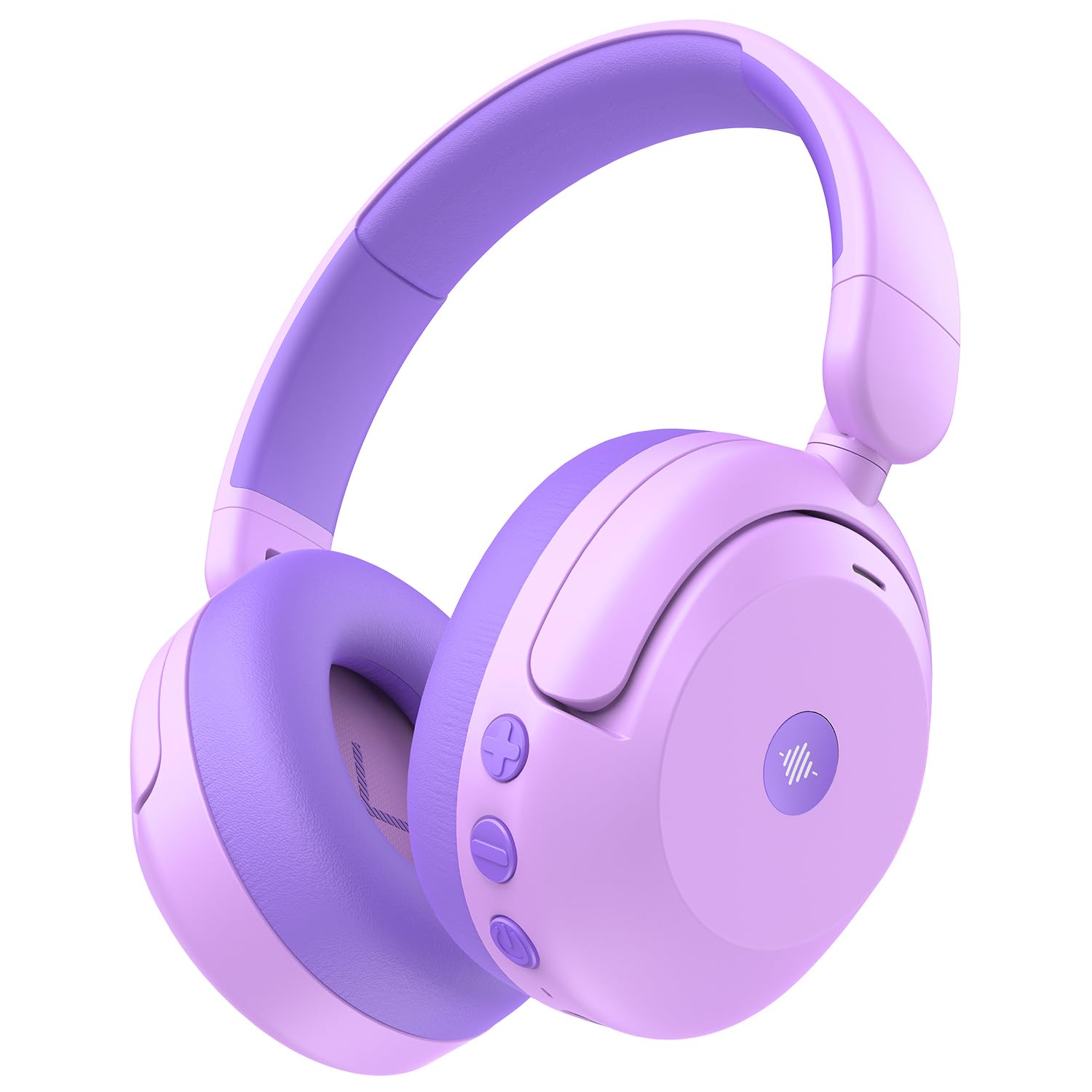
Image: iClever BTH20 headphones in purple, showcasing their over-ear design and vibrant color.

Video: A close-up view of the iClever BTH20 headphones, highlighting the control buttons, charging port, and audio jack. This video demonstrates the physical features and connectivity options.
4. Nhazi
4.1 Ịchaji ekweisi
- Jikọọ eriri USB-C na-enye chaja na ọdụ ụgbọ mmiri dị na ekweisi.
- Plug the other end of the USB-C cable into a compatible USB power adapter (not included) or a computer's USB port.
- Ihe ngosi LED ga-egosi ọkwa nchaji (dịka ọmụmaatụ, ọbara ọbara maka ịchaji, acha anụnụ anụnụ maka chaja zuru oke).
- A full charge takes approximately 2 hours. A 10-minute fast charge provides about 5 hours of use.
4.2 Njikọ Bluetooth
- Hụ na ekweisi ndị ahụ agbanyụrụ ma gbanyụọ ha.
- Pịa ma jide bọtịnụ ike ruo mgbe akara ọkụ ọkụ na-acha anụnụ anụnụ na ọbara ọbara, na-egosi ọnọdụ njikọ.
- Na ngwaọrụ gị (smartphone, tabletị, wdg), gbanye Bluetooth wee chọọ ngwaọrụ dịnụ.
- Select "iClever BTH20" from the list of devices.
- Ozugbo ejikọrọ, ihe ngosi LED ga-atụgharị na-acha anụnụ anụnụ.
4.3 Njikọ wired
For devices without Bluetooth or when the battery is low, use the included 3.5mm audio cable:
- Plug one end of the 3.5mm audio cable into the audio jack on the headphones.
- Tinye nsọtụ nke ọzọ n'ime ihe na-eme ka ụda 3.5mm dị na ngwaọrụ gị.
- Note: Active Noise Cancellation (ANC) is not available when using a wired connection.
5. Ntuziaka ọrụ
5.1 Gbanyụọ ma ọ bụ gbanyụọ
- Ike Na: Press and hold the Power button for 2-3 seconds until the LED indicator lights up.
- Gbanyụọ: Press and hold the Power button for 3-5 seconds until the LED indicator turns off.
5.2 Njikwa olu
The headphones feature an 80dBA volume limit to protect young hearing. Use the dedicated volume buttons:
- Olu elu: Pịa bọtịnụ '+'.
- Olu ala: Pịa bọtịnụ '-'.
5.3 Nkagbu mkpọtụ mkpọtụ (ANC)
The BTH20 headphones offer two noise reduction modes for different environments:
- Na-arụ ọrụ ANC: Press the ANC button (often marked with a wave icon) to cycle through modes.
- Low Noise Reduction Mode: Provides a gentler ear pressure, suitable for environments with moderate background noise.
- High Noise Reduction Mode: Blocks out most engine and mechanical noises, ideal for travel (e.g., airplanes).

Image: Diagram illustrating the Active Noise Cancellation feature and its effectiveness in reducing ambient sound.
5.4 Igwe okwu
The headphones include an inbuilt microphone for basic voice chat and calls when connected via Bluetooth.
- Oku na-aza/Nkwụsị: Pịa bọtịnụ ọrụ dị iche iche (ọtụtụ mgbe bọtịnụ ike) otu ugboro.
- Ịjụ oku: Pịa ma jide bọtịnụ ọtụtụ ọrụ maka sekọnd iri na abụọ.
6. Nkasi Obi na Ịdị Mma
The iClever BTH20 headphones are designed for maximum comfort for children:
- Ihe mkpuchi isi nwere ike idozi: The 10-level adjustable headband ensures a snug yet comfortable fit for various head sizes, accommodating children from 3 years old and up.
- Soft Ear Cushions: The ear cushions are made from a pressure-reducing, skin-like texture, providing a gentle fit that prevents discomfort during long listening sessions.
- Nhazi dị arọ: Weighing only 220 grams, these headphones are light enough for children to wear without feeling burdened.

Image: A child wearing the iClever BTH20 headphones, demonstrating the comfortable and secure fit.
7. Nlekọta
To ensure the longevity and optimal performance of your iClever BTH20 headphones, follow these maintenance guidelines:
- Nhicha: Use a soft, dry cloth to wipe the headphones. Avoid using harsh chemicals or abrasive materials.
- Nchekwa: When not in use, fold the headphones and store them in the provided carrying pouch to protect them from dust and damage. Store in a cool, dry place.
- Zenarị mmiri: These headphones are not water-resistant. Avoid exposure to liquids, moisture, or extreme temperatures.
- Jiri Nlekọta Aka: Although durable, avoid excessive bending or dropping the headphones to prevent damage to internal components.
8. Nchọpụta nsogbu
| Nsogbu | Ngwọta |
|---|---|
| Ekweisi agaghị agbanwu. | Hụ na ekweisi ndị ahụ chajịchara nke ọma. Jiri eriri USB-C jikọọ na isi iyi ọkụ eletrik. |
| Enweghị ike ijikọ site na Bluetooth. | Make sure the headphones are in pairing mode (flashing blue/red LED). Turn off and on Bluetooth on your device. Ensure no other devices are connected. |
| Enweghị ụda ma ọ bụ obere olu. | Check volume levels on both headphones and the connected device. Ensure the headphones are properly paired or the 3.5mm cable is securely connected. |
| ANC is not working. | Ensure the headphones are powered on and not connected via the 3.5mm audio cable (ANC is only for Bluetooth mode). Press the ANC button to cycle through modes. |
| Igwe okwu anaghị arụ ọrụ. | Ensure headphones are connected via Bluetooth. Check microphone settings on your connected device. |
9. Nkọwapụta
| Njirimara | Nkọwa |
|---|---|
| Aha Nlereanya | BTH 20 |
| Ụdị | iClever |
| Teknụzụ Njikọta | Wireless (Bluetooth 5.4) / Wired (3.5mm Jack) |
| Ụdị Bluetooth | 5.4 |
| Oke Bluetooth | 10 mita |
| Njikwa mkpọtụ | Mkpọtụ Na-arụ Ọrụ (ruo 40dB) |
| Oke Oke | 80dBA (iClever Sound Refiner Technology) |
| Nha ọkwọ ụgbọ ala ọdịyo | 40 millimeters |
| Oke ugboro ugboro | 20Hz - 20,000Hz |
| Ndụ Batrị (ANC gbanyụrụ) | Ruo awa 60 |
| Ndụ Batrị (ANC Gbanyere) | Ruo awa 35 |
| Oge nchaji batrị | 2 Hours (10-min fast charge for 5 hours playtime) |
| Nchaji ọdụ ụgbọ mmiri | USB-C |
| Ihe onwunwe | Acrylonitrile Butadiene Styrene (ABS), Leather, POK (BPA/PVC free) |
| Ibu Ibu | 220 grams |
| Ogologo afọ | Afọ 3+ |
| Mmiri Nguzogide | Ọ bụghị mmiri na-eguzogide |
10. Akwụkwọ ikike & Nkwado
iClever products come with a standard warranty. For specific warranty details and to register your product, please refer to the warranty card included in your package or visit the official iClever websaịtị.
For technical support, troubleshooting assistance, or any questions regarding your iClever BTH20 headphones, please contact iClever Customer Service:
- Websaịtị: Visit the official iClever websaịtị maka FAQ na akụrụngwa nkwado.
- Email: Refer to your product packaging or the iClever website for customer support email addresses.