
Okwu mmalite
Thank you for choosing the UGREEN 12000mAh 100W Fast Charging Power Bank. This device is designed to provide portable, high-speed charging for a wide range of electronic devices, including laptops, smartphones, and tablets. Please read this manual carefully to ensure safe and optimal use of your power bank.
Ngwaahịa gafereview
The UGREEN 100W Power Bank features a compact design with a digital display for battery status and charging information. It includes multiple ports for versatile charging options.

Nkọwa onyonyo: A n'ihu view of the UGREEN 12000mAh 100W Fast Charging Power Bank, showcasing its sleek grey design and digital display.

Nkọwa onyonyo: A nso-elu view of the UGREEN Power Bank's top, highlighting the USB-C (IN/OUT 1) and USB-A (OUT 2) ports, along with the 100W power indicator.

Nkọwa onyonyo: The UGREEN Power Bank being held, illustrating its compact size and lightweight design, suitable for portability.
Melite
- Ebube mbụ: Before first use, fully charge the power bank. Connect a USB-C cable to the IN/OUT 1 port and connect the other end to a suitable power adapter (not included). The digital display will show the charging progress.
- Lelee ọkwa batrị: Jiri nwayọ pịa bọtịnụ ike ka view pasent batrị dị ugbu atage na ngosi dijitalụ.
Ntuziaka ọrụ
Ịchaji Power Bank
To recharge your UGREEN Power Bank, connect a USB-C cable to the IN/OUT 1 port. The power bank supports fast charging input, allowing for quick replenishment of its internal battery.
Ịchaji ngwaọrụ gị
- Jikọọ ngwaọrụ: Use a compatible charging cable to connect your device to either the USB-C (IN/OUT 1) or USB-A (OUT 2) port on the power bank.
- Malite chajị: The power bank will automatically detect the connected device and begin charging. The digital display will show the output power.
- Nchaji Ọsọ Ọsọ: The USB-C port supports up to 100W Power Delivery (PD) for fast charging compatible laptops and other devices.
- Ngwaọrụ ọtụtụ: You can charge up to two devices simultaneously using both output ports.

Nkọwa onyonyo: The UGREEN Power Bank simultaneously charging a laptop via USB-C and another device via USB-A, demonstrating its multi-device charging capability.
Ụdị Nchaji dị ala ugbu a
For small devices like smartwatches, Bluetooth earbuds, or fitness trackers that require lower charging currents, activate the low current charging mode:
- Mee ọrụ: Double-press the power button to enter low current charging mode. An indicator on the display may appear.
- Jikọọ: Connect your low-power device to the power bank.
- Gbanyụọ: Double-press the power button again to exit low current charging mode, or it will automatically turn off after a period of inactivity.
Nkọwa onyonyo: The UGREEN Power Bank connected to a smartwatch and wireless earbuds, illustrating its low current charging mode for small electronic accessories.
Nlekọta
- Nhicha: Use a soft, dry cloth to clean the power bank. Do not use liquid cleaners or aerosols.
- Nchekwa: Chekwaa ụlọ akụ ọkụ ahụ n'ebe dị jụụ, kpọrọ nkụ na-adịghị na ìhè anyanwụ kpọmkwem na oke okpomọkụ.
- Nlekọta batrị: Iji mee ka batrị dị ogologo, chajịa ike ahụ nke ọma otu ugboro n'ime ọnwa atọ ọ bụrụ na ọ naghị adị gị ka e ji ya eme ihe mgbe niile.
Nchọpụta nsogbu
- Ụlọ akụ Power anaghị akwụ ụgwọ:
- Hụ na eriri chaja na ihe nkwụnye ọkụ na-arụ ọrụ nke ọma.
- Check if the cable is securely connected to the IN/OUT 1 port.
- Ngwaọrụ anaghị akwụ ụgwọ site na ụlọ akụ ọkụ:
- Verify the power bank has sufficient charge.
- Ensure the charging cable is compatible with your device and securely connected.
- Gbalịa ọdụ ụgbọ mmiri ma ọ bụ eriri dị iche.
- Ọ bụrụ na ị na-achaji ngwaọrụ nwere obere ike, hụ na agbanyere ọnọdụ chaja dị ala.
- Nchaji nwayọ:
- Ensure your cable and device support fast charging protocols (e.g., Power Delivery for 100W output).
- Charging multiple devices simultaneously may reduce individual port output.
Nkọwapụta

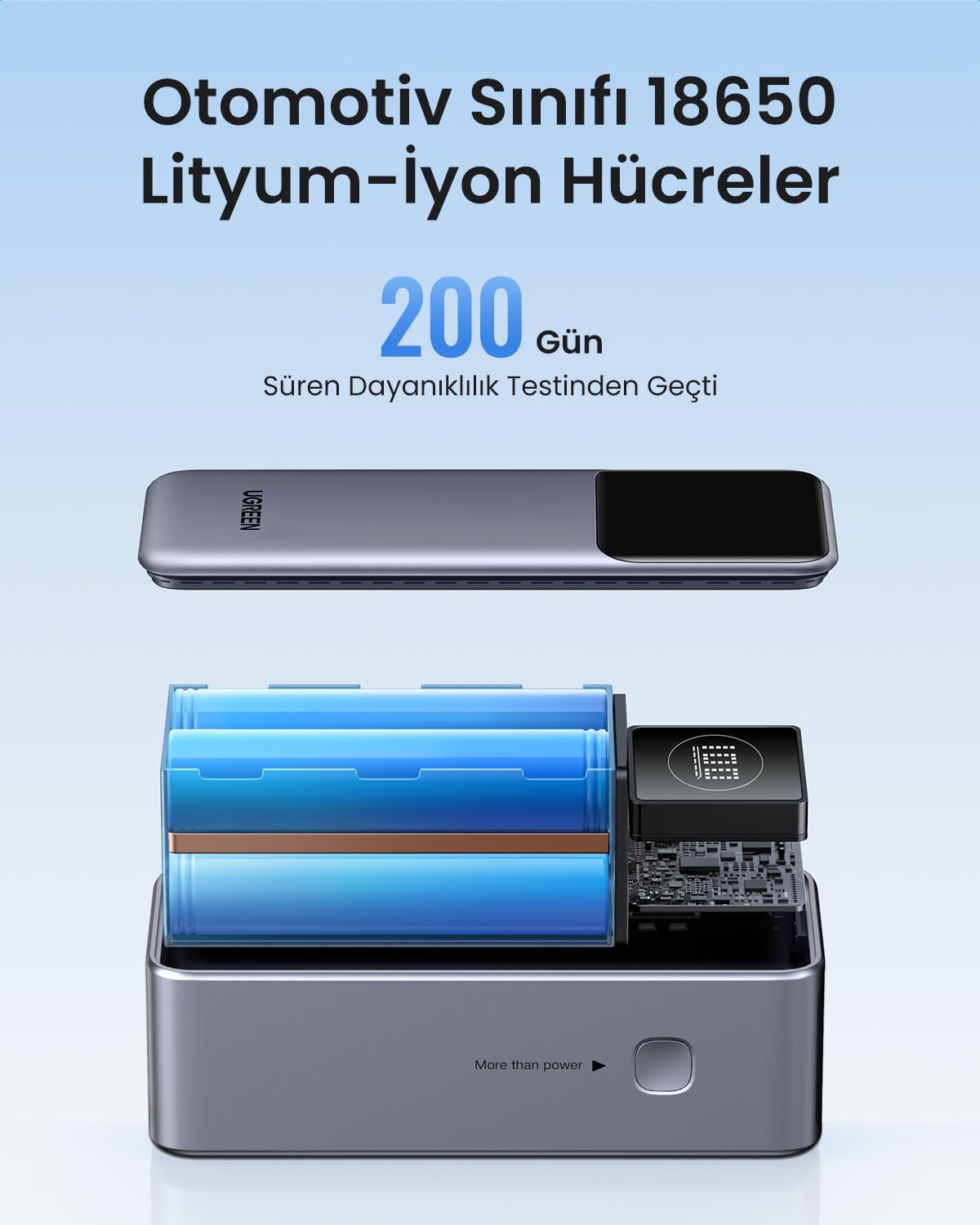
Nkọwa onyonyo: Ihe gbawara view of the UGREEN Power Bank, revealing its internal structure and the automotive-grade 18650 lithium-ion battery cells.
| Njirimara | Nkọwa |
|---|---|
| Ụdị | UGREEN |
| Nọmba nlereanya | 35526B / AFNUGRNW28 |
| Ike batrị | 12000mAh |
| Mpụta ike kacha | 100W |
| Ọnụọgụ nke ọdụ ụgbọ mmiri | 3 (1x USB-C In/Out, 1x USB-A Out) |
| Ụdị batrị | Automotive Grade 18650 Lithium-ion Cells |
| Akụkụ | 45.5 x 46 x 115 mm (ihe dị ka) |
| Ibu | 309g (ihe dị ka) |
Ozi nchekwa
- Ewepụla ụlọ akụ ike ka ọ bụrụ oke okpomọkụ, ìhè anyanwụ kpọmkwem, ma ọ bụ ọkụ.
- Zere idobe, ịkụtu, ma ọ bụ igbasa ngwaọrụ ahụ.
- Debe ebe ụmụaka na-apụghị iru.
- Do not use if the power bank is damaged or swollen.
- Tụfuo ngwaahịa ahụ nke ọma dịka iwu mpaghara siri dị.
Akwụkwọ ikike na nkwado
This UGREEN Power Bank comes with a Akwụkwọ ikike nke ụbọchị 90 site na ụbọchị ịzụrụ, na-ekpuchi ntụpọ nrụpụta. Biko dowe ihe akaebe nke ịzụrụ ihe maka akwụkwọ ikike.
For technical support, warranty inquiries, or further assistance, please contact UGREEN customer service through the official UGREEN website or your retailer's support channels.
Onye ọrụ UGREEN Websaịtị: www.green.com