
Okwu mmalite
Thank you for choosing the JUNJIEUNVO Q39 Wireless Translation Earbuds. These earbuds are designed to provide high-quality audio, comfortable wear, and convenient language translation capabilities. This manual will guide you through the setup, operation, and maintenance of your new device.
Ihe ngwugwu
- JUNJIEUNVO Q39 Wireless Translation Earbuds (Left and Right)
- Nchaji case
- Igwe nchaji USB
- Akwụkwọ ntuziaka onye ọrụ (Akwụkwọ a)
Ngwaahịa gafereview
The JUNJIEUNVO Q39 earbuds feature an open-ear design for comfort and situational awareness, integrated Bluetooth 5.4 for stable connectivity, and IPX5 water resistance for sports use. The charging case provides extended battery life and includes a digital display.

Image: The JUNJIEUNVO Q39 Wireless Translation Earbuds in their charging case. The earbuds are beige with gold accents, and the charging case is open, revealing the earbuds and a digital display for battery status.
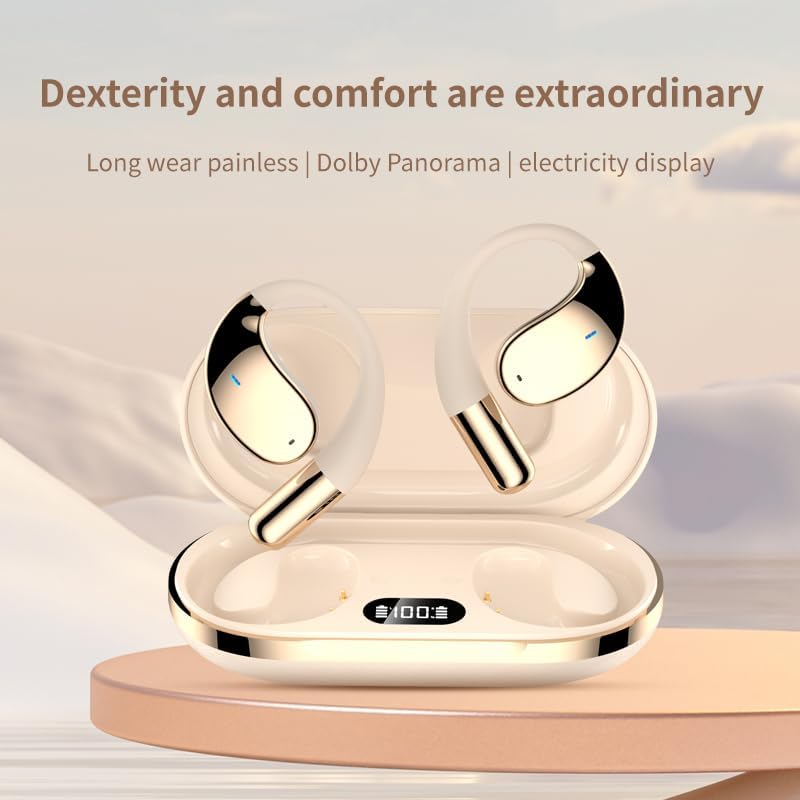
Foto: Ihe dị nso view of the JUNJIEUNVO Q39 earbuds nestled in their charging case. The case features a clear digital display indicating the battery percentage, currently showing "100".
Melite
1. Ịchaji ihe ntị na akpa
Tupu ojiji nke mbụ, chajie nke ọma ntị na akpa nchaji.
- Connect the USB charging cable to the charging port on the case and to a USB power source.
- The digital display on the charging case will show the battery level during charging.
- Ịchaji zuru oke maka ikpe ahụ na-ewe ihe dị ka awa 1.5.
- The earbuds will charge automatically when placed inside the powered charging case. Earbuds battery capacity: 40mAh each. Charging case battery capacity: 500mAh.
2. Njikọ Bluetooth
Iji jikọọ ekweisi gị na ngwaọrụ:
- Gbaa mbọ hụ na ebubo na ekwe ntị.
- Mepee igbe nchaji. Igwe ntị ga-abanye na ọnọdụ njikọta na-akpaghị aka.
- Na ngwaọrụ gị (ama, mbadamba, wdg), gaa na ntọala Bluetooth wee gbanye Bluetooth.
- Chọọ maka available devices and select "Q39" from the list.
- Ozugbo ejikọtara ya, ị ga-anụ olu nkwenye, ekweisi ndị ahụ ga-adịkwa njikere maka ojiji.
- The earbuds support Bluetooth V5.4+EDR and a connection distance of up to 10 meters.
Ntuziaka ọrụ
Gbanyụọ/ Gbanyụọ
- Ike Na: Mepee igbe nchaji, na ntị ntị ga-agbanye ọkụ ozugbo.
- Gbanyụọ: Tinye ihe ntị ntị n'ime akpa nchaji wee mechie mkpuchi. Ha ga-agbanyụ ozugbo wee malite ịchaji.
Egwu Egwu
Specific touch controls for music playback are typically detailed in a quick start guide or on the product itself. Generally, common controls include:
- Gwuo/kwụsịtụ: Otu mgbata na ntị ntị.
- Track na-esote: Pịa bọtịnụ ntị aka nri ugboro abụọ.
- Gara aga Track: Kpatụ ntị ugboro abụọ n'akụkụ aka ekpe.
- Njikwa olu: (If supported) Triple tap on an earbud or adjust via your connected device.
Njikwa Oku
- Azịza/Kwụsị Oku: Naanị otu ọpịpị na ntị ntị n'oge oku mbata.
- Jụ oku: Pịa ma jide otu ntị ntị maka sekọnd 2 n'oge oku mbata.
Translation Function
The JUNJIEUNVO Q39 earbuds support language translation for over 134 countries. To utilize this feature:
- Ensure your earbuds are connected to your smartphone.
- Download and install the dedicated translation application (if available) or a compatible third-party translation app on your smartphone.
- Follow the instructions within the translation application to initiate and manage real-time translation. The earbuds will act as the audio input and output device for the translation.
Nlekọta
- Nhicha: Jiri akwa dị nro, kpọrọ nkụ, akwa enweghị lint iji hichaa ntị ntị na akpa chaja. Ejila kemịkalụ siri ike ma ọ bụ ihe abrasive.
- Nguzogide mmiri: Igwe ntị ntị anaghị egbochi mmiri IPX5, nke pụtara na ọ na-eguzogide ọsụsọ na ọsụsọ. Ekpunyela ha na mmiri ma ọ bụ kpughee ha n'oké mmiri ozuzo. Gbaa mbọ hụ na ha akpọnwụwo tupu etinyeghachi ha n'akpa chaja.
- Nchekwa: Chekwaa ntị ntị n'akpa chaja ha mgbe anaghị eji ya iji chebe ha ma debe ya ebubo. Zere oke okpomọkụ.
Nchọpụta nsogbu
- Igwe ntị anaghị ejikọta:
- Gbaa mbọ hụ na akwụgoro ekwe ntị abụọ ahụ.
- Gbanyụọ Bluetooth na ngwaọrụ gị wee gbanye ya azụ.
- Forget "Q39" from your device's Bluetooth list and try pairing again.
- Tinye earbuds azụ n'ime akpa ahụ, mechie mkpuchi, chere sekọnd ole na ole, wee mepee ka ịtọgharịa.
- Enweghị ụda sitere na otu ntị ntị:
- Check battery level of both earbuds.
- Try resetting the earbuds as described above.
- Nchaji anaghị akwụ ụgwọ:
- Gbaa mbọ hụ na ejikọrọ eriri chajị na echekwabara na ikpe ahụ yana isi iyi ike.
- Gbalịa eriri USB ma ọ bụ ihe nkwụnye ọkụ dị iche.
Nkọwapụta
| Aha Nlereanya | YYK-Q39 |
| Ụdị Bluetooth | V5.4+EDR |
| Chip Bluetooth | Blue Flood |
| Protocol akwadoro | AVRCP V1.6, A2DP V1.3, HFP V1.7 (Simultaneous LE and BR / EDR) |
| Usage/Playback Time | Ihe dị ka awa 8 (na olu 80%) |
| Oge Njikere | awa 80 |
| Oge Njikere (Ikpe) | Ihe dị ka awa 1.5 |
| Anya ikuku | 10 mita |
| Ike batrị earbud | 40mAh |
| Ịchaji Ike batrị Case | 500mAh |
| Ogo Nguzogide Mmiri | IPX5 |
| Ntinye ntị | On Ear (Open-ear design) |
| Mgbochi | 32 Ohm |
| Ibu Ibu | 5 ounces (total package weight is 185g gross, 84g net) |
| UPC | 884613749477 |
Akwụkwọ ikike na nkwado
Maka ozi gbasara akwụkwọ ikike na nkwado ndị ahịa, biko lee akwụkwọ enyere n'oge ịzụrụ ihe ma ọ bụ kpọtụrụ onye na-ere ahịa gị. Debe ihe akaebe nke ịzụrụ ihe gị maka akwụkwọ ikike ọ bụla.