
1. Okwu mmalite
Thank you for choosing the JUNJIEUNVO Q16 Wireless Translation Earbuds. These open-ear design earbuds offer a comfortable listening experience, advanced Bluetooth 5.4 connectivity, IPX5 waterproof rating, and support for real-time language translation across over 100 countries. This manual provides detailed instructions on how to set up, operate, and maintain your earbuds to ensure optimal performance.
2. Ihe ngwugwu
Biko lelee ngwungwu maka ihe ndị a:
- JUNJIEUNVO Q16 Wireless Translation Earbuds (Left and Right)
- Nchaji case
- Akwụkwọ ntuziaka onye ọrụ
- Charging Cable (USB-C, not always included, please check packaging)
3. Ngwaahịa gafereview
The Q16 earbuds feature an open-ear design for comfort and situational awareness, housed in a compact charging case. The case includes a digital display for battery status.

Foto 3.1: Q16 Earbuds in their charging case, showing the left (L) and right (R) indicators along with the digital battery display.

Foto 3.2: The open-ear design of the Q16 earbuds, emphasizing comfort and awareness of surroundings.

Foto 3.3: Diagram illustrating the directional sound transmission technology, designed to protect privacy and reduce sound leakage.
4. Nhazi
4.1 Ịchaji ntị na akpa
Before first use, fully charge the earbuds and the charging case. The charging case has a 500mAh battery, and each earbud has a 40mAh battery. A full charge takes approximately 1.5 hours.
- Connect the charging cable (typically USB-C) to the charging port on the case and to a USB power source.
- The digital display on the charging case will show the charging progress.
- Place the earbuds into the charging case. Ensure they are correctly seated; the case will indicate if they are charging.
4.2 Njikọ Bluetooth
The Q16 earbuds use Bluetooth 5.4 for a stable and efficient connection. The pairing process is automatic upon opening the case.
- Ensure your smartphone or device's Bluetooth is turned on.
- Mepee mkpuchi nke akpa chaja. Ekwe ntị ndị a ga-abanye na ọnọdụ njikọta na akpaghị aka.
- On your device, search for Bluetooth devices and select "Q16" from the list.
- Ozugbo ejikọtara ya, ị ga-anụ olu nkwenye, ekweisi ndị ahụ ga-adịkwa njikere maka ojiji.
- For subsequent connections, simply open the charging case, and the earbuds will automatically reconnect to the last paired device.
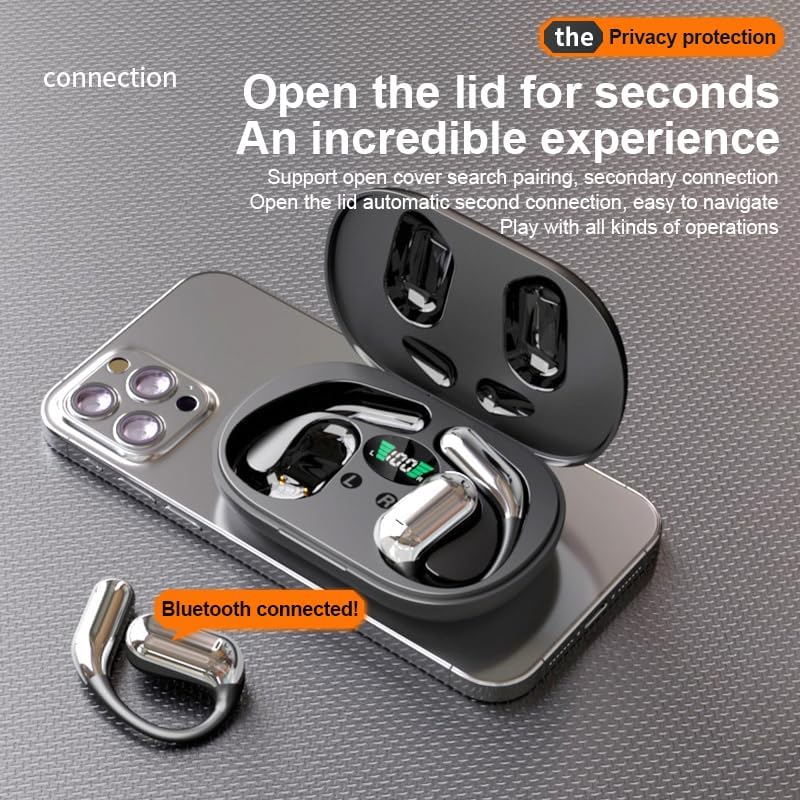
Foto 4.1: The Q16 earbuds connected to a smartphone, indicating successful Bluetooth pairing.
5. Ntuziaka ọrụ
5.1 Gbanyụọ ma ọ bụ gbanyụọ
- Ike Na: Mepee mkpuchi mkpuchi nchaji, na ntị ntị ga-agbanye ọkụ ozugbo.
- Gbanyụọ: Tinye ihe ntị ntị n'ime akpa nchaji wee mechie mkpuchi. Ha ga-agbanyụ ozugbo wee malite ịchaji.
5.2 Nghaghachi egwu
(Specific touch controls are not detailed in the provided product data. The following are common gestures; refer to the manufacturer's official app or website for precise controls.)
- Gwuo/kwụsịtụ: Kpatụ ntị ntị otu ugboro.
- Track na-esote: Kpatụ ntị ntị aka nri ugboro abụọ.
- Gara aga Track: Kpatụ ntị ntị aka ekpe ugboro abụọ.
- Njikwa olu: (Typically a long press or triple tap, specific action not provided. Adjust via your connected device if not available on earbuds.)

Foto 5.1: Illustration of the panoramic stereo surround sound feature, enhancing the audio experience.
5.3 Njikwa oku
- Azịza/Kwụsị Oku: Kpatụ ntị ntị otu ugboro.
- Jụ oku: Ogologo pịa otu ntị ntị maka sekọnd 2.
5.4 Language Translation Function
The Q16 earbuds support real-time translation for over 100 languages. This feature typically requires a dedicated translation application on your paired smartphone.
- Download and install the recommended translation app (refer to product packaging or manufacturer's website for app details) on your smartphone.
- Ensure the earbuds are connected to your smartphone via Bluetooth.
- Open the translation app and follow its instructions to initiate real-time translation. The earbuds will act as your audio input/output device for the translation.
5.5 IPX5 Ọkwa Mmiri Na-anaghị Adọba Mmiri
The earbuds are rated IPX5 waterproof, meaning they are resistant to splashing water from any direction. This makes them suitable for sports and outdoor activities. Note: The charging case is not waterproof. Avoid exposing the charging case to water.
6. Nlekọta na nlekọta
- Nhicha: Gently wipe the earbuds and charging case with a soft, dry, lint-free cloth. Do not use harsh chemicals or abrasive materials.
- Nchekwa: Mgbe ị na-ejighị ya, debe ekweisi ntị n'ime akpa chaja ha iji chebe ha ma mee ka ha dị ọkụ. Debe ha n'ebe dị jụụ ma kpọọ nkụ, ebe okpomọkụ na-adịghị oke njọ.
- Zenarị mmiri: While the earbuds are IPX5 waterproof, avoid submerging them in water. The charging case is not waterproof.
- Nlekọta batrị: Ka ịgbatị ndụ batrị ogologo, zere ịchaji ekwe ntị na chaja ugboro ugboro. Na-ana ha ebubo mgbe niile, ọbụlagodi na ọ bụghị iji ya eme ihe mgbe niile.
7. Nchọpụta nsogbu
| Nsogbu | Ngwọta |
|---|---|
| Igwe ntị anaghị ejikọta ya na ngwaọrụ. |
|
| Enweghị ụda sitere na ekweisi. |
|
| Igwe ntị anaghị akwụ ụgwọ. |
|
| Translation function not working. |
|
8. Nkọwapụta
| Njirimara | Nkọwa |
|---|---|
| Aha Nlereanya | YYK-Q16 |
| Ụdị Bluetooth | V5.4+EDR |
| Chip | Blue Flood |
| Protocol akwadoro | AVRCP V1.6, A2DP V1.3, HFP V1.7 (Simultaneous LE and BR / EDR) |
| Usage/Playback Time | Ihe dị ka awa 8 (na olu 80%) |
| Oge Njikere | awa 80 |
| Oge Nchaji | Ihe dị ka awa 1.5 |
| Anya ikuku | 10 mita |
| Ike batrị earbud | 40mAh (nke ọ bụla) |
| Ịchaji Ike batrị Case | 500mAh |
| Ngosi nke enweghị mmiri | IPX5 (naanị ekwe ntị) |
| Translation Support | Over 100 languages |
| Ntinye ntị | On Ear (Open-ear design) |
| Mgbochi | 32 ohms |
| Nha ịbụ | 84g (total) |
9. Akwụkwọ ikike na nkwado
For warranty information and customer support, please refer to the documentation included with your purchase or visit the official JUNJIEUNVO website. If you encounter any issues not covered in this manual, please contact our customer service team for assistance.
Onye nrụpụta: UNVO
Akara: JUNJIEUNVO