
Okwu mmalite

Image: The MAMAMOO Official Light Stick Ver.2.6, featuring its design and branding.
This manual provides detailed instructions for the proper use and care of your MAMAMOO Official Light Stick Ver.2.6. Please read this manual thoroughly before use to ensure optimal performance and longevity of your product.
The outer case is designed to protect the inclusions inside. Minor damages to the outer box are not considered a reason for return or exchange. For accurate verification of product defects or omissions, please record an unboxing video immediately upon delivery.
Ihe ngwugwu
Nyochaa na etinyere ihe niile edepụtara n'okpuru na ngwugwu gị:
- Igbe Ọpụpụ
- MAMAMOO Official Light Stick Ver.2.6
- eriri
- Deco Sticker Set
- Akwụkwọ ntuziaka (akwụkwọ a)

Foto: Ofeview of the MAMAMOO Official Light Stick Ver.2.6 package contents, showing the light stick, strap, decorative stickers, and the instruction manual.
Ntọala: Ntinye Batrị
The light stick requires three AAA batteries for operation. Follow these steps for correct battery installation:
- Locate the battery compartment cover at the bottom of the light stick handle.
- Mepee oghere batrị.
- Insert three AAA batteries, ensuring the correct polarity (⊖ na ⊕) as indicated inside the compartment. Incorrect insertion can damage the device.
- Mechie mkpuchi nke batrị batrị nke ọma.

Foto: ihu na azụ view of the MAMAMOO Official Light Stick Ver.2.6, highlighting the battery compartment location on the handle.
Precautions for Battery Insertion and Replacement:
- Add the correct order from ⊖ to ⊕ pole. Enwere ihe ize ndụ nke mgbawa na ntapu n'ihi okpomọkụ na ntụgharị ntụgharị.
- Remove the battery part immediately when the battery part suddenly heats up. (Do not hold it with your hands as there is a risk of burns.)
- Please use genuine alkaline AAA batteries. If not genuine, there may be damage to the product.
- Akwụsịla, kwasa, obere sekit, okpomọkụ. Ihe ize ndụ nke mmerụ ahụ n'ihi mgbawa ma ọ bụ ntapu.
- Wepu batrị n'igwe ozugbo ejirichara ya n'ihi na ọ nwere ike ibute ntapu.
- Biko jiri batrị ọhụrụ maka arụmọrụ ọ bụla.
- Ejikọtala batrị ọhụrụ na batrị ejirila na batrị ndị ọzọ.
- Echekwala batrị n'akpa ma ọ bụ akpa na-enweghị batrị.
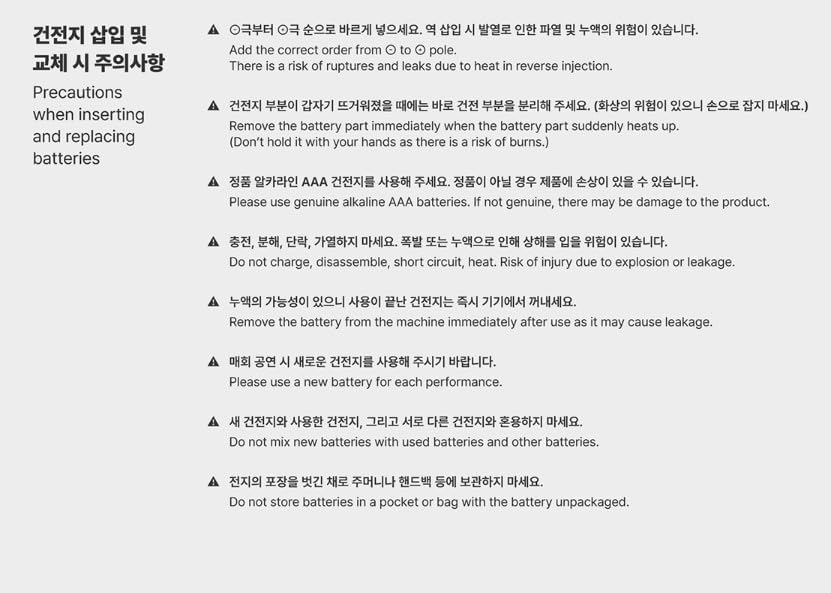
Image: Detailed instructions and warnings regarding the safe insertion and replacement of batteries for the light stick.
Operating Instructions: Light Modes
The light stick can be controlled wirelessly in normal mode. Make sure to change to normal mode before watching a concert.
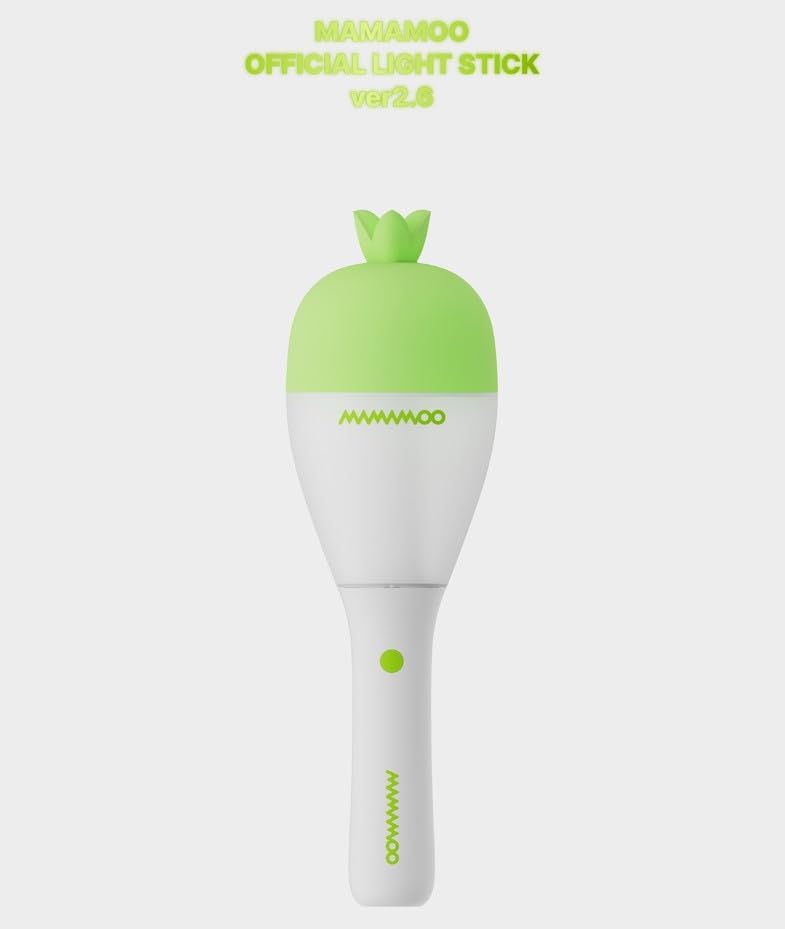
Foto: ihu doro anya view of the MAMAMOO Official Light Stick Ver.2.6, showing its design and the main button.
1. Power ON/OFF (Button Long Click)
- Press and hold the button for about 3 seconds to turn the power on or off.
2. Normal Mode (Button One Click)
- Mgbe ike dị, pịa bọtịnụ nkenke ka ịgbanwee ụdị agba dị iche iche.
- Normal mode switching sequence: COLOR ► BLINK ► MOOD LIGHT (followed by various color options).
3. Application Mode (Button Double Click)
- The light stick connects to MAMAMOO applications to enjoy a variety of content.
- Double click the button to switch to Application mode (blue blinking).
- Double click the button again to return to color change mode.
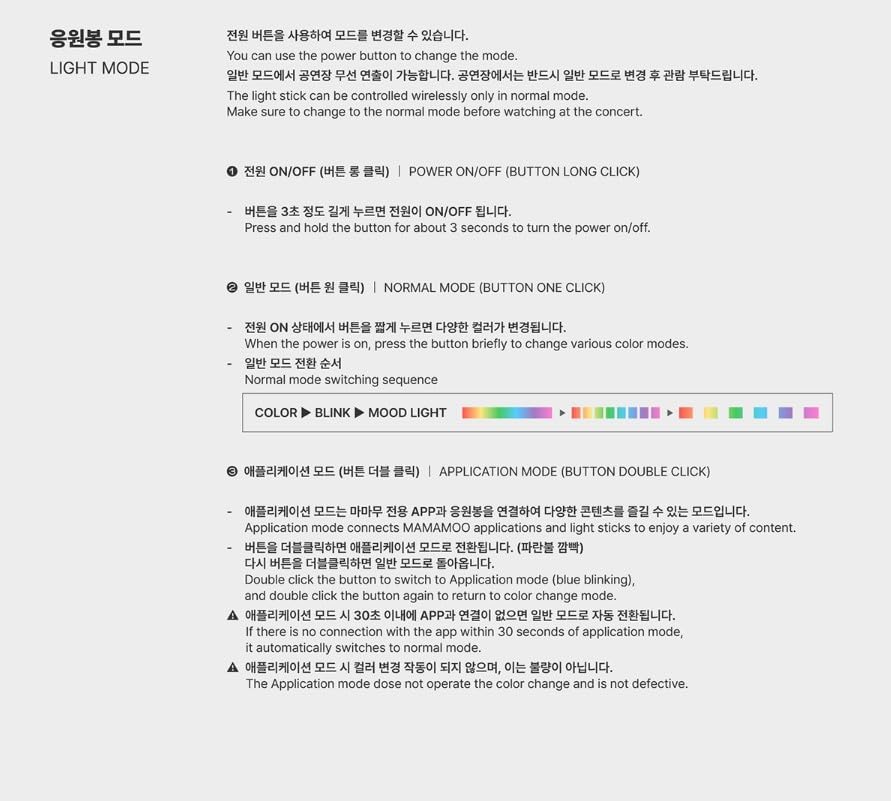
Image: Visual guide detailing how to operate the light stick, including power control, switching between normal light modes, and activating application mode.
Nlekọta
To ensure the longevity and proper functioning of your light stick, follow these maintenance guidelines:
- Clean the light stick with a soft, dry cloth. Do not use abrasive cleaners or solvents.
- Avoid exposing the light stick to extreme temperatures, direct sunlight, or high humidity.
- If the light stick will not be used for an extended period, remove the batteries to prevent leakage and potential damage.
- Store the light stick in its original packaging or a protective case to prevent scratches and damage.
Nchọpụta nsogbu
- Light stick does not turn on:
- Ensure batteries are inserted correctly with the right polarity.
- Replace with new, genuine AAA alkaline batteries.
- Pịa ma jide bọtịnụ ike ma ọ dịkarịa ala 3 sekọnd.
- Application mode issues:
- If there is no connection with the app within 30 seconds of entering application mode, it automatically switches to normal mode.
- If the application mode does not operate the color change and is not defective, ensure the app is properly installed and the light stick is within range.
- Light stick heats up:
- Immediately remove batteries if the battery compartment becomes hot. This indicates a potential issue with batteries or incorrect insertion.
Nkọwapụta
| Aha ngwaahịa | MAMAMOO Official Light Stick Ver.2.6 |
| Ihe onwunwe | ABS, PC (Acrylic, Plastic) |
| Ibu | 170g (9.6 ounces) |
| Oge ọrụ | Awa 4 |
| Mba onye si | China |
| Akụkụ (L x W x H) | 86.7 × 86.7 × 282 mm (3.41"L x 3.41"W x 11.1"H) |
| Batrị | AAA BATTERIES 3 ea (Battery Powered) |
| Onye nrụpụta | BIZENT.MALL |
| Nọmba nlereanya | MAMAMOO_LIGHTSTICK (MAMAMOO425) |
| Isi Iyi Ìhè | ọkụ Emitting Diode (LED) |
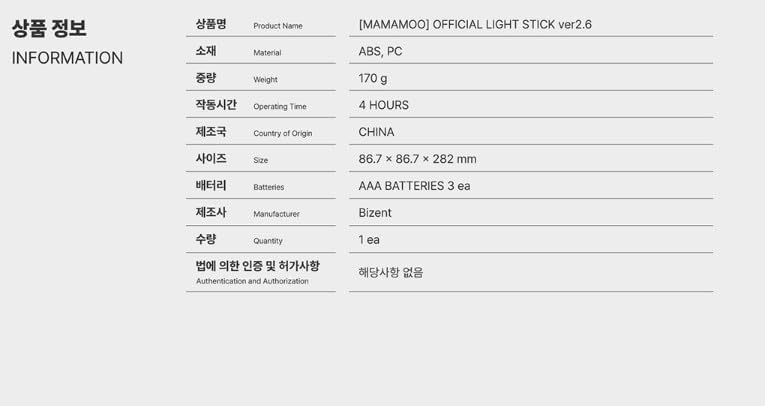
Image: A table presenting the key product information and specifications for the light stick, including material, weight, operating time, and dimensions.
Ozi akwụkwọ ikike
The product comes with a limited warranty. The warranty description is "FANLIGHT". For specific details regarding warranty coverage, terms, and conditions, please refer to the documentation provided by the manufacturer or contact the seller directly.
Nkwado ndị ahịa
If you encounter any issues or have questions not covered in this manual, please contact the seller or the manufacturer for assistance. Ensure you have your product model number (MAMAMOO_LIGHTSTICK) and purchase details available when seeking support.