
Ngwaahịa gafereview
The Generac iQ3800DF is a portable inverter generator designed for versatile power needs, from outdoor activities to home backup. This unit features dual-fuel capability, allowing operation on either gasoline or liquid propane (LP) gas. It provides clean, stable power suitable for sensitive electronics and tools, combined with quiet operation and an electric start for user convenience. Integrated COsense technology enhances safety by detecting and shutting down the unit if hazardous carbon monoxide levels are present.
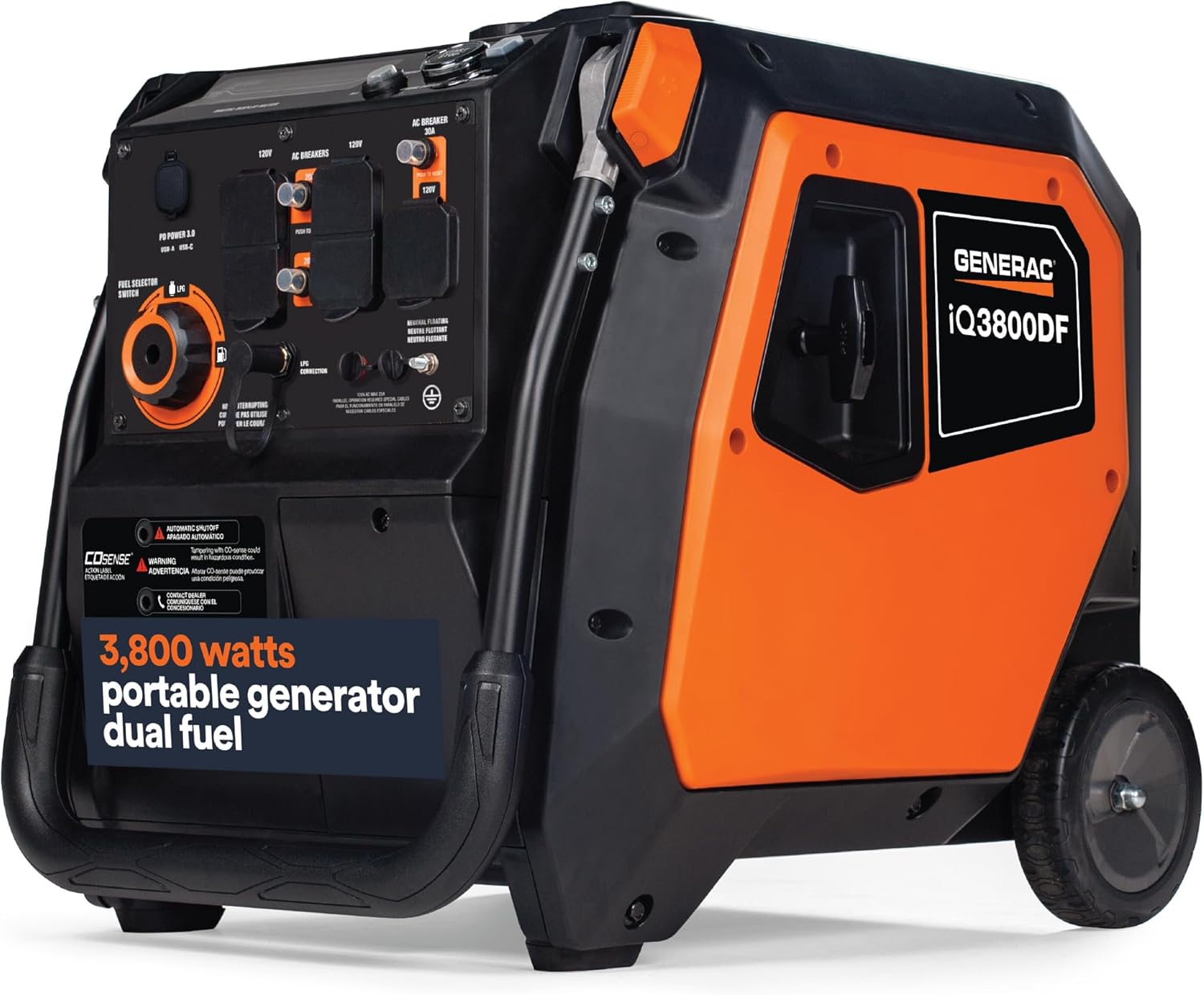
Foto: N'ihu-n'akụkụ view of the Generac iQ3800DF 3800-Watt Dual-Fuel Portable Inverter Generator.
Atụmatụ igodo
- Ngwọta Ike Mbugharị: The iQ3800DF inverter generator is suitable for outdoor adventures, camping trips, tailgating events, and home backup, providing stable power.
- Convenient Electric Start: Features an electric start with an included battery for easy and reliable operation.
- Ọrụ dị jụụ: A fully enclosed case minimizes noise levels, making it suitable for various environments.
- Fuel Switching Convenience: Seamlessly switch between gasoline and LP gas fuel types using the fuel source selector.
- COsense Technology: Provides protection against hazardous carbon monoxide by automatically shutting down the unit.
- Smart and Reliable: Equipped with LED indicators for low oil, overloaded, and ready-to-use status. Includes two USB ports for device charging and parallel-ready capability for increased power output.

Image: Diagram highlighting key features including Push Button Start, Quiet Operation, COsense Technology, and Dual Fuel capability.
Ntọlite na ojiji mbụ
Unpacking and Included Components
Carefully unpack the generator and all components from the packaging. Inspect for any damage. Ensure all listed items are present.

Image: Diagram illustrating the components included in the box.
Agụnyere ihe ndị a:
- Mmanụ Engine
- LP Hose
- Mmanụ Ala
- Battery (for electric start)
- Ngwa Ngwa
- Akwụkwọ ntuziaka onye nwe
Na-agbakwụnye mmanụ Engine
- Tinye generator n'elu larịị.
- Chọta okpu/dipstick mmanụ jupụtara.
- Using the provided oil funnel, slowly add the recommended engine oil (refer to the owner's manual for specific oil type and capacity) until it reaches the upper mark on the dipstick. Do not overfill.
- Dochie okpu/dipstick mmanụ n'enweghị nsogbu.
Ijikọ batrị
For electric start functionality, the included battery must be connected. Refer to the detailed instructions in the owner's manual for proper battery connection procedures, ensuring correct polarity.
Na-arụ ọrụ na Generator
Ogwe njikwa gafereview
Familiarize yourself with the generator's control panel before operation. The panel provides access to outlets, fuel selection, and starting controls.

Image: Labeled diagram of the Generac iQ3800DF control panel.
Key elements of the control panel include:
- 20A, 120V 5-20R GFCI Outlets
- 30A, 120/240V L14-30R Outlet
- Ọdụ ụgbọ mmiri USB-A & USB-C
- Fuel Selector Switch (Gas/LPG)
- Njikọ LPG
- Mkpọpụta ndị yiri ya
- Ebe ala
- 20A sekit Breaker
- 30A sekit Breaker
- Mgbanwe Economy
- Igodo Mmalite Eletrik
- Mgba ọkụ/ Gbanyụọ isi
Nhọrọ mmanụ ụgbọala (Petrol/Propane)
The generator operates on either gasoline or liquid propane (LP) gas. Use the fuel selector switch on the control panel to choose your desired fuel type. Ensure the generator is off before switching fuel types. When using LP gas, connect the LP hose to the generator's LPG connection and to a propane tank.

Image: Generac iQ3800DF operating with a circular saw, illustrating dual fuel capability and runtime differences.
Starting the Generator (Electric Start)
- Ensure the generator is on a level surface and away from any obstructions.
- Họrọ ụdị mmanụ ụgbọala chọrọ site na iji mgba ọkụ na-ahọrọ mmanụ ụgbọala.
- Turn the main On/Off switch to the 'On' position.
- Press and hold the Electric Start button until the engine starts.
- Allow the engine to warm up for a few moments before connecting electrical loads.
COsense Technology
The integrated COsense technology continuously monitors carbon monoxide (CO) levels. If unsafe levels of CO are detected, the generator will automatically shut down to protect users. If a shutdown occurs, move the generator to an open, well-ventilated area and allow it to cool before attempting to restart.
Ọnọdụ akụ na ụba
The Economy Mode switch allows the generator to adjust engine speed based on the electrical load. This feature can reduce noise levels and fuel consumption when less power is required. For maximum power response, turn Economy Mode off.
Nlekọta
Regular maintenance is crucial for the longevity and optimal performance of your Generac iQ3800DF generator. Always refer to the complete maintenance schedule in your owner's manual.
Usoro nhazi izugbe
- Tupu ojiji ọ bụla: Check engine oil level, inspect for loose fasteners or damage.
- Kwa awa 25 ma ọ bụ kwa afọ: Gbanwee mmanụ injin.
- Kwa awa 50 ma ọ bụ kwa afọ: Clean/replace air filter, inspect spark plug.
- Kwa awa 100 ma ọ bụ kwa afọ: Replace spark plug, inspect fuel filter.
Nchekwa
When storing the generator for an extended period, ensure the fuel system is properly prepared to prevent issues. This typically involves draining gasoline or adding a fuel stabilizer. Store the generator in a clean, dry area.
Nchọpụta nsogbu
This section addresses common operational issues. For comprehensive troubleshooting, consult the full owner's manual.
Okwu na ngwọta nkịtị
- Generator will not start: Check fuel level, ensure fuel selector is set correctly, verify battery connection for electric start, check engine oil level.
- Enweghị mmepụta ike: Check circuit breakers on the control panel, ensure no overload condition, verify connections to outlets.
- Ihe ngosi LED:
- Low Oil: Indicates insufficient engine oil. Add oil to the correct level.
- Na Na Na Na Na Indicates too many devices are connected, exceeding the generator's capacity. Disconnect some devices.
- Dị njikere iji: Indicates the generator is running correctly and providing stable power.
- COsense Shutdown: If the generator shuts down due to COsense, move it to an open, well-ventilated area immediately. Do not operate in enclosed spaces.
Nkọwa nka nka
The following table provides detailed technical specifications for the Generac iQ3800DF 3800-Watt Dual-Fuel Portable Inverter Generator.

Image: Generac iQ3800DF showing product dimensions and weight.
| Nkọwapụta | Uru |
|---|---|
| Ụdị | Generac |
| Aha Nlereanya | iQ3800 DF |
| Nọmba Nlereanya ihe | 8944 |
| Wattage (Na-agba ọsọ) | 3000 Watt |
| Wattage (Starting) | 3800 Watt |
| Ụdị mmanụ ụgbọala | Mmanụ, mmanụ mmanụ mmanụ |
| Isi Iyi Ike | Akwanyere mmanụ ụgbọala |
| Voltage | 120 volts (AC) |
| Ibu Ibu | 107 pound |
| Akụkụ ngwaahịa | 37.2"L x 20.3"W x 22.4"H |
| Ụdị Engine | Igwe ọkụ n'ime |
| Ụdị Sistemụ mgbanye | Eletriki Mmalite |
| Olu tank | 3.2 galọn |
| Mkpokọta ọdụ ọkụ | 4 |
| Atụmatụ pụrụ iche | CO Sensor, Dual Fuel, Electric Start, Fully Enclosed Design, USB Port |
| Batrị gụnyere | Ee |
| Ụdị cell batrị | Acid ndu |

Image: Chart detailing running and starting watts for various devices to help determine power needs.
Akwụkwọ ikike na nkwado
Ozi akwụkwọ ikike
The Generac iQ3800DF generator comes with a 2 Year Limited Commercial Warranty na a 3 Year Limited Residential Warranty. For full details regarding warranty coverage, terms, and conditions, please refer to the official warranty statement included in your owner's manual or visit the Generac websaịtị.
Nkwado ndị ahịa
For technical assistance, parts, or service inquiries, please contact Generac customer support. You can find contact information in your owner's manual or on the official Generac website. Always provide your model number (8944) and serial number when contacting support.