
1. Okwu mmalite
This manual provides detailed instructions for the installation, operation, and maintenance of your GTRUI 12.3-Inch Car Stereo GPS Navigation System. This system is designed to upgrade your vehicle's infotainment experience while retaining original functions.

Image: The GTRUI 12.3-inch car stereo seamlessly integrated into a BMW dashboard, showcasing the CarPlay interface with navigation and music applications.
2. Compatible Models and Years
This system is exclusively designed for the following vehicles:
- BMW X5 F15 (2014-2017) with NBT System
- BMW X6 F16 (2014-2017) with NBT System
This unit is intended for Left Driving Vehicles only. Ensure your vehicle has the NBT system for proper compatibility.

Image: A visual comparison of the BMW dashboard before and after the GTRUI 12.3-inch screen installation, highlighting the larger display. Also shown are key NBT system components: the 6-pin LVDS port, the Media button on the iDrive controller, and the original BMW system user interface.
3. Ihe ngwugwu
Nyochaa na akụrụngwa niile dị na ngwugwu tupu ịmalite nrụnye:
- 12.3-Inch Display Unit
- Ihe nkwado nkwado
- Njikọ Wiring ISO
- eriri USB
- eriri AUX
- Akwụkwọ ntuziaka (akwụkwọ a)
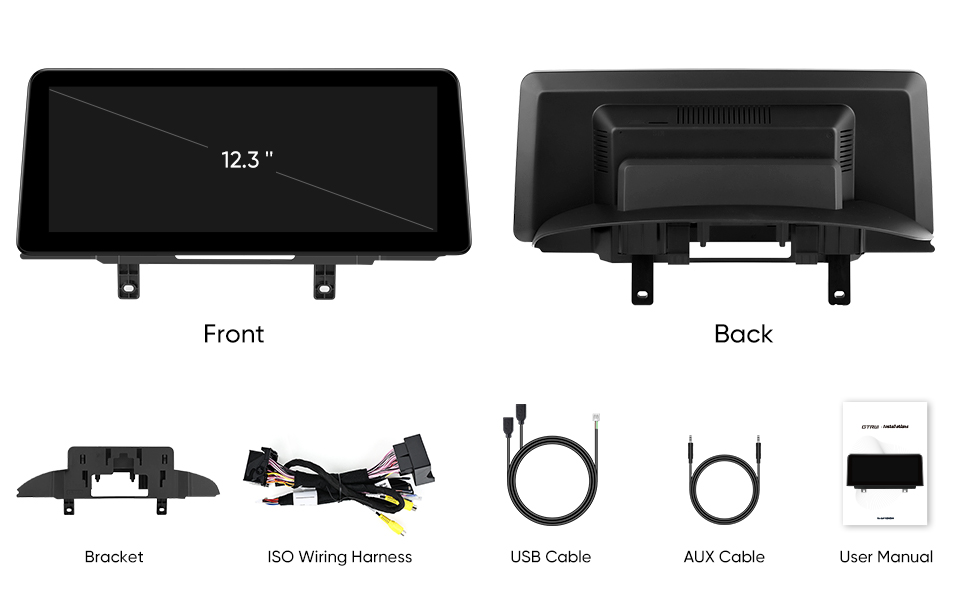
Image: An illustration of the complete GTRUI car stereo upgrade kit, showing the front and back of the 12.3-inch display unit, mounting brackets, the ISO wiring harness, USB cable, AUX cable, and the user manual.
4. Atụmatụ igodo
- 12.3-Inch IPS Touch Screen: 1920x720 Pixels resolution for high-definition visuals, fully laminated glass-to-glass design for reduced glare and enhanced clarity.
- Wireless & Wired CarPlay/Android Auto: Seamless smartphone integration for navigation, calls, messages, and music via voice commands (Siri, Google Assistant).
- Mmekọrịta na-enweghị ntụpọ: Designed to match the original BMW dashboard for a factory-like appearance.
- Original Functions Retained: Maintains compatibility with iDrive System, original fiber optic sound system, radio, CD player, Bluetooth, backup camera display, and steering wheel controls.

Image: The GTRUI 12.3-inch car stereo display highlighting its key features: IPS technology, HD 1920x720 resolution, Wireless CarPlay, Wireless Android Auto, and a Built-in DSP for enhanced audio.
5. Ntọala na nwụnye
Important: Installation of this system requires disassembling parts of the dashboard and connecting various cables. It is highly recommended that installation be performed by a qualified professional or an experienced technician to avoid damage to your vehicle or the product.
The installation process involves replacing your car's original screen and connecting the new unit to the existing wiring harness adapter. This is not a simple "plug and play" installation and may require several hours.
Key Installation Steps (Overview):
- Carefully remove the original car stereo unit and dashboard trim.
- Disconnect the original screen and associated wiring.
- Connect the provided ISO wiring harness to the vehicle's existing wiring.
- Connect the new 12.3-inch display unit to the wiring harness, USB cable, and AUX cable.
- Secure the new display unit using the mounting brackets.
- Reassemble the dashboard trim.
- Test all functions before finalizing the installation.
Refer to the detailed wiring diagrams and specific instructions provided in the physical user manual included with your product for precise installation steps.
6. Ntuziaka ọrụ
6.1. CarPlay ikuku na gam akporo Auto
To use Wireless CarPlay or Android Auto, simply pair your smartphone via Bluetooth. Once paired, the system will automatically connect, displaying your phone's interface on the 12.3-inch screen. This allows access to navigation, calls, messages, and music applications.

Image: A visual guide demonstrating wireless smartphone connection for CarPlay and Android Auto via Bluetooth, showing the distinct user interfaces for each system on the car stereo display.
Mara: Some smartphones may not support wireless Android Auto and may require a wired connection.
6.2. Iwu olu
Utilize voice commands for hands-free operation. Activate Siri (for Apple CarPlay) by saying "Hey Siri" or Google Assistant (for Android Auto) by saying "OK Google". You can then issue commands for navigation, making calls, sending messages, and playing music.

Image: A driver interacting with the car stereo using voice commands, illustrating the use of "Hey Siri" and "Hey Google" for functions like navigation, messaging, calls, and music playback.
6.3. Retained Original Functions
The GTRUI system is designed to work seamlessly with your BMW's existing features. You can switch between the new system and the original BMW interface as needed. The following original functions are retained:
- iDrive System
- Original Fiber Optic Sound System
- Original Radio
- Ihe ọkpụkpọ CD
- Bluetooth
- Backup Camera Display
- Steering Wheel Control (SWC) Function

Image: A collage illustrating the various original BMW car functions that are retained and compatible with the GTRUI system, including steering wheel controls, iDrive, amplifier, radio, CD player, backup camera, and Bluetooth.
7. Nlekọta
To ensure the longevity and optimal performance of your GTRUI car stereo system, follow these maintenance guidelines:
- Nhicha: Use a soft, dry, anti-static cloth to clean the screen and exterior. Avoid abrasive cleaners, solvents, or aerosol sprays.
- Okpomọkụ: Do not expose the unit to extreme temperatures (hot or cold) for extended periods.
- Mmiri: Keep the unit dry. Avoid exposure to water or excessive humidity.
- Mmelite ngwanrọ: Lelee nke onye nrụpụta oge ụfọdụ website for any available software updates to ensure the system runs efficiently and securely.
8. Nchọpụta nsogbu
If you encounter issues with your GTRUI car stereo, refer to the following common troubleshooting steps:
- Enweghị ike:
- Check all power connections to ensure they are securely fastened.
- Verify the vehicle's fuse related to the stereo system.
- Enweghị ụda:
- Gbaa mbọ hụ na agbanyụghị ụda ma ọ bụ mee ka ọ dị ala.
- Lelee njikọ eriri ọdịyo.
- Confirm that the correct audio source is selected (e.g., original BMW system, CarPlay, Android Auto).
- CarPlay/Android Auto anaghị ejikọ:
- Ensure Bluetooth is enabled on your smartphone and the car stereo.
- Try forgetting the device on both the phone and the stereo, then re-pairing.
- For Android Auto, ensure your phone supports wireless Android Auto or try a wired connection.
- Restart both your phone and the car stereo.
- Ihuenyo mmetụ anaghị anabata:
- Perform a system reset (refer to the physical manual for specific instructions).
- Hụ na ihuenyo ahụ dị ọcha ma ghara inwe ihe ruru unyi.
- Original Functions Not Working:
- Verify all original wiring harness connections are correct.
- Ensure you are correctly switching between the GTRUI system and the original BMW interface.
For persistent issues or complex problems, please contact GTRUI professional technical support.
9. Nkọwapụta
| Njirimara | Nkọwa |
|---|---|
| Ụdị | GTRUI |
| Aha Nlereanya | NBT-12.3 |
| Nha ihuenyo | 12.3 sentimita asatọ |
| Mkpebi | 1920x720 pikselụ |
| Ụdị ngosi | IPS Touchscreen (Glass to Glass) |
| Sistemụ nrụọrụ | Linux (with Android Support) |
| Njikọta | Bluetooth, WiFi, USB, Wireless |
| Atụmatụ pụrụ iche | Wireless CarPlay, Android Auto, Voice Command, Backup Camera Display, iDrive System Compatible |
| Ụdị nkwụnye | Ugwu Dashboard |
| Supported Navigation | GPS (Road Map Type) |
| Akụkụ ngwaahịa | 12.3"L x 12.3"W x 12.3"H |
| Ibu Ibu | 2.05 kilogram |
| UPC | 725414054806 |
10. Akwụkwọ ikike na nkwado
GTRUI provides professional technical support to assist with the installation and operation of all features and functions of your upgraded car stereo system.
For warranty information, please refer to the documentation included with your purchase or contact GTRUI customer service directly. Keep your proof of purchase for warranty claims.
Nkwado kọntaktị: For technical assistance, troubleshooting, or warranty inquiries, please visit the official GTRUI website or contact their customer support channels as provided in your purchase documentation.