
1. Okwu mmalite
This manual provides detailed instructions for the installation, operation, and maintenance of your Locstar LS-8015FM Keyless Entry Door Lock. Please read this manual thoroughly before installation and use to ensure proper function and safety.
2. Ozi nchekwa
- Do not attempt to disassemble or repair the lock yourself. Contact customer support for assistance.
- Use only the specified battery type (4 AA alkaline batteries). Do not mix old and new batteries or different types of batteries.
- Keep mechanical keys in a secure location outside the property to prevent lockout in case of electronic failure or dead batteries.
- Protect your passcode from unauthorized access.
3. Ihe ngwugwu
Chọpụta na akụrụngwa niile dị tupu ịmalite nrụnye:
- Smart Lock Assembly (Exterior and Interior Handles)
- Lock Body / Latch
- Ntuziaka onye ọrụ
- Ịkwanye skru na ngwa ngwa
- Igodo igwe

Image: Complete set of accessories for the Locstar LS-8015FM smart lock.
4. Nkọwapụta
| Ụdị | Locstar |
| Aha Nlereanya | LS-8015FM |
| Njirimara Pụrụ Iche | Mkpọchi akpaaka |
| Ụdị mkpọchi | Left (Handed) |
| Ihe onwunwe | Zinc |
| Akụkụ ihe (L x W x H) | 2.7 x 3.38 x 6.11 sentimita asatọ |
| Ibu Ibu | 4.62 pound |
| Batrị achọrọ | Yes (4 AA alkaline batteries, not included) |

Image: Detailed dimensions for the Locstar LS-8015FM lock and its latch, suitable for DIY installation.
5. Ntọala na nwụnye
The Locstar LS-8015FM lock is designed for easy DIY installation, typically requiring only a Phillips screwdriver. It is compatible with most standard door types and thicknesses (1.5 to 2.1 inches).
5.1 Nkwadebe
- Ensure your door is within the specified thickness range.
- Gather a Phillips head screwdriver.
- Wepụ ihe ọ bụla dị na ọnụ ụzọ.

Image: The Locstar LS-8015FM smart lock ready for DIY installation on a door.
5.2 Nzọụkwụ nwụnye
- Install the lock tongue: Insert the latch into the door edge and secure it with screws.
- Wụnye n'ihu panel: Connect the front panel to the lock tongue, rotate, and tighten the insertion holes.
- Secure the center shaft: Install the center shaft and insert the pin into the fork, ensuring it is secure.
- Align and insert: Align the holes and insert the lock assembly into the door.
- Thread the cable: Carefully thread the connecting cable through the back panel of the door.
- Secure the back panel: Attach the back panel to the door with screws.
- Jikọọ waya: Connect the cable from the front panel to the back panel.
- Wụnye batrị: Insert four AA alkaline batteries into the battery compartment.
- Reset (if necessary): Press and hold the reset button for 10 seconds to restore default settings. (Press 0# for default unlocking).
- Cover the back panel: Attach the cover to the back panel and tighten the screws to complete installation.
Image: Installation steps 1-6 for the Locstar LS-8015FM smart lock.

Image: Installation steps 7-12 for the Locstar LS-8015FM smart lock, including battery installation and final cover attachment.
6. Ntuziaka ọrụ
The Locstar LS-8015FM offers multiple convenient ways to unlock your door.
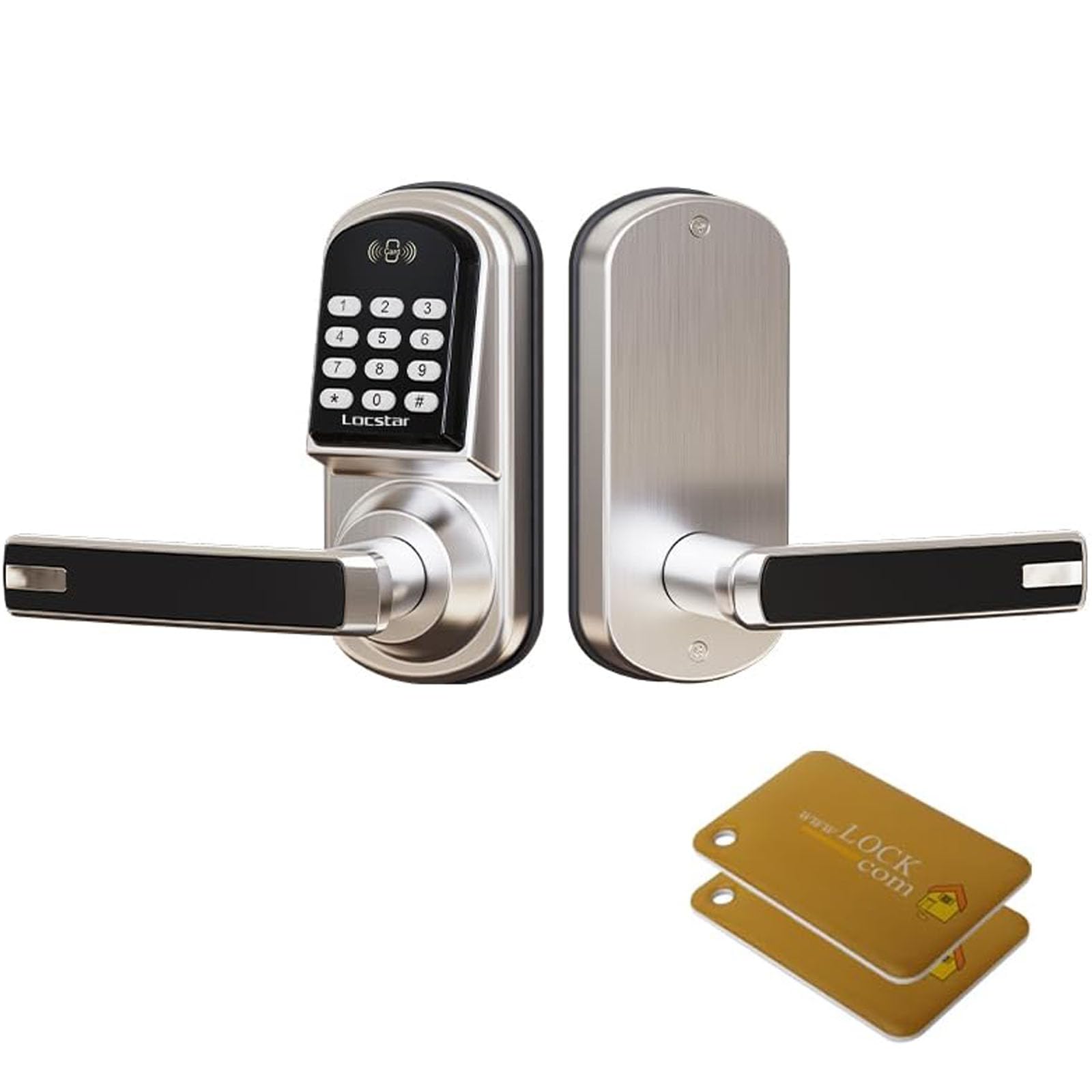
Foto: Ofeview of unlocking methods: Card, Passcode, and Key, along with the lock's aluminum alloy construction and battery box location.
6.1 Ụzọ mmeghe
- Passcode Unlock: Enter your programmed passcode on the keypad, then press '#'. The lock will provide audible and visual feedback upon successful entry.
- Card Unlock: Present a registered IC card to the card reader area on the lock. The lock will unlock automatically.
- Mkpọghe igodo: Insert the mechanical key into the keyway and turn to unlock the door. This is a backup method for emergencies or battery depletion.

Image: Visual representation of IC card and password unlock options for the Locstar smart lock.
6.2 Programming Passcodes and Cards
Refer to the specific programming section in your detailed user guide for initial setup and modification of user passcodes and IC cards. This typically involves entering a master code followed by specific commands to add or delete user credentials.
6.3 Njirimara mkpọchi akpaaka
The lock is equipped with an auto-lock feature that automatically re-locks the door after a set period once it has been unlocked. This feature enhances security and can usually be configured or disabled through the lock's programming menu.
6.4 Backlit Keypad
The keypad features backlighting, allowing for clear visibility and operation even in low-light conditions or at night.
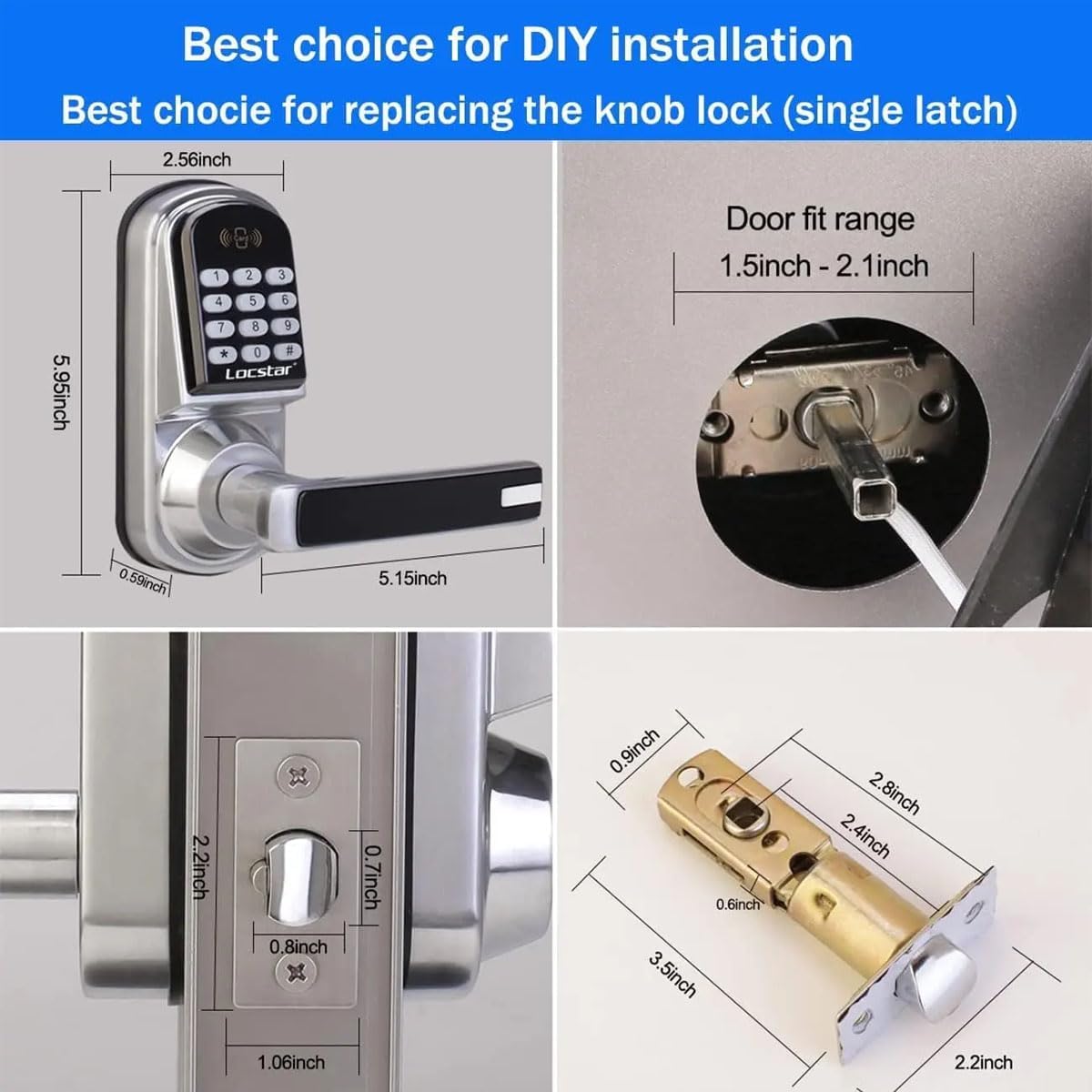
Image: The Locstar LS-8015FM smart lock with its backlit keypad clearly visible at night.
7. Nlekọta
7.1 nnọchi batrị
The lock requires 4 AA alkaline batteries. When the batteries are low, the lock will typically provide an audible or visual low-battery warning. Replace all four batteries simultaneously to ensure optimal performance.
- Open the battery compartment cover on the interior side of the lock.
- Wepu batrị ochie.
- Tinye batrị alkaline AA ọhụrụ, hụ na polarity ziri ezi (+/-).
- Mechie mkpuchi oghere batrị.
7.2 Nhicha
Jiri nwayọ hichaa mpụta mkpọchi, damp ákwà. Zere iji ihe nhicha, ihe mgbaze, ma ọ bụ ihe ndị na-agbaze kemịkalụ, n'ihi na ihe ndị a nwere ike imebi ihe ndị dị na ya na ihe ndị dị na eletrọniki.
8. Nchọpụta nsogbu
If you encounter issues with your Locstar LS-8015FM lock, refer to the following common problems and solutions:
- Mkpọchi anaghị aza: Check battery levels. Replace batteries if necessary. Ensure the cable connection between the front and back panels is secure.
- Koodu paswọọdụ anaghị arụ ọrụ: Verify that you are entering the correct passcode. Ensure the lock is not in a 'locked out' state due to multiple incorrect entries. Try resetting the lock to factory settings (refer to installation step 5.2, point 9).
- Mechanical key not working: Ensure the key is fully inserted and turned correctly. If the key is bent or damaged, do not force it.
- Mkpọchi akpaaka anaghị emetụ aka: Check the lock's programming settings to ensure the auto-lock feature is enabled and configured with the desired delay.
- Difficulty turning handle: Ensure the lock body/latch is properly aligned and installed. Check for any obstructions in the door frame or strike plate.
Maka nsogbu ndị na-adịgide adịgide, kpọtụrụ ndị ahịa.
9. Akwụkwọ ikike na nkwado
Locstar provides a comprehensive warranty that covers defects in materials and workmanship for the LS-8015FM Keyless Entry Door Lock. For specific warranty terms and conditions, please refer to the warranty card included with your product or contact Locstar customer support.
Nkwado ndị ahịa
If you have any questions, require technical assistance, or need to report an issue, please contact Locstar customer support through the retailer where the product was purchased or via the official Locstar websaịtị.