
1. Okwu mmalite
This manual provides detailed instructions for the installation, operation, and maintenance of the TMEZON MZ-VDP-NE160 4-wire doorbell camera. This outdoor station is designed to work seamlessly with compatible TMEZON videophone monitors, such as the MZ-IP-V728TW, to provide secure and convenient visitor management for your property.
2. Ozi nchekwa
Please read and understand all safety instructions before installing or operating this device. Failure to follow these instructions may result in electric shock, fire, or damage to the product.
- Nchekwa Eletriki: Installation should be performed by a qualified electrician or technician. Ensure power is disconnected before any wiring work.
- Mkpughe mmiri: While designed for outdoor use, avoid direct high-pressure water jets. Ensure all connections are properly sealed.
- Okpomọkụ: Do not expose the device to extreme temperatures outside its operating range.
- Nhicha: Jiri akwa dị nro, kpọrọ nkụ maka nhicha. Ejila ihe nchacha abrasive ma ọ bụ ihe mgbaze.
3. Ihe ngwugwu
Chọpụta na akụrụngwa niile dị na ngwugwu:
- 1 x TMEZON MZ-VDP-NE160 Doorbell Camera Unit
- Ihe mgbakwasị ụkwụ na ihe nkwụnye mgbidi
- Njikọ waya
- Akwụkwọ ntuziaka (akwụkwọ a)
4. Ngwaahịa gafereview
The TMEZON MZ-VDP-NE160 is an outdoor doorbell camera unit. It features a camera for video surveillance, a microphone for audio input, a speaker for audio output, and a call button to initiate communication with the indoor monitor.
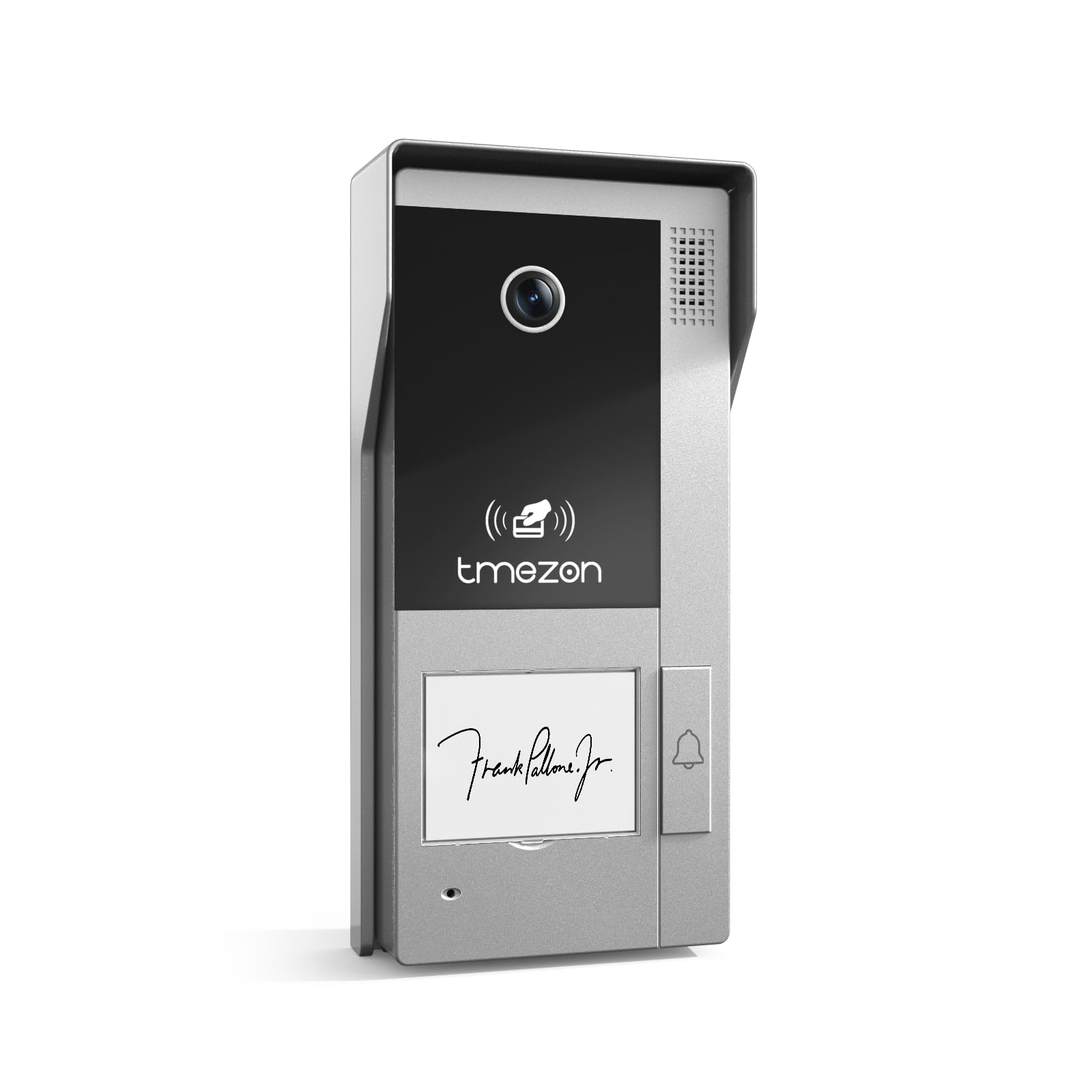
Foto 1: N'ihu view of the TMEZON MZ-VDP-NE160 doorbell camera, showing the camera lens, call button, microphone, and speaker grille.
Isi ihe gụnyere:
- Igwefoto oghere: Captures video feed.
- Bọtịnụ oku: Activates the indoor monitor and initiates communication.
- Igwe okwu: Na-ese ọdịyo sitere n'aka ndị ọbịa.
- Ọkà okwu: Allows two-way audio communication.
- Wiring Terminal (Rear): For connecting the 4-wire cable to the indoor monitor and power supply.
5. Ntọala na nwụnye
The MZ-VDP-NE160 is a 4-wire system. Proper wiring is crucial for correct operation. It is recommended to consult a professional for installation if you are unfamiliar with electrical wiring.
5.1 Ebe nrịgo
- Choose a location near your entrance, typically at a height of 1.4 to 1.6 meters (4.6 to 5.2 feet) from the ground, ensuring a clear view nke ndị ọbịa.
- Avoid direct sunlight or strong light sources that could cause glare on the camera.
- Hụ na elu ihe e ji etinye ya dị larịị ma kwụsie ike.
5.2 Eserese Waya (Izugbe)
The doorbell camera connects to the indoor monitor (e.g., MZ-IP-V728TW) using a 4-wire cable. The typical connections are:
- Waya 1: Audio
- Waya 2: Vidiyo
- Waya 3: Ala (GND)
- Waya 4: Ike (DC 12V)
Note: Refer to the specific wiring diagram provided with your indoor monitor for precise connection details. Ensure polarity is correct for power connections.
5.3 Nzọụkwụ nwụnye
- Kwụpụ ike: Before starting, ensure all power to the existing doorbell system and the indoor monitor is turned off at the circuit breaker.
- Arịọnụ mgbodo: Secure the mounting bracket (if applicable, or the unit directly) to the wall using the provided screws and wall plugs.
- Njikọ waya: Connect the 4-wire cable from the indoor monitor to the corresponding terminals on the rear of the MZ-VDP-NE160 doorbell camera. Ensure connections are secure.
- Ngalaba echekwara: Attach the doorbell camera unit to the mounting bracket or directly to the wall, ensuring it is firmly in place.
- Weghachi ike: Once all connections are made and secured, restore power to the system.
- Sistemụ nnwale: Test the doorbell functionality by pressing the call button and verifying communication with the indoor monitor.
6. Ntuziaka ọrụ
The TMEZON MZ-VDP-NE160 doorbell camera operates in conjunction with your TMEZON indoor monitor.
- Visitor Call: When a visitor presses the call button on the MZ-VDP-NE160, the indoor monitor will ring and display the video feed from the doorbell camera.
- Nkwukọrịta ụzọ abụọ: On the indoor monitor, you can answer the call to engage in two-way audio communication with the visitor.
- Door Release (if connected): If an electronic door lock is connected to your indoor monitor system, you can typically unlock the door from the indoor monitor during a call.
- Nleba anya: Some indoor monitors allow you to manually view the live video feed from the doorbell camera at any time, even without a visitor pressing the button.
7. Nlekọta
Regular maintenance helps ensure the longevity and optimal performance of your doorbell camera.
- Nhicha: Periodically wipe the camera lens and the front panel with a soft, slightly damp ákwà iji wepụ uzuzu na unyi. Ejila kemịkalụ siri ike ma ọ bụ ihe ndị na-eme ka ihe dị nro.
- Nyochaa njikọ: Annually, inspect the wiring connections for any signs of corrosion or loosening. Ensure the unit is securely mounted.
- Mmelite ngwanrọ: While this specific unit does not have user-updatable software, ensure your indoor monitor's firmware is up to date for best compatibility and features.
8. Nchọpụta nsogbu
If you encounter issues with your MZ-VDP-NE160 doorbell camera, refer to the following common problems and solutions:
| Nsogbu | Ihe nwere ike ime | Ngwọta |
|---|---|---|
| No video/audio on indoor monitor |
|
|
| Call button not responding |
|
|
| Ogo vidiyo na-adịghị mma |
|
|
If the problem persists after attempting these solutions, please contact TMEZON customer support.
9. Nkọwapụta
| Njirimara | Nkọwa |
|---|---|
| Nlereanya | MZ-VDP-NE160 |
| Ụdị | TMEZON |
| Akụkụ ngwaahịa (L x W x H) | 1 x 1 x 1 cm |
| Ụdị waya | 4-Wire Sistemu |
| Nrụ ọrụ Voltage | 240 Volts (System dependent, typically 12V DC for the unit itself, 240V might refer to power supply input) |
| Oriri ike | 5 Watt |
| Agba | Agba ntụ |
| Ngwa gụnyere | Otu mgbịrịgba ọnụ ụzọ |
10. Akwụkwọ ikike na nkwado
For warranty information and technical support, please refer to the documentation provided with your complete TMEZON videophone system or visit the official TMEZON websaịtị. Debe nnata nzụta gị dị ka ihe akaebe nke ịzụrụ maka nkwupụta ikike.
For direct assistance, you may contact TMEZON customer service through their official channels.