
Okwu mmalite
Thank you for choosing the BACKWIN B800-T USB-C Wired Headphones. This manual provides detailed instructions for the proper use, setup, and maintenance of your new headphones. Please read this manual thoroughly before using the product to ensure optimal performance and longevity.
Ihe ngwugwu
Gbaa mbọ hụ na ihe niile dị na ngwugwu:
- BACKWIN B800-T USB-C Wired Headphones
- Ear Cushions (various sizes: large, medium, small)

Image: The BACKWIN B800-T USB-C Wired Headphones, showing the earbuds, inline control, and USB-C connector. Also included are additional ear cushions.
Ngwaahịa gafereview
Atụmatụ igodo
- Four-Unit Driver Design: Each earbud features a dynamic bass unit and a high-definition decoding iron coil unit for powerful subwoofer sound and clear high-pitched audio.
- Integrated DAC Chip: Equipped with a 24-bit/96Khz DAC decoding chip for high-fidelity audio.
- Ndakọrịta USB-C zuru ụwa ọnụ: Designed for devices with a Type-C interface, especially those without a 3.5mm audio jack.
- Inline Control with Microphone: Features volume control and a high-definition microphone for convenient call management and music playback.
- Nkagbu mkpọtụ mkpọtụ: The earbud design and included silicone ear caps provide passive noise isolation.
- Ihe owuwu na-adịgide adịgide: Metal back shell of the headphones is CNC machined for precise workmanship.
Ngwa

Image: An exploded diagram illustrating the internal components of the earbud, including the dynamic coil, composite vibration film, sound processor with physical noise reduction, and the iron ring. This combination delivers rich bass, full midrange, and clear treble.
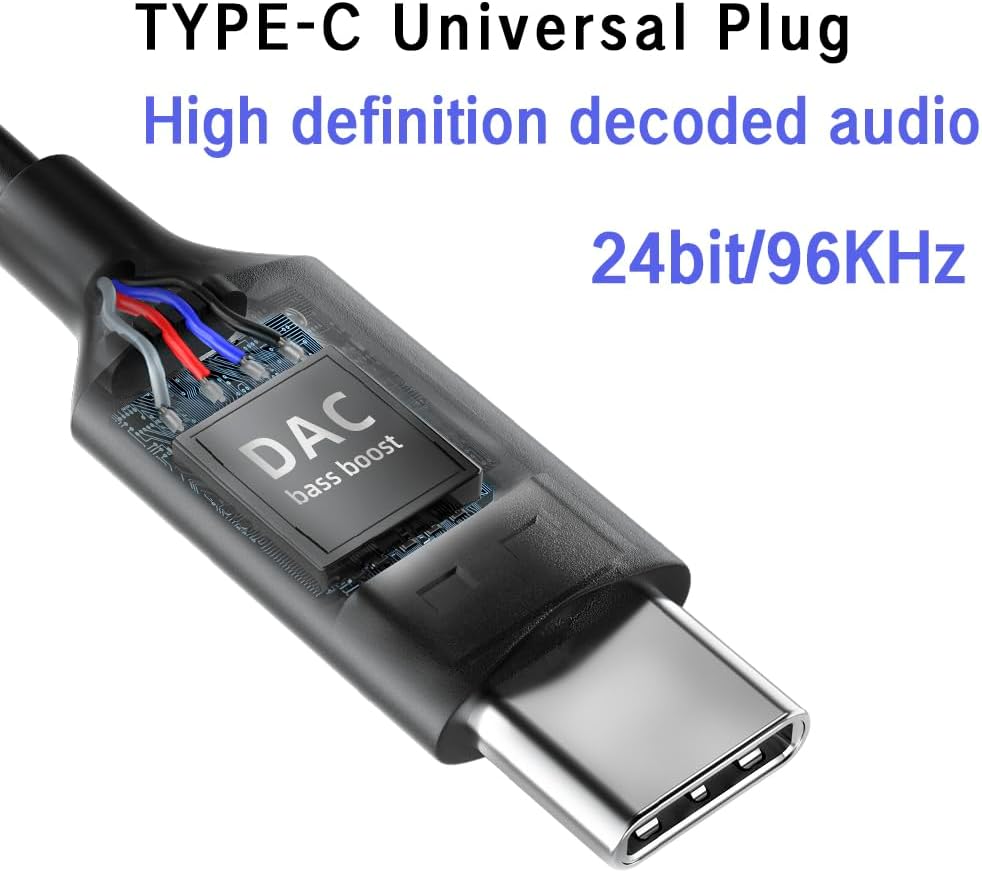
Foto: A nso nso view of the USB-C plug, highlighting the integrated DAC (Digital-to-Analog Converter) chip, which supports 24-bit/96KHz high-definition audio decoding.

Foto: nkọwa zuru ezu view of the earbud's metal back shell, showcasing the CNC precision machining and overall craftsmanship.
Melite
1. Selecting Ear Cushions
The headphones come with large, medium, and small soundproof silicone ear caps. Choose the size that provides the most comfortable and secure fit for your ears. A proper fit is crucial for optimal sound quality and passive noise cancellation.
2. Ijikọ na ngwaọrụ gị
- Locate the USB-C port on your compatible device (e.g., smartphone, tablet, laptop).
- Insert the USB-C plug of the headphones firmly into the device's USB-C port.
- Your device should automatically recognize the headphones. No additional drivers are typically required.
Mara: These headphones are designed for devices with a Type-C interface, especially those without a 3.5mm audio jack. Compatibility may vary with some devices; ensure your device supports audio output via its USB-C port.

Image: A person wearing the BACKWIN B800-T USB-C Wired Headphones, demonstrating proper ear placement and fit.
Ntuziaka ọrụ
Inline Remote Control Functions
The inline remote control allows you to manage audio playback and calls without needing to access your device directly.

Image: A diagram detailing the functions of the inline remote control, including volume up, volume down, microphone, and multi-function button for calls and music playback.
- Bọtịnụ olu elu (+) Pịa ka iwelie olu ọdịyo.
- Bọtịnụ ụda ala (-) Pịa ka ibelata olu ọdịyo.
- Bọtịnụ ọrụ dị iche iche (Bọtịnụ etiti):
- For Calls:
- Otu Pịa: Answer an incoming call or end an active call.
- Ogologo Pịa: Jụ oku mbata.
- Maka egwu:
- Otu Pịa: Play or Pause music.
- Pịa ugboro abụọ: Gaa na egwu na-esote.
- Click Three Times: Laghachi na egwu gara aga.
- For Calls:
- Igwe okwu: Igwe okwu arụnyere n'ime ya na-enye ohere maka nkwukọrịta na-enweghị aka n'oge oku.
Nlekọta
- Nhicha: Gently wipe the earbuds and cable with a soft, dry cloth. Do not use harsh chemicals or abrasive materials.
- Nkwachi ntị: Remove and clean the silicone ear cushions regularly with mild soap and water. Ensure they are completely dry before reattaching.
- Nchekwa: Store the headphones in a clean, dry place when not in use. Avoid extreme temperatures and direct sunlight.
- Nlekọta USB: Zenarị nrịgọ dị nkọ ma ọ bụ ịdọrọ eriri gabiga ókè ka ọ ghara imebi.
- Mkpughe mmiri: Igwe ekweisi ndị a anaghị egbochi mmiri. Zere ikpughe na mmiri ma ọ bụ oke mmiri.
Nchọpụta nsogbu
| Nsogbu | Ihe nwere ike ime | Ngwọta |
|---|---|---|
| Enweghị ụda ma ọ bụ olu dị ala |
|
|
| Igwe okwu anaghị arụ ọrụ |
|
|
| Mgbanwe ụda ma ọ bụ adịghị mma |
|
|
Nkọwapụta
| Aha Nlereanya | B800-T |
| Ụdị | BACKWIN |
| Teknụzụ Njikọta | Ekwenyere |
| Jack ekweisi | Ụdị-C (USB-C) |
| Ụdị ọkwọ ụgbọ ala ọdịyo | Hybrid Driver (Dynamic bass unit + high-definition decoding iron coil unit) |
| Nzaghachi ugboro ugboro | Up to 96 KHz (24bit/96Khz Decoding chip) |
| Mmetụta | 96 dB |
| Mgbochi | 32 ohms |
| Njikwa mkpọtụ | Nkagbu mkpọtụ mkpọtụ |
| Ụdị njikwa | Volume Control, Push Button (for calls/music) |
| Ihe onwunwe | Metal (earbud back shell) |
| Ibu Ibu | 3.17 ounces |
| Ngwa gụnyere | Nkịta ntị |
Akwụkwọ ikike na nkwado
For warranty information or technical support, please refer to the documentation provided with your purchase or contact BACKWIN customer service through the retailer where the product was purchased. Keep your proof of purchase for warranty claims.
Maka enyemaka ọzọ, ị nwere ike ịga na BACKWIN Store on Amazon.