1. Okwu mmalite
Thank you for choosing the Generic T10 Ultra Smartwatch Series 8. This manual provides essential information for setting up, operating, and maintaining your new smartwatch. Please read it carefully to ensure proper use and to fully utilize all its features.
2. Ngwaahịa gafereview
The T10 Ultra Smartwatch Series 8 features a 49mm stunning large screen and a durable aluminum body. It is designed to assist you with health monitoring, fitness tracking, and communication.
2.1 Atụmatụ
- 49mm large display
- Durable aluminum body with four screws and two strap locks
- ECG function, heart rate, blood pressure, blood oxygen, and sleep monitoring
- Bluetooth call and notification support (SMS, email, social media)
- Multiple sports modes for indoor and outdoor activities
- IP68 mmiri na-eguzogide
- Stopwatch, music control, vibration support, NFC payments, and password protection
- Lithium-ion polymer batrị
2.2 Ngwa gụnyere
- T10 Ultra Smartwatch Series 8
- Lee eriri
- chaja ikuku
- Akwụkwọ ntuziaka onye ọrụ
2.3 Eserese ngwaahịa
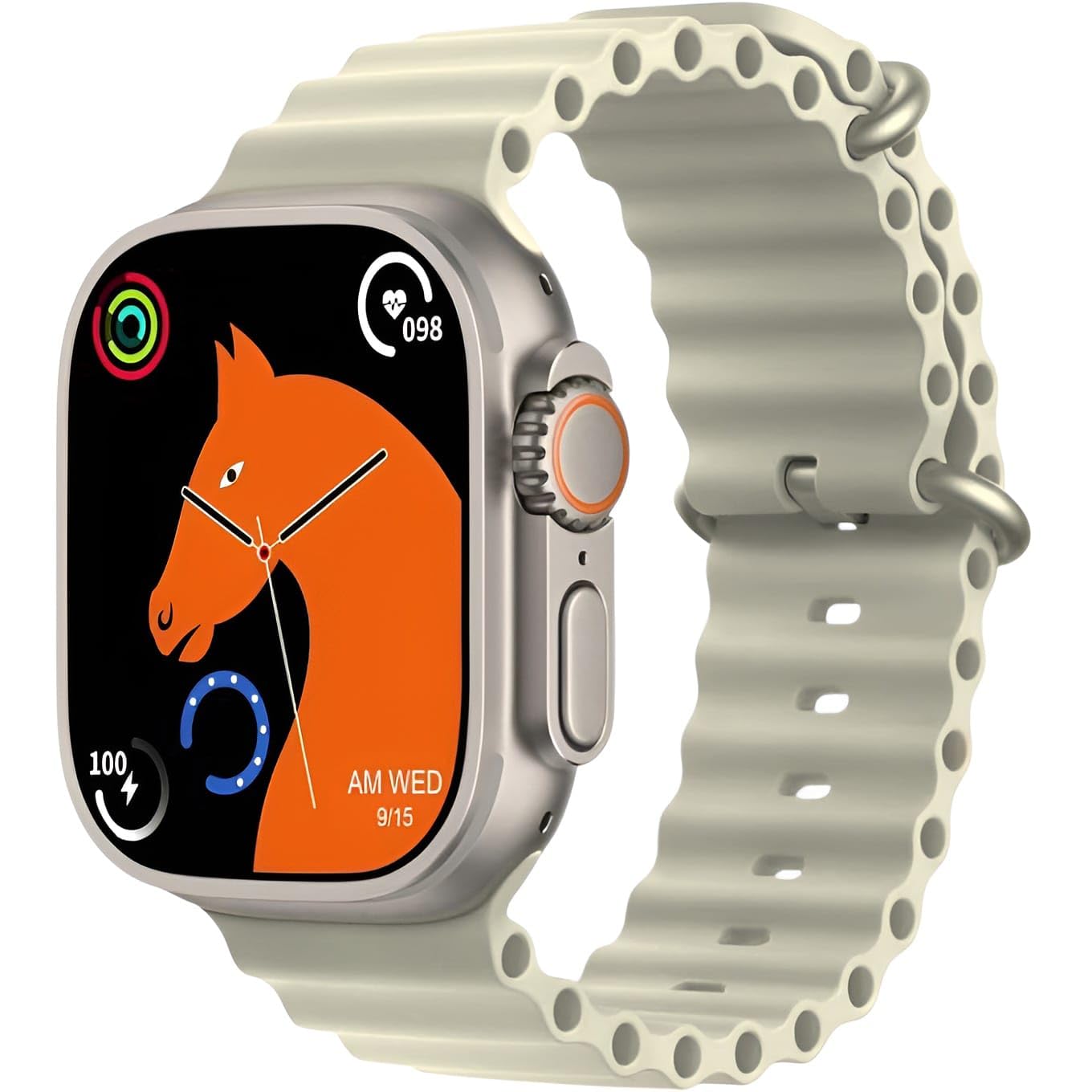
This image displays the T10 Ultra Smartwatch Series 8 in off-white. The watch features a large rectangular screen, a digital crown on the side, and a comfortable silicone strap. It highlights the sleek design and prominent display.
3. Nhazi
3.1 Nchaji izizi
Before first use, fully charge your smartwatch. Place the watch on the wireless charging pad. The screen will indicate charging status. A full charge typically takes 2-3 hours.
3.2 Gbanyụọ ma ọ bụ gbanyụọ
- Ike Na: Pịa ma jide bọtịnụ dị n'akụkụ ruo mgbe ihuenyo ahụ ga-enwu.
- Gbanyụọ: Pịa ma jide bọtịnụ dị n'akụkụ, wee họrọ 'Kwado Gbanyụọ' na ihuenyo ahụ.
3.3 Ijikọ na ama gị
- Download the companion app (refer to the packaging or watch screen for app name) from your smartphone's app store.
- Gbaa mbọ hụ na agbanyere Bluetooth na ekwentị gị.
- Mepee ngwa ahụ ma soro ntuziaka na ihuenyo ka ịmepụta akaụntụ ma ọ bụ banye.
- In the app, search for your smartwatch. Select 'T10 Ultra Series 8' from the list of available devices.
- Confirm the pairing request on both your smartphone and smartwatch.
4. Ntuziaka ọrụ
4.1 Nsoro ụzọ
- Ihuenyo mmetụ aka: Mịgharịa aka ekpe/aka nri, elu/ala iji lelee menu na atụmatụ dị iche iche. Pịa iji họrọ.
- Bọtịnụ akụkụ: Press to return to the home screen or wake the watch. Hold to access power options.
- Okpueze dijitalụ: Rotate to scroll through lists or zoom in/out. Press to select or return to the previous screen.
4.2 Hazie ihu nche
Long-press on the watch face to access watch face options. Swipe left or right to browse available designs and tap to select your preferred watch face. Additional watch faces may be available through the companion app.
5. Nlekọta ahụike
The T10 Ultra Smartwatch provides various health monitoring features. For accurate readings, ensure the watch is worn snugly on your wrist.
5.1 Nleba anya ọnụego obi
Access the heart rate function from the main menu. The watch will automatically start measuring your heart rate. View real-time data on the watch screen or in the app.
5.2 Blood Pressure and Blood Oxygen (SpO2)
Navigate to the blood pressure or blood oxygen features. Remain still during measurement for best results. These measurements are for reference only and should not be used for medical diagnosis.
5.3 ECG Function
To use the ECG function, follow the instructions on the watch screen or in the companion app. This feature provides an electrocardiogram reading, which is for informational purposes and not a substitute for professional medical advice.
5.4 Sleep Tracking
Wear the smartwatch while sleeping to track your sleep patterns. The watch automatically detects sleep duration and quality, providing data on deep sleep, light sleep, and awake times in the companion app.
6. Communication & Notifications
6.1 Ịnata Ọkwa
Once paired with your smartphone, the smartwatch will display notifications for incoming calls, SMS messages, emails, and various social media apps (e.g., Facebook, WhatsApp, WeChat). Ensure notification permissions are enabled in your phone's settings and the companion app.
6.2 Makingkpọ oku na ịza Oku
You can make and answer calls directly from your smartwatch. When a call comes in, tap the answer icon on the watch screen. To make a call, access the dialer or contacts list on your watch.
7. Ụdị egwuregwu
The smartwatch supports various sports modes to track your physical activity.
7.1 Indoor Sports
- Na-agba ọsọ
- Ịgba ígwè
- Nọdụ ala
- Ibili elu
- Free Movement
7.2 Outdoor Sports
- Ije ije
- Ịrị ugwu
- Other Sports
In each mode, the watch tracks metrics such as steps, calories burned, and distance. Select your desired sport from the activity menu to begin tracking.
8. Akụkụ ndị ọzọ
8.1 IP68 Water Resistance
The smartwatch is IP68 rated for water resistance, meaning it can withstand dust and immersion in water up to 1.5 meters for 30 minutes. It is suitable for daily use and light water activities, but not recommended for swimming or diving.
8.2 elekere nkwụsị
Access the stopwatch function from the menu to time activities.
8.3 Njikwa egwu
Control music playback on your paired smartphone directly from your watch. You can play, pause, skip tracks, and adjust volume.
8.4 Vibration Support
The watch provides vibration alerts for notifications, alarms, and other functions.
8.5 NFC Payments
The smartwatch supports NFC payments. Refer to the companion app or specific payment service instructions for setup and usage details.
8.6 Nchekwa okwuntughe
Set a password on your smartwatch to protect your data and privacy. This can be configured in the watch settings.
9. Nlekọta
9.1 Nhicha
Jiri ákwà dị nro ma kpọrọ nkụ hichaa elekere ahụ ma kechie ya mgbe niile. Maka unyi siri ike, jiri obere damp ákwà wee kpoo ya nke ọma. Zere kemịkalụ siri ike ma ọ bụ ihe ndị na-emebi ihe.
9.2 Nchekwa
When not in use for extended periods, store the smartwatch in a cool, dry place. Ensure it has some charge to prevent deep discharge of the battery.
10. Nchọpụta nsogbu
Ọ bụrụ na ị na-enwe nsogbu na smartwatch gị, gbalịa ngwọta ndị a:
- Lelee anaghị agbanye: Hụ na elekere ahụ chajịchara nke ọma. Jikọọ ya na chaja ikuku ruo opekata mpe nkeji iri atọ.
- Enweghị ike ijikọ na smartphone: Make sure Bluetooth is enabled on your phone and the watch. Restart both devices and try pairing again. Check if the companion app has necessary permissions.
- Ọgụgụ ahụike na-ezighi ezi: Gbaa mbọ hụ na etinyere elekere nke ọma na nkwojiaka gị, ọ bụghị nke siri ike ma ọ bụ nke tọgbọrọ chakoo. Hichaa ihe mmetụta dị n'azụ elekere.
- Amamọkwa anaghị apụta: Verify that notifications are enabled in your phone's settings and within the companion app. Ensure the watch is connected via Bluetooth.
- Ndụ batrị dị mkpụmkpụ: Reduce screen brightness, disable unnecessary features, and limit background app refresh.
If problems persist, consult the manufacturer's support resources or contact customer service.
11. Nkọwapụta
| Njirimara | Nkọwa |
|---|---|
| Onye nrụpụta | N'ozuzu |
| Mba onye si | China |
| Ibu Ibu | 100 grams |
| ASIN | B0DRTLGS96 |
| Atụmatụ pụrụ iche | Ozi email |
| Teknụzụ Njikọta | Bluetooth |
| Aha ika | N'ozuzu |
| Agba | Nchapụ ọcha |
| Ngwa gụnyere | Strap, Smartwatch, Wireless Charger |
12. Ozi nchekwa
- Do not attempt to disassemble or modify the smartwatch.
- Debe ngwaọrụ ahụ ka ọ ghara ịdị oke okpomọkụ, ìhè anyanwụ kpọmkwem, na ọkụ mepere emepe.
- Avoid exposing the watch to strong impacts or drops.
- The health monitoring features are for general wellness and fitness purposes only and are not intended for medical diagnosis, treatment, or prevention of any disease. Consult a medical professional for health-related concerns.
- Keep the watch and its accessories out of reach of children.
- Use only the provided wireless charger or a compatible charger.
13. Akwụkwọ ikike na nkwado
Specific warranty details and customer support contact information are not provided in the product data. Please refer to the product packaging, the seller's website, or contact the retailer for information regarding warranty coverage and technical support for your Generic T10 Ultra Smartwatch Series 8.


