
Bietrun DX-GAC2000W
Bietrun 2000W Pure Sine Wave Inverter User Manual
Model: DX-GAC2000W
1. Okwu mmalite
This manual provides essential information for the safe and efficient operation of your Bietrun 2000W Pure Sine Wave Inverter. Please read it thoroughly before installation and use, and retain it for future reference.
Ihe ngwugwu
Chọpụta na ihe niile dị na ngwugwu:
- 1 x Bietrun 2000W Pure Sine Wave Inverter
- 2 x 10AWG 3-foot Battery Cables (Red and Black)
- 1 x Ground Cable
- 1 x Njikwa anya
- 4 x fuses
- 1 x Small Wrench
- Ịkwanye kposara

Image 1.1: The Bietrun 2000W Pure Sine Wave Inverter with its remote control, battery cables, ground cable, fuses, and wrench.
2. Ntuziaka nchekwa
Observe the following safety precautions to prevent injury and damage to the inverter or connected devices:
- Emeghela inverter casing. Enweghị akụkụ ndị ọrụ ga-arụ ọrụ n'ime.
- Hụ na ikuku na-efe efe nke ọma gburugburu inverter. Ekpuchila oghere oyi.
- Keep the inverter away from water, moisture, flammable materials, and direct sunlight.
- Connect the inverter only to a 12V DC power source. Connecting to other voltages nwere ike imebi.
- Ensure correct polarity when connecting battery cables (Red to Positive, Black to Negative). Reverse polarity will cause damage.
- Always connect the ground cable to a proper earth ground.
- Do not exceed the inverter's rated continuous power output (2000W) or peak surge power (4000W).
- Kwụpụ inverter ahụ na batrị tupu ị rụọ ọrụ ma ọ bụ hichaa ya.
Atụmatụ nchedo agbakwunyere
The inverter includes multiple protection mechanisms:
- Nchekwa oke ibu
- Vol dị alatage Nchedo
- Nchekwa GFCI
- Mfefetage Nchedo
- Nchekwa oke okpomọkụ
- Nchekwa sekit dị mkpụmkpụ
- Weghachite Nchekwa Njikọ
- Karịrị Nchedo Ugbu a

Image 2.1: Visual representation of the inverter's comprehensive safety protection system.
3. Akụrụngwa Ngwaahịa
The Bietrun 2000W Pure Sine Wave Inverter is designed for reliable power conversion with advanced features:
- Mpụta Sine Wave dị ọcha: Provides high-quality AC power (THD < 3%) suitable for sensitive electronics, ensuring stable operation and minimizing damage risk.
- Ịrụ ọrụ dị elu: Conversion efficiency exceeding 90% reduces energy loss.
- Ike na-aga n'ihu: Delivers 2000W continuous power with a 4000W peak surge capacity.
- Mmepụta dị iche iche: Features 4 AC outlets, 1 AC wiring terminal, 2 USB ports (5V/2.1A), and 1 Type-C port (5V/2.1A).
- HD LED Display: Provides real-time status updates including input/output voltage, charging status, battery status, current power, and fault codes.
- Njikwa anya: Allows for convenient power management from a distance.
- Ọrụ dị jụụ: High-efficiency cooling system with a low-noise fan maintains optimal operating temperature.
- Nhazi kọmpat na nke na-adịgide adịgide: Encased in rugged Aluminum Alloy, with dimensions of 19 x 10 x 7 inches and a weight of 12.5 lbs.

Image 3.1: Key features of the Bietrun 2000W Pure Sine Wave Inverter.
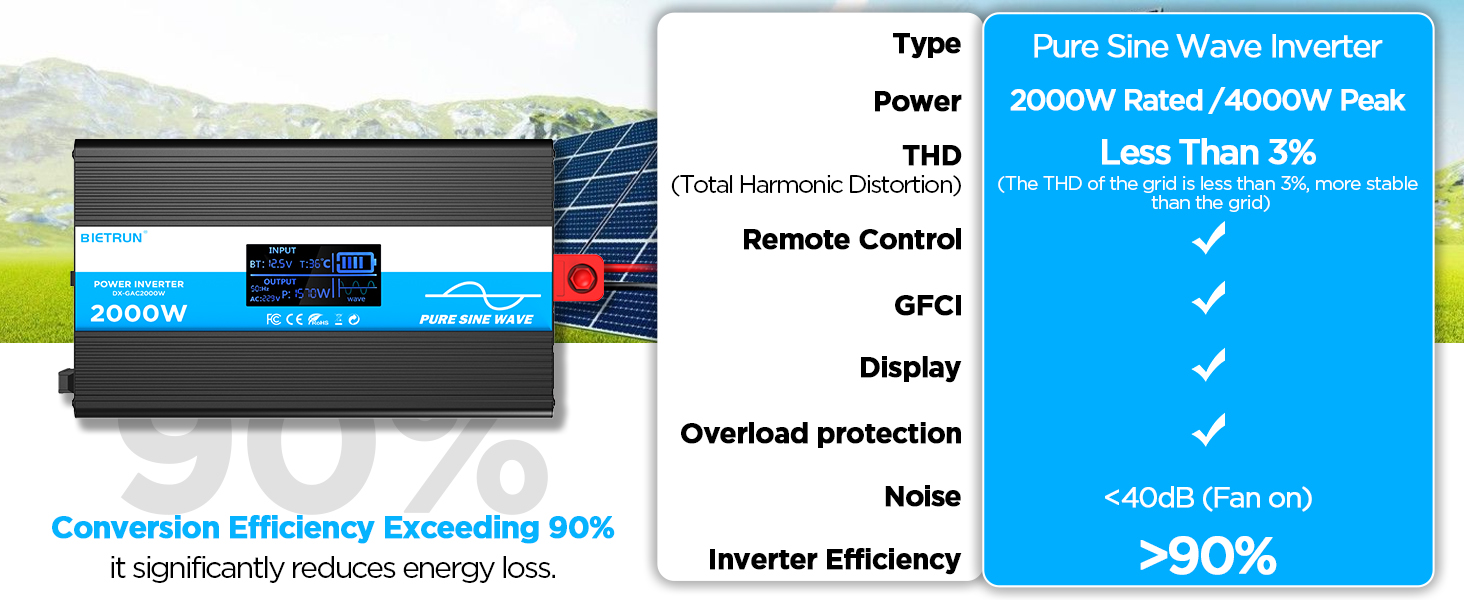
Image 3.2: Illustrates the stable, grid-like output of a pure sine wave inverter compared to unstable power from other types.
4. Ntọala na nwụnye
Ebe na mgbakwasa
Choose a dry, well-ventilated location away from direct sunlight, heat sources, and flammable materials. The inverter can be wall-mounted using the provided screws.
Ndakọrịta batrị
The inverter is compatible with various 12V battery types, including LiFePO4, LI, SLD, GEL, FLD, and AGM batteries.

Image 4.1: The inverter supports multiple 12V battery chemistries.
Nzọụkwụ Njikọ
- Kwadebe eriri: Use the provided 10AWG 3-foot cables. Ensure all connections are secure.
- Jikọọ eriri ala: Attach the green/yellow ground cable to the inverter's ground terminal and to a reliable earth ground point.
- Jikọọ eriri batrị:
- Jikọọ uhie battery cable to the inverter's nti (+) Ọnụ.
- Jikọọ nwa battery cable to the inverter's adịghị mma (-) Ọnụ.
- Jikọọ nsọtụ ọzọ nke uhie cable to the battery's nti (+) Ọnụ.
- Jikọọ nsọtụ ọzọ nke nwa cable to the battery's adịghị mma (-) Ọnụ.
Ihe dị mkpa: Ensure correct polarity. A spark may occur during the final connection, which is normal due to capacitor charging.
- Njikọ echekwara Double-check all connections for tightness to prevent loose contacts and overheating.
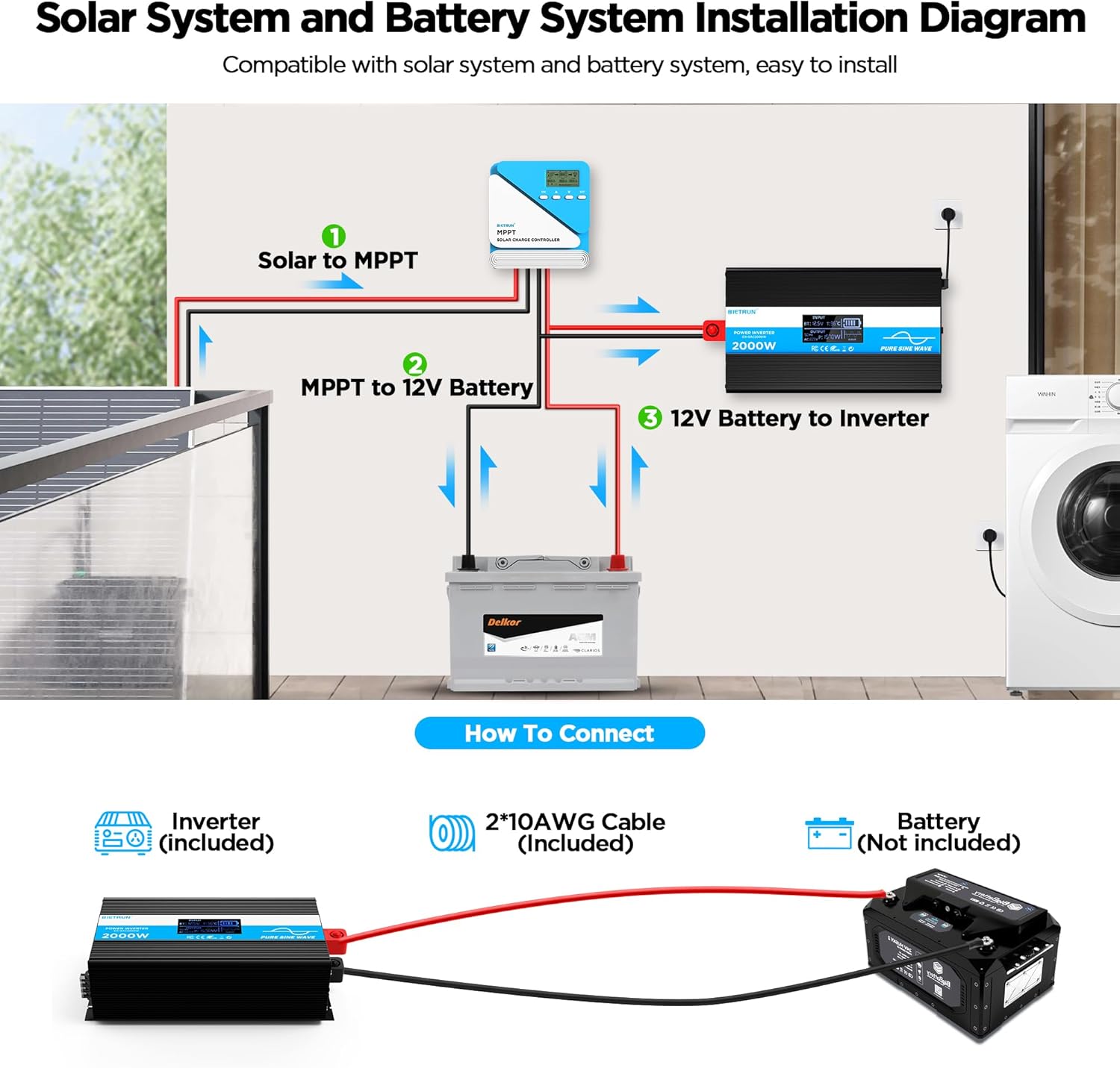
Image 4.2: Basic wiring diagram for connecting the inverter to a 12V battery.
Inverter Interface Overview

Image 4.3: Front panel layout with output interfaces and controls.

Image 4.4: Rear panel layout with battery input terminals and cooling fans.
5. Ọrụ
Ịgbanyụ/ Gbanyụọ
- Ọrụ aka: Flip the ON/OFF switch on the inverter to the 'ON' position to power on. Flip to 'OFF' to power off.
- Ọrụ njikwa anya: Ensure the inverter's 'REMOTE' switch is in the 'ON' position. Use the ON/OFF buttons on the remote control to operate the inverter.
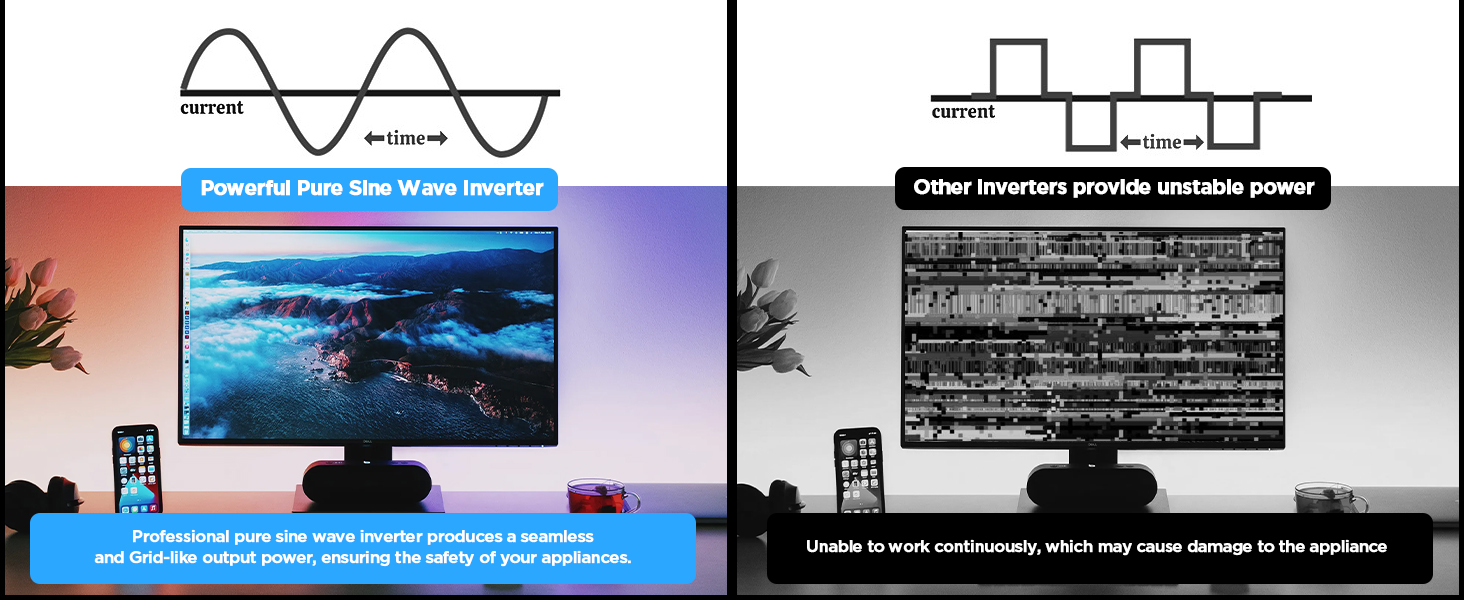
Image 5.1: The remote control allows for convenient operation.
Ngwa jikọọ
Once the inverter is powered on, plug your AC devices into the AC outlets or connect to the AC wiring terminal. USB devices can be connected to the USB or Type-C ports.
Ensure the total power consumption of all connected devices does not exceed 2000W continuously.
6. HD Display Information
The integrated HD display provides real-time operational data and fault indications:
- Ntinye: Na-egosiputa batrị voltage (BT) and internal temperature (T).
- Mpụta: Shows output frequency (Hz), AC voltage (AC), and current power consumption (P).
- Ọnọdụ batrị: Visual indicator of battery charge level.
- Ebugharị: Indicates pure sine wave output.
- Koodu mmejọ: Numeric codes appear for specific issues, aiding in troubleshooting.

Image 6.1: The HD display provides comprehensive status updates and fault codes.
Nkọwa koodu mmejọ
- 2: Vol dị alatage Ịdọ aka ná ntị
- 3: Mfefetage Nchedo
- 4: Vol dị alatage Nchedo
- 5: Ịdọ aka ná ntị karịrị akarị
- 6: Nchekwa oke ibu
- 7: Nchekwa oke okpomọkụ
- 8: Mmepụta Nchekwa sekit dị mkpụmkpụ
7. Nchọpụta nsogbu
If the inverter is not functioning correctly, refer to the display for fault codes and consult the table below:
| Nsogbu | Ihe nwere ike ime | Ngwọta |
|---|---|---|
| Inverter anaghị agbanyụ | Njikọ batrị dị nro, obere volt batrịtage, faulty fuse. | Check battery cable connections. Recharge or replace battery. Check and replace fuses if blown. |
| No AC output (Fault Code 8) | Mpụta obere sekit. | Disconnect all AC loads. Check for short circuits in connected devices or wiring. Reconnect one by one. |
| Overload warning/protection (Fault Code 5/6) | Ibu ejikọrọ karịrị ikike inverter. | Reduce the total power of connected devices. Disconnect high-power appliances. |
| Vol dị oberetage warning/protection (Fault Code 2/4) | Batrị voltage dị oke ala. | Recharge the battery. Check battery health. |
| Mfefetage protection (Fault Code 3) | Ntinye voltage di oke elu. | Nyochaa voltaji batrịtage is within the 12V range. Disconnect from charging source if overcharging. |
| Overtemperature protection (Fault Code 7) | Inverter is overheating. | Ensure adequate ventilation. Reduce load. Allow inverter to cool down. Clean fan vents if obstructed. |
If the fault persists after attempting the solutions, contact customer support.
8. Nkọwapụta
| Njirimara | Nkọwapụta |
|---|---|
| Nọmba nlereanya | DX-GAC2000W |
| Ike na-aga n'ihu | 2000W |
| Ike kacha elu | 4000W |
| Ntinye Voltage | DC 12V |
| Mmepụta Voltage | AC 110V-120V |
| Mmepụta Waveform | Okpokoro nke Sine |
| Mgbagwoju anya Harmonic Distortion (THD) | <3% |
| Ntugharị arụmọrụ | > 90% |
| Ntinye AC | 4 |
| ọdụ ụgbọ mmiri USB | 2 (5V/2.1A) |
| Ụdị-C Port | 1 (5V/2.1A) |
| Akụkụ (L x W x H) | 19 x 10 x 7 sentimita asatọ |
| Ibu Ibu | 11.13 pound |
| Sistemụ jụrụ oyi | Ndị Fans na-ajụ oyi abụọ |
9. Nlekọta
Mmezi oge niile na-eme ka arụmọrụ kachasị mma na ogologo ndụ nke inverter gị dịgide:
- Nhicha: Periodically clean the exterior of the inverter with a dry, soft cloth. Ensure cooling vents are free from dust and debris. Do not use liquid cleaners.
- Lelee njikọ: Regularly inspect battery cable connections for tightness and corrosion. Clean any corrosion with a wire brush and baking soda solution.
- Igwe ikuku: Ensure the inverter always has adequate airflow. Do not operate in enclosed spaces without ventilation.
- Ndochi fiusi: If a fuse blows, replace it only with a fuse of the same type and rating as specified in the package contents.
10. Akwụkwọ ikike na nkwado
For warranty information or technical support, please refer to the contact details provided with your purchase or visit the official Bietrun websaịtị. Debe nnata nzụta gị ka ihe akaebe nke ịzụrụ.
Ask a question about this manual
Ask about setup, troubleshooting, compatibility, parts, safety, or missing instructions. Manuals+ will review the question and use this page’s manual context to help answer it.