
1. Okwu mmalite
Welcome to the user manual for your new XIAOMI Redmi Note 14 Pro+ 5G Smartphone. This guide provides essential information on setting up, operating, and maintaining your device. Please read it carefully to ensure optimal performance and longevity of your smartphone.
2. Ihe ngwugwu
Chọpụta na ngwungwu gị nwere ihe ndị a:
- XIAOMI Redmi Note 14 Pro+ 5G Smartphone
- eriri USB
- Ntuziaka mmalite ngwa ngwa (nwere ike ịdị iche site na mpaghara)
- Ngwá ọrụ Mwepu SIM (nwere ike ịdị iche site na mpaghara)
Note: A charger is not included in the package. Please use a compatible 120W HyperCharge adapter for optimal charging.
3. Ngwaọrụ gafereview
Familiarize yourself with the physical components of your Redmi Note 14 Pro+ 5G.
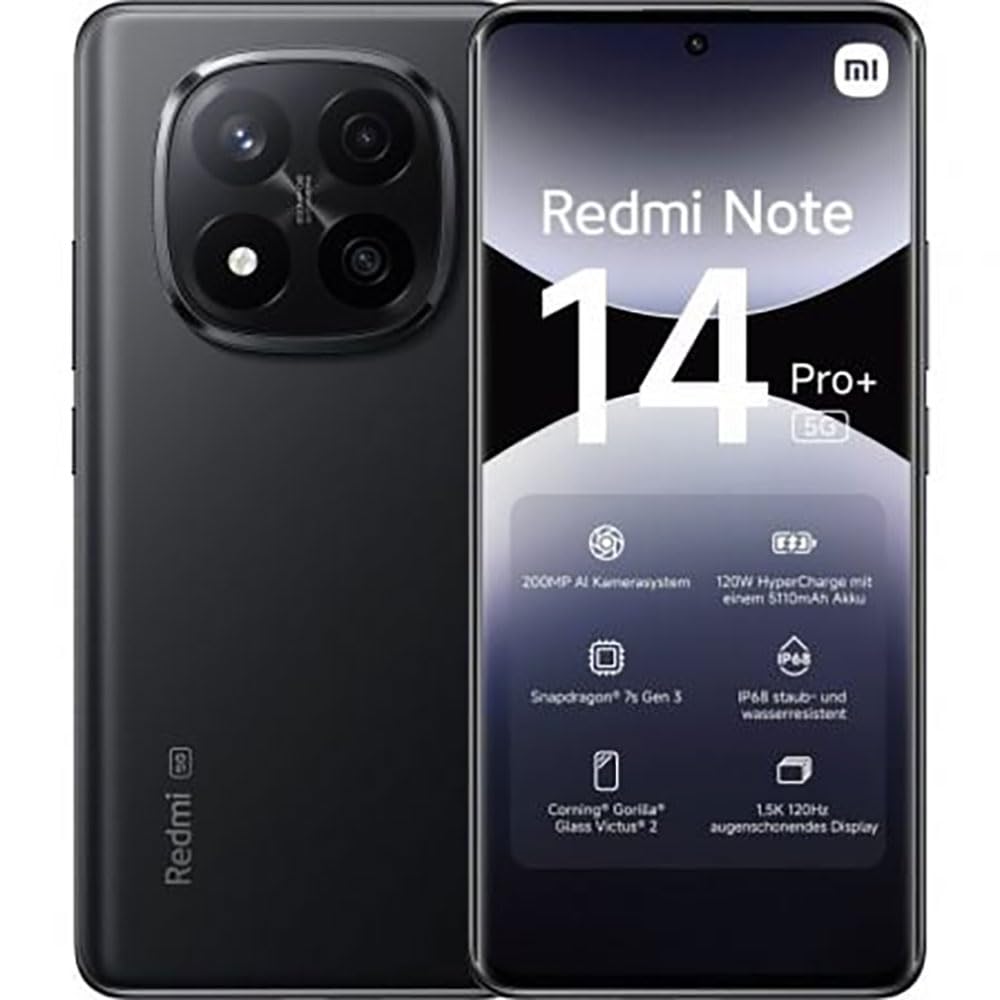
The image displays the front and back of the XIAOMI Redmi Note 14 Pro+ 5G smartphone. The front shows the display with 'Redmi Note 14 Pro+ 5G', '200 Megapixels', and '256 GB' text. The back features a prominent camera module with multiple lenses and the 'Redmi 5G' branding.
Isi ihe:
- Ngosipụta ihu: 6.67-inch 1.5K 120Hz AMOLED display with Corning Gorilla Glass Victus 2.
- Modul igwefoto azụ: Houses the 200MP Pro-Grade AI Camera system.
- Bọtịnụ ike: Dị n'akụkụ, eji ya eme ihe iji gbanye/gbanyụọ ma teta/hie ụra na ngwaọrụ ahụ.
- Bọtịnụ olu: Dị n'akụkụ, ejiri ya gbanwee mgbasa ozi na olu oku.
- Ọdụ ụgbọ mmiri Ụdị-C: Maka ịchaji na ịnyefe data.
- Oghere kaadi SIM: Supports Dual SIM Nano SIM cards.
- Ndị na-ekwu okwu: Stereo speakers for audio output.
4. Nhazi
4.1. Ịtinye kaadị SIM
- Chọta tray kaadị SIM n'akụkụ ngwaọrụ gị.
- Insert the SIM eject tool into the small hole next to the tray and press firmly until the tray pops out.
- Place your Nano SIM card(s) into the tray with the gold contacts facing down. Ensure proper orientation.
- Jiri nwayọ tụgharịa traị ahụ azụ n'ime oghere ruo mgbe ọ pịrị n'ime ya.
4.2. Ịgbanye Ngwaọrụ Gị n'ọrụ
Pịa ma jide bọtịnụ ike on the side of the phone until the XIAOMI logo appears on the screen. Follow the on-screen instructions to complete the initial setup, including connecting to Wi-Fi, setting up your Google account, and configuring security features like fingerprint recognition.
4.3. Ụgwọ mbụ
It is recommended to fully charge your device before first use. Connect the USB Type-C cable to the phone and a compatible 120W HyperCharge adapter (not included) to a power outlet.
5. Ijikwa ekwentị gị
5.1. Nsoro ụzọ
- Ihuenyo mmetụ aka: Pịa ka ịhọrọ, pia ka ịpịgharịa, tuo ka mbugharị.
- Ihuenyo ụlọ: Your central hub for apps and widgets.
- Ogwe ngosi: Si n'elu ihuenyo gbanye ala ka ị nweta ọkwa na ntọala ngwa ngwa.
- Drawer ngwa: Swipe up from the bottom of the screen (or tap the app drawer icon) to view ngwa niile arụnyere.
5.2. Gbanyụọ / gbanyụọ ma malitegharịa
- Iji Gbanyụọ: Press and hold the Power Button until the power menu appears, then select "Power off."
- Iji Malitegharịa: Press and hold the Power Button until the power menu appears, then select "Restart."
5.3. Nchekwa atụmatụ
Your device supports various security options:
- Nchọpụta akara mkpịsị aka: Register your fingerprints for quick and secure unlocking.
- Mkpọghe ihu: Use your face to unlock the device.
- PIN/Ụkpụrụ/Paswọọdụ: Standard security methods.
Access these settings via Ntọala > Nchekwa & nzuzo.
6. Akụkụ igwefoto
The Redmi Note 14 Pro+ 5G features a powerful 200MP Pro-Grade AI Camera system designed to enhance your photography experience.
- Igwefoto isi 200MP: Capture highly detailed images with optical image stabilization (OIS).
- Ụdị igwefoto ọtụtụ: Includes automatic, scene, portrait, and manual modes for versatile shooting.
- Dual LED Flash: Provides enhanced lighting in low-light conditions.
- Igwefoto ihu: A 20MP front sensor for high-quality selfies and video calls.
- Ndekọ vidiyo: Supports up to 8K video capture at 120 fps.
7. Njirimara AI
Leverage the integrated AI functionalities for a smarter user experience:
- AI Ehichapụ Pro: Intelligently remove unwanted objects or people from your photos.
- AI Image Expansion: Expand the boundaries of your images using AI.
- AI Notes: Smart note-taking capabilities.
- Ndepụta Okwu AI: Generate subtitles for videos or audio in real-time.
- AI Recorder: Enhanced voice recording with AI features.
- Onye ntụgharị asụsụ AI: Nsụgharị asụsụ n'oge a na-eme.
- Gemini: Integrated AI assistant.
- Circle to Search by Google: Quickly search for information by circling objects on your screen.
8. Ịchaji
Your Redmi Note 14 Pro+ 5G supports 120W HyperCharge technology for rapid charging.
- Ike batrị: 5110mAh Lithium-polymer battery.
- Ịchaji: Use the provided USB Type-C cable with a compatible 120W power adapter (sold separately) for optimal charging speeds.
- Ndụ batrị: Expect up to 20 hours of talk time. Actual battery life may vary based on usage.
Always use certified charging accessories to prevent damage to your device.
9. Nlekọta
9.1. Mgbochi mmiri na uzuzu
The device features an IP68 ọkwa for dust and water resistance. This means it is protected against dust ingress and can withstand immersion in water up to 1.5 meters for 30 minutes. However, this resistance is not permanent and may decrease over time with normal wear. Avoid exposing the device to hot water, saltwater, or other liquids.
9.2. Na-ehicha ngwaọrụ gị
- Jiri akwa dị nro na-enweghị lint hichaa ihuenyo na ahụ.
- Zere iji ihe nchacha abrasive, ihe mgbaze, ma ọ bụ aerosol sprays.
- If the device gets wet, wipe it thoroughly with a clean, dry cloth before charging or using ports.
9.3. Mmelite ngwanrọ
Lelee ma wụnye mmelite ngwanrọ mgbe niile iji hụ na ngwaọrụ gị nwere njirimara kachasị ọhụrụ, patches nche na nkwalite arụmọrụ. Gaa na Ntọala > Gbasara ekwentị > Ụdị MIUI ịlele maka mmelite.
10. Nchọpụta nsogbu
Ọ bụrụ na ị na-enwe nsogbu na ngwaọrụ gị, gbalịa ngwọta ndị a na-ahụkarị:
- Ngwaọrụ anaghị agbanwu: Hụ na batrị ahụ chajị. Jikọọ na chaja ruo opekata mpe nkeji iri na ise, wee nwaa ịgbanwuo ya.
- Ngwa na-akụda ma ọ bụ na-ajụ oyi: Mechie ngwa nsogbu ahụ wee meghee ya. Ọ bụrụ na nsogbu ahụ anọgide, malitegharịa ekwentị gị.
- Njikọ netwọk adịghị mma: Check your SIM card is correctly inserted. Try toggling Airplane Mode on and off. If the issue persists, contact your network provider.
- Batrị na-agbapụta ngwa ngwa: Reduce screen brightness, close unused apps, and disable unnecessary features like GPS or Bluetooth when not in use.
- Ihuenyo anaghị anabata: Force restart your device by holding the Power Button for approximately 10-15 seconds.
For more complex issues, refer to the official XIAOMI support websaịtị ma ọ bụ kpọtụrụ ndị ahịa.
11. Nkọwapụta
| Njirimara | Nkọwapụta |
|---|---|
| Ụdị | XIAOMI |
| Aha Nlereanya | Redmi Note 14 Pro+ 5G |
| Sistemụ nrụọrụ | Android 14 |
| Ụdị CPU | Snapdragon 7 Gen 3 |
| RAM | 8 GB |
| Ike nchekwa | 256 GB |
| Nha ihuenyo | 6.67 sentimita asatọ |
| Ngosipụta mkpebi | 2712 x 1220 pikselụ |
| Ọnụego ume ọhụrụ | 120 Hz |
| Mkpebi igwefoto azụ | 200 Megapixels (with OIS) |
| Mkpebi igwefoto n'ihu | 20 megapixels |
| Ike batrị | 5110 mAh |
| Nchaji teknụzụ | 120W HyperCharge |
| Mmiri Nguzogide | IP68 |
| Teknụzụ ekwentị | 5G |
| Ụdị kaadị SIM | Nano SIM (Dual SIM) |
| Njikọta | USB Ụdị-C |
12. Akwụkwọ ikike na nkwado
12.1. Akwụkwọ ikike nke onye nrụpụta
Your XIAOMI Redmi Note 14 Pro+ 5G Smartphone comes with a Akwụkwọ ikike onye nrụpụta afọ 2. Akwụkwọ ikike a na-ekpuchi ntụpọ dị na ngwa na arụ ọrụ n'okpuru ojiji nkịtị. Biko dowe ihe akaebe nke ịzụrụ ihe maka akwụkwọ ikike.
The warranty does not cover damage caused by accidents, misuse, unauthorized modifications, or normal wear and tear.
12.2. Nkwado ndị ahịa
For technical assistance, warranty claims, or further information, please visit the official XIAOMI support website or contact their customer service department. Contact details can typically be found on the XIAOMI websaịtị ma ọ bụ na kaadị akwụkwọ ikike nke dị na ngwaahịa gị.