
1. Okwu mmalite
This manual provides essential instructions for the proper setup, operation, and maintenance of your OnePlus Nord N30 5G smartphone. Please read this guide thoroughly before using your device to ensure optimal performance and longevity.
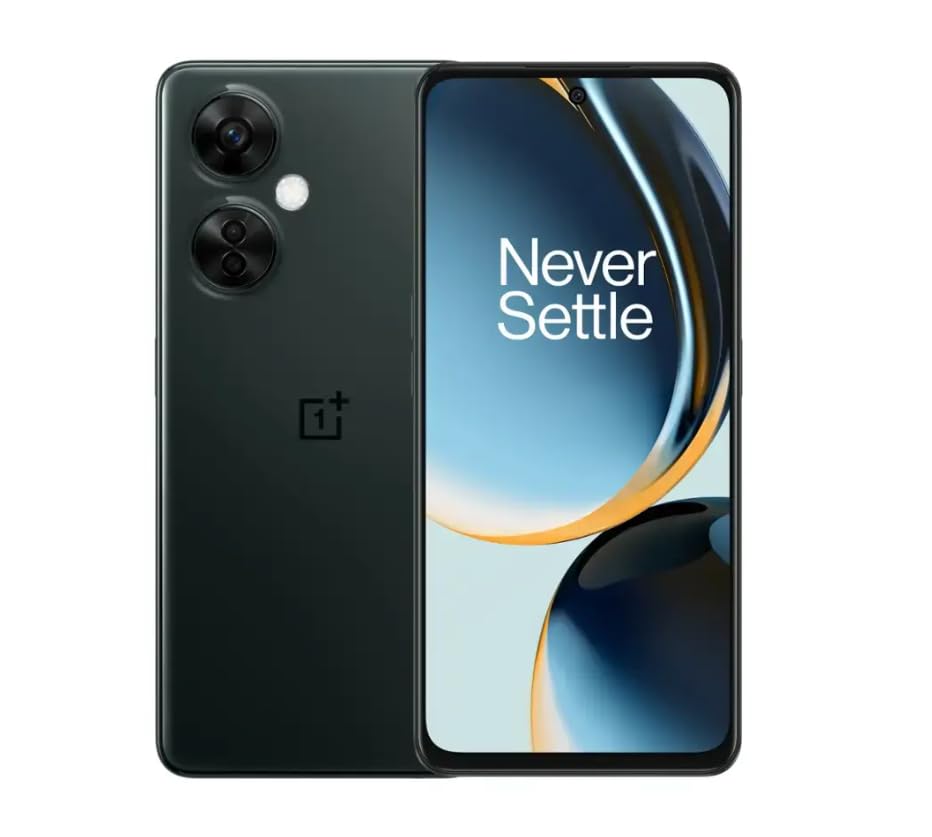
Image 1.1: OnePlus Nord N30 5G smartphone. This image displays the overall design of the device, highlighting its screen and camera module.
2. Kedu ihe dị na Igbe ahụ
Chọpụta na ihe niile dị na ngwugwu:
- Ekwentị OnePlus Nord N30 5G
- Ihe nkwụnye ọkụ
- eriri USB
Mara: Ngwa nwere ike ịdị iche site na mpaghara.
3. Nhazi
3.1. Ịtinye kaadị SIM
- Chọta tray kaadị SIM n'akụkụ ngwaọrụ ahụ.
- Insert the SIM ejector tool (not included, use a paperclip if necessary) into the small hole next to the tray to open it.
- Place your Nano-SIM card(s) into the tray with the gold contacts facing down. The device supports a single SIM card and a microSDXC card for expandable storage.
- Jiri nlezianya tụgharịa tray ahụ n'ime oghere ruo mgbe ọ na-agbanye na ahụ ekwentị.
3.2. Nchaji mbụ na ịgbanwuo
Tupu e jiri ya na mbụ, a na-atụ aro ka ị chajịa ngwaọrụ ahụ nke ọma.
- Connect the USB cable to the power adapter and then to the phone's USB-C port.
- Plug the power adapter into a wall outlet. The device supports 50W SUPERVOOC fast charging.
- Once sufficiently charged, press and hold the Power button (located on the side) until the OnePlus logo appears.
3.3. Initial Device Configuration
Soro ntuziaka ndị dị na ihuenyo iji mezue ntọala mbụ:
- Họrọ asụsụ ọkacha mmasị gị.
- Jikọọ na netwọk Wi-Fi.
- Review ma nabata usoro na ọnọdụ.
- Jiri akaụntụ Google gị banye ma ọ bụ mepụta nke ọhụrụ.
- Set up security features such as fingerprint unlock or face unlock.
4. Ntuziaka ọrụ
4.1. Ngosipụta na igodo
The OnePlus Nord N30 5G features a 6.72-inch LCD display with a 120Hz refresh rate for smooth visuals. Navigate the OxygenOS interface using gestures or traditional navigation buttons.
- Swipe elu: Nweta drawer ngwa.
- Mkpu ala: Access notifications and quick settings.
- Kpatụ: Họrọ ihe.
- Tuo: Bugharịa ma ọ bụ pụta.
4.2. Ojiji igwefoto
The device is equipped with a triple rear camera system and a front camera.
- Igwefoto isi: 108 MP, f/1.7 (wide) for high-resolution photos.
- Igwefoto nnukwu: 2 MP, f/2.4 for close-up shots.
- Igwefoto omimi: 2 MP, f/2.4 for portrait mode effects.
- Igwefoto ihu: 16 MP, f/2.4 for selfies and video calls.
Open the Camera app and select your desired mode (Photo, Video, Portrait, Macro, etc.) from the interface. Tap the shutter button to capture images or start/stop video recording.
4.3. Njikwa nchekwa
The phone comes with 128GB of internal storage. You can expand this up to 1TB using a microSDXC card inserted into the SIM tray.
- To check storage usage: Go to Ntọala > Nchekwa.
- Ịkwaga files to microSD: Use the File Ngwa njikwa.
4.4. Njikọta
The device supports 5G cellular technology, Wi-Fi, and Bluetooth 5.1.
- 5G: Ensure your SIM card and plan support 5G for faster mobile data speeds.
- Wi-Fi: Jikọọ na netwọk ikuku site na Ntọala > Wi-Fi.
- Bluetooth: Pair with wireless headphones or other devices via Ntọala > Bluetooth.
4.5. Nchekwa atụmatụ
Secure your device using the side-mounted fingerprint sensor or face unlock.
- To set up fingerprint unlock: Go to Ntọala > Nchekwa & nzuzo > Mkpọghe mkpịsị aka.
- To set up face unlock: Go to Ntọala > Nchekwa & nzuzo > Mkpọghe ihu.
4.6. Akwukwo
The device features dual stereo speakers for enhanced audio experience. It also includes a 3.5 mm audio jack for wired headphones.
5. Nlekọta
5.1. Nlekọta batrị
The 5000mAh battery provides extended usage. To prolong battery life:
- Zere oke okpomọkụ.
- Use the provided 50W SUPERVOOC charger for optimal charging speed and battery health.
- Zere igbapu batrị kpamkpam ugboro ugboro.
5.2. Mmelite ngwanrọ
Keep your OxygenOS (based on Android 13) updated to ensure optimal performance, security, and access to new features.
- To check for updates: Go to Ntọala > Banyere ngwaọrụ > Ụdị OxygenOS.
5.3. Na-ehicha ngwaọrụ
Jiri ákwà dị nro, nke na-enweghị lint hichaa ihuenyo na ahụ ekwentị. Zere iji kemịkalụ siri ike ma ọ bụ ihe ndị na-emebi emebi.
6. Nchọpụta nsogbu
Akụkụ a na-ekwu maka nsogbu ndị ị nwere ike izute.
6.1. Ngwaọrụ anaghị agba ọkụ
- Hụ na batrị ahụ chajị. Jikọọ ngwaọrụ ahụ na chaja ahụ ma ọ dịkarịa ala nkeji iri na ise.
- Pịa ma jide bọtịnụ Ike maka sekọnd 10-15 iji mee ka ọ malitegharịa.
6.2. Okwu Njikọta netwọkụ
- Lelee ma ọ bụrụ na etinyere kaadị SIM ahụ nke ọma.
- Verify that mobile data is enabled in Ntọala > Netwọk mkpanaka.
- Malitegharịa ngwaọrụ ahụ.
- Contact your carrier (T-Mobile) to confirm service availability in your area.
6.3. Ngwa na-emebi ma ọ bụ na-ajụ oyi
- Mechie wee mepee ngwa ahụ.
- Hichapụ ihe nchekwa ngwa ahụ: Ntọala > Ngwa > [Aha ngwa] > Storage usage > Kpochapụ cache.
- Ensure the app and OxygenOS are updated to the latest versions.
6.4. Batrị na-agbapụta ngwa ngwa
- Belata nchapụta ihuenyo.
- Gbanyụọ atụmatụ ejighi ya dị ka Bluetooth, GPS, ma ọ bụ Wi-Fi mgbe ọ dịghị mkpa.
- Lelee ojiji batrị n'ime Ntọala > Batrị iji chọpụta ngwa ndị na-agụ agụụ ike.
- Ensure background app refresh is limited for non-essential apps.
7. Nkọwapụta
| Aha Nlereanya | OnePlus Nord N30 5G |
| Sistemụ nrụọrụ | OxygenOS (based on Android 13) |
| Nhazi | Qualcomm Snapdragon 695 Octa-core |
| RAM | 8GB |
| Nchekwa nke ime | 128GB (Expandable up to 1TB via microSDXC) |
| Ngosipụta | 6.72 inches LCD, 2400 x 1080 resolution, 120Hz Refresh Rate |
| Igwefoto azụ | 108 MP (wide), 2 MP (macro), 2 MP (depth) |
| Igwefoto ihu | 16 MP |
| Ike batrị | 5000 mAh |
| Ịchaji | 50W SUPERVOOC Fast Charging (approx. 47 minutes for full charge) |
| Njikọta | 5G, Wi-Fi, Bluetooth 5.1, USB-C |
| Jack ọdịyo | 3.5 mm |
| Akụkụ | 6 x 4 x 4 sentimita asatọ |
| Ibu | 10.8 ounces |
| Atụmatụ pụrụ iche | Dual SIM, Side-mounted Fingerprint Sensor, Face Unlock, Dual Stereo Speakers |
8. Renewed Product Information
This OnePlus Nord N30 5G is an Amazon Renewed product. Renewed products are pre-owned and professionally inspected, tested, and cleaned to work like new. They come with generic or original accessories and packaging.
8.1. Ọnọdụ Mmegharị Amazon
Amazon Renewed products are categorized based on their cosmetic condition and battery life. All renewed products are fully functional and have a battery life greater than 80% of a new equivalent.

Image 8.1: Amazon Renewed conditions overview. This image illustrates the criteria for Excellent, Good, and Acceptable cosmetic conditions for renewed products.

Foto 8.2: Visual examples of renewed product cosmetic conditions. This image provides visual examples of what 'Excellent', 'Good', and 'Acceptable' cosmetic conditions might look like on a phone's back.

Image 8.3: Customer feedback on Amazon Renewed. This image presents testimonials from customers regarding their positive experiences with Amazon Renewed products.
9. Akwụkwọ ikike na nkwado
9.1. Akwụkwọ ikike Ozi
As an Amazon Renewed product, this device is backed by the Amazon Renewed Guarantee. Please refer to the Amazon Renewed program terms and conditions for specific warranty details and coverage. This typically includes a limited warranty for a specified period from the date of purchase, covering defects in materials and workmanship.
9.2. Nkwado ndị ahịa
For technical assistance, troubleshooting, or warranty claims, please contact Amazon Customer Service or refer to the official OnePlus support websaịtị maka akụrụngwa ndị ọzọ na FAQ.
- Ọrụ ndị ahịa Amazon: Gaa leta amazon.com/contact-us
- OnePlus Support: Visit the official OnePlus support websaịtị maka mpaghara gị.