1. Okwu mmalite
This manual provides instructions for the installation and care of your Generic Glass Camera Lens Protector, designed specifically for the Samsung Galaxy A72. This protector is a thin, durable layer crafted from high-quality tempered glass, offering robust protection against scratches, dust, dirt, and accidental impacts. It ensures your smartphone's camera lens remains clear and functional for optimal photo and video capture.
Atụmatụ gụnyere:
- Scratch-Resistant: Protects the camera lens from daily scratches, maintaining its pristine condition.
- Igwe ọkụ na-adịgide adịgide: Made from high-quality tempered glass for strength and impact resistance.
- Ultra-Clear Transparency: Preserves the clarity and quality of the camera lens, ensuring clear and sharp photos and videos.
- Nwụnye dị mfe: Designed for a simple, bubble-free application.
- Nkịtị dị nro: Adds minimal bulk to your device while providing excellent protection.
2. Ihe ngwugwu
Biko lelee ngwungwu ka ị hụ na ihe niile dị:
- 1 x Glass Camera Lens Protector (Model MO-ST-126)
- (Optional: Cleaning wipes, dust removal sticker - if included, please refer to your specific package)
3. Ntuziaka nwụnye
Follow these steps carefully for a bubble-free and secure installation of your camera lens protector.
- Prepare the Lens: Ensure your Samsung Galaxy A72 camera lens is completely clean and free of dust, fingerprints, and smudges. Use a microfiber cloth or the provided cleaning wipes (if applicable) to thoroughly clean the lens surface.
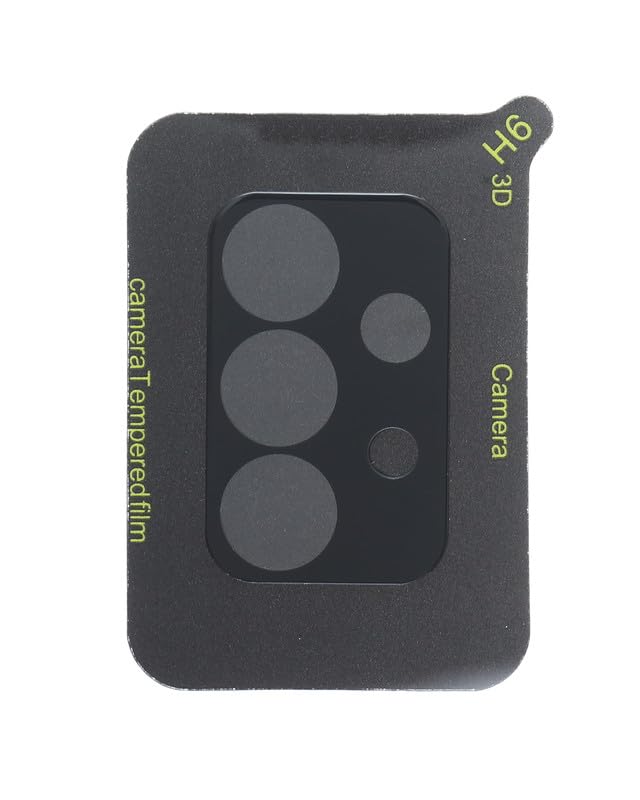
Image 1: The Generic Glass Camera Lens Protector. This image displays the black tempered glass protector designed for the Samsung Galaxy A72, featuring precise cutouts for the multiple camera lenses and sensors. The protector is labeled with "H6 3D" and "camera Tempered film".
- Wepu ihe nkiri nchekwa: Carefully peel off the protective film from the adhesive side of the lens protector. Avoid touching the adhesive surface to prevent dust or fingerprints.
- Align the Protector: Gently align the lens protector with the camera module on your Samsung Galaxy A72. Ensure the cutouts for the lenses and sensors match perfectly.
- Apply the Protector: Once aligned, slowly lower the protector onto the camera lens. The adhesive will begin to spread.
- Remove Bubbles: If any small bubbles appear, gently press them towards the edges of the protector using a soft cloth or your finger. Most bubbles should disappear within 24-48 hours.
- Nyocha ikpeazụ: Verify that the protector is securely attached and that there are no obstructions to the camera lenses.
4. Ojiji na Nlekọta
Once installed, the lens protector requires minimal special operation. Its primary function is passive protection.
- Maintain Clarity: To ensure optimal photo and video quality, periodically clean the surface of the lens protector with a soft, lint-free cloth.
- Zere kemịkalụ siri ike: Do not use abrasive cleaners or harsh chemicals on the protector, as this may damage the oleophobic coating or the glass itself.
- Jiri Nlekọta Aka: While durable, the protector is still glass. Avoid dropping your device or exposing the camera area to sharp objects to prevent damage.
5. Nchọpụta nsogbu
If you encounter any issues after installation, refer to the following common problems and solutions:
- Bubbles Under the Protector:
- Obere afụ: Gently push them towards the nearest edge with a soft cloth. Most small bubbles will dissipate on their own within 1-2 days.
- Large Bubbles/Dust: If a large bubble persists or you see a dust particle, you may need to carefully lift a corner of the protector (using a thin, non-abrasive tool like a plastic card) to remove the dust with a dust-absorber sticker, then reapply. Be cautious to avoid bending or cracking the protector.
- Ndozigharị: If the protector is significantly misaligned, carefully lift it from one corner and reapply, ensuring proper alignment with the camera module.
- Reduced Camera Quality: Ensure the protector is clean. If the issue persists, check if the protector is correctly installed and not obstructing any part of the lens or flash. A faulty protector might need replacement.
6. Nkọwapụta
| Nọmba nlereanya | MO-ST-126 |
| Ụdị ekwentị dakọtara | Samsung Galaxy A72 |
| Ụdị | N'ozuzu |
| Ihe onwunwe | Igwe ọkụ |
| Product Hardness | 9H |
| Atụmatụ pụrụ iche | Shockproof, Scratch Resistant |
| Agba | Nwa |
| Akụkụ ngwaahịa | 5 x 5 x 1.27 cm |
| Ibu Ibu | 30 grams |
| Ọnụọgụ nke ihe | 1 |
7. Akwụkwọ ikike Ozi
Specific warranty details for this product are not provided in the available information. Please refer to the product packaging or contact the retailer/manufacturer for warranty inquiries.
8. Nkwado ndị ahịa
For further assistance, questions, or concerns regarding your Generic Glass Camera Lens Protector, please contact the seller or the customer support channel provided by your retailer.


