
HETP HX160Q2
HETP Wireless Power Bank User Manual
Model: HX160Q2
Okwu mmalite
Thank you for choosing the HETP Wireless Power Bank. This 40800mAh portable charger is designed to provide versatile and efficient power for your electronic devices. Featuring 7-in-1 charging capabilities, including built-in cables, multiple output ports, and wireless charging, it ensures your devices remain powered on the go. Please read this manual carefully before use to ensure proper operation and maintenance.

Foto: N'ihu view of the HETP Wireless Power Bank, displaying its LCD screen with 100% charge and the wireless charging pad. The side shows the built-in cables.
Njirimara ngwaahịa
- Ike dị elu: 40800mAh premium Li-polymer battery for multiple device charges.
- Nchaji 7-na-1: Simultaneously charge up to 7 devices.
- Igwe eji arụnyere: Includes iOS, USB-C, and Micro USB cables for convenience.
- Ọdụ ụgbọ mmiri mmepụta ọtụtụ: Two USB-A ports and one USB-C port.
- Nchaji ikuku: 15W wireless charging compatible with all wireless-enabled devices.
- Nchaji ngwa ngwa: 25W PD 3.0 and QC 4.0 fast charging technology.
- Ngosipụta LCD: Clear digital display showing battery percentage.
- Atụmatụ nchekwa: Multi-security protection for safe charging.

Image: Diagram illustrating the wide compatibility of the power bank with various electronic devices, including smartphones, tablets, smartwatches, and earbuds.
Ihe ngwugwu
- 1 x HETP Wireless Portable Charger Power Bank (40800mAh)
- 1 x Product Instruction Manual (this document)
Akpachara anya maka nchekwa
- Do not expose the power bank to extreme temperatures (hot or cold), direct sunlight, or fire.
- Ewepụla, gbanwee, ma ọ bụ rụkwaa ngwaọrụ n'onwe gị.
- Debe mmiri na mmiri mmiri ndị ọzọ.
- Zere idobe ma ọ bụ idobe ụlọ akụ ike na mmetụta siri ike.
- Chekwaa n'ebe dị jụụ, kpọrọ nkụ mgbe ọ naghị eji ya.
- Debe ebe ụmụaka na-apụghị iru.
Ntọlite na ojiji mbụ
Ịchaji Power Bank
Before first use, fully charge the power bank. The LCD display will show the charging progress and battery percentage.
- Iji eriri USB-C arụnyere n'ime ya: Connect the built-in USB-C cable from the power bank to a USB wall adapter (not included).
- Using the USB-C Input Port: Connect a USB-C cable (not included) from a USB wall adapter to the USB-C input port on the power bank.
The LCD screen will illuminate and display the charging percentage. Once it reaches 100%, the power bank is fully charged.

Image: Illustration demonstrating two methods to recharge the power bank: via its integrated USB-C cable or by connecting an external USB-C cable to the dedicated input port.
Ntuziaka ọrụ
Ngwa ịchaji
The HETP Wireless Power Bank offers multiple ways to charge your devices simultaneously.
1. Wired Charging (Using Built-in Cables)
- Pull out the appropriate built-in cable (iOS, USB-C, or Micro USB) from its slot.
- Connect the cable to your device's charging port.
- The power bank will automatically begin charging your device. The LCD display will show "OUT" indicating output.
2. Wired Charging (Using Output Ports)
- Use your device's original charging cable or a compatible cable.
- Connect one end of the cable to one of the power bank's output ports (USB-A1, USB-A2, or USB-C).
- Jikọọ nsọtụ nke ọzọ na ngwaọrụ gị.
- Nchaji ga-amalite na akpaghị aka.
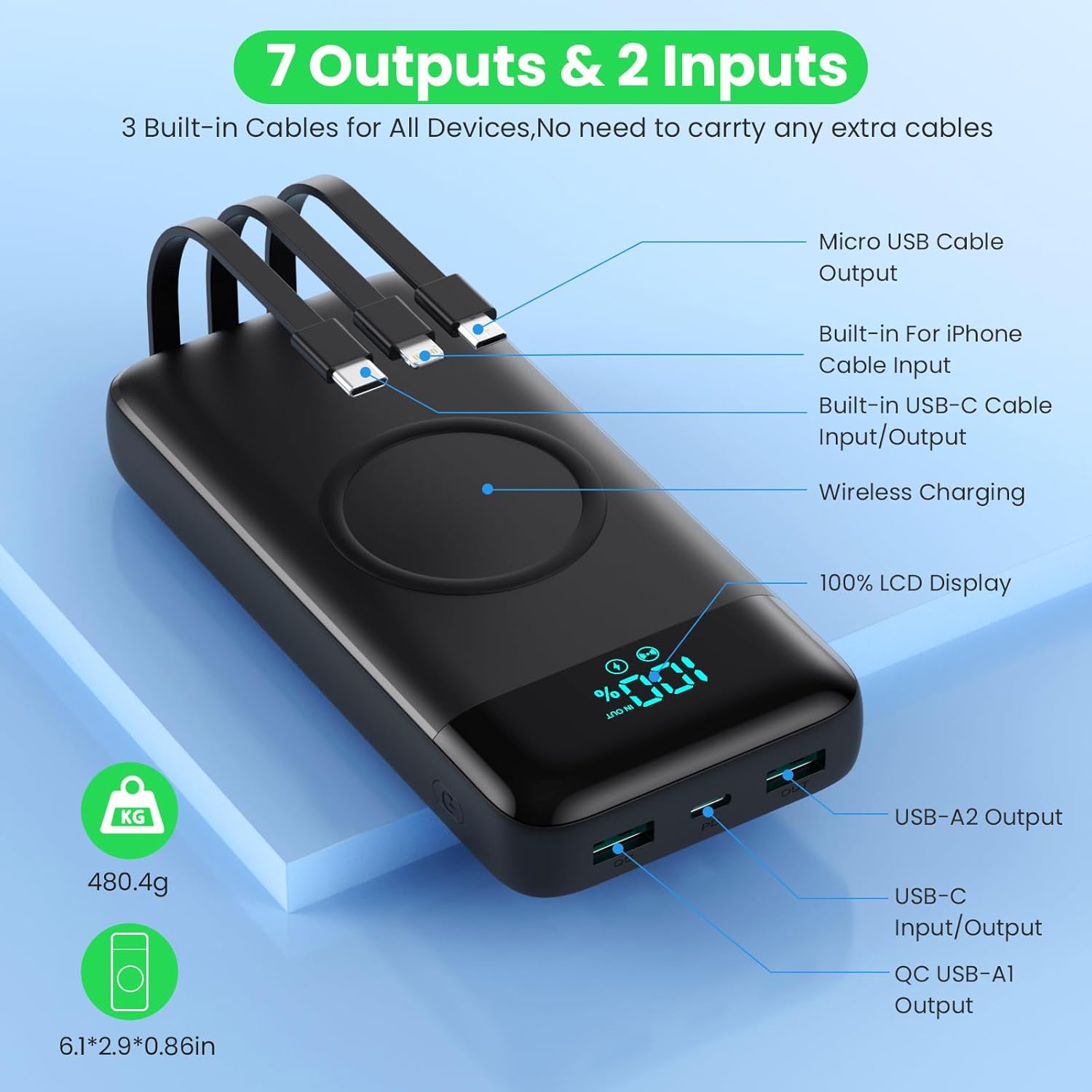
Image: Detailed diagram highlighting all 7 output options (3 built-in cables, 3 USB ports, 1 wireless) and 2 input options (built-in USB-C cable, USB-C port) on the power bank, along with the LCD display.
3. Nchaji ikuku
- Gbaa mbọ hụ na ngwaọrụ gị na-akwado chaja ikuku.
- Place your wireless-enabled device directly onto the wireless charging pad located on the top surface of the power bank.
- Align the device centrally on the pad for optimal charging.
- The power bank will automatically detect and begin wireless charging.

Image: A smartphone being wirelessly charged on the power bank, illustrating the fast wireless charging feature and supported wattages.
Ịkwụ ụgwọ n'otu oge
The HETP Wireless Power Bank is designed to charge multiple devices concurrently using a combination of its built-in cables, output ports, and wireless charging pad.

Foto: Otu n'elu view showing the power bank simultaneously charging a tablet, multiple smartphones, and a smartwatch using its various charging methods.
Nlekọta
- Nhicha: Use a soft, dry cloth to clean the surface of the power bank. Do not use abrasive cleaners or solvents.
- Nchekwa: If storing for an extended period, charge the power bank to approximately 50-70% capacity. Recharge every 3-6 months to maintain battery health.
- Nlekọta USB: When retracting built-in cables, do so gently to avoid damage.
Nchọpụta nsogbu
| Nsogbu | Ihe nwere ike ime | Ngwọta |
|---|---|---|
| Ụlọ akụ ọkụ anaghị akwụ ụgwọ | Charging cable or adapter faulty; power bank fully discharged; input port issue. | Try a different charging cable and wall adapter. Ensure the power bank is connected correctly. Allow a few minutes for the LCD to activate if fully discharged. |
| Ngwaọrụ anaghị akwụ ụgwọ site na ụlọ akụ ọkụ | Power bank low on charge; device cable faulty; device not compatible; incorrect port used; wireless charging misalignment. | Check power bank's charge level. Try a different cable. Ensure device is compatible. For wireless charging, reposition device on the pad. |
| Nchaji nwayọ | Cable not supporting fast charging; device not supporting fast charging; multiple devices charging simultaneously. | Use a fast-charging compatible cable. Ensure your device supports fast charging. Charging multiple devices may reduce individual charging speeds. |
| Ngosipụta LCD anaghị arụ ọrụ | Power bank off; internal issue. | Press the power button to activate the display. If problem persists, contact customer support. |
Nkọwapụta
| Njirimara | Nkọwa |
|---|---|
| Nọmba nlereanya | HX160Q2 |
| Ike batrị | 40800mAh |
| Ụdị batrị | Li-polymer |
| Akụkụ ngwaahịa | 10.58 x 6.78 x 1.31 cm |
| Ibu Ibu | 100 g |
| Ntinye (USB-C) | Nchaji ngwa ngwa 25W PD |
| Mpụta (USB-C) | Nchaji ngwa ngwa 25W PD |
| Mpụta (USB-A) | QC 4.0 Fast Charging |
| Mbupute ikuku | 15W (5W, 7.5W, 10W, 15W compatible) |
| Igwe eji arụ ọrụ | iOS, USB-C, Micro USB |
| Ngosipụta | Ngosipụta dijitalụ LCD |
| Agba | Nwa |
Akwụkwọ ikike na nkwado
Each HETP product is safety certified. If you encounter any problems or have questions regarding your Wireless Power Bank, please do not hesitate to contact our customer support team. We are committed to providing professional after-sales service and satisfactory solutions within 12 hours.
Biko lee akwụkwọ ịzụrụ ihe gị maka usoro akwụkwọ ikike na ozi kọntaktị akọwapụtara.
Ask a question about this manual
Ask about setup, troubleshooting, compatibility, parts, safety, or missing instructions. Manuals+ will review the question and use this page’s manual context to help answer it.