
Okwu mmalite
Thank you for choosing the CREATE Speaker Retro. This portable Bluetooth speaker combines a classic retro design with modern audio technology, offering versatile connectivity and powerful sound. This manual will guide you through the setup, operation, and maintenance of your new speaker to ensure optimal performance and longevity.

Image: The CREATE Speaker Retro, highlighting its elegant retro aesthetic and compact form factor.
Ntuziaka nchekwa dị mkpa
- Gụọ ntuziaka niile nke ọma tupu i jiri ngwaahịa ahụ.
- Debe akwụkwọ ntuziaka a maka ntụnye aka n'ọdịnihu.
- Do not expose the speaker to water or excessive moisture. This product is ọ bụghị waterproof.
- Etinyela ya nso ebe okpomọkụ dị ka radiators, ihe ndekọ okpomọkụ, stovu, ma ọ bụ ngwaọrụ ndị ọzọ (gụnyere amplifiers) nke na-emepụta okpomọkụ.
- Jiri naanị mgbakwunye / ngwa ndị nrụpụta akọwapụtara.
- Kwupu ngwa a n'oge oke mmiri ozuzo ma ọ bụ mgbe ejighi ya ogologo oge.
- Tụtụ aka n'aka ndị ọrụ ruru eru.
Ihe ngwugwu
The CREATE Speaker Retro package includes:
- CREATE Speaker Retro Portable Bluetooth Speaker (1 unit)
- USB-C eriri USB
- Akwụkwọ ntuziaka (akwụkwọ a)
Njikwa na Ọdụ Ụgbọ Mmiri Gbasaraview
Mara onwe gị nke ọma na njikwa na njikọ nke ọkà okwu:

Foto: Zuru ezu view of the speaker's top control panel.
- Mpịakọta Mpịakọta: Na-agbanwe olu ụda niile.
- Bass Knob: Na-edozi ọkwa bass.
- Knob Treble: Na-edozi ọkwa treble.
- Ntinye Nhọrọ Nhọrọ: Toggles between AUX, Bluetooth (BT), and USB input modes.
- Ike mgba ọkụ: Na-agbanyụ/Gbanyụọ ọkà okwu.
- Ntinye AUX (3.5mm): For connecting external audio devices via an audio cable.
- Ọdụ ụgbọ mmiri USB: Maka ịkpọghachi draịva USB.
- DC-IN 5V Port: Maka ịchaji ọkà okwu.
- Ìhè ihe ngosi: Na-egosi ọkwa ike, ọkwa nchaji na ọkwa njikọta Bluetooth.
Melite
1. gingchaji Okwu Okwu
Before first use, fully charge the speaker. Connect the provided USB-C charging cable to the DC-IN 5V port on the speaker and the other end to a compatible USB power adapter (not included) or a computer's USB port. The indicator light will show the charging status. A full charge takes approximately 4-5 hours.
- Ịchaji: Indicator light glows (color may vary).
- Ebubo zuru oke: Indicator light turns off or changes color.
2. Ịgbanye / gbanyụọ
To power on the speaker, flip the Mgbanwe ọkụ to the "ON" position. To power off, flip the switch to the "OFF" position.
Ntuziaka ọrụ
1. Ọnọdụ Bluetooth
The speaker features Bluetooth 5.2 for wireless audio streaming with a range of up to 10 meters.
- Ike na ọkà okwu.
- Tọọ nke Ntinye Nhọrọ Nhọrọ to "BT/AUX" and then ensure it's in Bluetooth mode (indicator light will blink, indicating pairing mode).
- Na ama gị, mbadamba, ma ọ bụ ngwaọrụ Bluetooth ọzọ enyere, mee ka Bluetooth nwee ike wee chọọ ngwaọrụ dịnụ.
- Select "CREATE Speaker Retro" from the list.
- Once paired, the indicator light will stop blinking and remain solid. You can now play music wirelessly.
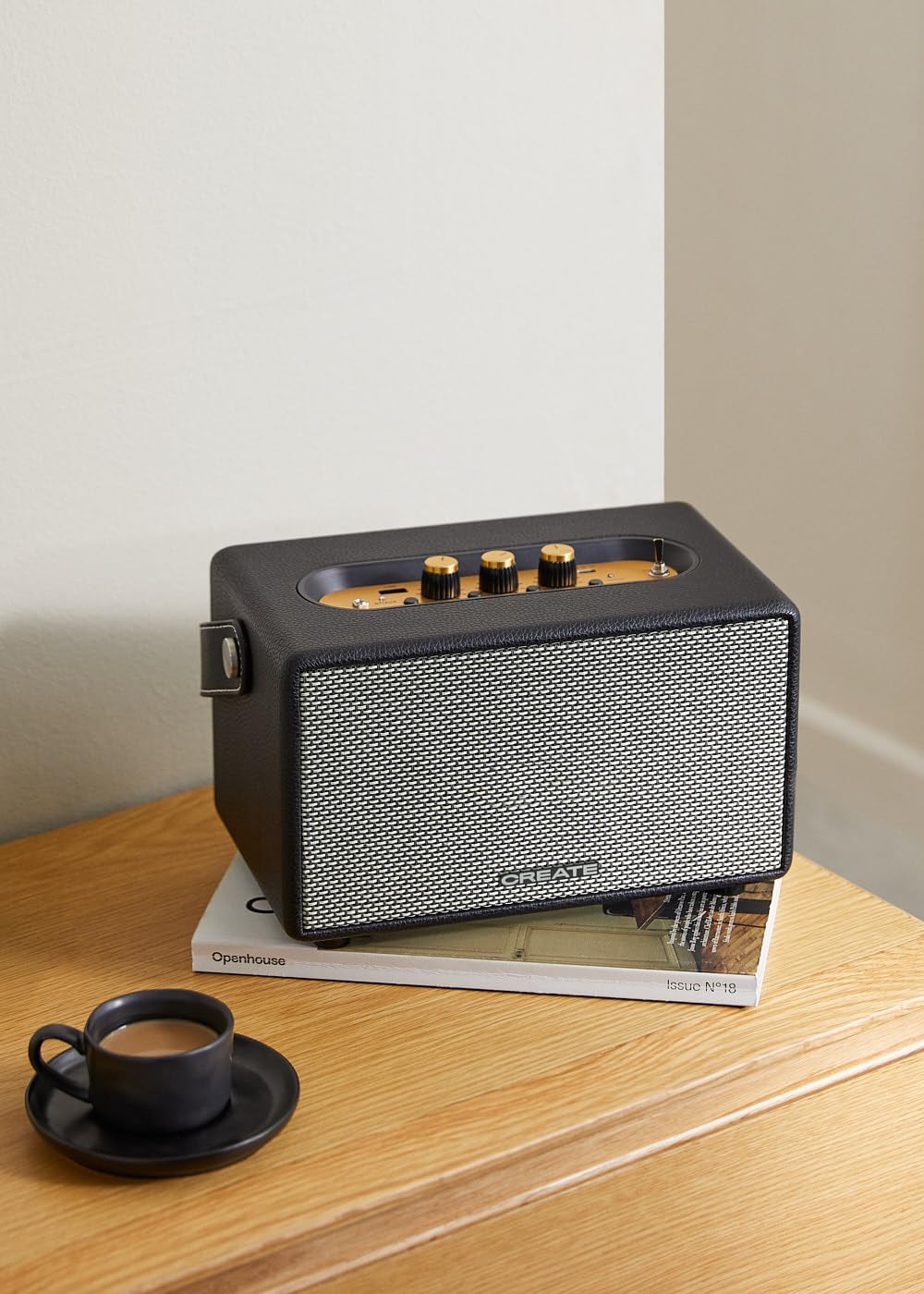
Image: Connecting to the speaker via Bluetooth from a mobile device.
2. USB Playback Mode
Kpọọ ọdịyo files ozugbo site na draịvụ USB.
- Ike na ọkà okwu.
- Fanye draịva USB nwere ọdịyo files n'ime Ọdụ ụgbọ mmiri USB.
- Tọọ nke Ntinye Nhọrọ Nhọrọ to "USB". The speaker will automatically begin playing music from the USB drive.

Image: Inserting a USB drive for direct audio playback.
3. Ụdị ntinye AUX
Jikọọ ngwaọrụ ọdịyo mpụga site na iji eriri ọdịyo 3.5mm.
- Ike na ọkà okwu.
- Jikọọ otu njedebe nke eriri ọdịyo 3.5mm (anaghị etinye ya) na Ntinye aka AUX ọdụ ụgbọ mmiri na ọkà okwu.
- Connect the other end of the cable to the headphone jack or audio output of your external device (e.g., MP3 player, laptop).
- Tọọ nke Ntinye Nhọrọ Nhọrọ to "AUX". The speaker will now play audio from your connected device.
4. Na-edozi ụda
Use the dedicated knobs on the control panel to fine-tune your audio experience:
- Tugharia ihe Mpịakọta Akpata to increase or decrease the overall sound level.
- Tugharia ihe Bass Knob to adjust the low-frequency sounds.
- Tugharia ihe Treple akpu to adjust the high-frequency sounds.
Nlekọta
Nhicha
To clean the speaker, use a soft, dry cloth. Do not use abrasive cleaners, waxes, or solvents as they may damage the finish. Avoid spraying liquids directly onto the speaker.
Nchekwa
When not in use for extended periods, store the speaker in a cool, dry place away from direct sunlight and extreme temperatures. Ensure the speaker is fully charged before storing to preserve battery health.
Nlekọta batrị
The speaker is equipped with a built-in rechargeable battery. To maximize battery life:
- Zere ịchaji batrị ugboro ugboro.
- Recharge the battery regularly, even if the speaker is not used often.
- Do not expose the speaker to temperatures above 45°C (113°F) or below 0°C (32°F).
Nchọpụta nsogbu
If you encounter any issues with your CREATE Speaker Retro, please refer to the following common problems and solutions:
| Nsogbu | Ihe nwere ike ime | Ngwọta |
|---|---|---|
| Ọkà okwu anaghị agba ọkụ. | Batrị agwụla. | Charge the speaker for 4-5 hours using the USB-C cable. |
| Enweghị ụda sitere na ọkà okwu. | Volume is too low; incorrect input mode; device not connected properly. | Increase volume. Ensure the correct input mode (BT, USB, AUX) is selected. Reconnect Bluetooth device or AUX cable. |
| Njikọ Bluetooth ada ada. | Ọkà okwu anọghị n'ụdị njikọta; ngwaọrụ ahụ anọghị n'ebe dị anya; nnyonye anya. | Ensure speaker is in Bluetooth pairing mode (blinking indicator). Move device closer to speaker (within 10m). Turn off other Bluetooth devices. |
| USB playback not working. | Incorrect input mode; USB drive not formatted correctly or no compatible files. | Ensure "USB" input mode is selected. Check USB drive for compatible audio files (e.g., MP3). Try a different USB drive. |
| Play/Pause button not responding. | Potential hardware issue or software glitch. | Restart the speaker. If the issue persists, contact customer support. (Note: A user review mentioned this issue.) |
Nkọwapụta
| Aha Nlereanya | SPEAKER RETRO |
| Nọmba nlereanya | 181643_452174 |
| Akụkụ (D x W x H) | 17 x 26 x 15 cm |
| Ibu | 2.5 n'arọ |
| Max. Speaker Output Power | 40 W |
| Ọnọdụ mmepụta ọdịyo | Stereo (Ọwa 2.0) |
| Teknụzụ Njikọta | Bluetooth 5.2, USB, AUX (3.5mm) |
| Oke Bluetooth | Ruo mita 10 |
| Ike batrị | 3000 mAh |
| Ndụ batrị | Ruo awa 5 (dabere na ojiji) |
| Oge Nchaji | Ihe ruru. 4-5 awa |
| Usoro njikwa | Touch (knobs and switches) |
| Agba | Nwa |
| Waterproof | Mba |
Akwụkwọ ikike na nkwado
Ozi akwụkwọ ikike
The CREATE Speaker Retro comes with a standard manufacturer's warranty. Please retain your proof of purchase for warranty claims. The warranty covers defects in materials and workmanship under normal use. It does not cover damage caused by misuse, accidents, unauthorized modifications, or exposure to water.
For specific warranty terms and conditions, please refer to the warranty card included with your product or contact CREATE customer service.
Nkwado ndị ahịa
If you have any questions, require technical assistance, or need to report an issue that cannot be resolved using the troubleshooting guide, please contact CREATE customer support.
You can find more information and contact details on the official CREATE website or through their Amazon brand store: