
BYTECH BC-AU-BE-146-WT
User Manual: BYTECH TWS Earbuds
Model: BC-AU-BE-146-WT
Okwu mmalite
Thank you for choosing the BYTECH TWS Earbuds. This manual provides essential information for setting up, operating, and maintaining your new wireless earbuds. Please read this manual carefully before use to ensure optimal performance and longevity of your device.
These earbuds feature advanced Bluetooth 5.3 technology and True Wireless Stereo (TWS) connectivity, offering a seamless audio experience.
Kedu ihe dị na Igbe ahụ?
- BYTECH TWS Earbuds (Left and Right)
- Akpa nchaji ikuku
- Akwụkwọ ntuziaka (akwụkwọ a)
- (Note: Charging cable may be included but not explicitly listed in product specifications. Please check packaging.)
Ngwaahịa gafereview

Foto 1: The BYTECH TWS Earbuds in their open wireless charging case. The case features a digital display indicating the battery level, and the earbuds are white with a sleek design. The case also shows subtle color gradients, possibly from an LED indicator.
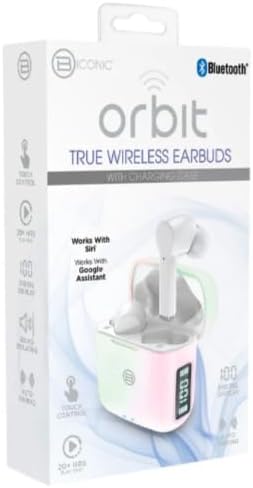
Foto 2: Retail packaging for the BYTECH Orbit True Wireless Earbuds. The box highlights key features such as Bluetooth connectivity, touch control, 20+ hours of play, auto pairing, and compatibility with Siri and Google Assistant.
Melite
1. Ịchaji ihe ntị na akpa
Before first use, fully charge the earbuds and the charging case. Place the earbuds into the charging case. The case is equipped with wireless charging capability. Connect the charging case to a power source using a compatible charging cable (not explicitly listed as included, please check your package) or place it on a wireless charging pad.
- The digital display on the charging case will indicate the battery level.
- Ensure the earbuds are properly seated in their slots for charging.
2. Pairing with Your Device (Bluetooth)
- Gbaa mbọ hụ na ebubo na ekwe ntị.
- Open the charging case. The earbuds will automatically enter pairing mode (indicated by flashing lights on the earbuds, if applicable).
- Na ekwentị gị ma ọ bụ ngwaọrụ Bluetooth nyere gị aka, gaa na ntọala Bluetooth.
- Gbanwuo Bluetooth.
- Chọọ maka new devices. You should see "BYTECH BC-AU-BE-146-WT" or a similar name appear in the list of available devices.
- Select the device name to connect. Once connected, a voice prompt will confirm the successful pairing, and the indicator lights on the earbuds will stop flashing.
- For subsequent uses, the earbuds will automatically connect to the last paired device when taken out of the case, provided Bluetooth is enabled on your device.
These earbuds support True Wireless Stereo (TWS) connectivity, meaning both earbuds connect to each other wirelessly to provide a stereo sound experience.
Na-arụ ọrụ Earbuds
The BYTECH TWS Earbuds feature intuitive touch controls for various functions. While specific touch gestures are not detailed in the product description, common functions typically include:
- Gwuo/kwụsịtụ: Otu mgbata na ntị ntị.
- Track na-esote: Pịa bọtịnụ ntị aka nri ugboro abụọ.
- Gara aga Track: Kpatụ ntị ugboro abụọ n'akụkụ aka ekpe.
- Azịza/Kwụsị Oku: Naanị otu ọpịpị na ntị ntị n'oge oku mbata.
- Jụ oku: Pịa ma jide otu ntị ntị maka sekọnd 2 n'oge oku mbata.
- Mee ka onye enyemaka olu rụọ ọrụ: Triple tap or press and hold (check specific model behavior) to activate Siri (for iOS devices) or Google Assistant (for Android devices).
- Njikwa olu: Some models allow volume adjustment via touch (e.g., tap and hold left for volume down, right for volume up). If not, adjust volume directly on your connected device.
Please refer to the quick start guide included in your packaging for precise touch control instructions specific to your BC-AU-BE-146-WT model.
Nlekọta
Nlekọta kwesịrị ekwesị na-eme ka ntị ntị gị dị ogologo ma rụọ ọrụ nke ọma.
- Nhicha: Regularly clean the earbuds and charging case with a soft, dry, lint-free cloth. Do not use abrasive cleaners, alcohol, or chemical solvents. Gently remove any earwax or debris from the earbud tips and speaker mesh using a small, soft brush or cotton swab.
- Nchekwa: When not in use, always store the earbuds in their charging case to protect them from dust, dirt, and physical damage. Store the case in a cool, dry place away from direct sunlight and extreme temperatures.
- Nlekọta batrị: Iji chekwaa ndụ batrị, zere iwepụ ike niile na ekweisi na ihe mkpuchi ahụ mgbe niile. Chaji ha mgbe niile, ọbụlagodi na ejighi ha ruo ogologo oge.
- Nguzogide mmiri: These earbuds are not specified as water-resistant. Avoid exposure to water, sweat, and high humidity to prevent damage.
Nchọpụta nsogbu
If you encounter issues with your BYTECH TWS Earbuds, try the following solutions:
- Igwe ntị anaghị ejikọta ya na ngwaọrụ:
- Gbaa mbọ hụ na ebubo na ekwe ntị wee pụọ na ikpe ahụ.
- Gbanyụọ ma gbanye Bluetooth na ngwaọrụ gị.
- Forget the device ("BYTECH BC-AU-BE-146-WT") from your device's Bluetooth settings and try pairing again.
- Hụ na ejikọghị ngwaọrụ ndị ọzọ na ekweisi.
- Naanị otu earbud na-arụ ọrụ:
- Tinyeghachi ntị ntị abụọ ahụ n'ime akpa chaja, mechie mkpuchi ahụ, chere sekọnd ole na ole, wee wepụ ha ọzọ.
- Gbaa mbọ hụ na akwụgoro ekwe ntị abụọ ahụ.
- Try resetting the earbuds (refer to quick start guide for specific reset procedure).
- Enweghị ụda ma ọ bụ obere olu:
- Lelee ọkwa olu dị na ma ngwaọrụ gị ejikọtara ma ekweisi.
- Gbaa mbọ hụ na ekwe ntị na-anọdụ ala nke ọma na ntị gị.
- Clean any debris from the earbud speaker mesh.
- Nsogbu ịchaji:
- Ensure the charging cable (if used) is securely connected and functional.
- If using wireless charging, ensure the case is correctly placed on the charging pad.
- Lelee maka ihe ọ bụla dị n'ọdụ chaja nke akpa ahụ.
Ọ bụrụ na nsogbu ka dị, biko kpọtụrụ nkwado ndị ahịa.
Nkọwapụta
| Njirimara | Nkọwapụta |
|---|---|
| Ụdị | BYTECH |
| Aha Nlereanya | BC-AU-BE-146-WT |
| Nọmba nlereanya | BC-AU-BE-146-WT |
| Teknụzụ Njikọta | Bluetooth 5.3 |
| Ụdị Ihe | In-Ear (Intraurales) |
| Agba | Ọcha |
| Ngwa gụnyere | Akpa nchaji ikuku |
| Onye nrụpụta | Biconic |
| ASIN | B0DPRCBT76 |
| Ụbọchị mbụ dị | Disemba 6, 2024 |
Akwụkwọ ikike na nkwado
For warranty information and customer support, please refer to the documentation included with your product packaging or visit the official BYTECH websaịtị. Usoro na ọnọdụ akwụkwọ ikike nwere ike ịdị iche site na mpaghara na onye na-ere ahịa.
Debe ihe akaebe nke ịzụrụ ihe maka akwụkwọ ikike ọ bụla.
Ask a question about this manual
Ask about setup, troubleshooting, compatibility, parts, safety, or missing instructions. Manuals+ will review the question and use this page’s manual context to help answer it.