
Okwu mmalite
This user manual provides detailed instructions for the setup, operation, and maintenance of your Anderic RRTR214D Ceiling Fan Remote Control. Designed as a direct replacement for various Harbor Breeze remote models, this remote offers comprehensive control over your ceiling fan's speed and lighting functions. Please read this manual thoroughly before use to ensure proper functionality and to maximize the lifespan of your device.
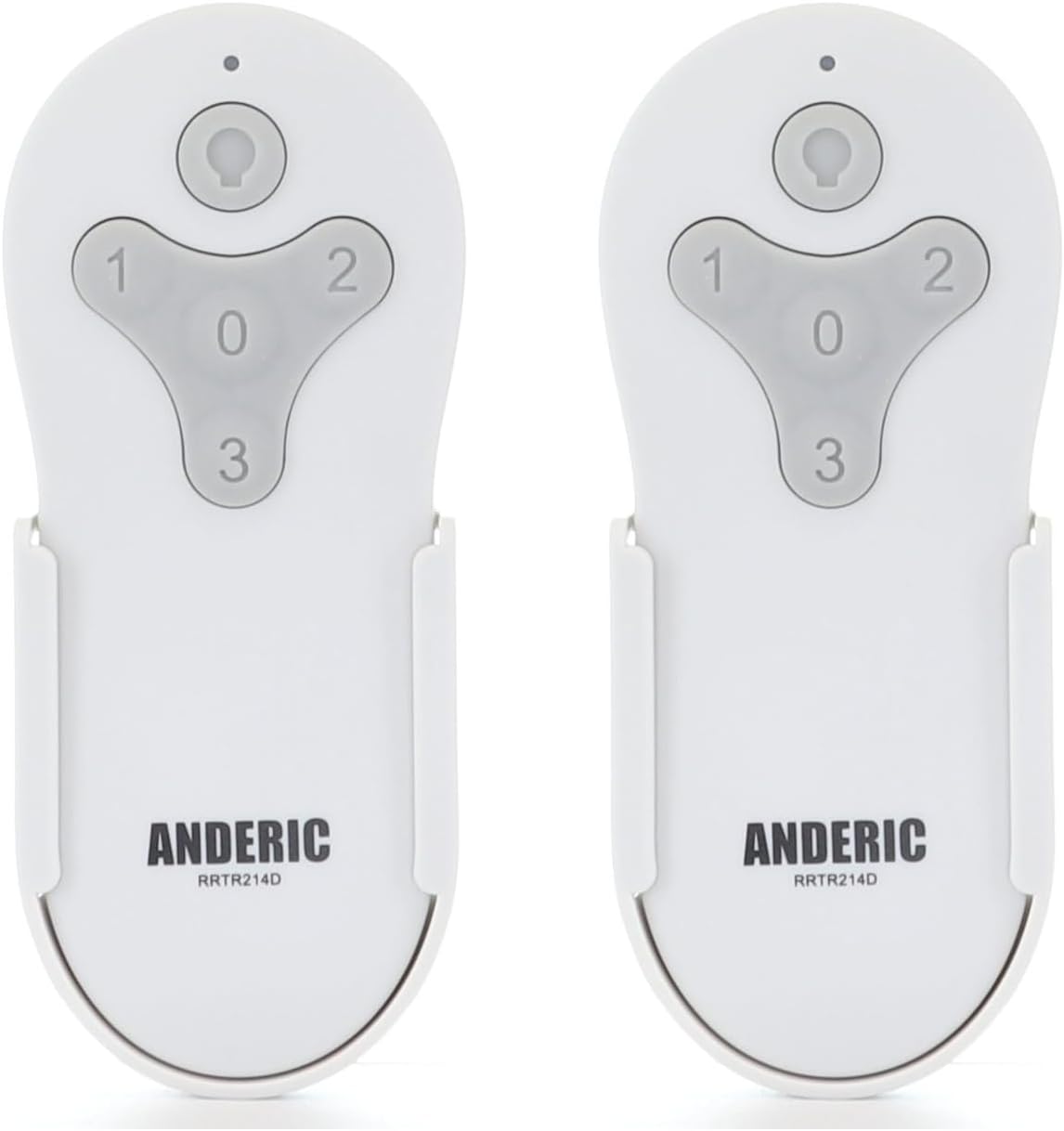
Figure 1: Two Anderic RRTR214D remote controls. These remotes are designed for ease of use and reliable performance with compatible ceiling fans.
Ngwaahịa gafereview na Atụmatụ
The Anderic RRTR214D remote control is engineered to provide seamless control for your ceiling fan. Its key features include:
- Ndochi ozugbo: Seamlessly replaces Harbor Breeze remote models A25-FA0138, KUJCE10311, TR214B, KUJCE10712, TR214A, and KUJCE10610.
- Njikọta na-enweghị mgbake: Designed for easy pairing with your current receiver, ensuring a hassle-free setup.
- Njikwa zuru oke: Offers complete control over fan speeds (high, medium, low, and off) and light functions (on/off and dimming).
- Akwadoro batrị: Uses a 23A 12-volt battery (not included) for long-lasting operation.
- Convenient Wall Mount: Includes a wall mount for easy installation and accessibility.

Figure 2: Remote control button functions. The remote features dedicated buttons for light control (on/off/dimming) and fan speeds (1 for low, 2 for medium, 3 for high, 0 for off).

Figure 3: Remote control dimensions. The compact design ensures it fits comfortably in hand and integrates well into your living space.
Ndakọrịta
The Anderic RRTR214D remote control is specifically designed to replace the following Harbor Breeze remote models. It is crucial that your existing ceiling fan receiver was originally supplied with one of these models for proper compatibility.
- A25-FA0138
- KUJCE10311
- TR214B
- KUJCE10712
- TR214A
- KUJCE10610
This remote cannot be paired with other ceiling fan receivers not originally supplied with these specific models.

Figure 4: Compatible Harbor Breeze models. This image illustrates the range of specific Harbor Breeze fan models that are compatible with the Anderic RRTR214D remote control.
Ntọala na nwụnye
Ntinye batrị
The Anderic RRTR214D remote control requires one 23A 12-volt battery (not included). Follow these steps to install the battery:
- Chọta mkpuchi mkpuchi batrị n'azụ nke njikwa anya.
- Slide the cover off in the direction indicated by the arrow (if present).
- Insert one 23A 12-volt battery, ensuring the positive (+) and negative (-) terminals align correctly with the markings inside the compartment.
- Weghachite mkpuchi nke batrị batrị n'ime ebe ruo mgbe ọ pịrị na nchekwa.

Figure 5: Battery installation. This diagram illustrates the correct orientation for inserting the 23A 12-volt battery into the remote control's battery compartment.
Ntuziaka ijikọ
To pair your new Anderic RRTR214D remote control with your ceiling fan receiver, follow these simple steps:
- Cycle power to the fan: Turn off the power to your ceiling fan at the wall switch or circuit breaker, wait for approximately 10 seconds, and then turn the power back on.
- Install battery in the remote: Ensure the 23A 12-volt battery is correctly installed in your remote control.
- Press and hold the "0" key: Within 30 seconds of restoring power to the fan, press and hold the "0" (fan off) button on the remote control for five seconds. The fan light should blink or the fan should respond, indicating successful pairing.
Mara: Only one remote can be paired to the same fan at a time. If you are replacing an old remote, ensure it is no longer in use or its pairing is cleared (if applicable) before pairing the new remote.
Nwụnye mgbidi mgbidi
The included wall mount provides a convenient storage solution for your remote control. To install the wall mount:
- Choose a suitable location on a wall, away from direct sunlight or heat sources.
- Use the provided screws (or appropriate hardware for your wall type) to secure the wall mount to the desired surface. Ensure it is level and firmly attached.
- Slide the remote control into the wall mount for easy access.

Figure 6: Wall mount installation. The wall mount helps keep your remote accessible and prevents it from being misplaced.
Ọrụ
Once paired, your Anderic RRTR214D remote control allows you to operate your ceiling fan and its light with ease.
- Njikwa ọsọ fan:
- Pịa "1" for Low fan speed.
- Pịa "2" for Medium fan speed.
- Pịa "3" for High fan speed.
- Pịa "0" to turn the fan Off.
- Njikwa ọkụ:
- Pịa Bọtịnụ ọkụ (bulb icon) to turn the light On or Off.
- To dim the light, press and hold the Bọtịnụ ọkụ. Release when the desired brightness is achieved.
Nlekọta
Proper maintenance will ensure the longevity and optimal performance of your remote control.
- Ngbanwe batrị: When the remote's range decreases or the fan/light response becomes inconsistent, it's time to replace the 23A 12-volt battery. Follow the battery installation steps in the "Setup and Installation" section.
- Nhicha: Clean the remote control with a soft, dry cloth. Do not use abrasive cleaners, solvents, or harsh chemicals, as these can damage the surface or internal components.
- Nchekwa: If the remote will not be used for an extended period, remove the battery to prevent leakage and potential damage. Store the remote in a cool, dry place.
Nchọpụta nsogbu
If you encounter issues with your Anderic RRTR214D remote control, please refer to the following common problems and solutions:
| Nsogbu | Ihe nwere ike ime | Ngwọta |
|---|---|---|
| Remote not responding to fan/light. |
|
|
| Fan operates but light does not. |
|
|
| Fan speeds are incorrect or inconsistent. |
|
|
Ọ bụrụ na nsogbu ahụ anọgide mgbe ị nwalechara ngwọta ndị a, biko kpọtụrụ ndị ahịa maka enyemaka ọzọ.
Nkọwapụta
| Nọmba nlereanya | RRTR214D-2PK |
| Akụkụ ngwaahịa | 1.7 x 3.9 x 1.8 sentimita asatọ |
| Ibu Ibu | 2.24 ounces |
| Ụdị batrị | 1 x 23A 12-volt (not included) |
| Agba | Ọcha |
| Onye nrụpụta | Dan's Electronics Etc., Inc. |
Akwụkwọ ikike na nkwado
For warranty information or technical support, please refer to the documentation provided with your purchase or visit the official Anderic website. You may also contact the manufacturer, Dan's Electronics Etc., Inc., for assistance.
For additional resources and product information, you can visit the Anderic Store on Amazon.