
Okwu mmalite
This manual provides essential information for the safe and efficient use of your Blackview BV7300 Rugged Smartphone. Please read this guide thoroughly before operating the device to ensure proper functionality and to understand its features.
Nwa ojiiview BV7300 is designed for durability and performance, featuring a robust construction, a large battery, and advanced camera capabilities, including night vision and powerful campọkụ ọkụ.
Ngwaahịa gafereview
Nwa ojiiview BV7300 is a rugged smartphone built to withstand challenging environments. It features a 6.67-inch HD+ IPS display, a powerful processor, and a triple camera system.

Foto 1: N'ihu na azụ view nke ndị ojiiview BV7300 Rugged Smartphone, highlighting its robust design and camera module.
Akụkụ Ahụ
- Ngosipụta: 6.67-inch HD+ IPS screen with 90Hz refresh rate.
- Igwefoto: 50MP main rear camera, 20MP night vision camera, 32MP front camera.
- Camping Lights: Two 800 lumen LED camping lights located on the rear.
- ọdụ ụgbọ mmiri: Ọdụ USB Type-C maka ịchaji na nnyefe data.
- Bọtịnụ: Power button, volume buttons, customizable function button.
- Oghere kaadi SIM: Dual SIM support.
- Ndị na-ekwu okwu: Dual box speakers.
Melite
1. Ịtinye kaadị SIM na kaadị MicroSD
- Chọta tray kaadị SIM n'akụkụ ngwaọrụ ahụ.
- Jiri ngwaọrụ ejector SIM enyere ka imepe traị.
- Carefully place your Nano-SIM cards and/or a MicroSD card (up to 2TB) into the designated slots. Ensure correct orientation.
- Jiri nwayọ pịa tray ahụ n'ime ngwaọrụ ahụ ruo mgbe ọ ga-adị ọcha.
2. Ike mbido na ịtọlite
- Pịa ma jide bọtịnụ Ike ruo mgbe Ojiiview akara ngosi pụtara.
- Soro mkpali na ihuenyo ka ịhọrọ asụsụ gị, jikọọ na Wi-Fi, wee guzobe akaụntụ Google gị.
- Configure security settings, including facial recognition or a PIN/pattern/password.
3. Ịchaji ngwaọrụ
Connect the USB Type-C cable to the phone's charging port and the other end to a compatible power adapter. The device supports fast charging. A full charge of the 15000mAh battery provides extended usage.
Ntuziaka ọrụ
Ngosipụta na igodo

Figure 2: Details of the 6.67-inch HD+ IPS display, showing resolution, brightness, screen-to-body ratio, panel type, and dynamic refresh rate.
The 6.67-inch HD+ IPS display offers a resolution of 1280x720 pixels and a 90Hz dynamic refresh rate for smooth visuals. Navigate the Android 14 operating system using touch gestures.
Ọrụ igwefoto
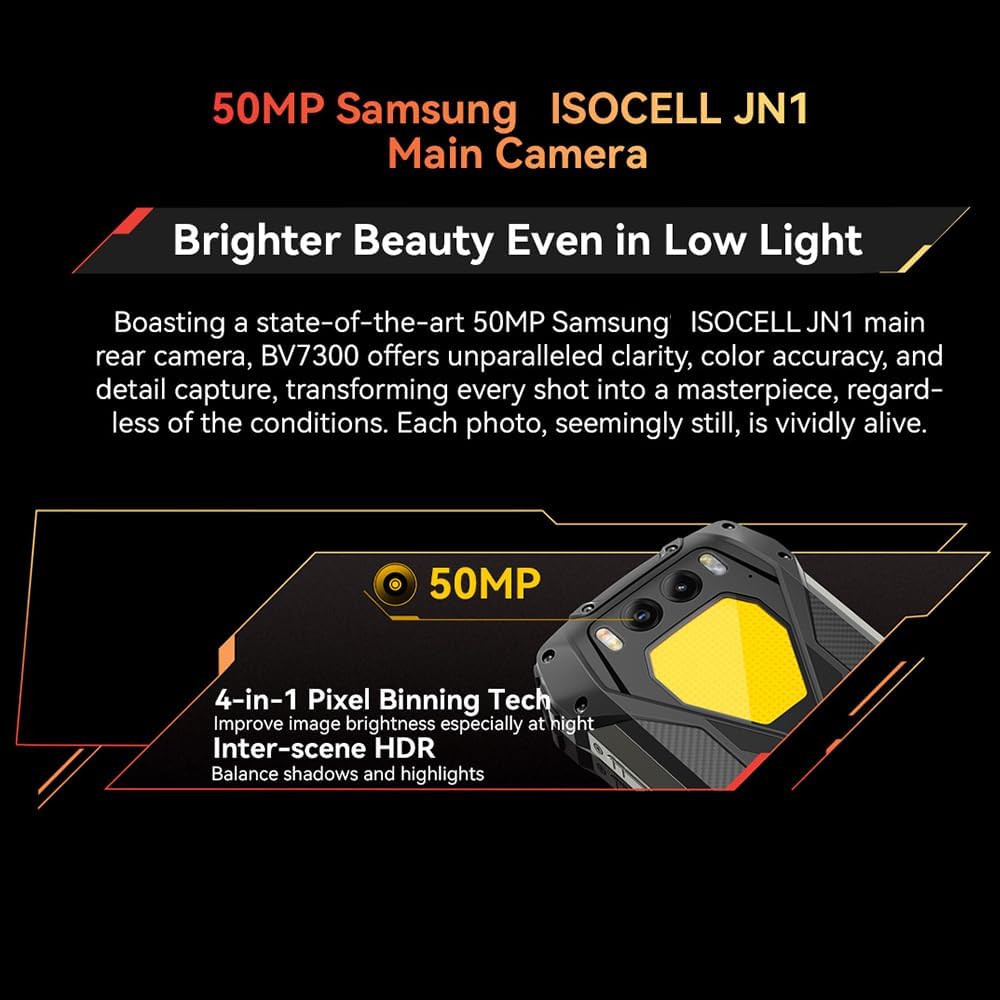
Figure 3: Close-up of the Blackview BV7300's rear camera module, featuring the 50MP main camera.

Figure 4: Diagram illustrating the Blackview BV7300's triple camera setup, including 32MP front, 50MP main, and 20MP night vision cameras.
- Main Camera (50MP): For high-resolution photos and 1080p video recording. Features 4-in-1 Pixel Binning and Inter-scene HDR for improved image quality in various lighting conditions.
- Night Vision Camera (20MP): Activates in low-light or complete darkness to capture clear images. Access this mode through the camera application.
- Igwefoto n'ihu (32MP): For selfies and video calls, includes beauty mode features.
- To switch between camera modes, open the Camera app and select the desired option (Photo, Video, Night Vision, Portrait, etc.).
Abụọ Campọkụ ọkụ
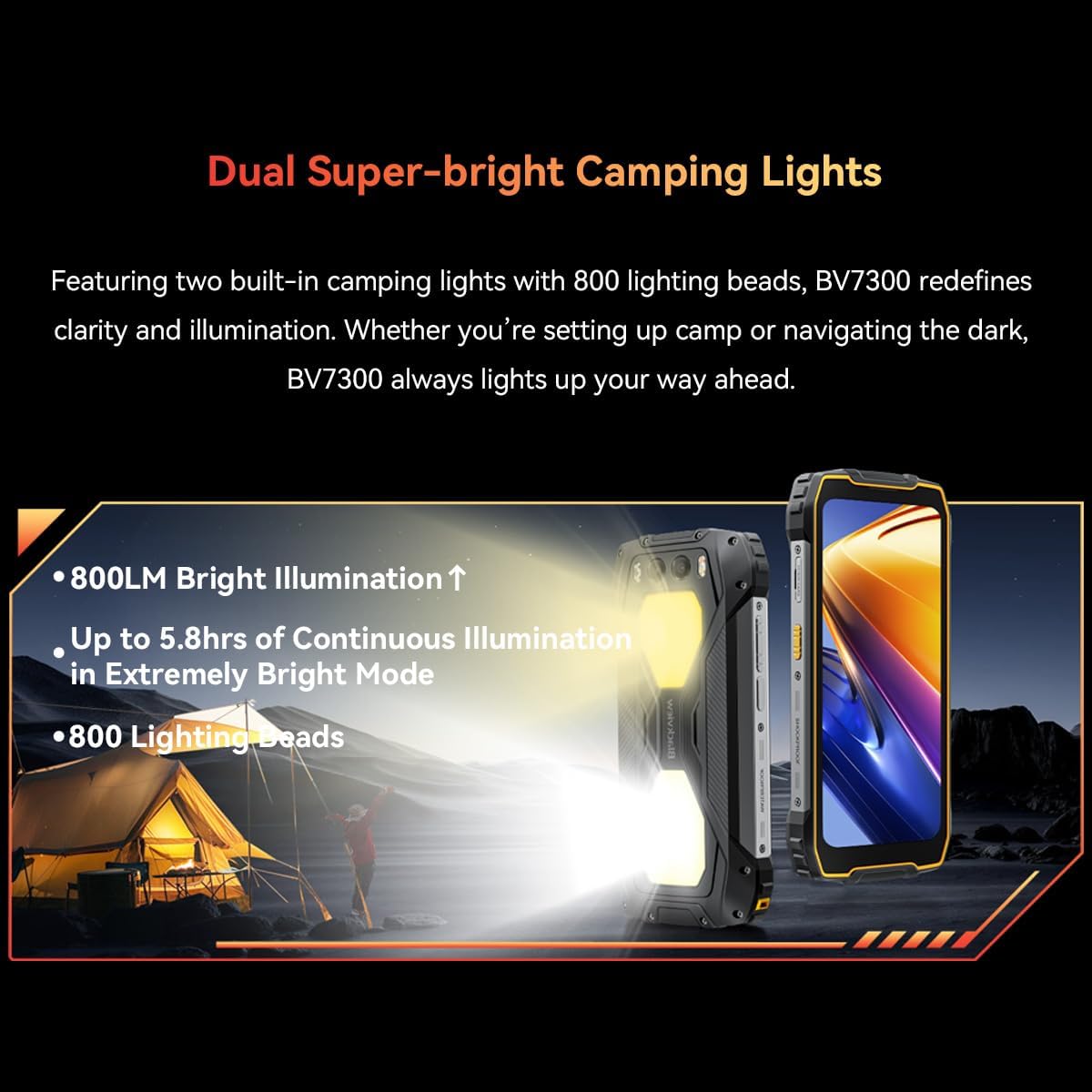
Figure 5: The Blackview BV7300 with its dual 800 lumen camping lights activated, providing strong illumination.

Figure 6: Illustration detailing the dual super-bright camping lights, highlighting 800LM brightness, up to 5.8 hours of continuous illumination in extremely bright mode, and 800 lighting beads.
The BV7300 features two powerful 800 lumen LED camping lights on its rear. These lights offer three lighting modes and three brightness levels. To activate and adjust the lights, use the dedicated function button or access the quick settings panel.
Njikwa batrị

Ọgụgụ 7: Ime view nke ndị ojiiview BV7300 highlighting its 15000mAh battery and charging port.

Figure 8: Graphic showing estimated usage times for the 15000mAh battery: 18 hrs game, 16.5 hrs video, 28 hrs website, 56.5 hrs calling, 32.5 hrs music, 1368 hrs standby.
The BV7300 is equipped with a 15000mAh battery. For optimal battery life, use the provided charger and cable. The device supports OTG (On-The-Go) functionality, allowing it to act as a power bank to charge other devices.
Audio

Figure 9: Image depicting the Blackview BV7300 with sound waves emanating from its dual box speakers, illustrating its audio capabilities.
The device features dual box speakers for enhanced audio output. Adjust volume using the dedicated volume buttons on the side of the phone.
Nlekọta
- Nhicha: Jiri akwa dị nro na-enweghị lint hichaa ihuenyo na ahụ. Zere kemịkalụ siri ike.
- Nguzogide mmiri: The BV7300 is waterproof. Ensure all port covers are securely closed before exposing the device to water. Do not intentionally submerge the device beyond its rated depth and time limits.
- Mmelite ngwanrọ: Lelee ma wụnye mmelite sistemu oge niile iji hụ na arụmọrụ na nchekwa kacha mma.
- Njikwa nchekwa: Na-ekpochapụ oge ụfọdụ na-adịghị mkpa files and applications to maintain sufficient storage space. The device supports up to 2TB TF expansion.
Nchọpụta nsogbu
| Nsogbu | Ngwọta |
|---|---|
| Ngwaọrụ anaghị agbanwu ọkụ. | Ensure the battery is charged. Connect the device to a charger for at least 30 minutes. If it still doesn't power on, perform a forced restart by holding the Power button for 10-15 seconds. |
| Mgbama netwọkụ adịghị mma. | Check if SIM cards are correctly inserted. Ensure you are in an area with network coverage. Restart the device. |
| Ngwa na-adị nwayọ ma ọ bụ na-ada ada. | Close background applications. Clear app cache. Ensure sufficient storage space is available. Restart the device. |
| Batrị na-agbapụ ngwa ngwa. | Reduce screen brightness. Disable unused features like Wi-Fi, Bluetooth, GPS. Close power-intensive applications. Check for background app activity. |
| Camping lights not working. | Ensure the battery has sufficient charge. Check settings or dedicated button for activation. |
Nkọwapụta
| Njirimara | Nkọwa |
|---|---|
| Aha Nlereanya | BV7300 |
| Sistemụ nrụọrụ | Android 14 |
| Nhazi | MediaTek Kompanio 800T Octa Core, 2 GHz |
| RAM | 18 GB (6GB fixed + 12GB virtual expansion) |
| Nchekwa nke ime | 256 GB |
| Nchekwa enwere ike ịgbasa | Ruo 2 TB site na kaadị MicroSD |
| Ngosipụta nha | 6.67 sentimita asatọ |
| Ngosipụta mkpebi | 1280x720 (HD+), 263 PPI |
| Ọnụego ume ọhụrụ | 90 Hz Dynamic |
| Igwefoto azụ | 50 MP (Samsung ISOCELL JN1) |
| Ọhụụ abalị Igwefoto | 20 MP (Sony IMX376) |
| Igwefoto ihu | 32 MP |
| Ike batrị | 15000 mAh |
| Ịchaji | Type-C, Fast Charging, OTG support |
| Njikọta | 4G, Dual SIM, GPS, NFC, USB |
| Atụmatụ pụrụ iche | Dual 800LM Camping Lights, Stereo Speakers, Rugged Construction, Waterproof, Facial Recognition |
| Akụkụ | 186 x 85 x 24 mm |
| Ibu | 528 g |
Akwụkwọ ikike na nkwado
Nwa ojiiview BV7300 comes with a 24-month warranty in Europe. For warranty claims or technical support, please contact Blackview customer service or the retailer from whom you purchased the device. Keep your proof of purchase for warranty validation.
For further assistance, visit the official Blackview websaịtị ma ọ bụ lee ozi kọntaktị enyere mgbe ị zụtara ya.