
Okwu mmalite
Thank you for choosing the SWOFY D26 MP3 Player. This device combines a high-capacity music player with the versatility of an Android 13.0 system, featuring Bluetooth and Wi-Fi connectivity, a 4.7-inch HD touchscreen, and support for various streaming applications. This manual will guide you through the setup, operation, maintenance, and troubleshooting of your new device to ensure an optimal user experience.
Kedu ihe dị na Igbe ahụ
Biko lelee ihe dị n'ime ngwugwu ahụ nke ọma. Ọ bụrụ na ihe ọ bụla efuo ma ọ bụ mebie, kpọtụrụ ndị ọrụ nkwado ndị ahịa.
- SWOFY D26 MP3 Player (x1)
- USB-C eriri USB (x1)
- 64GB SD Card (x1)
- Wired Headphones (x1)
- Akpa nchekwa (x1)
- Akwụkwọ ntuziaka onye ọrụ (x1)

Image: All components included in the SWOFY D26 MP3 Player package.
Ngwaọrụ agwụlaview
The SWOFY D26 features a sleek design with a responsive touchscreen and essential physical controls.

Foto: N'ihu view of the SWOFY D26 MP3 Player.
Akụkụ ndị bụ isi:
- 4.7-inch HD Touchscreen: For intuitive navigation and media viewing.
- Bọtịnụ ike: Located on the side for turning the device on/off and screen lock.
- Bọtịnụ olu: Hazie mmepụta ọdịyo.
- Ọdụ USB-C: Maka ịchaji na ịnyefe data.
- Jack ekweisi 3.5mm: Maka mmepụta ọdịyo ejiri waya rụọ.
- Oghere Kaadị MicroSD: For memory expansion.
- Ọkà okwu agbakwunyere: For audio playback without headphones.
Melite
1. Ịchaji ngwaọrụ
Before first use, fully charge the MP3 player. Connect the provided USB-C cable to the device's USB-C port and the other end to a compatible USB power adapter (not included) or a computer's USB port. The charging indicator will show the charging status.
2. Gbanyụọ / gbanyụọ
- Iji gbanye: Pịa ma jide bọtịnụ ike ruo mgbe ihuenyo gbanye ọkụ.
- Iji gbanyụọ: Press and hold the Power button, then select "Power Off" from the options on the screen.
- Iji kpọchie/kpọghee ihuenyo: Jiri nwayọ pịa bọtịnụ Ike.
3. Mbido Mbido
Ozugbo agbanyere ya na mbụ, soro ntuziaka ndị dị na ihuenyo iji:
- Họrọ asụsụ ọkacha mmasị gị.
- Connect to a Wi-Fi network for internet access and app downloads.
- Tọọ ụbọchị na oge.
4. Ịtinye kaadị SD
The device comes with 32GB of internal ROM and includes a 64GB SD card, providing a total of 96GB storage. It supports expansion up to 1TB via a microSD card.
- Chọta oghere kaadị microSD n'akụkụ ngwaọrụ ahụ.
- Jiri nwayọ tinye kaadị microSD n'ime oghere ahụ ka kọntaktị ọlaedo ahụ chee ihu ala ruo mgbe ọ pịa ebe ọ dị.
- Iji wepụ, gbanye kaadị ahụ ntakịrị ruo mgbe ọ pụtara.
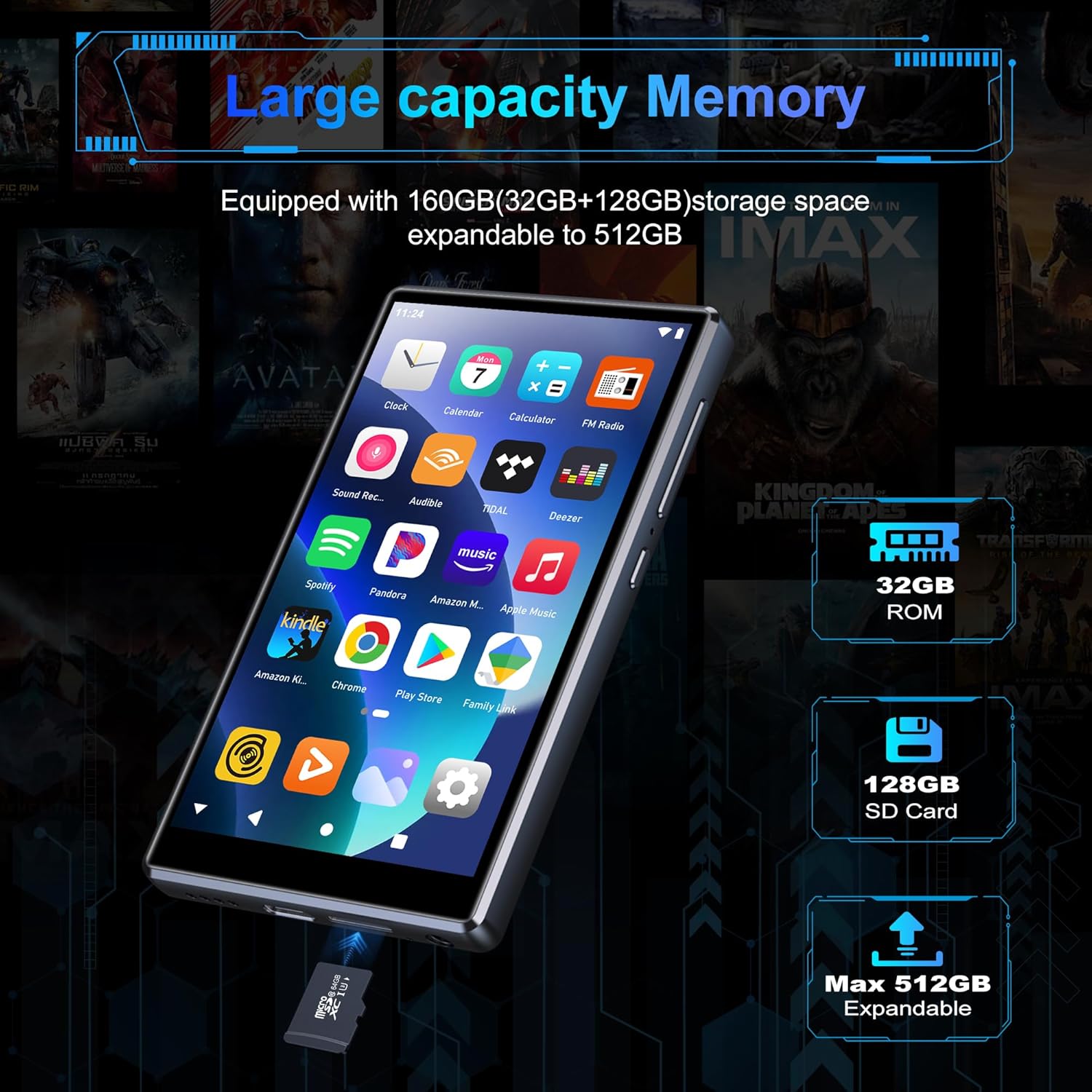
Image: Inserting an SD card for memory expansion.
Ntuziaka ọrụ
1. Nsoro ụzọ
The SWOFY D26 operates like a standard Android device. Use touch gestures (tap, swipe, pinch) to navigate menus, open apps, and control media playback.
2. Ijikọ na Wi-Fi
- Gaa na Ntọala > Netwọk & ịntanetị > Wi-Fi.
- Gbanwee Wi-Fi On.
- Họrọ netwọk ịchọrọ site na ndepụta ahụ wee tinye paswọọdụ ma ọ bụrụ na ịchọrọ.
- The device supports dual-band Wi-Fi (2.4GHz and 5GHz) for stable connections.
3. Njikọ Bluetooth
Connect your SWOFY D26 to Bluetooth headphones, speakers, or car stereo systems.
- Gaa na Ntọala > Ngwa ejikọrọ > Bluetooth.
- Gbanwee Bluetooth On.
- Ensure your Bluetooth accessory is in pairing mode.
- Họrọ ngwa mgbakwunye ahụ site na ndepụta ngwaọrụ dịnụ iji jikọọ.

Image: Bluetooth connectivity for audio playback.
4. Nghaghachi egwu
The device supports various audio formats including MP3, OGG, FLAC, AAC, WAV, WMA, and APE. You can play music stored locally or stream from pre-installed apps.
- Mpaghara Files: Use the pre-installed music player app to browse and play audio files stored on the device or SD card.
- Ngwa gụgharia: Access Spotify, Amazon Music, Deezer, Pandora, HIBY, and other streaming services via their respective apps.

Image: Enjoying music with the SWOFY D26 MP3 Player.
5. Nghaghachi vidiyo
The 4.7-inch HD screen supports 720p and 1280p video playback. Supported formats include AVI, MKV, RMVB, MP4, MPG, MOV, DAT, and TS.
- Use the pre-installed video player app to watch videos stored on the device or SD card.
- Download video streaming apps from the Play Store for online content.
6. Ngwa njikwa
The device comes with several popular apps pre-installed. You can download more apps via Wi-Fi from the Google Play Store or uninstall unnecessary ones.

Image: Pre-installed applications on the SWOFY D26.
- Wụnye ngwa: Open the Google Play Store app, search for your desired app, and tap "Install."
- Wepụ ngwa: Gaa na Ntọala > Ngwa, select the app, and tap "Uninstall."
7. Njikwa Nne na Nna
Utilize the parental control features to manage app access and screen time for children.
- Access parental control settings through the device's Ntọala menu.
- You can restrict app installations, remove pre-installed apps, set a reset lock, and control internet and music player usage duration.
8. Redio FM
The device includes a built-in FM radio. Connect wired headphones (acting as an antenna) to use this feature.
- Tinye ekweisi ekwe ntị.
- Open the FM Radio app.
- Nyochaa maka ọdụ ụgbọ mmiri dị.
Nlekọta
1. Nhicha
To clean the device, use a soft, dry, lint-free cloth. Avoid using harsh chemicals, cleaning solvents, or abrasive materials, as these can damage the screen or finish.
2. Nlekọta batrị
The SWOFY D26 is equipped with a 2500mAh lithium battery. To maximize battery life:
- Zere ịchaji batrị ugboro ugboro.
- Do not expose the device to extreme temperatures (hot or cold).
- Unplug the charger once the device is fully charged.
- Expected battery life: Up to 60 hours music playback, 10 hours video playback, 240 hours standby.

Foto: Ike batrị na oge eji eme atụmatụ.
3. Mmelite ngwanrọ
Periodically check for software updates to ensure optimal performance and access to new features. Connect to Wi-Fi and go to Ntọala > Sistemu > Mmelite sistemụ.
Nchọpụta nsogbu
If you encounter issues with your SWOFY D26 MP3 Player, refer to the following common solutions:
| Nsogbu | Ngwọta |
|---|---|
| Ngwaọrụ anaghị agbanwu ọkụ. | Ensure the device is charged. Connect to a charger for at least 30 minutes. If unresponsive, perform a hard reset by holding the power button for 10-15 seconds. |
| Nsogbu njikọ Wi-Fi. | Check if Wi-Fi is enabled in settings. Ensure the password is correct. Restart the device and your Wi-Fi router. Try connecting to a different Wi-Fi network. |
| Bluetooth pairing failure. | Ensure Bluetooth is enabled on both devices and the accessory is in pairing mode. Move devices closer. Restart both devices. |
| Ngwa na-akụ ma ọ bụ na-ajụ oyi. | Hichapụ cache na data n'ime ngwa ahụ Ntọala > Ngwa. Uninstall and reinstall the app. Ensure sufficient storage space is available. |
| Ogo ọdịyo adịghị mma. | Check headphone connection or Bluetooth connection. Test with different headphones or speakers. Ensure audio files are not corrupted. Adjust equalizer settings if available. |
Nkọwapụta
| Njirimara | Nkọwa |
|---|---|
| Aha Nlereanya | D26 |
| Sistemụ nrụọrụ | Android 13.0 |
| Nhazi | 8-core processor |
| RAM | 4 GB |
| Nchekwa ime (ROM) | 32 GB |
| Kaadị SD gụnyere | 64 GB |
| Max. Expandable Storage | Up to 1 TB (via microSD card) |
| Nha ihuenyo | 4.7 sentimita asatọ |
| Mkpebi ihuenyo | 720 * 1280 (HD Touchscreen) |
| Njikọta | Dual-band Wi-Fi (2.4GHz & 5GHz), Bluetooth |
| Ike batrị | 2500 mAh |
| Ndụ batrị (Egwu) | Ruo awa iri abụọ |
| Ndụ Batrị (Vidiyo) | Ruo awa iri abụọ |
| Ụdị ọdịyo akwadoro | MP3, OGG, FLAC, AAC, WAV, WMA, adaka |
| Ụdị vidiyo akwadoro | AVI, MKV, RMVB, MP4, MPG, MOV, DAT, TS |
| Atụmatụ pụrụ iche | Built-in Speaker, FM Radio, Parental Controls |
| Agba | Nwa |
| Akụkụ (L x W x H) | 11.9 x 6.7 x 1 cm |
| Ibu | 150 grams |

Image: Internal processor and RAM details.
Akwụkwọ ikike na nkwado
The SWOFY D26 MP3 Player comes with a standard manufacturer's warranty. For specific warranty terms and conditions, please refer to the warranty card included in your package or contact SWOFY customer support.
For technical support, troubleshooting assistance, or any product-related inquiries, please visit the official SWOFY website or contact their customer service department. Contact information can typically be found on the product packaging or the SWOFY brand store page.
SWOFY Brand Store: Visit SWOFY Store on Amazon