
Okwu mmalite
Thank you for choosing the TECKNET TK-MS017 Ergonomic Wireless Vertical Mouse. This manual provides detailed instructions for setting up, operating, maintaining, and troubleshooting your new mouse. Designed for comfort and efficiency, this vertical mouse helps reduce wrist strain during prolonged use.

The TECKNET Ergonomic Vertical Mouse, designed for comfortable use.
Njirimara ngwaahịa
- Nhazi Ergonomic Vertical: Mimics a natural handshake posture to reduce wrist and arm pressure, preventing discomfort from prolonged use.
- DPI nwere ike imeghari: 5 levels of DPI (800/1600/2400/3200/4800) for precise tracking and adaptable sensitivity.
- Pịa nkịtị: 99% noise reduction for a quiet working environment. (Forward/Backward buttons are not silent).
- 6 bọtịnụ: Includes standard left/right click, scroll wheel, DPI switch, and convenient forward/backward buttons for web igodo.
- Njikọ Ikuku 2.4G kwụsiri ike: Provides a reliable connection up to 10 meters with a plug-and-play USB receiver.
- Ogologo ndụ batrị: Features an independent power switch and automatic sleep function to conserve battery, offering up to 24 months of use.
- Ndakọrịta sara mbara: Supports Windows 11/10/8/7/XP, Mac OS X10.4, Chrome OS, and Linux.

Comparison of vertical ergonomic grip and traditional mouse grip, highlighting reduced wrist tension with the vertical design.
Ntuziaka nhazi
- Wụnye batrị:
Locate the battery compartment on the underside of the mouse. Open the cover and insert two AA batteries (not included), ensuring correct polarity. Close the battery cover securely.

The underside of the mouse, illustrating the battery compartment and the storage slot for the USB receiver.
- Jikọọ eriri USB:
Remove the USB receiver from its storage slot next to the battery compartment. Plug the receiver into an available USB port on your computer (PC, laptop, Mac, Chromebook, or tablet).
- Ike Na:
Flip the ON/OFF switch on the bottom of the mouse to the "ON" position. The mouse should automatically connect to your device. No additional drivers are typically required for most operating systems.
Ntuziaka ọrụ
Ọrụ bọtịnụ
- Pịa aka ekpe: Nhọrọ na mmalite ọkọlọtọ.
- Pịa aka nri: Na-emepe menu ihe ndị dị n'ime ya.
- Mpempe akwụkwọ mpịakọta: Akwụkwọ mpịakọta na web pages vertically. Can also be pressed for middle-click functionality.
- Bọtịnụ Mgbanwe DPI: Located near the scroll wheel. Press to cycle through DPI settings (800/1600/2400/3200/4800). The red indicator light will flash to confirm the change.
- Bọtịnụ mbugharị: Na-aga n'ihu web ihe nchọgharị ma ọ bụ file explorers. (Not supported on Mac OS).
- Bọtịnụ azụ: Na-agagharị azụ n'ime web ihe nchọgharị ma ọ bụ file explorers. (Not supported on Mac OS).
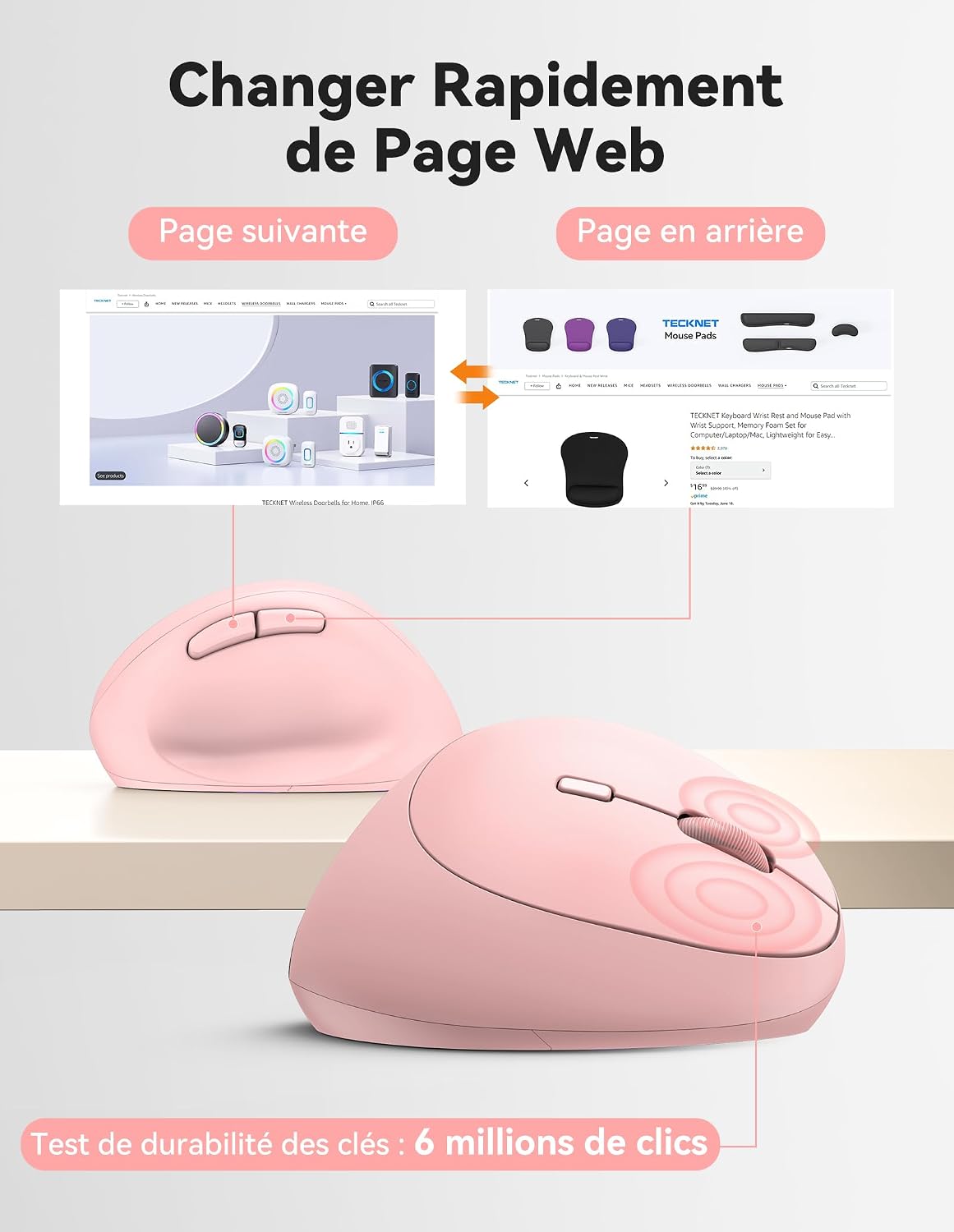
Diagram illustrating the location and function of each button on the TECKNET vertical mouse.
Mmezi DPI
The mouse offers 5 adjustable DPI levels to suit various tasks and preferences. Press the DPI switch button to change the cursor speed. The red indicator light will flash a corresponding number of times to indicate the current DPI setting:
- Flash X1: 800 DPI (Web Navigation)
- Flash X2: 1600 DPI (Excel Editing)
- Flash X3: 2400 DPI (Video Editing)
- Flash X4: 3200 DPI (Photoshop)
- Flash X5: 4800 DPI (Gaming Track)

Visual representation of the 5 adjustable DPI levels for different usage scenarios.
Ụdị Nchekwa Ike
To conserve battery life, the mouse will automatically enter sleep mode after 8 minutes of inactivity. To wake it up, simply move the mouse or click any button.
Nlekọta
- Nhicha: Jiri ákwà dị nro ma kpọọ nkụ hichaa òké ahụ. Zere iji kemịkalụ siri ike ma ọ bụ ihe ndị na-emebi ihe.
- Ngbanwe batrị: When the mouse performance degrades or the cursor becomes erratic, it's time to replace the batteries. Ensure you use fresh AA batteries and dispose of old batteries responsibly.
- Nchekwa: When not in use for extended periods, turn off the mouse using the ON/OFF switch to further conserve battery life. Store the USB receiver inside the mouse's battery compartment to prevent loss.
Nchọpụta nsogbu
- Òké anaghị aza:
- Gbaa mbọ hụ na agbanyụrụ òké ahụ.
- Lelee ma arụnyere batrị nke ọma ma nwee ụgwọ zuru oke. Dochie ma ọ dị mkpa.
- Gbaa mbọ hụ na etinyere eriri USB n'ọdụ ụgbọ mmiri USB na-arụ ọrụ nke ọma. Gbalịa ọdụ ụgbọ USB dị iche.
- Move the mouse closer to the USB receiver to rule out range issues.
- Malitegharịa ekwentị gị na kọmputa.
- Mmegharị kọsọ na-ezighi ezi:
- Hichaa ihe mmetụta anya na ala nke òké ahụ.
- Ensure you are using the mouse on a suitable surface. The mouse is designed to track on various surfaces like resin, wood, fabric, paper, and metal. Avoid highly reflective or transparent surfaces.
- Gbanwee ntọala DPI ka ọ bụrụ ọkwa dị ala ma ọ bụrụ na cursor nwere mmetụta nke ukwuu.
- Forward/Backward buttons not working on Mac:
These side buttons are not supported by Mac OS. This is a system limitation, not a mouse malfunction.
Nkọwapụta
| Ụdị | Teknụzụ |
| Nọmba nlereanya | TK-MS017 |
| Teknụzụ Njikọta | 2.4G Wireless (Radio-frequency) |
| Teknụzụ Nchọpụta Motion | Ngwa anya |
| Ọkwa DPI | 800, 1600, 2400, 3200, 4800 |
| Ọnụọgụ bọtịnụ | 6 |
| Ntuzi aka | Right |
| Akụkụ ngwaahịa | 10.5L x 6.5W centimeters |
| Ikuku iche | Ruo mita 10 |
| Isi Iyi Ike | Batrị 2 x AA (anaghị etinye ya) |
| Nkezi Ndụ batrị | Ruo ọnwa isii |
| Sistemu eji arụ ọrụ dakọtara | Windows 11/10/8/7/XP, macOS X10.4+, Chrome OS, Linux |
Akwụkwọ ikike na nkwado
TECKNET provides a 36-month support period for registered products. If you encounter any issues during the use of this product, please contact the professional TECKNET customer service team for assistance.
For more information and support, please visit the official TECKNET websaịtị ma ọ bụ kpọtụrụ ndị ahịa ha ozugbo.
Websaịtị: Ụlọ Ahịa TECKNET dị na Amazon