
1. Okwu mmalite
Daalụ maka ịzụrụasing the Max Power MPD437 Ultra PRO M2 Portable Bluetooth Speaker. This speaker is designed to provide high-quality audio in various environments, featuring water resistance and dust-proof capabilities for outdoor use. Please read this manual carefully before using the product to ensure proper operation and to maximize its lifespan.
Ozi nchekwa
- Ekpughela ọkà okwu ahụ n'ebe okpomọkụ dị oke elu ma ọ bụ anwụ kpọmkwem ruo ogologo oge.
- Zere idobe ma ọ bụ idobe ọkà okwu na mmetụta siri ike.
- Agbalịla ịgbasa ma ọ bụ gbanwee igwe okwu ahụ. Nke a ga-eme ka akwụkwọ ikike ahụ ghara ịdị irè.
- Debe ọkà okwu ka ọ ghara ịbanye na ngwaọrụ ahụike.
- Jiri naanị eriri nchaji enyere.
2. Ihe ngwugwu
Gbaa mbọ hụ na ihe niile dị na ngwugwu:
- Max Power MPD437 Ultra PRO M2 Portable Bluetooth Speaker
- Igwe ọkụ ọkụ
- eriri AUX
- Akwụkwọ ntuziaka (akwụkwọ a)
3. Ngwaahịa gafereview
Familiarize yourself with the components of your Max Power MPD437 Ultra PRO M2 speaker.
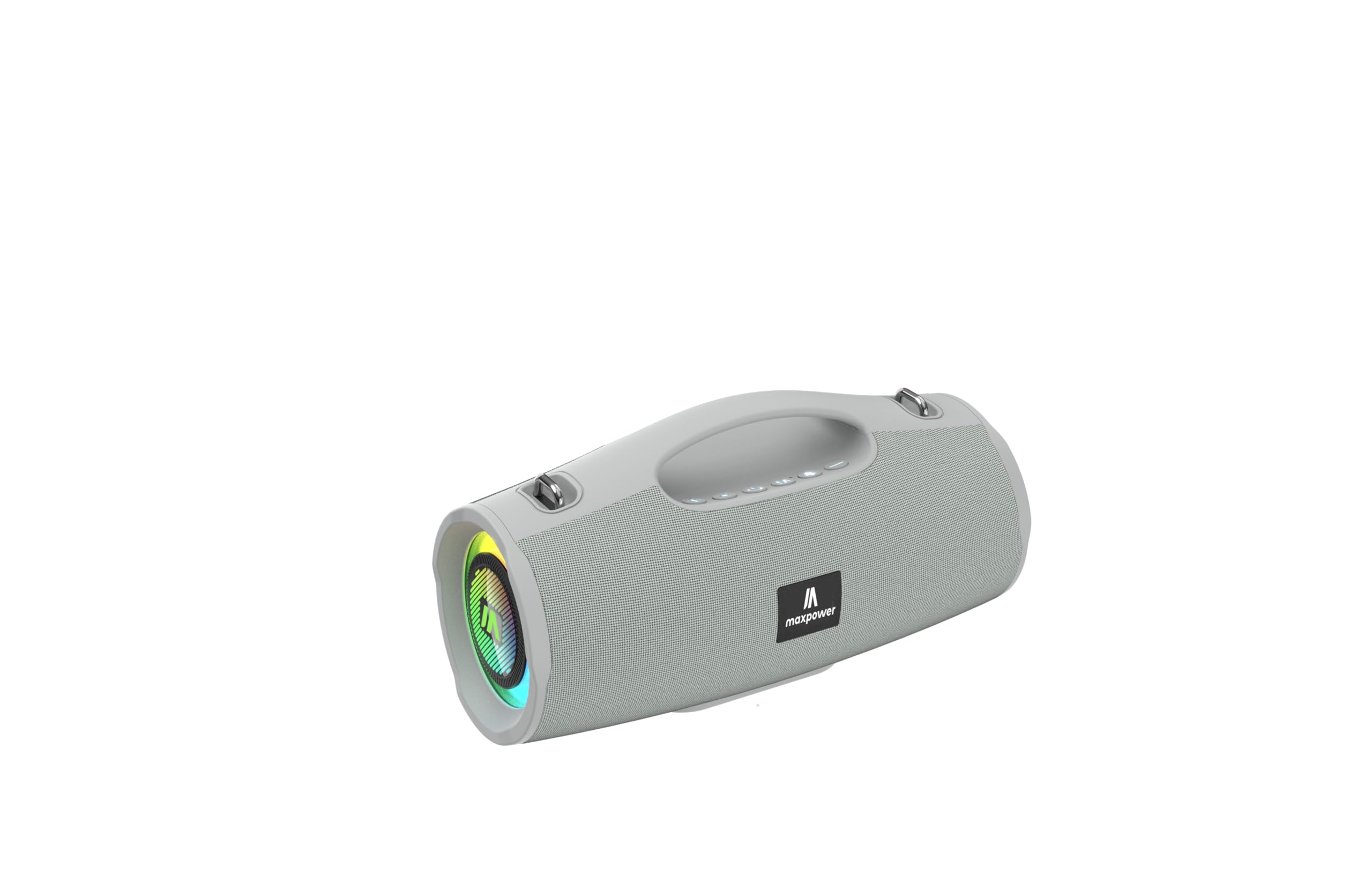
This image displays the Max Power MPD437 Ultra PRO M2 speaker. It features a robust grey casing, an integrated carrying handle at the top, and a series of control buttons. One end of the speaker is equipped with an LED light ring, indicating its operational status and adding visual effects.
Isi ihe:
- Integrated Carrying Handle: Maka ibugharị ngwa ngwa.
- bọtịnụ njikwa: For power, volume, playback, and mode selection.
- Grille ọkà okwu: Protects the speaker drivers.
- Mgbanaka ọkụ ọkụ: Provides visual effects and indicates status.
- Nchaji ọdụ ụgbọ mmiri: Maka ijikọ eriri ọkụ.
- Ntinye AUX: Maka njikọ ọdịyo wired.
4. Nhazi
4.1 Ịchaji ọkà okwu
- Connect the provided Power Cable to the charging port on the speaker.
- Plug the other end of the Power Cable into a suitable power source.
- Ihe ngosi LED ga-egosi ọkwa nchaji. Ụgwọ zuru ezu na-ewe ihe dị ka awa 3.
- Kwupuo eriri nchaji ozugbo chachara ya.
4.2 Njikọ Bluetooth
- Press and hold the Power button to turn on the speaker. The speaker will enter Bluetooth pairing mode, indicated by a flashing LED light.
- Na ngwaọrụ gị (smartphone, tabletị, laptọọpụ), gbanye Bluetooth wee chọọ ngwaọrụ dị.
- Select "MPD437 Ultra PRO M2" from the list of devices.
- Ozugbo ejikọtara ya, ọkà okwu ahụ ga-ewepụta nkwenye a na-anụ, ọkụ LED ahụ ga-akwụsịkwa ịgbawa.
- Ọkà okwu ahụ ga-anwa ijikọghachi na ngwaọrụ ejikọtara ikpeazụ ozugbo mgbe agbanyere ya.
4.3 Njikọ AUX
- Connect one end of the provided AUX Cable to the AUX input port on the speaker.
- Connect the other end of the AUX Cable to the audio output jack of your device.
- Ọkà okwu ga-agbanwe ozugbo gaa na ọnọdụ AUX.
5. Ntuziaka ọrụ
5.1 Gbanyụọ ma ọ bụ gbanyụọ
- Ike Na: Pịa ma jide bọtịnụ Ike maka sekọnd 2-3.
- Gbanyụọ: Pịa ma jide bọtịnụ Ike maka sekọnd 2-3.
5.2 Njikwa olu
- Dịkwuo Mpịakọta: Pịa bọtịnụ '+'.
- Belata Mpịakọta: Pịa bọtịnụ '-'.
5.3 Playback Control (Bluetooth/AUX Mode)
- Gwuo/kwụsịtụ: Pịa bọtịnụ Play/kwụsịtụ.
- Track na-esote: Pịa ma jide bọtịnụ '+'.
- Gara aga Track: Pịa ma jide bọtịnụ '-'.
5.4 Nhọrọ ọnọdụ
Press the 'M' (Mode) button to switch between Bluetooth, AUX, and FM Radio modes.
5.5 FM Redio arụ ọrụ
- Jiri bọtịnụ 'M' gbanwee gaa na ọnọdụ redio FM.
- Pịa bọtịnụ Play/Pause iji nyochaa ma chekwaa ọdụ FM dị na akpaghị aka.
- Jiri bọtịnụ '+' na '-' gaa n'etiti ọdụ echekwara.
Ụdị ọkụ ọkụ 5.6 LED
The speaker features vibrant LED lights. Press the dedicated LED button (if available, or a long press on a specific button) to cycle through different light modes or turn them off.
6. Nlekọta
6.1 Nhicha
- Jiri nwayọ hichaa ọkà okwu, damp akwa .
- Ejila ihe mkpocha abrasive, mmanya, ma ọ bụ ihe mgbaze kemịkal.
- Hụ na ọdụ ụgbọ mmiri niile kpọrọ nkụ tupu ịchaji ma ọ bụ jikọọ eriri.
6.2 Nchekwa
- Store the speaker in a cool, dry place away from direct sunlight.
- Ọ bụrụ na ị na-echekwa ya ruo ogologo oge, chajie batrị ahụ ruo ihe dịka 50% kwa ọnwa ole na ole iji chekwaa ahụike batrị.
7. Nchọpụta nsogbu
| Nsogbu | Ihe nwere ike ime | Ngwọta |
|---|---|---|
| Ọkà okwu anaghị agba ọkụ. | Batrị agwụla. | Jiri eriri ike enyere chajie ọkà okwu ahụ. |
| Enweghị ụda sitere na ọkà okwu. | Volume is too low or muted. Device not paired correctly. AUX cable not fully inserted. | Increase volume on both speaker and connected device. Re-pair Bluetooth. Ensure AUX cable is securely connected. |
| Enweghị ike ijikọ site na Bluetooth. | Speaker is not in pairing mode. Device Bluetooth is off. Speaker is too far from device. | Ensure speaker is in pairing mode (flashing LED). Turn on Bluetooth on your device. Move speaker closer to your device (within 35 feet). |
| Nnabata redio FM na-adịghị mma. | Mgbama adịghị ike na ọnọdụ dị ugbu a. | Move the speaker to a location with better signal reception. |
8. Nkọwapụta
| Aha Nlereanya | Ultra Pro M2 |
| Nọmba Nlereanya ihe | MPD437 |
| Ụdị | Ike kachasị |
| Ụdị Ọkà Okwu | Ọkà Okwu Nwere Ike |
| Teknụzụ Njikọta | Bluetooth, inyeaka |
| Teknụzụ nzikọrịta ozi ikuku | Bluetooth |
| Oke Bluetooth | 35 ụkwụ |
| Atụmatụ pụrụ iche | Dustproof, FM Radio, LED Light, Water Resistant |
| Ọkwa Nguzogide mmiri | Mmiri na-eguzogide |
| Isi Iyi Ike | Akwanyere batrị |
| Ike batrị | 3000 ndeamp Oge awa |
| Oge Nchaji | Awa 3 |
| Ọnọdụ mmepụta ọdịyo | Stereo |
| Signgbaàmà-na-Noise ruru | 85 dB |
| Usoro njikwa | Metụ aka |
| Akụkụ ngwaahịa | 4.5"D x 5"W x 9.9"H |
| Ibu Ibu | 2.65 pound |
| Ngwa gụnyere | AUX Cable, Power Cable |
| UPC | 785571466584 |
| GTIN | 785571466584 |
9. Akwụkwọ ikike na nkwado
9.1 Akwụkwọ ikike nwere oke
The Max Power MPD437 Ultra PRO M2 Portable Bluetooth Speaker comes with a limited warranty. Please refer to the warranty card included in your package or contact Max Power customer support for detailed warranty terms and conditions.
9.2 Nkwado ndị ahịa
For technical assistance, troubleshooting, or warranty inquiries, please contact Max Power customer support. Contact information can typically be found on the product packaging or the official Max Power websaịtị.