Okwu mmalite
This manual provides essential information for the safe operation, assembly, maintenance, and troubleshooting of your new Electric Children's Buggy Can-am Maverick. Please read this manual thoroughly before assembly and use to ensure proper function and safety.
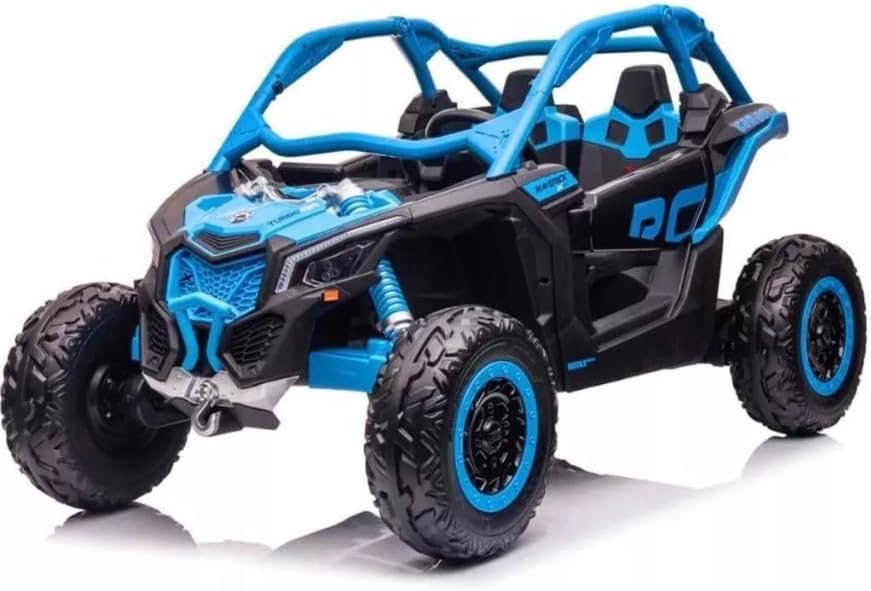
Image: A dynamic side view of the Electric Children's Buggy Can-am Maverick, showcasing its robust design and vibrant blue and black color scheme.
Ozi nchekwa dị mkpa
To reduce the risk of injury, adult supervision is required at all times. Never use this vehicle on roadways, near cars, near steep inclines or steps. Do not submerge the vehicle in water or other liquids.
- Always ensure the child is wearing appropriate safety gear, such as a helmet.
- Ensure all fasteners are securely tightened before each use.
- Only operate on flat, dry surfaces away from hazards.
- Chebe aka, ntutu isi na uwe ka akụkụ ahụ na-akpụ akpụ.
Ntọala na Mgbakọ
Assembly is required for this product. Please follow the steps below carefully.
Mwepu na nyocha izizi
Carefully remove all components from the packaging. Verify that all parts listed in the packing list are present and undamaged. If any parts are missing or damaged, do not proceed with assembly and contact customer support.
Nzọụkwụ Mgbakọ
- Nwụnye wheel: Attach the wheels to the axles, ensuring they are securely fastened with the provided hardware.
- Mgbakọ wheel akwọ ụgbọ: Connect the steering wheel to the steering column. Ensure it clicks into place or is secured with the designated screw.
- Ntinye oche: Place the seats into the designated slots and secure them. Ensure seatbelts are accessible and functional.
- Njikọ batrị: Connect the battery terminals. Refer to the battery compartment for specific instructions. Ensure the connection is firm.
- Ebo mbụ: Before first use, fully charge the battery for 8-12 hours. Do not overcharge.

Foto: N'azụ view of the electric buggy with the door open, highlighting the spacious interior and robust rear suspension components.
Ntuziaka ọrụ
Njikwa agafelaview

Image: The dashboard of the electric buggy, featuring the steering wheel, a digital speedometer display, and a multimedia screen.
- Bọtịnụ mmalite/Kwụsị: Located near the key slot, press to turn the vehicle on or off.
- Accelerator Pedal: Press to move forward. Release to brake.
- Ụgbọ ala: Turn left or right to steer the vehicle.
- Nhọrọ Gear: (If applicable) Switch between forward, neutral, and reverse.
- Multimedia Screen: Provides entertainment and vehicle information.
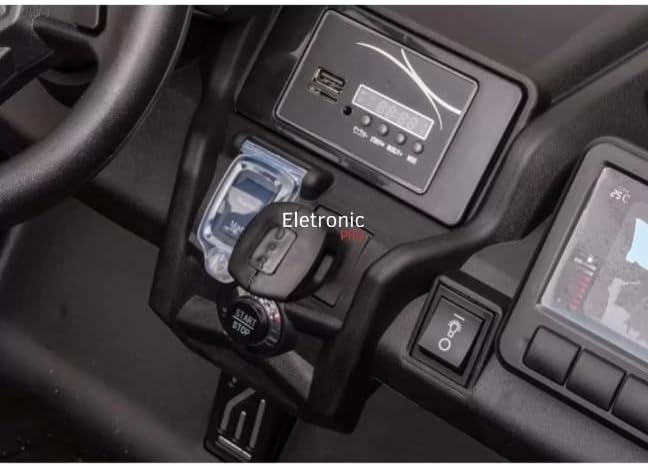
Foto: A nso nso view of the electric buggy's central console, showing the start/stop button and the key ignition slot.
Ịnya ụgbọ ala
- Ensure the child is seated properly and the seatbelt is fastened.
- Press the Start/Stop button to power on the vehicle.
- Gently press the accelerator pedal to move forward. Release the pedal to stop.
- Use the steering wheel to navigate.
- Always supervise the child during operation.

Image: The interior of the electric buggy, featuring two black, contoured seats equipped with safety seatbelts.
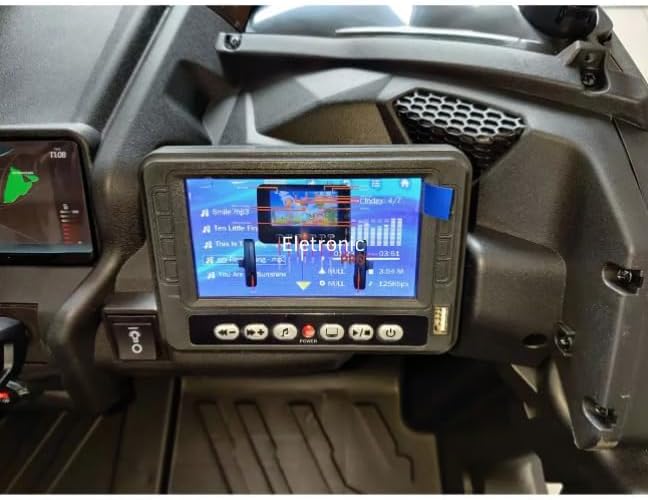
Image: A close-up of the electric buggy's multimedia screen, showing a music playback interface with song titles and an equalizer display.
Nlekọta
Nlekọta batrị
- Chajịa batrị ka emechara nke ọ bụla.
- Ekwela ka batrị pụta kpamkpam.
- If storing for extended periods, charge the battery once a month.
- Jiri chaja enyere naanị ya n'ụgbọala ahụ.
Nhicha na Nchekwa
- Jiri mgbasa ozi hichaa ụgbọala ahụamp akwa . Ejila ihe nhicha abrasive.
- Store the vehicle in a dry, cool place away from direct sunlight and moisture.
- Protect the vehicle from extreme temperatures.
Nchọpụta nsogbu
| Nsogbu | Ihe nwere ike ime | Ngwọta |
|---|---|---|
| Ụgbọ ala anaghị aga | Battery is low or disconnected; Loose wire connection; Blown fuse. | Charge battery; Check battery connections; Check fuse and replace if necessary. |
| Ụgbọ ala na-agba nwayọọ nwayọọ | Battery is low; Overloaded vehicle; Operating on rough terrain. | Recharge battery; Reduce load; Operate on smoother surfaces. |
| No sound from multimedia screen | Volume is too low; Audio cable disconnected. | Increase volume; Check audio connections. |
Nkọwapụta
- Ụdị: DK-CA001
- Akara: N'ozuzu
- Afọ akwadoro: Ọnwa 36 - afọ 8
- Akụrụngwa: Plastic, Rubber, Steel Alloy
- Akụkụ ngwaahịa: 145 x 84 x 79 cm
- Arọ ngwaahịa: 42 n'arọ
- Mgbakọ achọrọ: Ee
- Asambodo: Ọ metụtaghị
Akwụkwọ ikike na nkwado
This product comes with a return policy of 7 days from the date of purchase. For any issues, questions, or to claim warranty support, please contact the seller directly. Please retain your proof of purchase for any warranty claims.
Onye na-ere ahịa: ELETRONIC PRO LTDA


