1. Okwu mmalite
This manual provides important information regarding the installation, operation, and maintenance of your Generic Portable Carbon Monoxide Detector, Model JSN-997. This device is designed to detect carbon monoxide (CO) gas and alert you to potentially dangerous levels, helping to protect your family from the invisible threat of CO poisoning. Please read this manual thoroughly before using the detector and retain it for future reference.
2. Ozi nchekwa
Carbon monoxide (CO) is a colorless, odorless, and tasteless gas that can be fatal. This detector is designed to alert you to the presence of CO. However, it is not a substitute for proper maintenance of fuel-burning appliances or ventilation systems.
Ịdọ aka ná ntị nchekwa dị mkpa:
- Nkwekọrịta UL 2034: This carbon monoxide alarm is rigorously tested and certified to meet UL 2034 standards for reliable detection.
- Do Not Obstruct: Ensure the detector's vents are not blocked by furniture, curtains, or other objects.
- Nnwale: Do not use gas or any other substance to directly blow into the detector's sensing hole when testing. Use the designated test button.
- Azịza mkpu: If the alarm sounds, immediately move to fresh air, call emergency services, and do not re-enter the premises until it has been deemed safe by professionals.
Understanding CO Dangers:
Carbon monoxide exposure can lead to various health effects depending on concentration and exposure time. The detector is programmed to alarm at specific CO levels and durations:
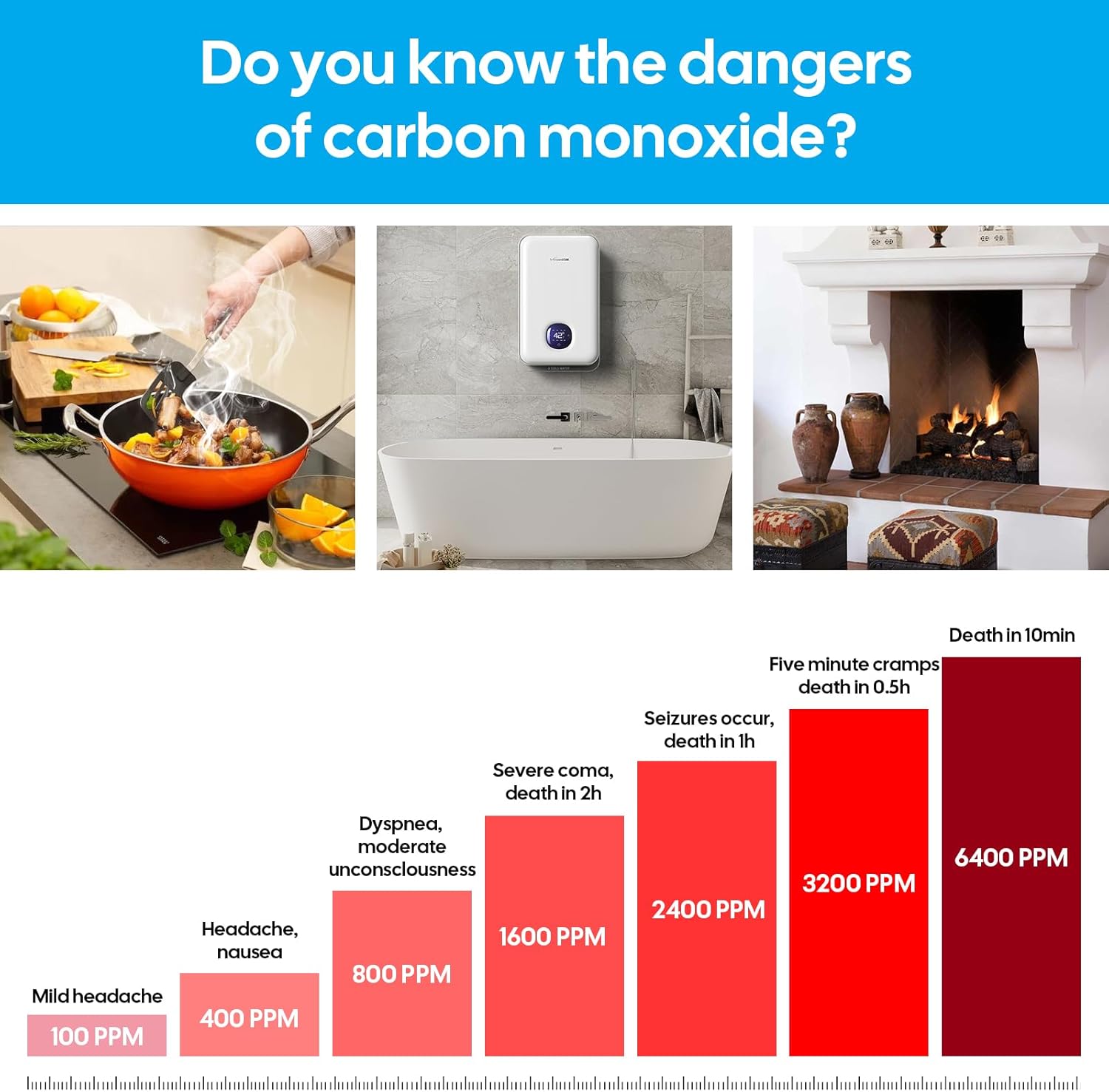
This image illustrates the CO concentration levels and the corresponding timeframes within which the alarm will be triggered.

This infographic highlights the potential health effects of carbon monoxide exposure at various concentrations.
3. Akụrụngwa Ngwaahịa
- Advanced Electrochemical Sensor: Ensures accurate and reliable CO level monitoring.
- Ngosipụta dijitalụ LCD: Shows real-time CO concentration (PPM) and temperature.
- Oti mkpu na-anụ ụda: 85-decibel alarm activates upon detection of dangerous CO levels.
- Mkpu anya: Flashing LED lights accompany the audible alarm.
- Bọtịnụ Nwale/Ntọgharị: Easy operation for testing the alarm and resetting it.
- Akwadoro batrị: Operates on 2 x 1.5V AAA batteries (not included), ensuring continuous monitoring even during power outages.
- Enwere ike ibugharị na kọmpat: Allows for flexible installation anywhere in your home or office.
- UL 2034 Certified: Meets high safety standards for carbon monoxide alarms.

This image highlights the display, test/reset button, and alarm light on the detector.
4. Ntọala na nwụnye
Nwụnye batrị:
- Unscrew the battery cover located on the back of the detector.
- Insert 2 x 1.5V AAA batteries (not included), ensuring correct polarity (+ and -).
- Dochie mkpuchi batrị ma chebe ya.

This image illustrates the battery installation process and the initial power-up sequence.
Ike izizi:
After battery installation, the detector will perform a self-test. The red, green, and yellow lights will flash in sequence, followed by a 33-second countdown. The display will then go out, indicating the device is ready for operation.
Nkwanye akwadoro:
For optimal protection, it is recommended to install a CO detector on each level of your home and in each bedroom. Consider placing detectors near sleeping areas and areas where fuel-burning appliances are located. The detector can be mounted on a wall or placed on a flat surface.
This image shows recommended top or side mounting and highlights key features.

This image demonstrates the versatility of placement to protect every corner of the home.
5. Ntuziaka ọrụ
Ọrụ nkịtị:
During normal operation, the detector continuously monitors CO levels. The LCD digital display will show the current CO concentration in parts per million (PPM) or temperature. A green light will flash approximately every 30 seconds to indicate proper functioning.
Na-anwale onye nchọpụta:
Regular testing ensures your detector is functioning correctly. Press the Test/Reset button firmly. The screen will light up, the red light will flash, and the alarm will sound. This confirms the alarm and display are working. The screen will then go off, and the green light will resume flashing every 30 seconds.

Press the test button to verify alarm functionality.
Ihe ngosi mkpu:
The detector uses visual indicators to communicate its status:
- Ọkụ ndụ ndụ: Indicates power and normal operation.
- Ìhè uhie: Indicates a CO alarm condition.
- Ìhè edo edo: Indicates a fault or low battery condition.

Visual indicators for Power, Alarm, and Fault status.
6. Nlekọta
Nnwale oge niile:
Test your CO detector weekly by pressing the Test/Reset button to ensure the alarm and display are functioning correctly.
Ngbanwe batrị:
When the batteries are low, the yellow fault light may illuminate, and the detector might emit a chirp. Replace both AAA batteries promptly following the instructions in Section 4.1.
Nhicha:
Gently clean the exterior of the detector with a soft, damp cloth. Do not use harsh chemicals or abrasive cleaners. Do not paint the detector, as this can interfere with the sensor's operation.
7. Nchọpụta nsogbu
| Nsogbu | Ihe nwere ike ime | Ngwọta |
|---|---|---|
| Mkpu na-ada ụda mgbe niile ma ọ bụ mgbe ụfọdụ. | Achọpụtara nnukwu mkpokọta CO2. | Immediately move to fresh air. Call emergency services. Do not re-enter until safe. |
| Yellow light flashes or detector chirps. | Batrị dị ala. | Replace both 1.5V AAA batteries. |
| Yellow light flashes continuously (no chirp). | Sensor fault or device malfunction. | Press the Test/Reset button. If the fault persists, the unit may need replacement. |
| Enweghị ngosi ma ọ bụ ọkụ. | Enweghị ike ma ọ bụ batrị nwụrụ anwụ. | Ensure batteries are correctly installed and fully charged. Replace if necessary. |
8. Nkọwapụta
- Nọmba nlereanya: JSN-997
- Akara: N'ozuzu
- Ụdị: CO Detector Alarm
- Isi mmalite ike: Batrị AAA 2 x 1.5V (anaghị etinye ya)
- Mkpu: Audible (85 dB)
- Ihe: High-grade ABS material
- Akụkụ ngwaahịa: 0.98"D x 2.36"W x 2.36"H
- Ibu ihe: Ihe dị ka 4.8 ounces (0.3 pound)
- Onye nrụpụta: Shenzhen Lidingfeng Technology CO., Ltd

This image provides the physical dimensions of the detector.
9. Akwụkwọ ikike na nkwado
Specific warranty information for this Generic product (Model JSN-997) is not provided in the product details. For warranty inquiries or technical support, please contact the seller or the manufacturer, Shenzhen Lidingfeng Technology CO., Ltd, directly through your purchase platform or their official contact channels.


