
Okwu mmalite
Thank you for choosing the COMFIER CF-9212BR3 Massage Chair. This manual provides essential information for the safe and effective operation, maintenance, and troubleshooting of your new massage chair. Please read it thoroughly before use and retain it for future reference.
Ntuziaka nchekwa dị mkpa
To reduce the risk of electric shock, burns, fire, or injury, always follow these basic precautions:
- Read all instructions before using the massage chair.
- Ejila mgbakwunye ndị nrụpụta akwadoghị.
- Ejila ngwaọrụ ahụ arụ ọrụ ma ọ bụrụ na eriri ma ọ bụ plọg mebiri emebi, ma ọ bụrụ na ọ naghị arụ ọrụ nke ọma, ma ọ bụ ma ọ bụrụ na ọ daa ma ọ bụ mebie.
- Debe eriri ahụ ka ọ ghara ikpo ọkụ.
- Ejila n'èzí.
- Arụla ọrụ ebe a na-eji ngwaahịa aerosol (spray) ma ọ bụ ebe a na-enye oxygen.
- Ka ịkwụpụ njikọ, tụgharịa njikwa niile gaa na ọnọdụ gbanyụọ, wee wepụ plọg ahụ na ntinye.
- Ezubere ngwa a maka iji naanị ụlọ.
- Consult a physician before using if you have any medical conditions.
Ihe ngwugwu
Mgbe ị na-ewepụ ihe ndị a, hụ na ihe niile edepụtara n'okpuru dị ma ghara imebi emebi:
- COMFIER CF-9212BR3 Massage Chair (fully assembled)
- Njikwa anya
- Ụdọ ọkụ
- Nkushi
- Akwụkwọ ntuziaka (akwụkwọ a)
Ntuziaka nhazi
1. Mwepu na ntinye
The COMFIER CF-9212BR3 Massage Chair comes fully assembled in one package, requiring no complex assembly. Carefully remove the chair from its packaging.

Image: Minimum Door Entrance Size
Ensure your doorway has a minimum width of 30 inches (76.2 cm) to allow for easy passage of the packaged massage chair.
Place the massage chair on a flat, stable surface. Ensure there is sufficient space around the chair for reclining and operation, especially for the zero-gravity function.
2. Njikọ ike
- Locate the power cord and connect it to the power inlet on the back or side of the massage chair.
- Tinye nsọtụ nke ọzọ nke eriri ọkụ n'ime oghere eletrik kwesịrị ekwesị.
- Ensure the power switch (if present) is in the OFF position before plugging in.
Ntuziaka ọrụ
1. Remote Control Overview
The massage chair is operated using the wired remote control. Familiarize yourself with the buttons and their functions.
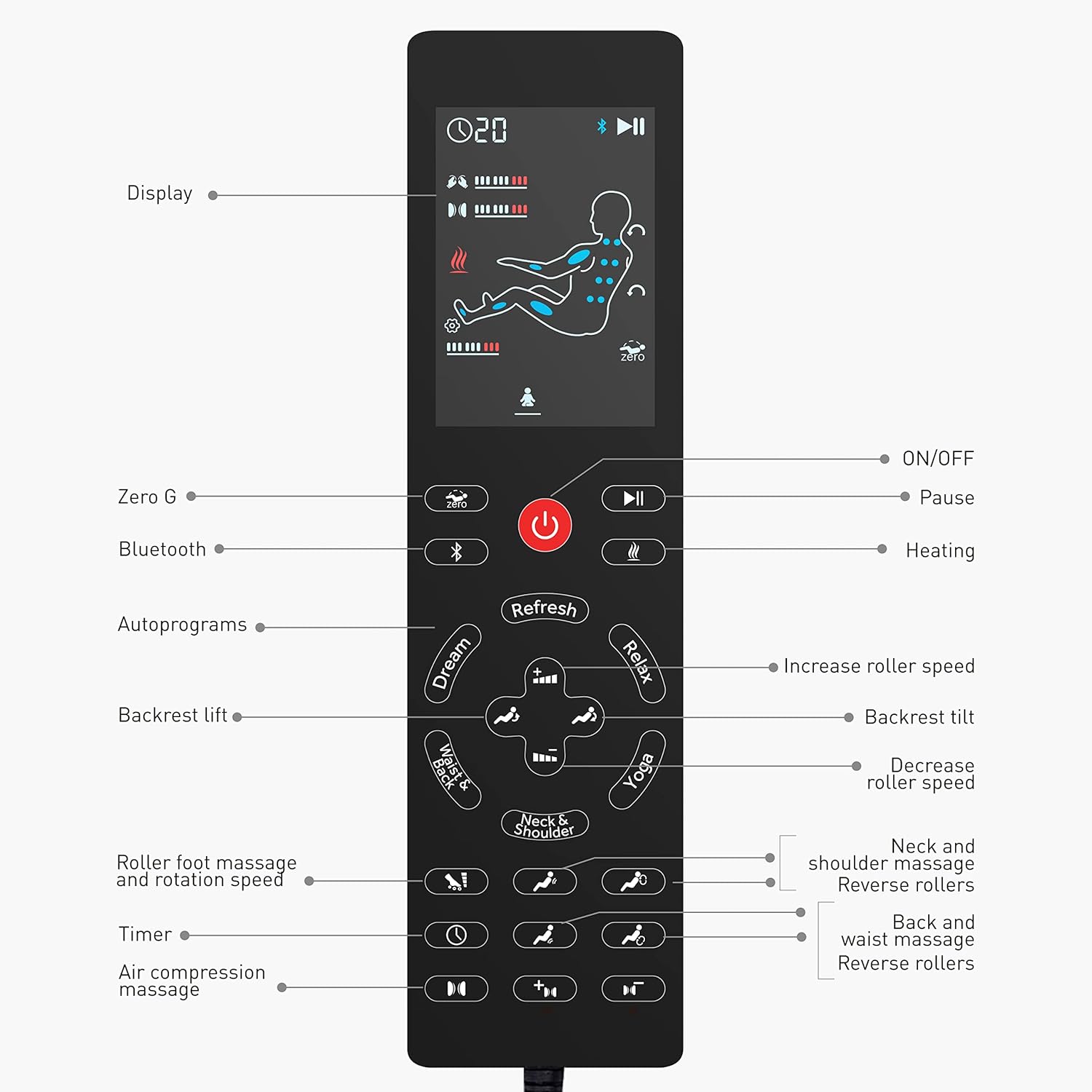
Image: Remote Control Layout
This image displays the remote control, highlighting the display, ON/OFF, Pause, Zero G, Bluetooth, Heating, Autoprograms (Dream, Refresh, Relax, Yoga, Neck & Shoulder, Waist & Back), Backrest lift/tilt, Roller speed adjustment, Roller foot massage, Timer, and Air compression massage controls.
- Ngosipụta: Shows current settings and massage status.
- Gbanyụọ/gbanyụọ: Powers the chair on or off.
- Kwụsị: Temporarily stops the massage program.
- Zero G: Activates and adjusts the zero gravity recline.
- Bluetooth: Activates Bluetooth pairing for audio.
- kpo oku: Turns the heat function on or off.
- Autoprograms: Selects from pre-set massage routines (Refresh, Relax, Yoga, Neck and Shoulders, Waist and Back, Dream).
- Backrest Lift/Tilt: Adjusts the recline angle of the backrest.
- Roller Speed: Increases or decreases the speed of the massage rollers.
- Roller Foot Massage: Controls the foot rolling massage.
- Ngụ oge: Sets the duration of the massage.
- Ịhịa aka n'ikuku: Adjusts settings for shoulder, arm, hip, calf, leg, and foot compression.
2. Basic Ọrụ
- Sit comfortably in the chair.
- Pịa Gbanye/ Gbanyụọ button on the remote control to power on the chair.
- Select your desired massage program or customize settings.
- To stop the massage, press the Gbanye/ Gbanyụọ bọtịnụ ọzọ.
3. Massage Features
Simulated Masseuse Hands (Shiatsu Kneading)
The chair features 8 shiatsu rollers and 14 massage balls designed to provide deep tissue kneading massage along your body's curve, targeting the neck, shoulders, back, and waist.

Image: Simulate Masseuse Hands
This illustration details the placement of 8 shiatsu rollers and 14 massage balls within the chair, demonstrating how they provide kneading massage to the neck, shoulders, back, waist, and foot rolling massage.
Adjust the shiatsu intensity and roller speed using the remote control to suit your preference.
Full Body Air Compression Massage
Airbags provide compression massage to your shoulders, arms, hips, calves, legs, and feet. There are 3 adjustable intensity levels.

Image: Full Body Air Compression Massage
This image shows the areas covered by the air compression massage, including shoulders, arms, thighs, calves, and feet, with an indicator for 3 intensity levels.
Use the Air Compression Massage buttons on the remote to select your desired intensity and target zones.
Ọrụ Okpomọkụ na-atọ ụtọ
The chair offers a soothing heat function for the back and seat, reaching a maximum temperature of 131°F (55°C).

Image: Soothing Heat for Back and Seat
This image illustrates the heat function, showing warmth applied to the lower back and seat area, with a note indicating a maximum temperature of 131°F.
Activate or deactivate the heat function using the kpo oku bọtịnụ na remote njikwa.
Ihe ndọghachi azụ efu efu
The chair features 3 levels of zero gravity recline, designed to elevate your legs slightly above your heart, reducing pressure and promoting circulation.

Image: Space-Capsule Zero Gravity
This diagram illustrates the three distinct zero gravity positions: Initial, Comfort, and Deep Zero-Gravity, with the recline angle specified as 126° ± 5°.
Pịa Zero G button on the remote to cycle through the zero gravity positions.
Ọkpọ egwu egwu Bluetooth
Connect your smartphone or other Bluetooth-enabled device to the massage chair to enjoy your favorite music during your massage session.

Image: Connect Your Phone For Music
This image shows a user enjoying music via Bluetooth connectivity on the massage chair, with a note about the footrest being freely retractable up to 6.3 inches.
- Pịa Bluetooth bọtịnụ na remote njikwa.
- On your device, search for "COMFIER Massage Chair" (or similar) in the Bluetooth settings and pair.
- Once connected, audio will play through the chair's speakers.
Extendable Footrest
The footrest can be extended up to 5 inches (or 6.3 inches as per image) to accommodate users of different heights, ensuring a comfortable fit for leg and foot massage.
Adjust the footrest manually by pushing or pulling it to the desired length.
Nlekọta
1. Nhicha
- Always unplug the chair before cleaning.
- Jiri ihe dị nro hichaa elu oche ahụ.amp akwa . Ejila ihe nchacha abrasive ma ọ bụ ihe mgbaze.
- For leather surfaces, use a specialized leather cleaner if necessary, following the product's instructions.
- Hụ na mmiri ọ bụla abanyeghị n'ime ihe ndị dị n'ime.
2. Nchekwa
- When not in use for extended periods, unplug the chair and store it in a cool, dry place.
- Avoid placing heavy objects on the chair.
Nchọpụta nsogbu
If you encounter any issues with your massage chair, please refer to the following common problems and solutions:
| Nsogbu | Ihe nwere ike ime | Ngwọta |
|---|---|---|
| Oche anaghị agba ọkụ. | Power cord not properly connected; power outlet not working. | Ensure the power cord is securely plugged into both the chair and the wall outlet. Test the outlet with another device. |
| Massage functions are weak or inconsistent. | Incorrect program selected; intensity set too low. | Select a different auto program or manually increase the intensity settings for rollers and air compression. |
| Njikọ Bluetooth ada ada. | Bluetooth not activated on chair or device; device too far. | Ensure Bluetooth is enabled on both the chair (via remote) and your device. Keep your device close to the chair. Try re-pairing. |
| Oche na-eme mkpọtụ pụrụ iche. | Normal operation sounds; loose component. | Some operational sounds are normal. If the noise is loud or unusual, discontinue use and contact customer support. |
If the problem persists after attempting these solutions, please contact COMFIER customer support.
Nkọwapụta
| Njirimara | Nkọwa |
|---|---|
| Ụdị | COMFIER |
| Aha Nlereanya | CF-9212BR3 |
| Agba | Agba aja aja |
| Ihe onwunwe | Leather (Polyurethane frame) |
| Akụkụ ngwaahịa (D x W x H) | 38.1D x 76.2W x 63.5H centimita |
| Ibu Ibu | 147.41 pound (ihe dị ka 66.86 n'arọ) |
| Atụmatụ pụrụ iche | Heat, Bluetooth, Yoga Stretching, Compression, Foot Rollers, Shiatsu Kneading, Zero Gravity Recliner, SL Track |
| Mgbakọ chọrọ | Mba |
| Okpomọkụ okpomọkụ | Oke. 131°F (55°C) |
| Mgbatị ụkwụ ụkwụ | Up to 5 inches (or 6.3 inches as per image) |
| Minimum Door Entrance Size | 30 sentimita (76.2 cm) |

Foto: Akụkụ ngwaahịa
This image provides detailed measurements of the massage chair in both its upright and reclined states, including height (40" upright, 30" reclined), width (29"), and depth (54" upright, 65" reclined).
Akwụkwọ ikike na nkwado ndị ahịa
For warranty information, technical support, or any questions regarding your COMFIER CF-9212BR3 Massage Chair, please refer to the warranty card included with your purchase or visit the official COMFIER websaịtị ahụ. I nwekwara ike ịkpọtụrụ ndị ọrụ nlekọta ndị ahịa site na ụlọ ahịa ebe azụrụ ngwaahịa ahụ.
Please have your model number (CF-9212BR3) and purchase date available when contacting support.