
1. Okwu mmalite
The BOYA V35 is a compact and easy-to-use 2.4GHz wireless microphone system designed for capturing clear, high-quality audio. It is ideal for content creators, journalists, and anyone needing a reliable wireless audio solution for cameras and camcorders with a 3.5mm input. This manual provides detailed instructions for setting up, operating, and maintaining your BOYA V35 system.
2. Kedu ihe dị na Igbe ahụ
Biko lelee ọdịnaya nke ngwugwu ahụ ka ị hụ na ihe niile dị:
- BY-V35 Transmitter (TX) x 2
- BY-V35 RX Receiver x 1
- BY-V35 Foam Windscreen x 2
- USB-C to USB-A Charging Cable x 1
- 3.5 mm TRS to TRS Audio Cable x 1
- Nchaji Okwu x 1
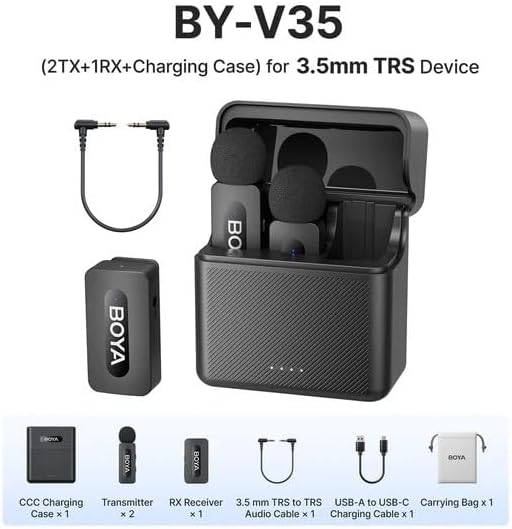
Foto 2.1: Diagram showing all components included in the BOYA V35 package, including two transmitters, one receiver, a charging case, foam windscreens, and cables.
3. Ngwaahịa gafereview
3.1. Mbufe (TX)

Foto 3.1: N'ihu view of the BY-V35 Transmitter with the foam windscreen attached, showing the BOYA logo and indicator light.

Foto 3.2: Akụkụ view of the BY-V35 Transmitter, illustrating the integrated clip for attachment to clothing and the foam windscreen.
The transmitter is a compact unit with an integrated microphone and clip. It features a power button, a status indicator light, and a USB-C charging port. The omnidirectional microphone is designed to capture sound from all directions.
3.2. Onye nnata (RX)

Foto 3.3: Akụkụ view of the BY-V35 Receiver, showing the USB-C port, power button, and 3.5mm output jack.
The receiver connects to your recording device (camera, camcorder). It includes a 3.5mm TRS output jack, a power button, a status indicator light, and a USB-C charging port. The receiver is designed for easy connection and stable signal reception.
3.3. Nchaji Okwu
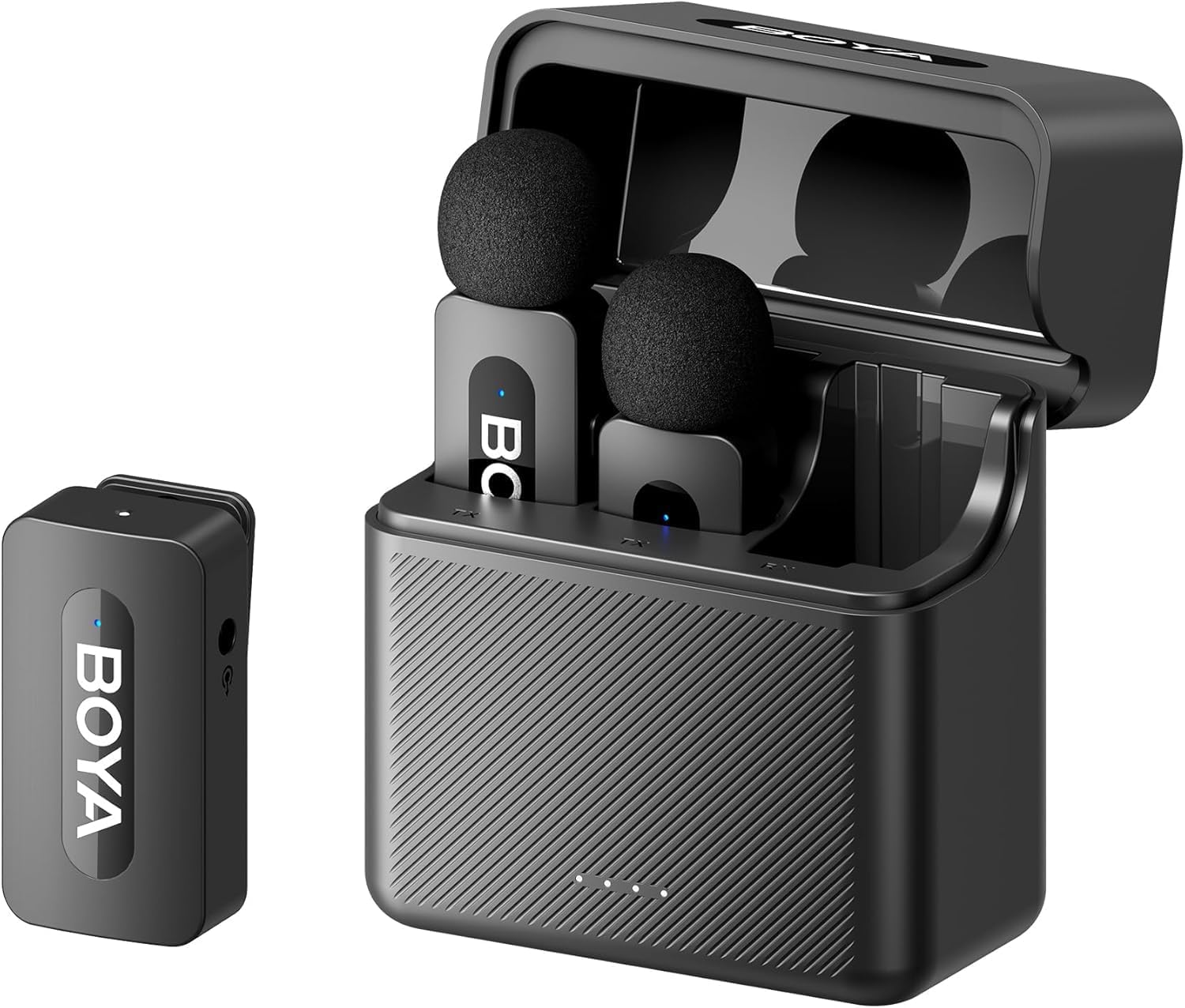
Foto 3.4: The complete BOYA V35 system, including the charging case, two transmitters, and one receiver, ready for storage or charging.
The charging case provides convenient storage and charging for both transmitters and the receiver. It has its own USB-C charging port and LED indicators to show the charging status of the case and the devices inside.
4. Ntuziaka Nhazi
4.1. Ịchaji ngwaọrụ
- Place the transmitters and receiver into the charging case.
- Connect the USB-C to USB-A charging cable to the charging case and a USB power adapter (not included).
- The LED indicators on the charging case will show the charging status. The device indicators will also light up during charging.
- Ensure all devices are fully charged before first use for optimal battery life.
4.2. Ịkwanye na ijikọta
- Press and hold the power button on both the transmitter(s) and the receiver for a few seconds until the indicator lights turn on.
- The devices will automatically attempt to pair. A solid blue light on both the transmitter and receiver indicates a successful connection. A blinking light indicates searching for a connection.
4.3. Connecting to a Recording Device
- Connect one end of the 3.5mm TRS to TRS audio cable to the 3.5mm output jack on the BY-V35 receiver.
- Connect the other end of the 3.5mm TRS to TRS audio cable to the microphone input jack on your camera or camcorder.
- Ensure your recording device's audio input is set to external microphone if applicable.
4.4. Attaching the Transmitter
- Attach the foam windscreen to the transmitter's microphone to reduce wind noise and plosives.
- Use the integrated clip on the back of the transmitter to securely attach it to the speaker's clothing, ideally about 6-8 inches (15-20 cm) from the mouth.
5. Ntuziaka ọrụ
5.1. Gbanyụọ / gbanyụọ
To power on or off the transmitter or receiver, press and hold the power button for approximately 3 seconds. The indicator light will illuminate or turn off accordingly.
5.2. Ndekọ Audio
- Ensure the transmitter(s) and receiver are powered on and successfully paired (solid blue indicator light).
- Start recording on your connected camera or camcorder.
- Monitor the audio levels on your recording device to ensure proper sound capture.
5.3. Status Indicator Lights
- Blue siri ike: Device is powered on and successfully paired.
- Blue na-egbuke egbuke: Device is powered on and searching for a connection.
- Uhie siri ike: Batrị dị ala.
- Blinking Red (while charging): Ịchaji na-aga n'ihu.
- Solid Green (while charging): Ebubo zuru oke.
6. Nlekọta
6.1. Nhicha
- Wipe the devices with a soft, dry cloth.
- Ejila kemịkal siri ike ma ọ bụ ndị na -ehicha ihe.
- Ensure the foam windscreens are clean and free of debris. Replace if damaged.
6.2. Nchekwa
- Store the BOYA V35 system in its charging case when not in use to protect it from dust and damage.
- Chekwaa n'ebe dị jụụ, kpọrọ nkụ, pụọ na ìhè anyanwụ kpọmkwem na oke okpomọkụ.
6.3. Nlekọta batrị
- Charge the devices regularly, even if not used frequently, to maintain battery health.
- Zere ka batrị ndị ahụ gbapụta kpamkpam ruo ogologo oge.
7. Nchọpụta nsogbu
| Nsogbu | Ihe nwere ike ime | Ngwọta |
|---|---|---|
| Enweghị ụda ma ọ bụ olu dị ala | Devices not powered on; Not paired; Incorrect cable connection; Recording device volume too low. | Ensure TX and RX are on and paired. Check 3.5mm cable connection. Increase recording device's input volume. |
| Ogo ụda adịghị mma (ụkwụ kwụ ọtọ, mpụ) | Interference; Out of range; Low battery; Damaged windscreen. | Move closer to the receiver. Charge devices. Replace windscreen. Avoid strong electromagnetic fields. |
| Ngwa anaghị ejikọta ọnụ | Devices too far apart; Interference; One device not powered on. | Ensure TX and RX are close to each other. Power cycle both devices. Check battery levels. |
| Charging case not charging devices | Charging case battery empty; Poor contact; Faulty cable. | Charge the charging case. Ensure devices are correctly seated. Try a different USB-C cable. |
8. Nkọwapụta
| Njirimara | Nkọwa |
|---|---|
| Ụdị | BOYA |
| Nọmba nlereanya | BY-V35 |
| Teknụzụ Njikọta | Ikuku 2.4GHz |
| Ụdị njikọ | 3.5mm ọkpụrụkpụ |
| Ụkpụrụ Polar | Omnidirectional |
| Oke ugboro ugboro | 20Hz-16kHz |
| Signgbaàmà-na-Noise ruru | 80 dB |
| Isi Iyi Ike | Akwanyere batrị |
| Ibu Ibu | 0.2 Kilograms (approximate, for entire kit) |
| Akụkụ akụkụ | 6.1 x 2.2 x 3.4 inches (approximate, for entire kit) |
| Ngwa dakọtara | Camcorder, Camera |
9. Akwụkwọ ikike na nkwado
For warranty information and technical support, please refer to the official BOYA website or contact your local distributor. Keep your proof of purchase for any warranty claims.