
1. Okwu mmalite
This manual provides detailed instructions for the installation, operation, and maintenance of your Geometric Future Eskimo Pro 360mm All-in-One (AIO) CPU Liquid Cooler. Please read this manual thoroughly before installation to ensure proper setup and optimal performance. Keep this manual for future reference.

Image 1.1: Geometric Future Eskimo Pro 360mm AIO CPU Liquid Cooler.
2. Ihe ngwugwu
Chọpụta na akụrụngwa niile dị na ngwugwu:
- Eskimo Pro 360mm Radiator with Integrated Pump/CPU Block
- 3 x Squama 2501 ARGB PWM Fans
- Intel Mounting Brackets and Hardware (LGA 1700/1851, 1200/115X, 2011/2066)
- AMD Nkwalite Brackets na Akụrụngwa (AM4/AM5)
- High-Conductivity Thermal Paste (GF10)
- Fan Screws and Radiator Mounting Screws
- ARGB and PWM Splitter Cables
- Akwụkwọ ntuziaka onye ọrụ
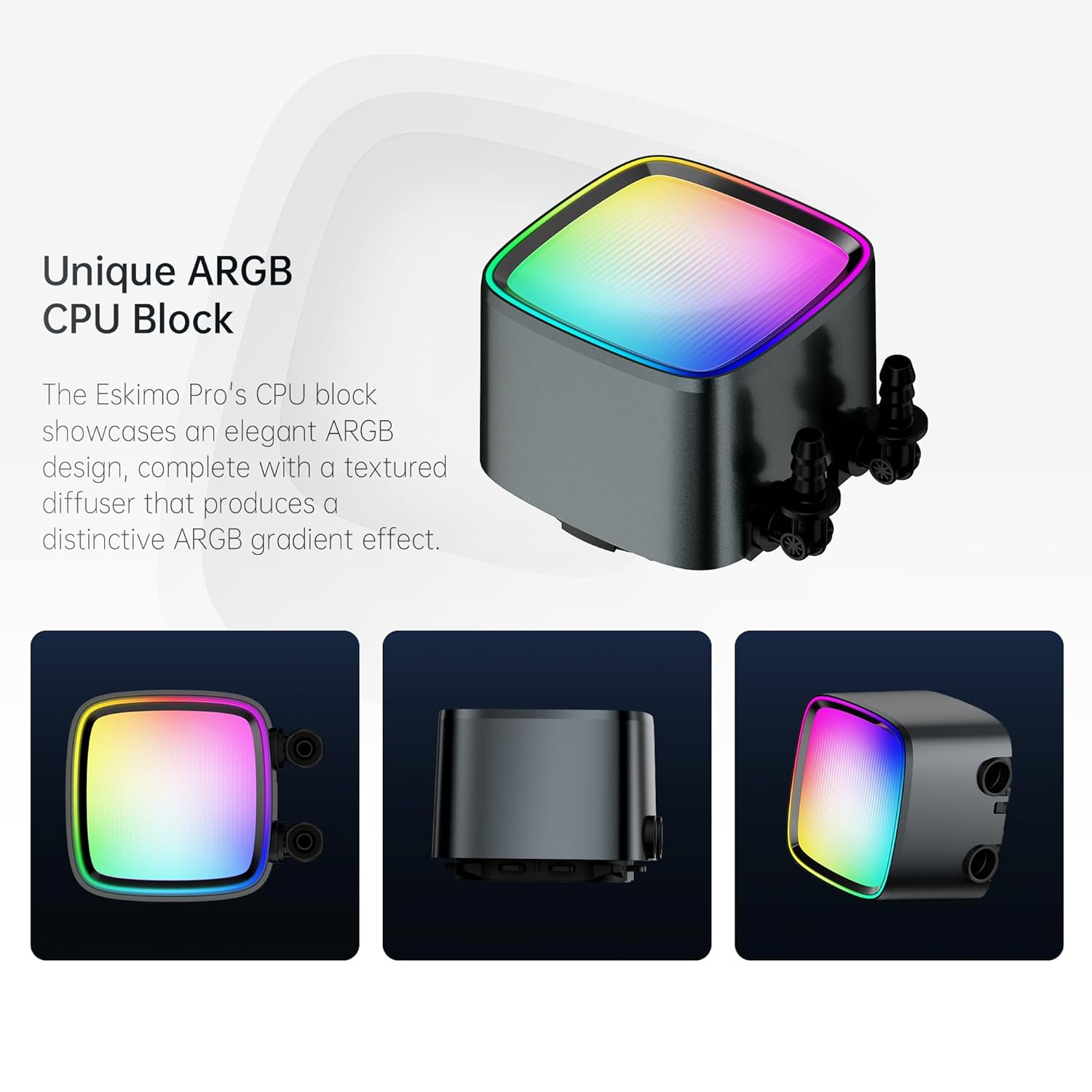
Foto 2.1: Ofeview of the Eskimo Pro 360mm AIO cooler with fans and pump/block.
3. Ozi nchekwa
Observe the following safety guidelines during installation and operation:
- Hụ na kọmputa gị agbanyụrụ ma kwụpụ ya na ihe mkpuchi mgbidi tupu etinye ya.
- Jiri nlezianya mee ihe ndị dị na ya iji zere mmebi.
- Refer to your motherboard manual for specific fan and ARGB header locations.
- Avoid touching the fan blades while they are spinning.
- Do not attempt to open or modify the sealed liquid cooling loop.
4. Ntọala na nwụnye
Follow these steps to install your Eskimo Pro 360mm AIO liquid cooler.
4.1 Ntinye mbụ
- Check Case Compatibility: Ensure your PC case has sufficient space to mount a 360mm radiator (typically at the top or front).
- Kwadebe CPU: Hichaa pasta ọkụ ochie ọ bụla site na CPU na ebe nju oyi CPU gị na motherboard.
4.2 Mounting the CPU Block
- Identify the correct mounting bracket for your CPU socket (Intel LGA 1700/1851, 1200/115X, 2011/2066 or AMD AM4/AM5).
- Attach the appropriate backplate to the rear of your motherboard, if required by your socket type.
- Secure the standoffs to the motherboard.
- Apply a small amount of the provided GF10 high-conductivity thermal paste to the center of your CPU's integrated heat spreader (IHS).
- Carefully place the CPU block onto the CPU, aligning the mounting holes.
- Secure the CPU block with the retention screws, tightening them in a diagonal pattern until snug.
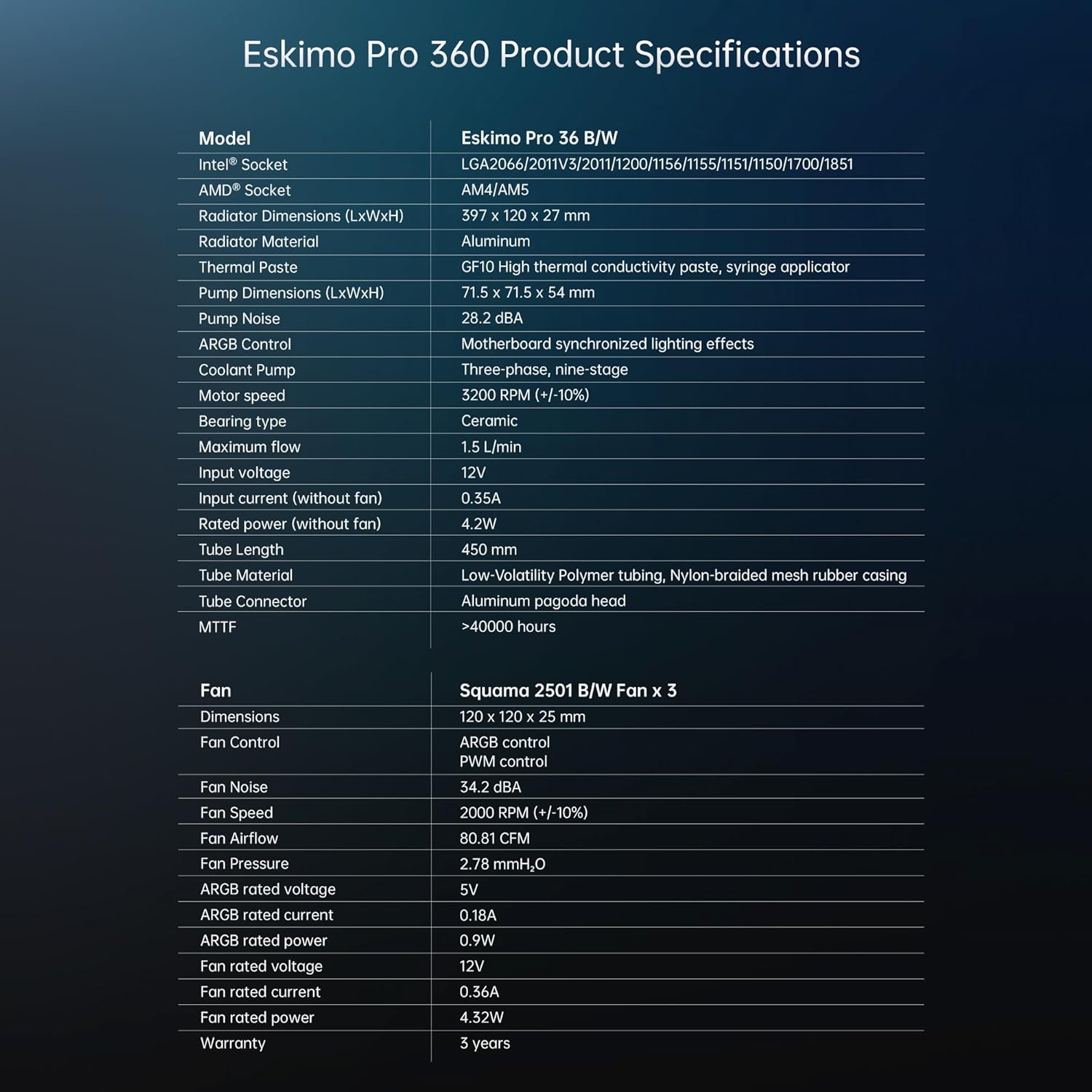
Image 4.1: Universal compatibility with Intel and AMD CPU mounting brackets.

Image 4.2: Illustration of applying high-conductivity thermal paste to the CPU.
4.3 Installing Radiator and Fans
- Attach the three Squama 2501 ARGB fans to the radiator using the provided fan screws. Ensure the fan airflow direction is appropriate for your case's cooling strategy (intake or exhaust).
- Mount the radiator assembly into your PC case using the longer radiator screws.

Foto 4.3: Akụkụ view of the radiator, showing the cooling fins.

Image 4.4: Close-up of a Squama 2501 ARGB fan, featuring dragon-scale textured blades.
4.4 Njikọ eriri
- Pump Power: Connect the pump's 3-pin or 4-pin connector to a dedicated AIO_PUMP or CPU_FAN header on your motherboard. Consult your motherboard manual for the correct header.
- Ike ofufe: Connect the PWM cables from the Squama 2501 fans to the CPU_FAN or SYS_FAN headers on your motherboard, using the provided splitter cable if necessary.
- Ọkụ ARGB: Connect the ARGB cables from the CPU block and fans to a 5V 3-pin ARGB header on your motherboard, using the provided splitter cable if necessary. Do not connect to a 12V RGB header, as this will damage the LEDs.
5. Ntuziaka ọrụ
Once installed, the Eskimo Pro 360mm AIO cooler operates automatically to maintain optimal CPU temperatures.
5.1 Agbanye ike mbụ
After completing the installation, power on your computer. The fans and pump should start operating, and the ARGB lighting on the CPU block and fans should illuminate.
5.2 ARGB njikwa ọkụ
The ARGB lighting is motherboard-synchronized. Use your motherboard's RGB software (e.g., ASUS Aura Sync, MSI Mystic Light Sync, Gigabyte RGB Fusion, ASRock Polychrome Sync) to customize lighting effects and colors.

Image 5.1: Close-up of the unique ARGB CPU block with a textured diffuser.
5.3 Fan and Pump Speed Control
The fans are PWM controlled, and the pump speed is regulated by the motherboard. You can adjust fan and pump curves through your motherboard's BIOS/UEFI settings or dedicated software to optimize for noise levels and cooling performance.
6. Nlekọta
Regular maintenance helps ensure the longevity and performance of your AIO cooler.
- Nhicha uzuzu: Na-asachapụ uzuzu site na ntù radiator na agụba fan site na iji ikuku abịakọrọ ma ọ bụ ahịhịa dị nro. Gbaa mbọ hụ na ndị fan anaghị agbagharị mgbe a na-ehicha ya.
- Njikwa USB: Ensure all cables are securely connected and not interfering with fan operation or airflow.
- Nlele anya: Occasionally inspect the tubing for any signs of wear or leaks. The low-volatility polymer tubing with nylon-braided mesh is designed for durability.

Image 6.1: Illustration of the low-volatility polymer tubing with a durable nylon braided rubber sleeve.
7. Nchọpụta nsogbu
If you encounter issues with your Eskimo Pro 360mm AIO cooler, refer to the following common problems and solutions.
- Okpomọkụ CPU dị elu:
- Ensure the CPU block is properly seated and making full contact with the CPU.
- Verify that thermal paste was applied correctly.
- Check that fans are spinning and oriented for optimal airflow.
- Confirm the pump is receiving power and operating.
- mkpọtụ mgbapụta:
- AIO pumps can sometimes produce noise due to air bubbles in the loop. Try gently tilting or shaking your PC case while it's running to help dislodge air bubbles.
- Adjust pump speed settings in your motherboard's BIOS/UEFI. Lower speeds may reduce noise.
- Ensure the radiator is mounted higher than the CPU block if possible, to keep air bubbles away from the pump.
- Ọkụ ARGB anaghị arụ ọrụ:
- Verify all ARGB cables are securely connected to the 5V 3-pin ARGB header on your motherboard.
- Hụ na etinyere ma hazie ngwanrọ RGB nke motherboard gị nke ọma.
- Check for any physical damage to the ARGB cables or connectors.
8. Nkọwapụta
Detailed technical specifications for the Geometric Future Eskimo Pro 360mm AIO Liquid Cooler:
| Akụkụ | Nkọwapụta |
|---|---|
| Nlereanya | Eskimo Pro 36 B/W |
| Intel® Socket Compatibility | LGA2066/2011v3/2011/1200/115X/1700/1851 |
| AMD® Socket Compatibility | AM4/AM5 |
| Radiator Dimensions (LxWxH) | 397 x 120 x 27 mm |
| Ihe Radiator | Aluminom |
| Thermal Tapawa | GF10 High thermal conductivity paste, syringe applicator |
| Pump Dimensions (LxWxH) | 71.5 x 71.5 x 54 mm |
| Mgbapụta mkpọtụ | 28.2 dBA |
| Njikwa ARGB | Motherboard synchronized lighting effects |
| Igwe mgbapụta oyi | Three-phase, nine-stage |
| Ọsọ moto | 3200 RPM (+/-10%) |
| Ụdị ibu | Ceramic |
| Oke eruba | 1.5 L/min |
| Ntinye voltage | 12V |
| Input current (without fan) | 0.55A |
| Rated power (without fan) | 4.2W |
| Ogologo tube | 450 mm |
| Akụrụngwa tube | Low-Volatility Polymer tubing, Nylon-braided mesh rubber casing |
| Njikọ Tube | Aluminum pagoda head |
| MTTF | > 40000 awa |
| Fan (Squama 2501 B/W Fan x 3) | |
| Akụkụ | 120 x 120 x 25 mm |
| Njikwa Fans | ARGB control, PWM control |
| Igwe mkpọtụ fan | 34.2 dBA |
| Ọsọ fan | 2000 RPM (+/-10%) |
| Ofufe ikuku | 80.81 CFM |
| Nrụgide Fans | 2.78 mmH₂O |
| ARGB rated voltage | 5V |
| ARGB rated current | 0.18A |
| ARGB rated power | 0.9W |
| Onye ofufe gosiri voltage | 12V |
| Fan rated current | 0.36A |
| Fan rated power | 4.32W |
| Akwụkwọ ikike | afọ 3 |

Image 8.1: Detailed product specifications for the Eskimo Pro 360mm AIO cooler.
9. Akwụkwọ ikike Ozi
The Geometric Future Eskimo Pro 360mm AIO CPU Liquid Cooler comes with a 3-afọ akwụkwọ ikike site na ụbọchị ịzụrụ. Akwụkwọ ikike a na-ekpuchi ntụpọ dị na ngwa na arụ ọrụ n'okpuru ojiji nkịtị. Biko dowe ihe akaebe nke ịzụrụ ihe maka akwụkwọ ikike.
The product has undergone rigorous testing and holds multiple international certifications, including CE, FC, RoHS, and UKCA, ensuring quality and safety standards are met.

Foto 9.1: Ofeview of the 3-year warranty and product certifications.
10. Nkwado
For technical assistance, warranty claims, or any questions regarding your Geometric Future Eskimo Pro 360mm AIO CPU Liquid Cooler, please contact Geometric Future customer support through their official website or the retailer where the product was purchased. Provide your product model and a detailed description of the issue for efficient support.