Okwu mmalite
Thank you for choosing the Generic Wireless Earbuds. These earbuds are designed for comfort, high-fidelity audio, and reliable connectivity, perfect for small ears and active lifestyles. Featuring a long-lasting battery, AI noise reduction for clear calls, IPX5 water resistance, and stable Bluetooth 5.3, they are built to enhance your audio experience. This manual provides detailed instructions on how to set up, operate, maintain, and troubleshoot your new earbuds.

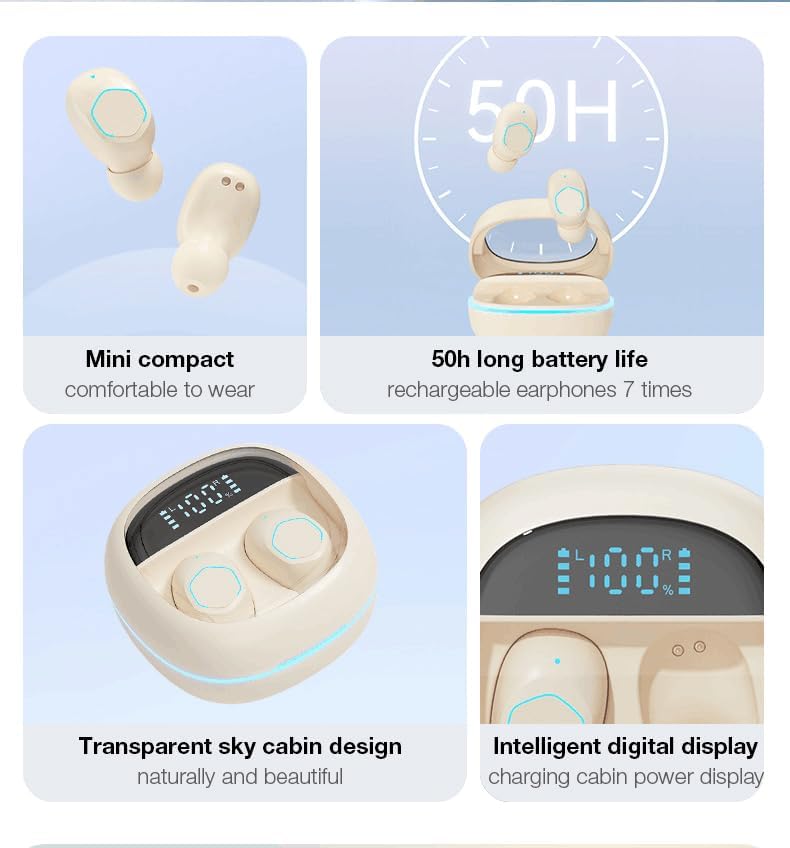
The Generic Wireless Earbuds in their open charging case, displaying the battery percentage na ihuenyo LED.
Kedu ihe dị na Igbe ahụ
Biko lelee ọdịnaya nke ngwugwu ahụ ka ị hụ na ihe niile dị:
- Akwụkwọ ntuziaka onye ọrụ
- Charging Station (Charging Case)
- USB-C eriri USB
- Igwe ntị ikuku ikuku (aka ekpe na aka nri)
Ntuziaka nhazi
1. Nchaji mbụ
Before first use, fully charge the earbuds and the charging case. Connect the provided USB-C cable to the charging case and a power source. The LED display on the case will show the battery percentage, indicating charging progress. A full charge typically takes approximately 1.5 hours.

The charging case with earbuds inside, showing the LED power display and RGB lighting.
2. Njikọ Bluetooth
- Mepee igbe nchaji. Igwe ntị ga-agbanye na-akpaghị aka wee banye ọnọdụ njikọta.
- Na ngwaọrụ gị (smartphone, mbadamba, wdg), gbanye Bluetooth.
- Chọọ maka available Bluetooth devices and select "Generic Earbuds" (or similar name) from the list.
- Ozugbo ejikọtara ya, ị ga-anụ olu nkwenye, ekweisi ndị ahụ ga-adịkwa njikere maka ojiji.
The earbuds utilize Bluetooth 5.3 for stable and fast connections up to 50 feet (15 meters).
3. Yiri ekwe ntị
These earbuds are designed to be compact and comfortable, especially for small ears. Gently insert each earbud into the corresponding ear (L for left, R for right) and rotate slightly to find a secure and comfortable fit. The skin-friendly silicone tips ensure stability during various activities.
The earbud's compact design ensures a secure and comfortable fit, even for petite ears.
Ntuziaka ọrụ
Njikwa mmetụ
The earbuds feature intuitive touch controls on their outer surface. Refer to the following table for common functions:
| Omume | Ọrụ |
|---|---|
| Single Tap (Left or Right Earbud) | Kpọọ/Kwụsị Egwu, Zaa/Kwụsị Oku |
| Pịa ugboro abụọ (mbọchị ntị aka nri) | Abụ na-abịa |
| Pịa ugboro abụọ (mkpọ ntị aka ekpe) | Abụ gara aga |
| Pịa ugboro atọ (mbọchị ntị aka nri) | Elu elu |
| Pịa ugboro atọ (mkpọ ntị aka ekpe) | Mpịakọta ọnụ |
| Pịa ogologo (2 sekọnd) | Jụ oku |
| Pịa ogologo (3 sekọnd) | Mee ka onye enyemaka olu rụọ ọrụ |

Visual representation of the smart button controls for music and calls.
Ngosipụta ike LED
The charging case features an LED digital display that shows the exact battery percentage of the case and individual battery levels for the left and right earbuds. This allows you to monitor power levels at a glance.
Njirimara ọdịyo
- 360° Hi-Fi Sound: Custom-tuned drivers deliver rich, immersive audio with deep bass.
- AI HD Call Clarity: Equipped with 4 microphones and AI noise reduction technology, these earbuds reduce up to 60% of ambient noise, ensuring crystal-clear voice calls.

The 'Whale Cavity' design enhances 360° stereo sound for a more immersive listening experience.
Ụdị Ịgba Cha Cha Latency dị ala
The earbuds feature a low-latency algorithm, providing minimal delay between audio and video, which is ideal for gaming and video playback. This ensures a synchronized and immersive experience.

Experience low game delay for instant audio-visual synchronization during gameplay.
Nlekọta
Nhicha
Ịsacha mgbe niile na-enyere aka ịnọgide na-enwe mma na ịdị ọcha:
- Jiri akwa dị nro, kpọrọ nkụ, akwa na-enweghị lint ka ihichapụ ntị ntị na akpa nchaji.
- For earwax or debris in the earbud tips, use a small, soft brush or cotton swab.
- Ejila ihe mkpocha abrasive, mmanya, ma ọ bụ ihe mgbaze kemịkal.
Nchekwa
When not in use, always store the earbuds in their charging case to protect them from dust, damage, and to keep them charged.
Nlekọta batrị
Ka ịgbatị ndụ batrị:
- Zere ịchaji batrị ugboro ugboro.
- Charge the earbuds and case regularly, even if not used for extended periods.
- Chekwaa n'ebe dị jụụ, ebe kpọrọ nkụ na-adịghị na oke okpomọkụ.
Nguzogide mmiri (IPX5)
The earbuds are rated IPX5 water-resistant, meaning they can withstand splashes and sweat. They are suitable for workouts and light rain. However, they are not designed for submersion in water or use during swimming. Ensure the earbuds are dry before placing them back in the charging case.
Nchọpụta nsogbu
Ọ bụrụ na ị hụ nsogbu na ntị ntị gị, gbalịa ngwọta ndị a:
- Enweghị ụda:
- Gbaa mbọ hụ na akwụgoro ihe ekwe ntị.
- Lelee njikọ Bluetooth na ngwaọrụ gị.
- Adjust volume on both earbuds and your device.
- Igwe ntị anaghị ejikọta:
- Hụ na ekweisi dị n'ụdị njikọta (oghere mepere emepe).
- Gbanyụọ ma gbanye Bluetooth na ngwaọrụ gị.
- Chezọ ngwaọrụ dị na ntọala Bluetooth gị wee jikọọ ọzọ.
- Gbaa mbọ hụ na ejirila chaja ntị nke ọma.
- Otu ntị anaghị arụ ọrụ:
- Place both earbuds back in the charging case, close it, and then open it again.
- Gbaa mbọ hụ na akwụgoro ekwe ntị abụọ ahụ.
- Okwu ịchaji:
- Check the USB-C cable and power adapter.
- Hụ na kọntaktị chaja dị na ntị na igbe ntị dị ọcha ma ghara inwe ihe ruru unyi.
- Ogo oku na-adịghị mma:
- Gbaa mbọ hụ na ekwe ntị na-anọdụ ala nke ọma na ntị gị.
- Gaa nso na ngwaọrụ ejikọrọ gị.
- Lelee maka nsogbu mkpọtụ gburugburu ebe obibi.
If the issue persists, please refer to the support information provided with your purchase or contact customer service.
Nkọwapụta
| Njirimara | Nkọwa |
|---|---|
| Ụdị | N'ozuzu |
| Nlereanya | B0DH3DQ7TY |
| Agba | Agba aja aja |
| Ntinye ntị | Na Ntị |
| Ụdị Ihe | Na Ntị |
| Mgbochi | 80 Ohm |
| Ụdị Bluetooth | 5.3 |
| Mmiri Nguzogide | IPX5 |
| ngụkọta oge egwuregwu (ya na ikpe) | Ruo awa iri abụọ |
| Nchaji ngwa ngwa | 10-minute charge = 2-hour playback |
| Ibu (kwa ekwe ntị) | 3.8g |
Akwụkwọ ikike na nkwado
These Generic Wireless Earbuds come with a standard manufacturer's warranty. Please refer to the warranty card included in your packaging for specific terms and conditions, including the warranty period and coverage details. For technical support, troubleshooting assistance beyond this manual, or warranty claims, please contact the retailer or manufacturer's customer service. Contact information can typically be found on the product packaging or the brand's official websaịtị.