
1. Okwu mmalite
The Radtel RT16 FRS Two Way Radio is designed for reliable, license-free communication across 16 channels. Featuring a durable build, USB-C charging, and VOX functionality, it is suitable for various environments from outdoor activities to commercial settings.
Ihe ngwugwu
Your Radtel RT16 package includes:
- 2x Radtel RT16 Two Way Radios
- 2x Rechargeable Lithium-Ion Batteries (2000mAh)
- Obere vidiyo Belt 2x
- 2x USB-C Charger Cables
- 2x Earpieces
- 1x Akwụkwọ ntuziaka onye ọrụ
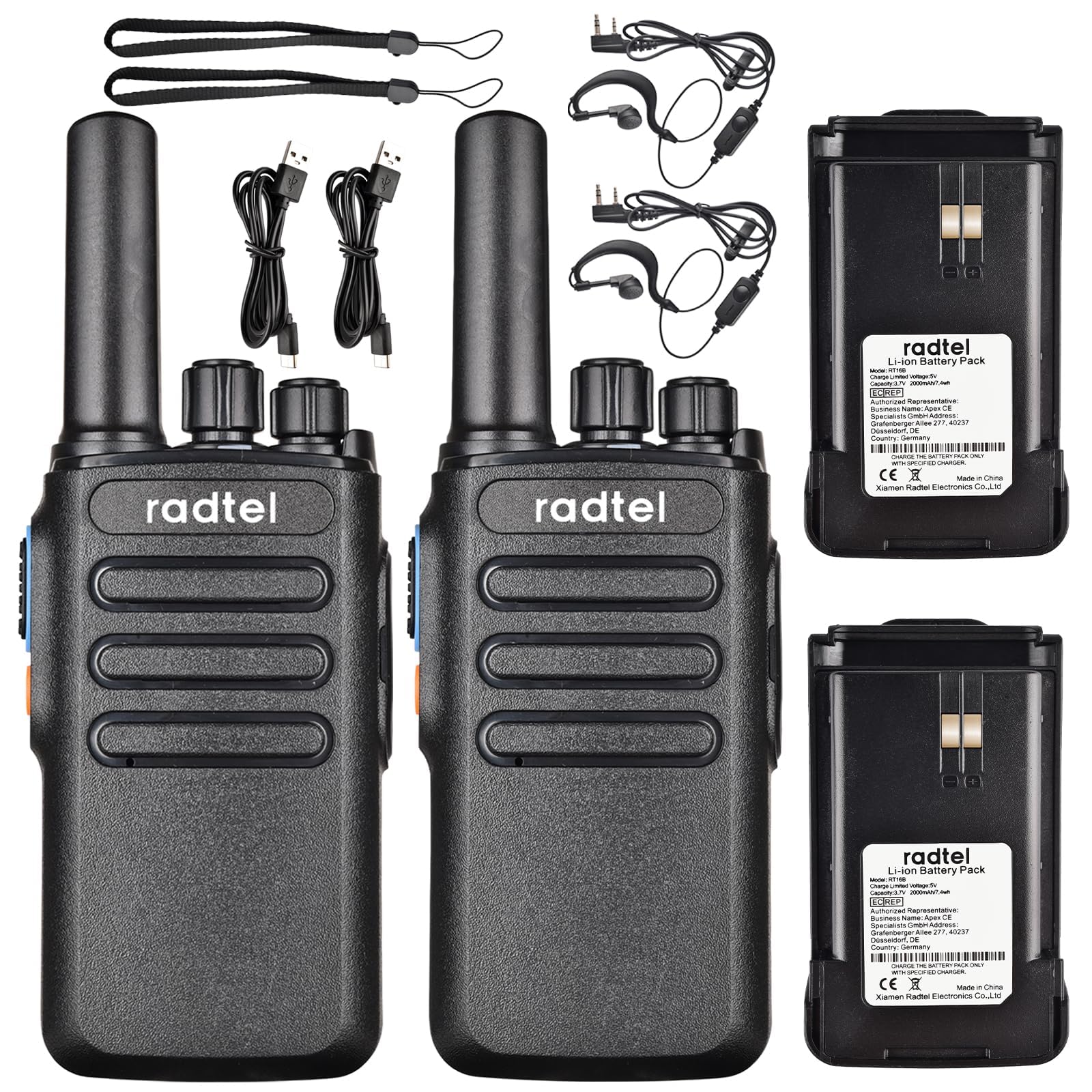
Image 1.1: Radtel RT16 Two Way Radios and included accessories.
2. Nhazi
2.1 Ntinye batrị
- Gbaa mbọ hụ na agbanyụrụ redio.
- Chọta ebe batrị dị n'azụ redio.
- Mikpuo batrị ahụ n'ime ebe ahụ ruo mgbe ọ pịrị aka n'ebe ahụ nke ọma.

Image 2.1: Battery compartment and belt clip attachment.
2.2 Belt Clip Attachment
- Kwado eriri eriri ahụ na oghere ndị a họpụtara n'azụ redio.
- Push the clip firmly until it locks into position.
2.3 Ịchaji batrị
The RT16 radios feature convenient USB-C charging. Use the provided USB-C cable to charge the radio. The charging port is located at the bottom of the radio.
- Connect the USB-C cable to the charging port on the radio.
- Connect the other end of the cable to a compatible USB power source (e.g., phone charger, power bank, car adapter).
- The indicator light on the radio will show charging status (refer to the LED indicator section for details).

Image 2.2: USB-C charging options for the RT16.
3. Ntuziaka ọrụ
3.1 Gbanyụọ/ Gbanyụọ na njikwa olu
To power on the radio, rotate the top-left knob clockwise until you hear a click and a voice prompt indicating the current channel. Continue rotating to adjust the volume. To power off, rotate the knob counter-clockwise until it clicks off.
3.2 Nhọrọ ọwa
The RT16 has 16 available channels. To select a channel, rotate the top-right knob. The radio will announce the selected channel number.

Foto 3.1: Elu view of the RT16 showing power/volume and channel knobs.
3.3 bọtịnụ Push-to-Talk (PTT).
To transmit your voice, press and hold the large button on the side of the radio. Release the button to listen.
3.4 Njikọ ekweisi
The radio supports a 2-pin K-connector headset for hands-free operation. Open the rubber cover on the side of the radio and plug in the headset connectors.

Image 3.2: Headset connection port on the RT16.
3.5 Voice Operated Exchange (VOX) Function
The VOX function allows for hands-free transmission without pressing the PTT button. The radio will automatically transmit when it detects your voice. This feature requires software activation for first use and offers 9 adjustable levels.

Image 3.3: Illustration of VOX function for hands-free use.
Activating VOX Mode
To activate VOX mode, hold down the small side button while powering on the radio. Continue holding until you hear a beep indicating activation.
Video 3.1: Demonstrates how to activate the voice control (VOX) mode on the Radtel RT16 radio.
Deactivating VOX Mode
To deactivate VOX mode, hold down the small side button while powering on the radio. Continue holding until you hear two beeps, confirming deactivation.
Video 3.2: Demonstrates how to deactivate the voice control (VOX) mode on the Radtel RT16 radio.
3.6 Language Switch Operation
The radio supports both Chinese and English voice prompts. To switch the language, turn the channel knob to channel 16. Then, power off the radio. While powering on, hold down the small side button until you hear a beep. This will switch the language mode.
Video 3.3: Instructions for switching between Chinese and English voice prompts on the Radtel RT16 radio.
4. Nlekọta
- Keep the radio clean by wiping it with a soft, damp akwa . Zere iji kemịkalụ siri ike ma ọ bụ ihe mgbaze.
- Do not immerse the radio in water as it is not water resistant.
- Chekwaa redio n'ebe dị jụụ na nkụ mgbe ọ naghị eji ya.
- Gbaa mbọ hụ na emechiela mkpuchi ọdụ ụgbọ mmiri USB-C ka ọ gbochie uzuzu na mmiri ịbanye.
5. Nchọpụta nsogbu
| Nsogbu | Ihe nwere ike ime | Ngwọta |
|---|---|---|
| Enweghị ike | Batrị dị ala ma ọ bụ etinyeghị ya nke ọma. | Chajịa batrị ma ọ bụ tinyegharịa ya na nchekwa. |
| Enweghị ike ịkparịta ụka na redio ndị ọzọ | Redio dị na ọwa dị iche iche ma ọ bụ na-anọghị nso. | Ensure both radios are on the same channel. Move closer to the other radio. Check for obstructions. |
| Ogo ọdịyo adịghị mma | Weak signal, interference, or low volume. | Adjust volume. Move to an area with fewer obstructions. Change channel if interference is present. |
| VOX anaghị arụ ọrụ | VOX not activated or sensitivity too low. | Activate VOX mode (see Section 3.5). Adjust VOX sensitivity level via programming software. |
6. Nkọwapụta
| Njirimara | Nkọwa |
|---|---|
| Ụdị | Radtel |
| Nọmba nlereanya | RT16 |
| Ọnụọgụ nke ọwa | 16 |
| Oke ugboro ugboro | 462/467 MHz (FRS Band) |
| Oke Okwu Kachasị | Up to 5 Kilometers (open outdoor areas) |
| Ike mmepụta | 2W |
| Ụdị batrị | Lithium ion (2000mAh) |
| Ịchaji | USB-C |
| Atụmatụ pụrụ iche | Long Range, Type-C rechargeable battery, VOX Function, Channel Scan |
| Ọkwa Nguzogide mmiri | Ọ bụghị mmiri na-eguzogide |
| Akụkụ ngwaahịa | 1.37"D x 2.16"W x 5.9"H |
| Ibu Ibu | 0.39 pound |
| Ngwa dakọtara | Other FRS two-way radios, Standard earpieces |
7. Akwụkwọ ikike
The Radtel RT16 FRS Two Way Radio comes with a 1-Year Warranty from the manufacturer, Xiamen Radtel Electronics Co.,Ltd.
8. Nkwado
For further assistance or to explore other Radtel products, please visit the official Radtel Store: