
CHOETECH B740
CHOETECH Mini Mobile Battery B740 User Manual
Ụdị: B740
1. Okwu mmalite
Daalụ maka ịzụrụasing the CHOETECH Mini Mobile Battery B740. This compact and powerful portable charger is designed to provide fast and efficient charging for your USB Type-C compatible devices, including smartphones, tablets, and portable gaming consoles. Please read this manual carefully before use to ensure proper operation and to maximize the lifespan of your device.
2. Ozi nchekwa
Iji hụ na ọrụ nchekwa na gbochie mmebi, biko debe ihe ndị a:
- Ewepụla ngwaọrụ ahụ na oke okpomọkụ, ìhè anyanwụ kpọmkwem, ma ọ bụ oke iru mmiri.
- Zere ịda, ime ka ihe ghara ịdị mma, ma ọ bụ ịgbasa ngwaọrụ ahụ.
- Debe mmiri na mmiri mmiri ndị ọzọ.
- Do not use if the device is damaged or shows signs of overheating.
- Debe ebe ụmụaka na-apụghị iru.
- Tụfuo batrị dịka iwu mpaghara siri dị.

The CHOETECH B740 is equipped with 10 layers of protection for its PCBA circuit, including over-heat, over-voltage, over-charge, and short-circuit protection, ensuring enhanced charging safety.
3. Ihe ngwugwu
Biko lelee ma ihe niile dị na ngwugwu ahụ:
- CHOETECH Mini Mobile Battery B740 Main Unit ×1
- USB Ụdị-C USB ×1
- Akwụkwọ ntuziaka ×1
4. Ngwaahịa gafereview na Atụmatụ
The CHOETECH B740 is a compact and versatile portable power bank designed for convenience and efficiency.

The CHOETECH B740 is available in Black, White, and Light Blue, featuring a compact design and a convenient built-in stand.
4.1 Atụmatụ
- Direct Plug-in Fast Charging: Simply plug the power bank directly into your smartphone's Type-C port for rapid charging. No need for extra cables.
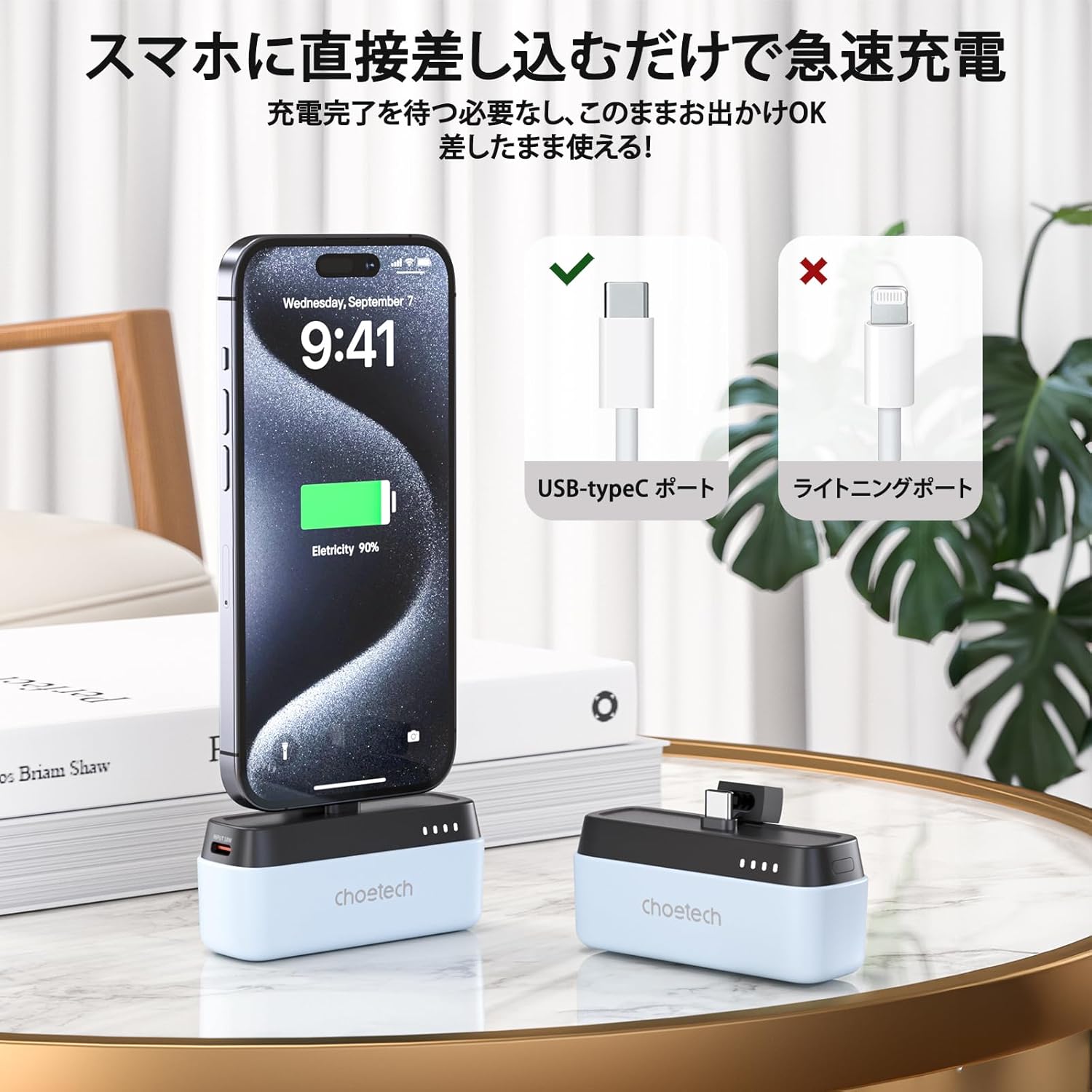
Figure 4.2: Direct Plug-in Charging
The B740 features a direct USB Type-C plug for convenient and fast charging without external cables. - Miniature and Portable Design: Weighing approximately 100g and designed to be as compact as a lipstick, it easily fits into small bags, making it ideal for travel and daily use.

Foto nke 4.3: Nha dị obere
Its miniature design allows for easy portability, comparable to the size of a lipstick. - 5000mAh Capacity with PD20W Output: Provides a 5000mAh battery capacity and supports PD20W fast charging, ensuring your devices are quickly powered up.

Figure 4.4: 5000mAh Capacity
The power bank features a 5000mAh battery, providing ample power for on-the-go charging.
Figure 4.5: PD20W Fast Charging
Experience faster and more efficient charging with the PD20W output capability. - Wide USB Type-C Compatibility: Compatible with a broad range of Type-C devices, including iPhone 15/16 series, Samsung, Huawei, iPads, Nintendo Switch, and more.

Figure 4.6: Broad Compatibility
The B740 supports charging for a wide array of USB Type-C enabled devices. - Nkwụrụ arụnyere: Features a convenient integrated stand, allowing you to watch videos or stream content comfortably while your device charges, in both portrait and landscape orientations.

Figure 4.7: Built-in Stand Functionality
Ihe nkwụnye agbakwunyere na-enye ohere maka enweghị aka viewing mgbe ị na-ana.
5. Nhazi
Before first use, it is recommended to fully charge your CHOETECH B740 power bank.
- Connect the provided USB Type-C cable to the input port of the power bank.
- Connect the other end of the USB Type-C cable to a compatible USB power adapter (not included) or a computer's USB port.
- The LED indicators will flash to show the charging status. Once all four LEDs are solid white, the power bank is fully charged.
6. Ntuziaka ọrụ
6.1 Ịchaji ngwaọrụ gị
- Ensure your CHOETECH B740 is sufficiently charged.
- Carefully plug the USB Type-C connector of the power bank directly into the Type-C charging port of your smartphone or compatible device.
- Ụlọ akụ ike ga-amalite ịchaji ngwaọrụ gị ozugbo. Ihe ngosi LED ga-egosi ọkwa batrị fọdụrụ na ụlọ akụ ike.
- To stop charging, simply unplug the power bank from your device.
- Note: If your device has a thick protective case, it may prevent the power bank's connector from fully engaging. Please remove the case if charging issues occur.
6.2 Ntuziaka ihe ngosi LED
The CHOETECH B740 features four LED lights to indicate battery status:
- Battery Ọkwa Display: The four white LEDs illuminate according to the remaining battery level. During fast charging, the LEDs will glow green.
- Ngosi nchaji: During the charging process (from low to high power), the current power level is indicated by flashing LEDs. When all four LEDs are continuously lit, it signifies that the power bank is fully charged.
- Discharge Indication: During the discharge process (from high to low power), the LEDs continuously display the current power level. When discharge is complete, the LEDs will turn off.
- Ịdọ aka ná ntị batrị dị ala: One white LED will flash to indicate a low battery level, prompting you to recharge the power bank.
7. Nlekọta
Proper care will extend the life of your power bank:
- Jiri ákwà dị nro ma kpọọ nkụ hichaa ngwaọrụ ahụ. Ejila kemịkalụ siri ike ma ọ bụ ihe ndị na-emebi emebi.
- Chekwaa n'ebe dị jụụ, kpọrọ nkụ mgbe ọ naghị eji ya.
- Zere ka anwụ na-acha kpọmkwem ma ọ bụ okpomọkụ dị oke elu ghara ịpụta ìhè ruo ogologo oge.
- Recharge the power bank at least once every three months if not used regularly to maintain battery health.
8. Nchọpụta nsogbu
| Nsogbu | Ihe nwere ike ime | Ngwọta |
|---|---|---|
| Ụlọ akụ ọkụ anaghị akwụ ụgwọ. | Cable not properly connected; faulty cable or adapter; power bank fully discharged. | Ensure cable is securely connected. Try a different USB Type-C cable or power adapter. Allow a few minutes for the power bank to respond if completely drained. |
| Ngwaọrụ anaghị akwụ ụgwọ site na ụlọ akụ ọkụ. | Power bank low on battery; device not Type-C compatible; thick phone case preventing connection; power bank malfunction. | Recharge the power bank. Verify your device has a Type-C port. Remove phone case. Contact customer support if the issue persists. |
| Nchaji nwayọ. | Device not supporting fast charging; cable quality; power bank not fully charged. | Ensure your device supports PD20W. Use the original or a high-quality USB Type-C cable. Fully charge the power bank. |
| LED indicators not working. | Power bank completely discharged; internal fault. | Charge the power bank for at least 30 minutes. If still unresponsive, contact customer support. |
9. Nkọwapụta
| Njirimara | Nkọwa |
|---|---|
| Nọmba nlereanya | B740 |
| Agba | Black, White, Light Blue |
| Ihe onwunwe | ABS+PC Fireproof V0 material |
| Interface | USB Ụdị-C |
| Ụzọ nchaji | USB Type-C direct plug-in charging |
| Akụkụ (ihe dị ka.) | 81.3 × 34.5 × 28 mm |
| Ibu (ihe dị ka.) | 100.5 g |
| Ike batrị | 5000mAh / 3.7V (18.5Wh) |
| Ntinye (USB-C) | 5V≈2A, 9V≈2A (18W) |
| Output (USB-C Plug) | 5V≈2.4A, 9V≈2.22A, 12V≈1.67A (20W) |
| Mkpokọta mpụta | 20W (Max) |
| Protocol akwadoro | QC3.0, QC2.0, PD3.0, PD2.0, AFC, FCP, Apple 2.4A |
| Asambodo | PSE, FCC, CE, RoHS |
| Onye nrụpụta | CHEETECH |
| Mba onye si | China |
10. Akwụkwọ ikike na nkwado
This product comes with a 24-month warranty from the date of purchase. If you encounter any issues or have questions regarding your CHOETECH Mini Mobile Battery B740, please contact our customer support team. For faster assistance, please have your model number (B740) and purchase details ready.
Notifying Business Operator Name (PSE Certification): Earth Reborn Co., Ltd.
For more information and support, please visit the official CHOETECH websaịtị ma ọ bụ kpọtụrụ onye na-ere ahịa gị.
Ask a question about this manual
Ask about setup, troubleshooting, compatibility, parts, safety, or missing instructions. Manuals+ will review the question and use this page’s manual context to help answer it.