
NXGKET 2AYV7YG-813
NXGKET Rechargeable Walkie Talkies for Kids - User Manual
Model: 2AYV7YG-813
Okwu mmalite
Thank you for choosing the NXGKET Rechargeable Walkie Talkies. This set of four walkie talkies is designed for children, offering long-range communication with a built-in lithium-ion battery and USB Type-C charging. With 16 channels, these devices are ideal for outdoor games, camping, and hiking, providing a reliable way for children to stay connected.
Please read this manual thoroughly before operating the devices to ensure safe and optimal performance. Keep this manual for future reference.
Ihe ngwugwu
Ngwungwu ahụ gụnyere:
- 4 x NXGKET Rechargeable Walkie Talkies (Orange, Yellow, Blue, Purple)
- 1 x USB Ụdị-C eriri USB
- Akwụkwọ ntuziaka (akwụkwọ a)

Image: Contents of the NXGKET walkie talkie package, showing the four colorful units, charging cable, and box.
Ngwaahịa gafereview
Familiarize yourself with the components of your walkie talkie:
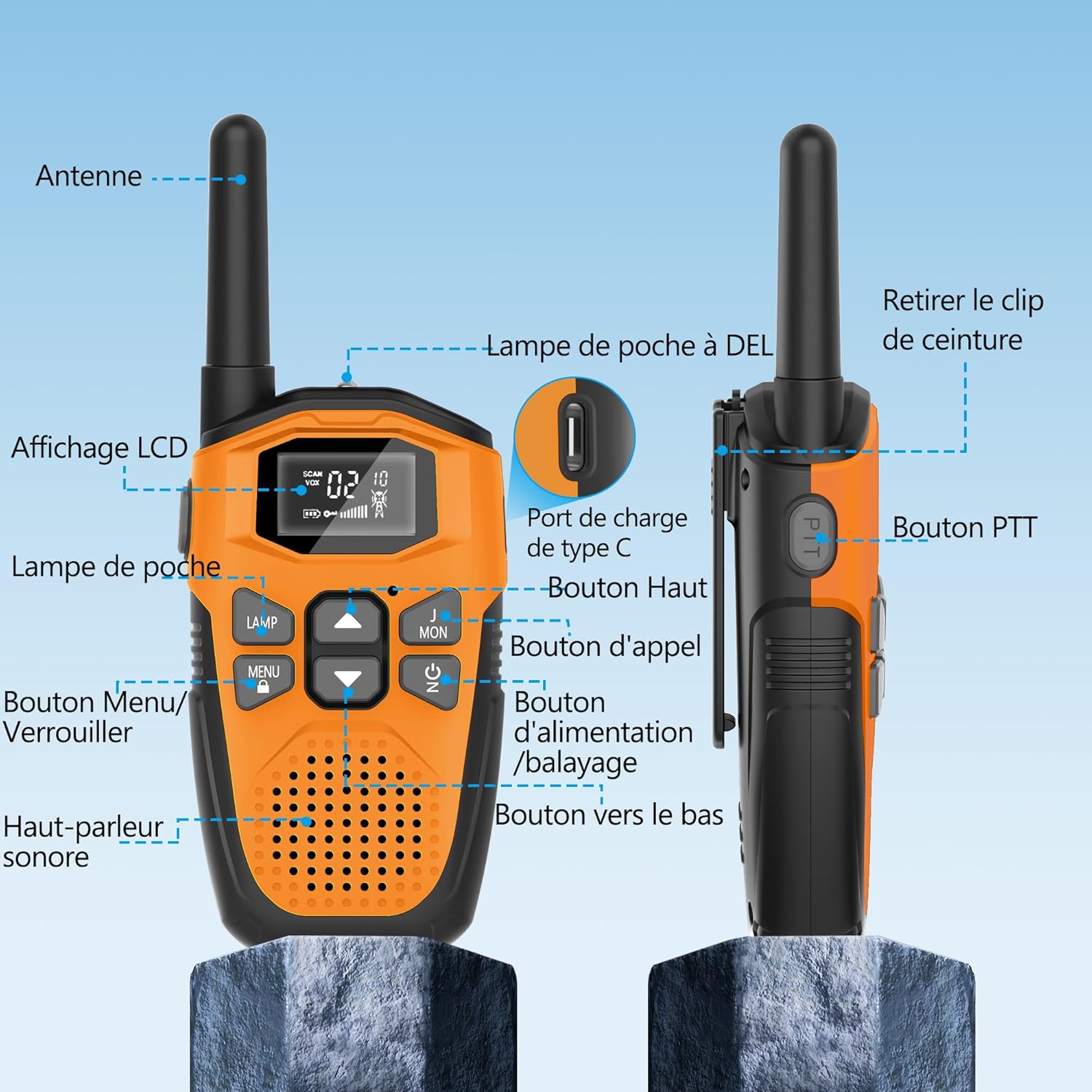
Image: Detailed diagram labeling the various parts of the walkie talkie, such as the antenna, LCD display, flashlight, PTT button, and charging port.
- Antenna: Maka ịnyefe na ịnata akara.
- Ngosipụta LCD: Shows channel, volume, battery status, and other indicators.
- Lamp (Flashlight): Built-in LED light for illumination.
- MENU/LOCK Button: Accesses menu settings or locks/unlocks the keypad.
- Ọkà okwu/igwe okwu: Maka mmepụta ọdịyo na ntinye.
- PTT (Push-to- Talk) bọtịnụ: Pịa ma jide ka ịnyefe olu gị.
- Bọtịnụ dị elu: Navigates menu or increases values.
- Bọtịnụ oku: Sends a call tone to other walkie talkies.
- Power/Scan Button: Turns the device on/off or initiates channel scanning.
- Pịa bọtịnụ: Navigates menu or decreases values.
- Ụdị-C ọdụ ụgbọ mmiri: For connecting the USB Type-C charging cable.
- Mpempe eriri: For attaching the walkie talkie to clothing or a belt.

Foto: Zuru ezu views highlighting the LCD display, speaker, charging port, and flashlight of the walkie talkie.
Melite
1. Nchaji mbụ
The walkie talkies come with a built-in 1200mAh rechargeable lithium-polymer battery. Before first use, it is recommended to fully charge the devices.
- Connect the supplied USB Type-C charging cable to the charging port on the walkie talkie.
- Jikọọ nsọtụ nke ọzọ nke eriri ahụ na ihe nkwụnye ike USB (anaghị etinye ya) ma ọ bụ ọdụ USB kọmputa.
- The battery indicator on the LCD display will show charging status. A full charge typically takes about 2 hours.
- Once fully charged, the device can operate for approximately 24 hours of continuous use and up to 3 days on standby.
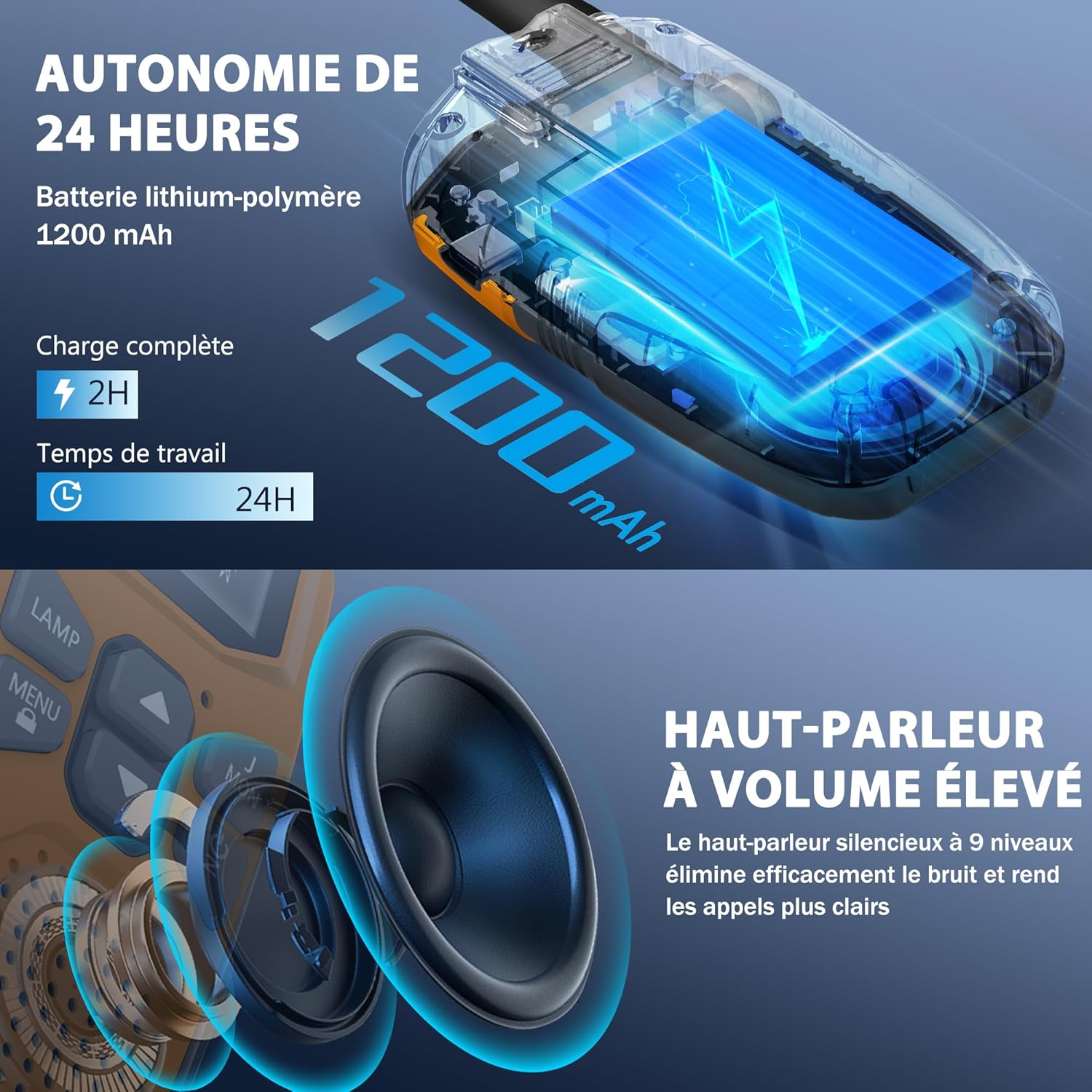
Image: Visual representation of the walkie talkie's 1200mAh battery and its charging and usage duration.
2. achinggbakwunye Clip Belt
To attach the belt clip, align it with the slots on the back of the walkie talkie and slide it down until it clicks into place. To remove, push the release tab and slide the clip upwards.
Ntuziaka ọrụ
1. Gbanyụọ / gbanyụọ
Pịa ma jide Ike/nyocha button for 3 seconds to turn the walkie talkie on or off.
2. Na-agbanwe olu
Jiri ihe Up na Ala buttons to adjust the speaker volume. The volume level will be displayed on the LCD.
3. Ịhọrọ ọwa
The walkie talkies have 16 channels. To communicate, all walkie talkies in your group must be on the same channel and privacy code.
- Pịa MENU button once. The channel number will flash on the LCD.
- Jiri ihe Up or Ala bọtịnụ iji họrọ ọwa ịchọrọ (1-16).
- Pịa MENU button again to confirm the channel selection, or wait a few seconds for it to automatically set.
4. Setting Privacy Codes (CTCSS/DCS)
The walkie talkies support 121 interference elimination codes (38 CTCSS codes and 83 DCS codes) to ensure private communication and reduce interference from other users on the same channel.
- Mgbe ịhọrọchara ọwa, pịa MENU button twice. The privacy code number will flash.
- Jiri ihe Up or Ala buttons to select a privacy code (0-121). Code 0 means no privacy code is set.
- Pịa MENU button again to confirm, or wait for automatic setting.
5. Nyefe na ịnata (PTT)
To speak, press and hold the PTT (Push-to- Talk) button located on the side of the walkie talkie. Speak clearly into the microphone. Release the PTT button to listen for a response.
6. Kpọọ ụda
Pịa Kpọọ button to send a call tone to other walkie talkies on the same channel and privacy code, alerting them to your presence.
7. VOX (Voice Operated Exchange) - Hands-Free Operation
VOX allows you to transmit without pressing the PTT button. When VOX is enabled, the walkie talkie will automatically transmit when it detects your voice.
- Pịa MENU button until the VOX icon flashes on the LCD.
- Jiri ihe Up or Ala buttons to select a VOX sensitivity level (1-3, with 3 being most sensitive). Select 'OFF' to disable VOX.
- Pịa MENU iji gosi.
8. Ọrụ ọkụ ọkụ
Pịa LAMP button to turn the built-in LED flashlight on or off. This can be used for emergency lighting or during nighttime activities.
9. Mkpọchi ahụ igodo
To prevent accidental changes to settings, press and hold the MENU/LOCK button for 3 seconds. A lock icon will appear on the LCD. Repeat the action to unlock the keypad.
Atụmatụ igodo
- Nkwukọrịta Mgbasa Ozi:
These walkie talkies offer significant communication range. In open areas such as rural environments, suburbs, or coastal regions without obstructions, they can reach up to 5 kilometers (3.1 miles). In urban or village settings, the range is approximately 1.5 kilometers (0.9 miles). This allows users to stay connected without relying on mobile phone networks.

Image: Visual representation of the walkie talkie's communication range in different environments.
- Kpochapụ ogo ọdịyo:
Equipped with a high-volume speaker and noise reduction technology, these walkie talkies deliver clear and loud audio. The 9-level silent speaker effectively eliminates noise, ensuring rapid and clear responses during conversations.
Foto: Zuru ezu view of the walkie talkie's speaker, emphasizing its high volume and clear sound capabilities.
- Nhazi na-adịgide adịgide na nke dị fechaa:
The walkie talkies feature a hard, anti-drop shell made from environmentally friendly, fall-resistant material, providing protection against accidental drops. Despite their robust construction, each unit is lightweight, weighing approximately 93g, and compact, measuring 16cm in height, 3cm in depth, and 2cm in width, making them easy for children to handle.
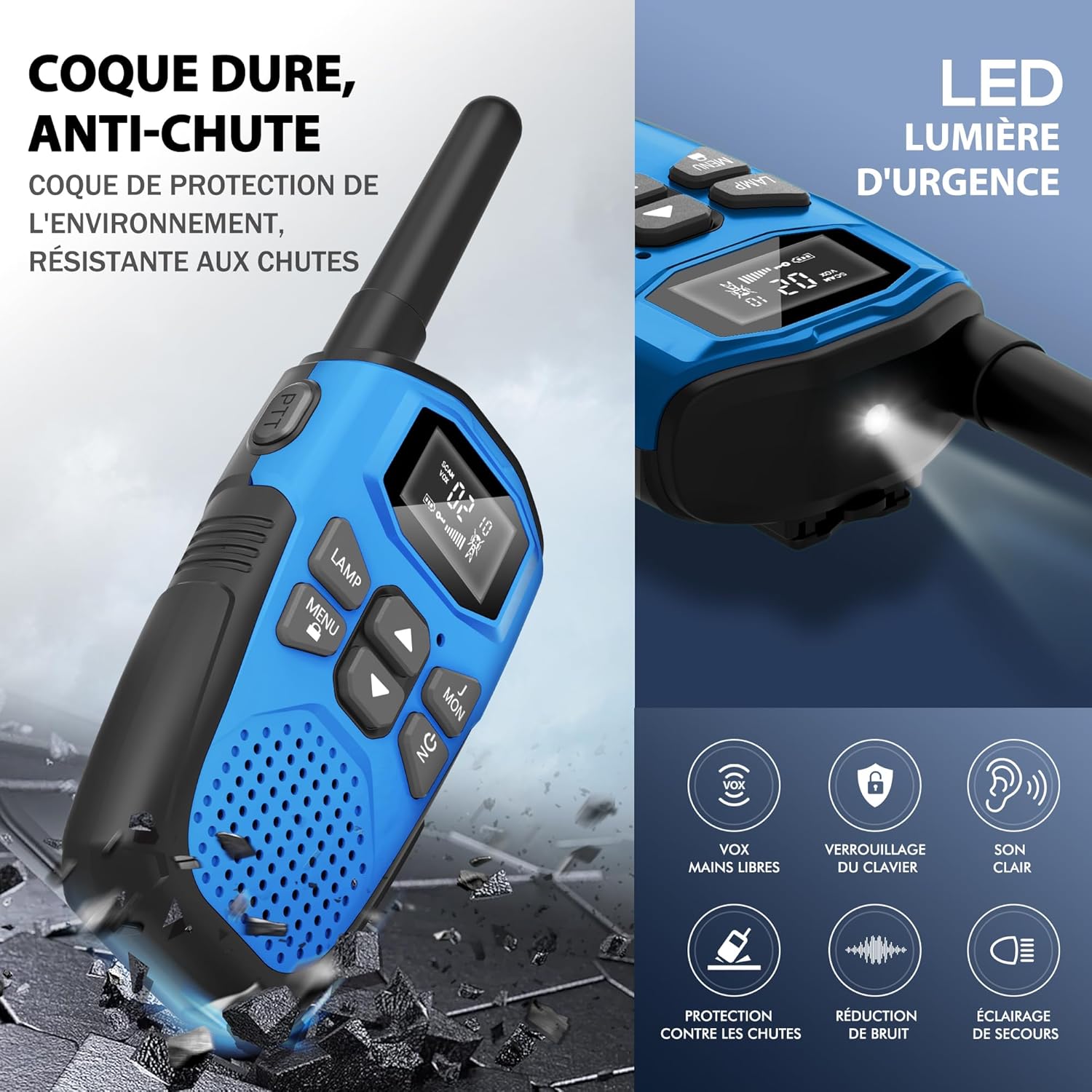
Image: Depiction of the walkie talkie's durable, drop-resistant casing and a summary of its key features.

Image: Dimensions and weight of the walkie talkie, highlighting its lightweight and slim design.
- Igwe ọkụ ọkụ agbakọtara ọnụ: Each walkie talkie includes a built-in LED flashlight, which can serve as an emergency light source, making it suitable for outdoor adventures and nighttime exploration.
- Nchekwa ike akpaaka: The devices are designed with an automatic power-saving feature to extend battery life during periods of inactivity.
- Nti mkpu batrị dị ala: An indicator will notify you when the battery level is low, prompting you to recharge the device.
Nkọwapụta
| Ụdị | NXGKET |
| Nọmba nlereanya | 2AYV7YG-813 |
| Agba | Orange, Yellow, Blue, Purple |
| Ọnụọgụ nke ọwa | 16 |
| Oke ugboro ugboro | 446 MHz |
| Oke kacha | 3 Kilometers (up to 5 km in open areas) |
| Teknụzụ Ndozi | UHF |
| Ngwakọta batrị | Lithium-Polymer |
| Ike batrị | 1200mAh (arụnyere n'ime) |
| Batrị enwere ike ịchaji | Ee |
| Voltage | 3.7 volts (DC) |
| Ọkwa Nguzogide mmiri | Ọ bụghị Waterproof |
| Atụmatụ pụrụ iche | Digital display, Long range, Lightweight, Battery saver mode, Rechargeable, VOX hands-free, Keypad lock, Clear sound, Drop protection, Noise reduction, Emergency light |
Nlekọta
- Nhicha: Jiri nwayọọ, damp akwa iji hichaa mpụta nke okwu mkparịta ụka. Ejila kemịkalụ siri ike ma ọ bụ ihe mkpocha abrasive.
- Nchekwa: Store the walkie talkies in a cool, dry place away from direct sunlight and extreme temperatures when not in use.
- Nlekọta batrị: To prolong battery life, avoid fully discharging the battery frequently. Recharge the devices regularly, even if not in constant use.
- Mkpughe mmiri: These walkie talkies are not waterproof. Avoid exposing them to rain, splashes, or immersion in water.
Nchọpụta nsogbu
| Nsogbu | Ngwọta enwere ike |
|---|---|
| Enweghị ike | Ensure the battery is charged. Press and hold the Power button for 3 seconds. |
| Cannot communicate with other walkie talkies |
|
| Ogo ụda adịghị mma ma ọ bụ kwụ ọtọ |
|
| Batrị na-agbapụ ngwa ngwa |
|
| Ahụigodo anaghị anabata | The keypad might be locked. Press and hold the MENU/LOCK button for 3 seconds to unlock it. |
Akwụkwọ ikike na nkwado
The NXGKET walkie talkies have been tested to meet CE certification standards.
Akwụkwọ ikike onye nrụpụta: A one-year warranty is provided by the manufacturer from the date of purchase. This warranty covers defects in materials and workmanship under normal use.
Mwepu: The warranty does not cover damage caused by misuse, accidents, unauthorized modifications, or exposure to water.
Nkwado ndị ahịa: For any questions, technical assistance, or warranty claims, please contact NXGKET customer service via the email address provided on your purchase receipt or through the retailer's support channels. Please have your model number (2AYV7YG-813) and purchase details ready when contacting support.
Ask a question about this manual
Ask about setup, troubleshooting, compatibility, parts, safety, or missing instructions. Manuals+ will review the question and use this page’s manual context to help answer it.