
1. Okwu mmalite
This manual provides instructions for the installation, operation, and maintenance of the Fdit K1H16A Smart Thermostat. This device is designed for controlling electric heating systems, including floor heating and radiators, utilizing a microcomputer for precise temperature management.
Akụkụ ndị bụ isi:
- Oke okpomoku sara mbara: Measurement accuracy of ±1℃ within a 0-50℃ range, allowing a set temperature range of 5-60℃.
- Njikwa microcomputer: Utilizes a single-chip microcomputer for enhanced stability and anti-interference.
- Kpochapụ ihe ngosi LCD: Provides clear data display for easy reading and operation.
- Accurate Temperature Detection: Equipped with a high-precision sensor for reliable temperature monitoring.
2. Ozi nchekwa
Please read all safety instructions before installation and operation. Failure to follow these instructions may result in electric shock, fire, or damage to the product.
- Ekwesịrị ịrụ ọrụ ọkụ eletrik ruru eru.
- Disconnect power at the circuit breaker before installing or servicing the thermostat.
- Hụ na waya ndị a dabara na koodu eletriki mpaghara.
- Do not install in locations with excessive vibration, direct sunlight, or extreme temperature fluctuations.
- This thermostat is designed for AC 90V-240V, 16A electric heating systems. Verify your system's voltage na ugbu a chọrọ.
3. Ihe ngwugwu
Chọpụta na ihe niile dị na ngwugwu:
- Fdit K1H16A Smart Thermostat
- External NTC Temperature Sensor Cable
- Ihe mgbakwasị ụkwụ (2)
- Akwụkwọ ntuziaka (akwụkwọ a)

Image: Contents of the Fdit K1H16A Smart Thermostat package, including the thermostat unit, the external NTC temperature sensor cable, and two mounting screws.
4. Nwụnye
4.1 Ịkwanye Thermostat
- Choose a suitable location on an interior wall, away from direct sunlight, drafts, or heat sources.
- Ensure the mounting type is surface mount.
- Jiri skru ndị e tinyere n'elu mee ka ntọala thermostat ahụ sie ike na mgbidi ahụ.
4.2 Ntuziaka waya
WARNING: Disconnect power before wiring.
Refer to the wiring diagram on the back of the thermostat unit for correct connections. The thermostat supports AC 90V-240V, 16A electric heating systems.
- Connect the Live (L) and Neutral (N) power supply wires to terminals 1 and 2 respectively.
- Connect the heating load wires (L1 and N1) to terminals 3 and 4 respectively.
- Connect the external NTC temperature sensor wires to terminals 5 and 6.
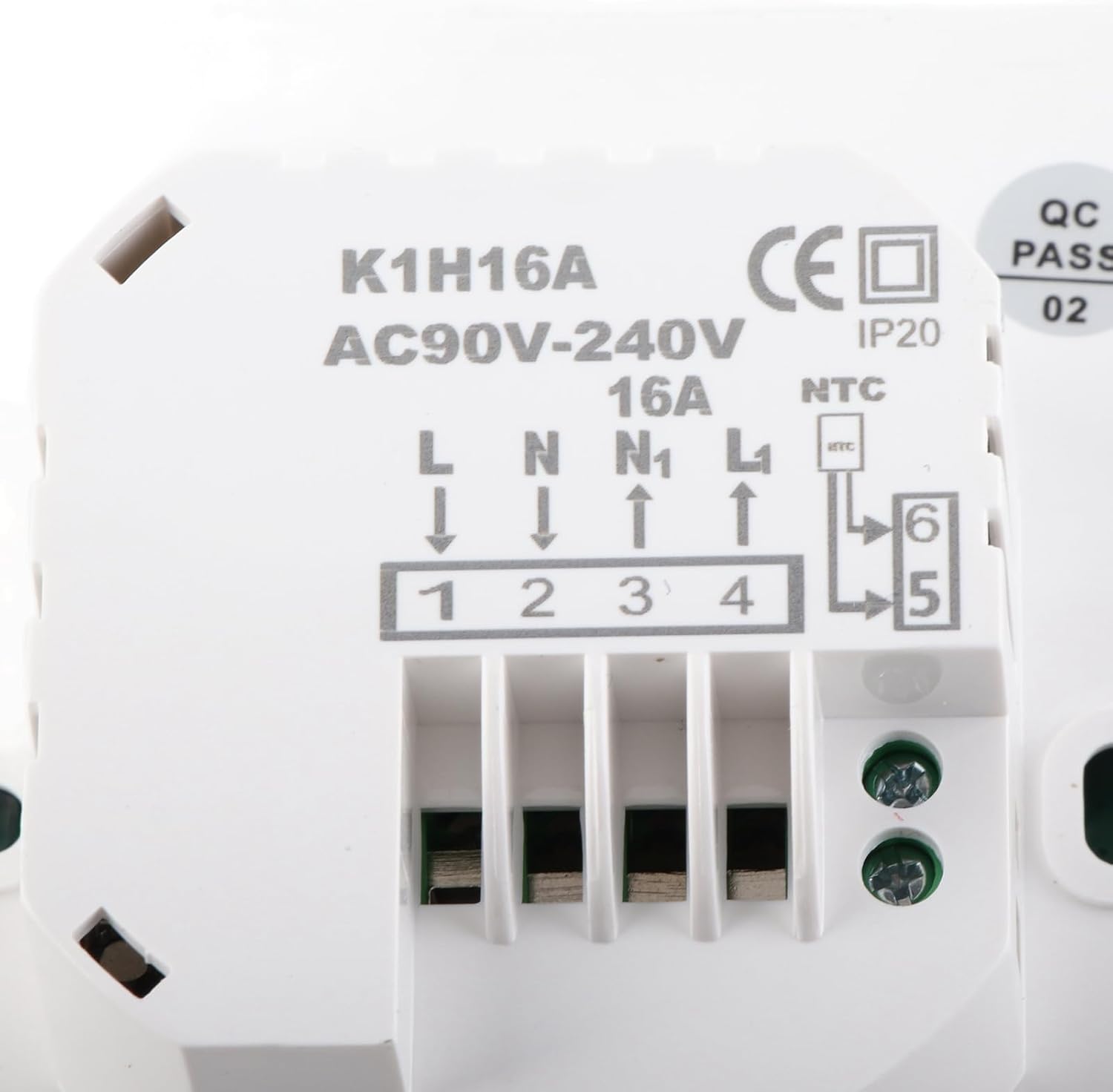
Foto: Zuru ezu view of the thermostat's rear, illustrating the wiring terminals (1-6) and the corresponding labels for Live, Neutral, Load, and NTC sensor connections. The model number K1H16A and voltage range AC90V-240V 16A are visible.

Image: The external NTC temperature sensor cable, typically used for floor temperature sensing in electric floor heating systems.
5. Ọrụ
5.1 LCD Ngosipụta karịrịview
The thermostat features a clear LCD display that shows the current temperature, set temperature, operating mode, and other relevant information. The display has a backlight for visibility in various lighting conditions.

Image: The thermostat installed on a wall, showing its LCD display with current and set temperatures.
5.2 bọtịnụ Ọrụ
The thermostat is controlled via push buttons located below the LCD display:

Foto: nso nso view of the thermostat's control panel, highlighting the power, ECO, time, and up/down arrow buttons.
- bọtịnụ ike (⏻): Turns the thermostat ON or OFF.
- Bọtịnụ ECO: Activates or deactivates economy mode, if available. Refer to advanced settings for configuration.
- Time Button (⏱): Used for setting the clock and accessing programmable schedules.
- Akụ Elu (v): Increases the set temperature or navigates menu options.
- Akụ Ala (▼): Decreases the set temperature or navigates menu options.
5.3 Ntọlite okpomọkụ
In normal operating mode, use the Up (v) na ala (▼) arrow buttons to adjust the desired temperature. The new setting will be displayed and saved automatically.
Atụmatụ 5.4 Enwere ike ịhazi ya
The thermostat supports programmable schedules. Press the Time (⏱) button to enter programming mode. Detailed instructions for setting daily or weekly schedules are typically found in the advanced settings menu, which can be accessed by specific button combinations (e.g., holding the Time button for several seconds).
5.5 Njikwa ngwa
This thermostat supports control via a mobile application. Please refer to the specific app's instructions for pairing and remote operation. App availability and features may vary.
6. Nlekọta
The Fdit K1H16A Smart Thermostat requires minimal maintenance.
- Nhicha: Wipe the thermostat's surface with a soft, damp akwa . Ejila ihe nchacha abrasive ma ọ bụ ihe mgbaze.
- Nyocha: Periodically check the wiring connections for tightness and ensure the thermostat is securely mounted.
7. Nchọpụta nsogbu
Ọ bụrụ na ị hụ nsogbu na thermostat gị, lee usoro ndị a na-emekarị maka nsogbu ndị a:
| Nsogbu | Ihe nwere ike ime | Ngwọta |
|---|---|---|
| Ngosipụta thermostat bụ oghere | Enweghị ọkụ | Check circuit breaker. Ensure wiring connections are secure. |
| Sistemụ kpo oku anaghị azaghachi | Incorrect wiring; Thermostat in OFF mode; Heating system fault | Verify wiring connections. Ensure thermostat is ON and set to a temperature above ambient. Check heating system for faults. |
| Ọgụgụ okpomọkụ ezighi ezi | Sensor issue; Thermostat location | Check external sensor connection. Ensure thermostat is not exposed to drafts or direct heat sources. |
Ọ bụrụ na nsogbu ahụ dịgidere, kpọtụrụ nkwado ndị ahịa.
8. Nkọwapụta
| Njirimara | Nkọwapụta |
|---|---|
| Ụdị | Fdit |
| Aha Nlereanya | K1H16A |
| Ụdị njikwa | Pịa bọtịnụ |
| Atụmatụ pụrụ iche | Ngosipụta Okpomọkụ nke enwere ike ime mmemme ya |
| Agba | Ọcha |
| Ụdị njikwa okpomọkụ | Dijitalụ |
| Isi Iyi Ike | Igwe ọkụ eletrik |
| Nrụ ọrụ Voltage | AC 90V-240V |
| Ibu Ibu ugbu a | 16A |
| Ibu Ibu | 188 grams (6.6 ounces) |
| Ihe onwunwe | Acrylonitrile Butadiene Styrene (ABS) |
| Ụdị ngosi | LCD |
| Usoro njikwa | Njikwa bọtịnụ, ngwa |
| Ụdị nkwụnye | Ugwu elu |
| Ìhè azụ | Ee |
| Izizi nha nha | ±1℃ |
| Measurement Temperature Range | 0-50 ℃ |
| Tọọ oke okpomọkụ | 5-60 ℃ |
| Akụkụ ngwugwu | 4.37 x 3.9 x 2.72 sentimita asatọ |
9. Akwụkwọ ikike na nkwado
For warranty information or technical support, please refer to the retailer's policy or contact Fdit customer service directly. Keep your purchase receipt for warranty claims.
Contact information can typically be found on the product packaging or the official Fdit websaịtị.