
1. Okwu mmalite
The Auronic Electric Air Dehumidifier AU3270 is designed to effectively remove excess moisture from indoor environments, helping to prevent mold growth and maintain a healthy humidity level. This appliance is suitable for spaces up to 15 square meters and can extract up to 10 liters of moisture per day. This manual provides essential information for the safe and efficient use of your dehumidifier.

Image: The Auronic Electric Air Dehumidifier AU3270 positioned in a living room, illustrating its compact design and 10-liter daily capacity for optimal dehumidification.
2. Ntuziaka nchekwa
Biko gụọ ntuziaka nchekwa niile nke ọma tupu i jiri ngwa ahụ iji gbochie mmerụ ahụ ma ọ bụ mmebi.
- Gbaa mbọ hụ na ọkọnọ ọkụ voltage dakọtara na akara ọkwa dị na dehumidifier.
- Ejila eriri ọkụ eletrik ma ọ bụ plọg mebiri emebi rụọ ọrụ dehumidifier ahụ.
- Debe ngwa ahụ pụọ na ebe okpomọkụ, ìhè anyanwụ kpọmkwem, na ihe ndị na-ere ọkụ.
- Do not block the air inlet or outlet. Maintain at least 20 cm clearance around the unit.
- Always place the dehumidifier on a stable, level surface to prevent water spillage.
- Unplug the appliance before cleaning, maintenance, or when not in use for extended periods.
- Ejila nkeji, eriri ọkụ, ma ọ bụ nkwụnye na mmiri ma ọ bụ ihe mmiri ndị ọzọ.
- Ezubere ngwa a maka iji ndị mmadụ (gụnyere ụmụaka) nwere ike anụ ahụ, mmetụta uche ma ọ bụ nke uche, ma ọ bụ enweghị ahụmịhe na ihe ọmụma, ma ọ bụrụ na enyereghị ha nlekọta ma ọ bụ ntụziaka gbasara iji ngwa ahụ site n'aka onye na-ahụ maka nchekwa ha.
- Ekwesịrị ilekọta ụmụaka ka ha hụ na ha ejighi ngwa eji egwu egwu egwu.
3. Nhazi
3.1 Ịkwapụ ihe na ihe dị n'ime ngwugwu
Carefully remove the dehumidifier from its packaging. Check that all components are present and undamaged. The package typically includes the dehumidifier unit, a drainage hose, and this user manual.

Image: Contents of the Auronic Dehumidifier package, displaying the main unit, continuous drainage hose, and user manual, along with key product dimensions.
3.2 Ntinye
Place the dehumidifier on a firm, level surface in the desired location. Ensure there is at least 20 cm of free space around the air inlet and outlet for optimal airflow. The unit is effective for rooms up to 15 square meters. Avoid placing it in direct sunlight or near heat-emitting appliances.
3.3 Njikọ ike
Plug the power cord into a grounded electrical outlet. Ensure the outlet meets the power requirements specified on the appliance's rating label.
3.4 Nhọrọ igbapu
The dehumidifier offers two drainage methods:
- tank mmiri: The unit collects condensed water in its internal 2-liter water tank. The appliance will automatically stop operating when the tank is full, and an indicator will illuminate.
- Mgbapu mmiri na-aga n'ihu: For uninterrupted operation, attach the included drainage hose to the continuous drainage port on the back of the unit. Route the hose to a suitable drain or larger container, ensuring it is sloped downwards to allow water to flow freely by gravity.
4. Ntuziaka ọrụ
4.1 Ogwe njikwa gafereview
The dehumidifier features an intuitive digital LED display and control buttons for easy operation.
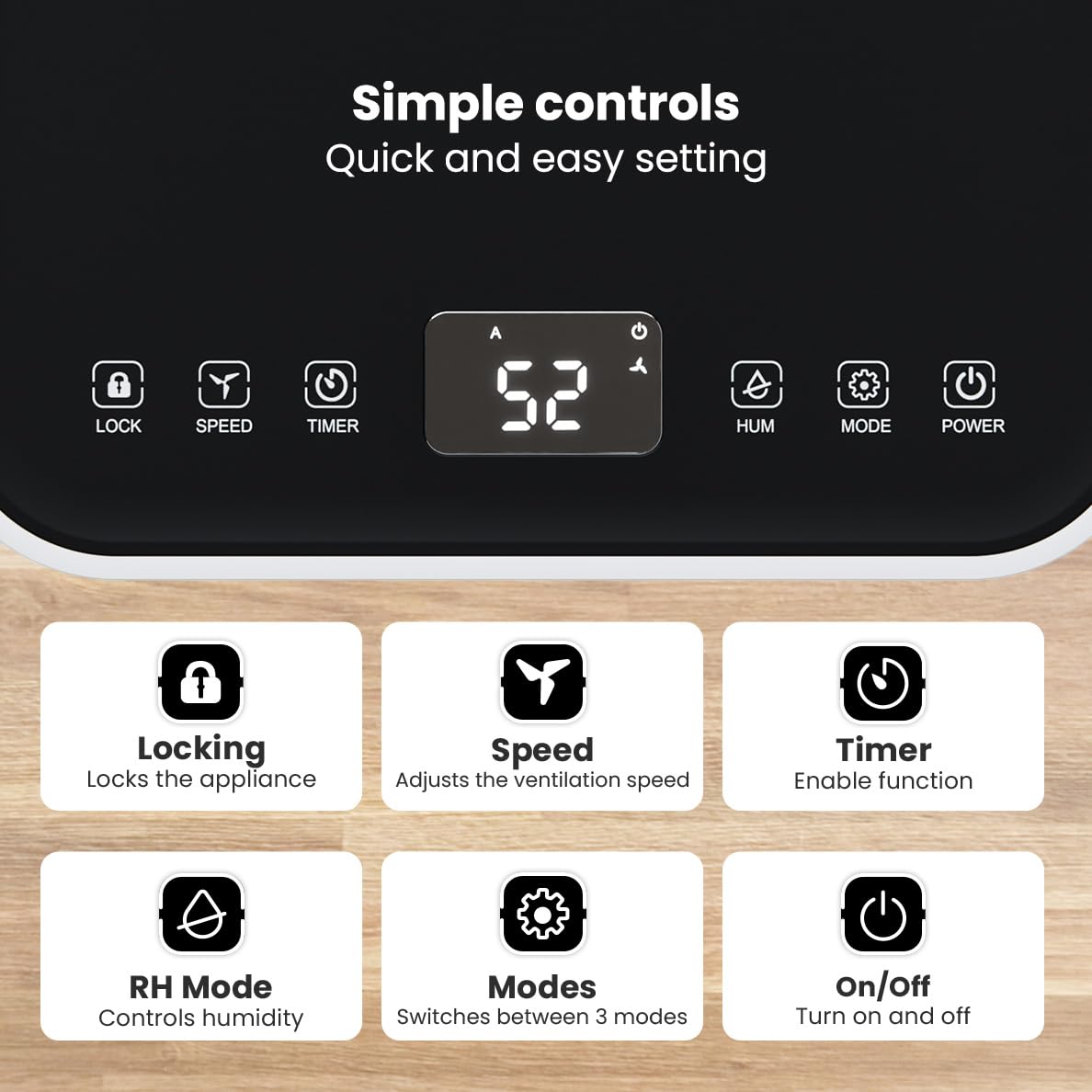
Foto: Zuru ezu view of the dehumidifier's control panel, highlighting each button's function for easy setting adjustments.
- bọtịnụ ike (⏻): Gbanyụọ ma ọ bụ gbanyụọ ngwa ahụ.
- Bọtịnụ ọnọdụ (⚙): Switches between the three operating modes: Automatic, Continuous, and Quiet.
- RH Mode Button (💧): Controls the desired relative humidity level. Press to set the target humidity.
- Bọtịnụ ihe eji agụ oge (⏱): Enables the timer function for scheduled operation.
- Bọtịnụ Ọsọ (⇋): Adjusts the ventilation speed (fan speed).
- Mkpọchi bọtịnụ (🔒): Kpochie ogwe njikwa iji gbochie mgbanwe mberede.
4.2 Ụdị arụ ọrụ
Press the Mode button to cycle through the available operating modes:
- Ụdị akpaaka: The device automatically adjusts its operation based on the current room humidity to maintain a comfortable level.
- Ụkpụrụ na-aga n'ihu: Kwesịrị ekwesị maka damp environments like wet basements. The dehumidifier operates continuously regardless of the humidity level until the water tank is full or continuous drainage is active.
- Ụdị dị jụụ: Designed for night-time use or in areas where low noise is preferred. The dehumidifier operates at a reduced fan speed, ensuring a peaceful environment with a noise level below 36dB.

Image: A chart comparing the noise level of the Auronic Dehumidifier (42dB) to common sounds like breathing, whispering, and loud conversation, highlighting its quiet operation.
4.3 Humidity Sensor and Display
The integrated humidity sensor monitors the room's humidity level, which is displayed on the digital screen. The color of the display indicates the current humidity status:
- Acha anụnụ anụnụ: Humidity level is below 45%.
- Akwụkwọ ndụ akwụkwọ ndụ: Humidity level is between 45% and 64%.
- Uhie: Humidity level is above 65%.
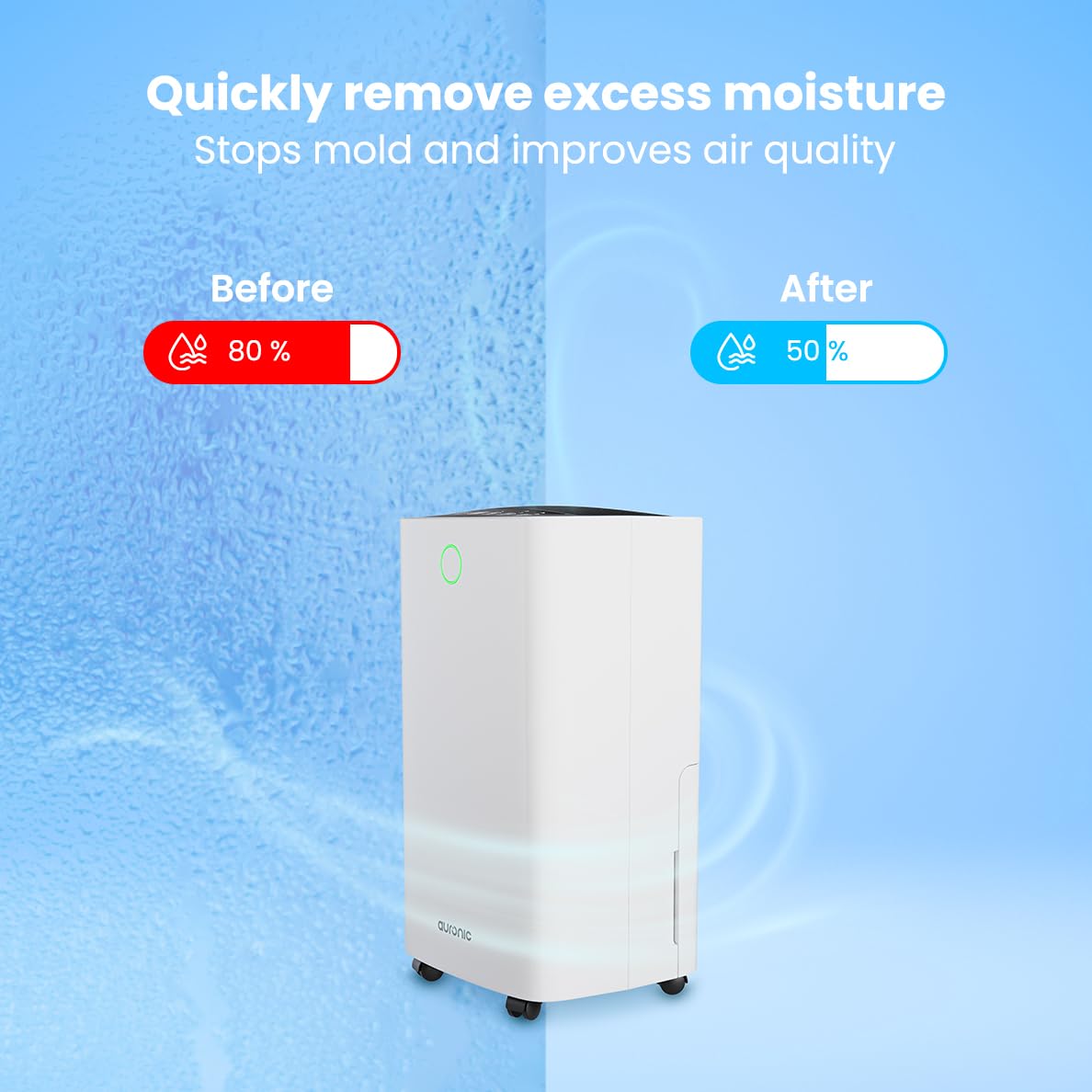
Image: A visual representation demonstrating the dehumidifier's effectiveness, showing a reduction in humidity from 80% to 50% in a room.
4.4 Laundry Drying Function
The Auronic dehumidifier includes a laundry drying function to assist in reducing the drying time of clothes, sheets, and towels. Place the appliance in your laundry room or near drying clothes to utilize this feature, which helps to remove moisture from the air and accelerate the drying process.

Image: The dehumidifier in a bathroom setting, demonstrating its ability to extract up to 10 liters of moisture and its suitability for rooms up to 15 square meters, alongside its intelligent humidity meter, wash-dry function, and silent operation.
5. Nlekọta
Nlekọta oge niile na-eme ka ogologo ndụ na ịrụ ọrụ nke ọma nke dehumidifier gị.
5.1 Na-ekpochapụ tankị mmiri
When the water tank is full, the dehumidifier will stop operating, and an indicator light will turn on. Carefully pull out the water tank from the unit, empty the collected water, and then reinsert the tank firmly until it clicks into place. Ensure the tank is properly seated to resume operation.
5.2 Na-ehicha ihe nzacha ikuku
The air filter should be cleaned regularly (e.g., every two weeks or as needed) to maintain optimal performance. A dirty filter can reduce efficiency and increase energy consumption.
- Kpupu ihe dehumidifier na ntinye ọkụ.
- Chọta ma wepụ ihe nzacha ikuku (ọkachasị n'azụ ma ọ bụ n'akụkụ nke ngwaọrụ ahụ).
- Clean the filter using a vacuum cleaner to remove dust and debris. For heavily soiled filters, wash gently with lukewarm water and a mild detergent.
- Allow the filter to air dry completely before reinserting it into the dehumidifier.
5.3 Nhicha na Nchekwa Izugbe
Jiri nwayọ hichaa mpụta nke dehumidifier, damp cloth. Do not use abrasive cleaners or solvents. For long-term storage, ensure the water tank is empty and clean, the filter is clean and dry, and the unit is unplugged. Store the dehumidifier in a cool, dry place, preferably in its original packaging.
6. Nchọpụta nsogbu
Ọ bụrụ na ị hụ nsogbu na dehumidifier gị, lee nsogbu na ngwọta ndị a na-ahụkarị:
| Nsogbu | Ihe nwere ike ime | Ngwọta |
|---|---|---|
| Dehumidifier anaghị agbanwuo. | No power supply; Power cord not plugged in; Power button not pressed. | Check power connection; Ensure outlet is functional; Press the Power button. |
| Anaghị anakọta mmiri ma ọ bụ belata mmiri mmiri. | Room temperature too low; Humidity level already low; Air filter clogged; Air inlet/outlet blocked; Water tank not properly inserted. | Ensure room temperature is above 5°C; Check current humidity; Clean the air filter; Clear any obstructions; Reinsert water tank correctly. |
| Ngalaba na-eme mkpọtụ. | Unit abụghị n'elu larịị; Ihe nzacha ikuku mechiri; Ihe ndị dị n'ime na-ama jijiji. | Place on a stable, level surface; Clean the air filter; If noise persists, contact customer support. |
| Ihe ngosi zuru oke nke tank mmiri dị, mana tank adịghị eju. | Float switch malfunction; Water tank not properly seated. | Remove and reinsert the water tank; Check float switch for obstructions. |
| Ngosipụta na-egosi koodu mperi. | Internal sensor error or malfunction. | Unplug the unit for 5 minutes, then plug back in. If error persists, contact customer support. |
7. Nkọwapụta
Technical specifications for the Auronic Electric Air Dehumidifier AU3270:
| Njirimara | Nkọwa |
|---|---|
| Ụdị | Auronic |
| Aha Nlereanya | AU3270 |
| Ike | 10 lita kwa ụbọchị |
| Ike tank mmiri | 2 lita |
| Mkpuchi Mpaghara Ala | Up to 15 m² (150000 Square Centimeters) |
| Wattage | 185 Watt |
| Akụkụ ngwaahịa (D x W x H) | 50D x 30.5W x 26.5H centimita |
| Ibu Ibu | 10 kilogram |
| Agba | Ọcha |
| Ọkwa mkpọtụ | Below 36dB (in Quiet Mode) |
8. Akwụkwọ ikike & Nkwado
8.1 Ozi akwụkwọ ikike
Your Auronic Electric Air Dehumidifier AU3270 comes with a standard manufacturer's warranty. Please refer to the warranty card included in your package for specific terms, conditions, and duration. Keep your proof of purchase for warranty claims.
8.2 Nkwado ndị ahịa
For any questions, technical assistance, or warranty claims, please contact Auronic customer support. Contact details can typically be found on the product packaging, the official Auronic websaịtị, ma ọ bụ kaadị akwụkwọ ikike.