
1. Okwu mmalite
The PEKOKKO L4Pro is a portable handheld laser marking machine designed for versatile and precise marking applications. It features a 5-inch color touchscreen, proprietary software, and a user-friendly interface, making it suitable for various tasks such as marking QR codes, barcodes, text, serial numbers, dates, characters, images, and logos. Its lightweight and compact design, combined with a removable 9000 mAh battery, ensures portability and extended use.

Figure 1: PEKOKKO L4Pro highlighting its 5-inch touch screen, fast engraving, compact design, multiple applications, and removable battery.
2. Ozi nchekwa
Please read and understand all safety instructions before operating the PEKOKKO L4Pro laser marking machine. Failure to follow these instructions may result in serious injury or property damage.
- Nchedo anya: Always wear appropriate laser safety glasses when operating the device to protect your eyes from laser radiation.
- Nchekwa akpụkpọ: Avoid direct exposure of skin to the laser beam.
- Nchekwa ihe: Do not mark highly reflective, flammable, or explosive materials. Ensure proper ventilation when marking materials that may produce fumes.
- Eji ikike ikike: Only trained and authorized personnel should operate the laser marking machine.
- Ụmụaka na anụ ụlọ: Debe ngwaọrụ ahụ ka ụmụaka na anụ ụlọ ghara iru.
- Ịnye ọkụ: Use only the provided power adapter and ensure the power source matches the device's requirements.
- Nlekọta: Anwala ịkwasa ma ọ bụ rụkwaa ngwaọrụ n'onwe gị. Kpọtụrụ nkwado ndị ahịa maka enyemaka.
3. Ngwaahịa gafereview
3.1 Ngwa ngwaọrụ
Familiarize yourself with the main components of your L4Pro laser marking machine:

Figure 2: L4Pro device components diagram.
- Onye ọbịa: The main body of the marking machine.
- Batrị: Removable power source for portable operation.
- Protection Shield: Orange shield covering the laser output area.
- Onye ofufe: Cooling fan for internal components.
- Njikọ USB: Port for data transfer and connectivity.
- bọtịnụ mkpali: Activates the laser for marking.
- Main Control Screen: 5-inch color touchscreen for operation.
- Ike mgba ọkụ: Bọtịnụ iji gbanye ma ọ bụ gbanyụọ ngwaọrụ ahụ.
Ihe ngwugwu 3.2
Mgbe ebupuchara, hụ na ihe niile edepụtara n'okpuru nọ:
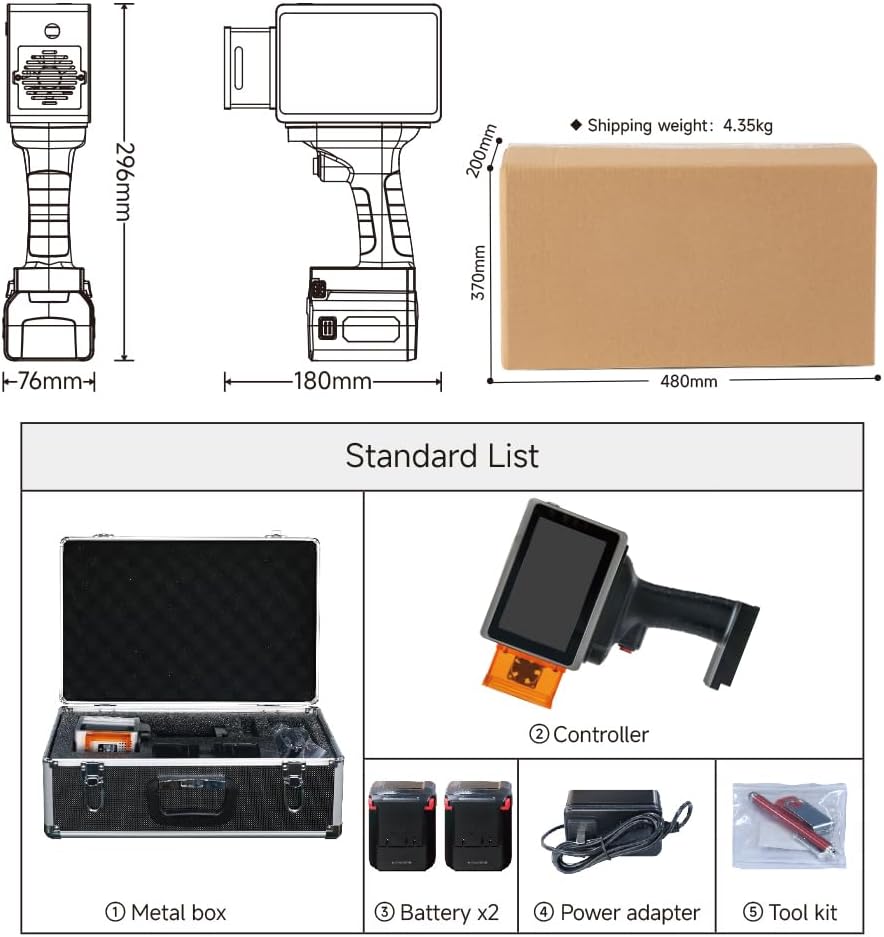
Figure 3: Standard package contents of the L4Pro.
- Metal Storage Box
- L4Pro Controller (Main Unit)
- Batrị x2
- Ihe nkwụnye ọkụ
- Ngwa Ngwa
4. Nhazi
4.1 Ntinye batrị
The L4Pro uses a removable battery for convenience. To install or remove the battery:
- Align the battery with the slot at the bottom of the main unit.
- Gently slide the battery into place until it clicks securely.
- Iji wepụ ya, pịa bọtịnụ ntọhapụ na batrị ahụ wee mịpụ ya.

Figure 4: Battery installation process.
4.2 Gbanyụọ/ gbanyụọ
To power on the device, press and hold the Power Switch (8) until the screen illuminates. To power off, press and hold the Power Switch again until the device shuts down.
5. Ọrụ
5.1 Nsoro Ụzọ Onye Ọrụ
The L4Pro features a 5-inch color touchscreen with an intuitive interface. Navigate through menus and options by tapping on the screen. The main screen provides access to various marking functions and settings.
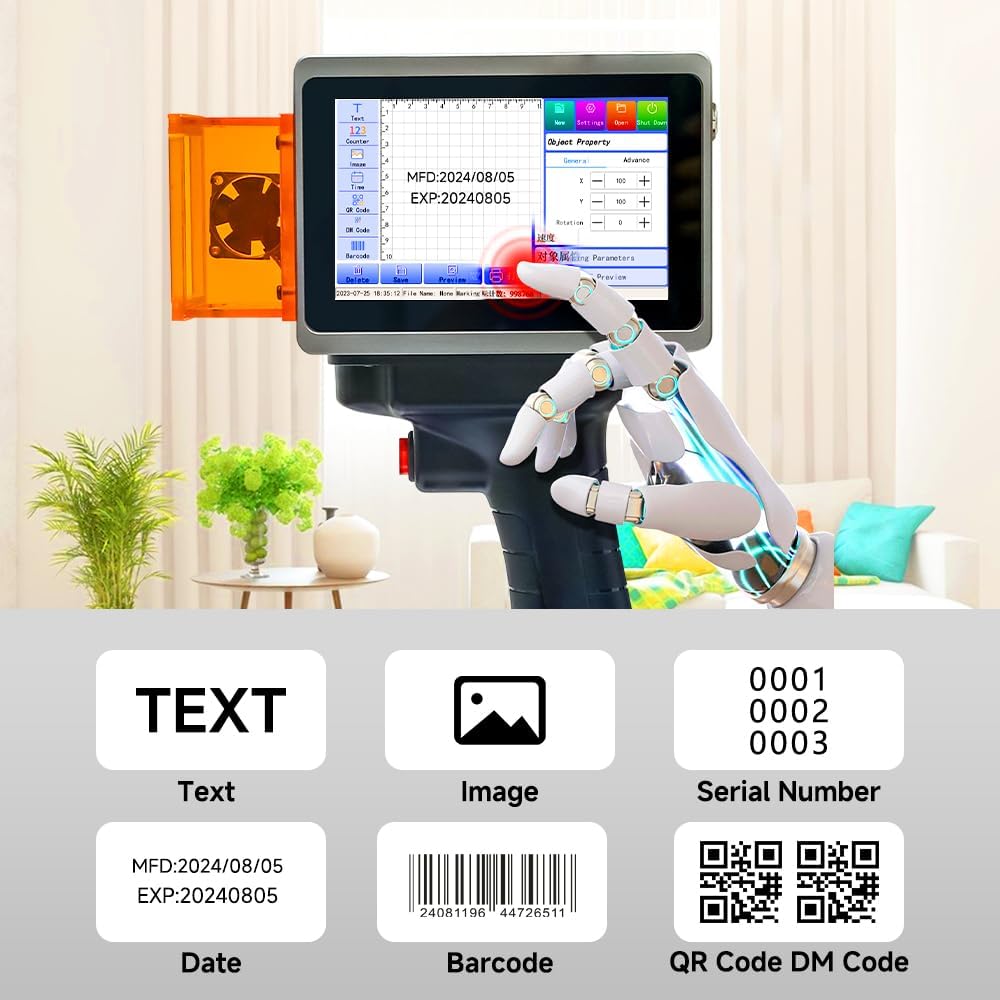
Figure 5: Main control screen interface with various marking options.
5.2 Creating Marking Content
The L4Pro supports various content types for marking:
- Ederede: Input custom text using the on-screen keyboard.
- Foto: Upload images or logos via the USB interface.
- Nọmba usoro n'usoro: Generate sequential numbers for batch marking.
- Ụbọchị: Automatically insert current date or expiration dates.
- Barcode/QR Code/DM Code: Create various types of scannable codes.
Use the touchscreen to select the desired content type, input your data, and adjust parameters such as size, font, and position.
5.3 N'ihuview Ọrụ
The device offers dual preview modes (projected edge and graphic outline) to accurately determine the marking position before engraving. This allows for quick adjustments and ensures precise placement of your design.
- Projected Edge: Displays a red light outline of the marking area on the target surface.
- Graphic Outline: Shows the full graphic outline for detailed positioning.
Access the preview function from the main control screen to verify your design's placement.
5.4 Marking Process
- Prepare the material to be marked, ensuring it is clean and stable.
- Create or load your desired marking content on the L4Pro's screen.
- Jiri ihe mbuview function to align the marking area precisely on the material.
- Hold the device firmly, ensuring the protection shield is close to the surface.
- Press the Trigger Button (6) to initiate the laser marking process.
- Move the device smoothly across the surface if marking a larger area, or hold steady for static marking.
5.5 Ihe akwadoro
The L4Pro is capable of marking on a wide range of materials, including but not limited to:
- Painted Cosmetics
- Osisi
- Akwụkwọ Kraft
- Igwe a na-ese
- Katọn
- Kwaaji
- Anụmanụ Tags (plastic)
- Cans (metal)
- Mobile Phone Cases (plastic)

Ọgụgụ 6: Ọpụamples of materials suitable for marking with the L4Pro.
6. Nlekọta
6.1 Nhicha
Regular cleaning helps maintain the performance and longevity of your device:
- Mputa: Jiri akwa dị nro hichaa mpụta igwe. Ejila ihe nchacha abrasive ma ọ bụ ihe mgbaze.
- Ihuenyo: Use a microfiber cloth specifically designed for electronic screens to clean the touchscreen.
- Laser Output Area: Ensure the laser output area and protection shield are free from dust and debris. Use a soft brush or compressed air if necessary.
6.2 Nlekọta batrị
Proper battery care extends battery life:
- Ịchaji: Charge the battery fully before first use and whenever the battery level is low. Use only the provided power adapter.
- Nchekwa: If storing the device for an extended period, charge the battery to approximately 50% and store it in a cool, dry place.
- Ndochi: If battery performance significantly degrades, consider replacing it with an official PEKOKKO replacement battery.
7. Nchọpụta nsogbu
This section addresses common issues you might encounter with your L4Pro. If you experience problems not covered here, please contact customer support.
| Nsogbu | Ihe nwere ike ime | Ngwọta |
|---|---|---|
| Ngwaọrụ anaghị agbanwu ọkụ | Low or depleted battery; Loose battery connection; Faulty power switch | Charge the battery; Reinstall the battery securely; Contact support if switch is faulty. |
| Poor marking quality | Incorrect laser settings; Unsuitable material; Dirty laser lens; Improper distance from material | Adjust laser power/speed settings; Ensure material compatibility; Clean the laser lens; Maintain correct focal distance. |
| Laser anaghị agba ọkụ | Safety interlock engaged; Trigger button not pressed correctly; System error | Ensure protection shield is correctly positioned; Press trigger firmly; Restart the device. |
| Ihuenyo mmetụ anaghị anabata | Software glitch; Screen damage | Restart the device; If issue persists, contact support. |
8. Nkọwapụta
| Njirimara | Nkọwapụta |
|---|---|
| Ụdị | PEKOKO |
| Aha Nlereanya | L4pro |
| Teknụzụ Njikọta | USB |
| Teknụzụ obibi akwụkwọ | Laser |
| Njirimara Pụrụ Iche | Lightweight, Touch Screen |
| Agba | Nwa |
| Ụdị mmepụta | Monochrome |
| Ọsọ mbipụta kacha (Monochrome) | 12000 ibe / nkeji |
| Ibu Ibu | 1.1 kilogram |
| Item Dimensions (DxWxH) | 9.8 x 18.1 x 17.7 centimita |
| Usoro njikwa | Metụ aka |
| Mgbasa ozi dakọtara | Akara aha |
| Ike batrị | 9000 mAh (up to 6+ hours continuous use) |
| Mkpebi Mbipụta kacha (Agba) | 1200 x 1200 DPI |
| Max Print Resolution (Black/White) | 1200 DPI |
| Duplex Printing | Mba (dị mfe) |
| UPC | 721587321912 |
| Mba onye si | China |
9. Akwụkwọ ikike na nkwado
9.1 Akwụkwọ ikike ngwaahịa
The PEKOKKO L4Pro laser marking machine comes with a akwụkwọ ikike otu afọ site na ụbọchị azụrụ ya. Akwụkwọ ikike a na-ekpuchi ntụpọ na mmebi nrụpụta n'oge ojiji nkịtị. Ọ naghị ekpuchi mmebi sitere na ojiji na-ezighị ezi, ihe mberede, mgbanwe na-akwadoghị, ma ọ bụ mmezi na-ezighi ezi.
9.2 Nkwado ndị ahịa
For technical assistance, troubleshooting, warranty claims, or any other inquiries, please contact PEKOKKO customer support through your retailer or the official PEKOKKO website. Please have your product model (L4pro) and purchase information ready when contacting support.