
COOLGEEK B0DD41WKCH
Akwụkwọ ntuziaka onye ọrụ
COOLGEEK Portable Stereo CD Player Boombox
Model: B0DD41WKCH
1. Okwu mmalite
Daalụ maka ịzụrụasing the COOLGEEK Portable Stereo CD Player Boombox. This manual provides essential information for the safe and efficient operation of your device. Please read it thoroughly before use and retain it for future reference.
2. Ngwaahịa gafereview
2.1 Atụmatụ
- Ọrụ 3-na-1: Combines a vertical CD player, Bluetooth speaker, and FM radio.
- Vintage & Fashion Design: Blends leather hues with brushed aluminum for a unique aesthetic.
- Enwere ike ibugharị: Features a leather handle for easy carrying.
- Ndụ batrị agbatịkwuru: Up to 18 hours of wireless playback on a single charge (approx. 2.5 hours charging time).
- Ndị na-ekwu okwu stereo: Built-in stereo speakers with an aluminum grille for enhanced audio.
- Versatile CD Compatibility: Supports various types of CDs with simple operation and 360° surround sound.
- Bluetooth Bluetooth: Fast and stable wireless connection.
- Igwe Redio: Tunable from 87.5 to 108 MHz.
- Inverted Phase Hole: Designed for powerful and booming bass experience.

Figure 2.1: The COOLGEEK Portable Stereo CD Player Boombox in green, showcasing ya vintage design and portable handle.

Figure 2.2: Visual representation of the boombox's key features, including its 3-in-1 functionality, Bluetooth 5.0, FM radio, vertical CD playback, and long battery life.
2.2 Kedu ihe dị na igbe ahụ
- Vintage CD Player (1 unit)
- Ihe nkwụnye ike (otu nkeji)
- Akwụkwọ ntuziaka (Akwụkwọ a)
3. Nhazi
- Iwepu: Jiri nlezianya wepụ ihe niile dị na nkwakọ ngwaahịa. Jido nkwakọ ngwaahịa maka mbugharị ma ọ bụ nchekwa n'ọdịnihu.
- Njikọ ike: Connect the provided power adapter to the DC IN port on the back of the boombox and plug it into a standard wall outlet.
- Ebube mbụ: For optimal battery performance, fully charge the device before first use. A full charge takes approximately 2.5 hours. The device can operate wirelessly for over 18 hours on a full charge.
- Nkwanye: Place the boombox on a stable, flat surface. Its portable leather handle allows for easy relocation.

Figure 3.1: The portable design of the boombox, highlighting its leather handle for easy transport and versatile placement.
4. Ntuziaka ọrụ
4.1 Na-achịkwaview
Familiarize yourself with the control buttons and knob located on the top panel of the boombox. Refer to Figure 4.1 for a visual guide.
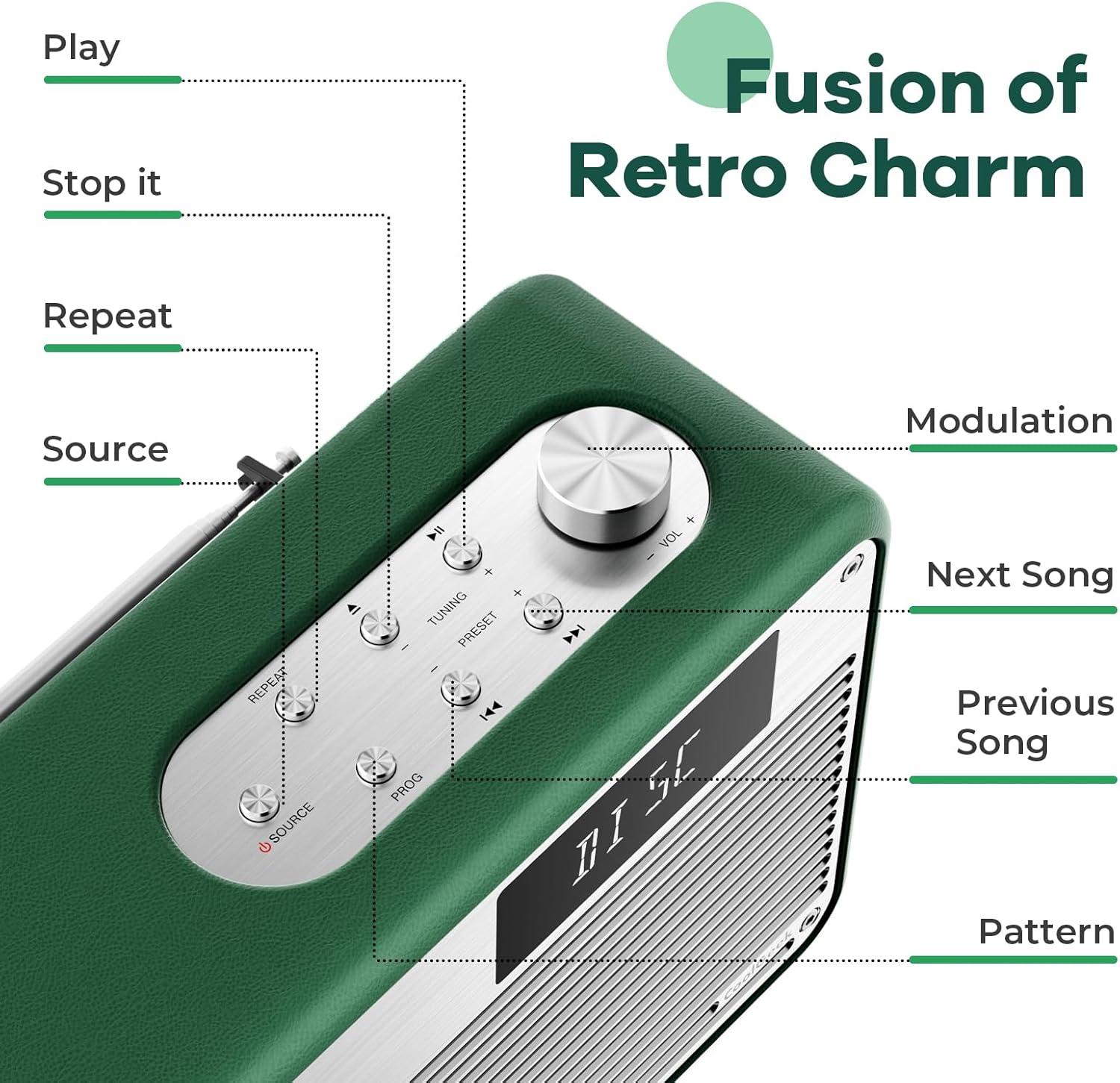
Ọgụgụ 4.1: Zuru ezu view of the control panel, indicating the function of each button and the modulation knob.
4.2 CD ịkpọghachi
- Fanye CD: Gently slide your CD into the vertical CD slot on the front of the boombox. The player is designed for simple disc insertion.
- Họrọ isi mmalite: Press the 'SOURCE' button until 'CD' mode is displayed.
- Gwuo/kwụsịtụ: Press the 'PLAY/PAUSE' button to start or pause playback.
- Ikwu egwu: Use the 'NEXT SONG' or 'PREVIOUS SONG' buttons to navigate between tracks.
- Njikwa olu: Rotate the 'MODULATION' knob to adjust the volume.
- Kwụsị ịkpọghachi: Press the 'STOP' button to end CD playback.
4.3 Ọnọdụ Bluetooth
- Họrọ isi mmalite: Press the 'SOURCE' button until 'BT' (Bluetooth) mode is displayed. The device will enter pairing mode, indicated by a flashing Bluetooth icon or specific audio prompt.
- Na-ejikọta: On your mobile device (smartphone, tablet, etc.), enable Bluetooth and search for available devices. Select 'COOLGEEK Boombox' (or similar name) from the list.
- Njikọ: Once paired, the boombox will indicate a successful connection. You can now play audio from your mobile device through the boombox.
- Jikwaa nkwughachi: Use the boombox's 'PLAY/PAUSE', 'NEXT SONG', and 'PREVIOUS SONG' buttons, or control playback directly from your paired device.
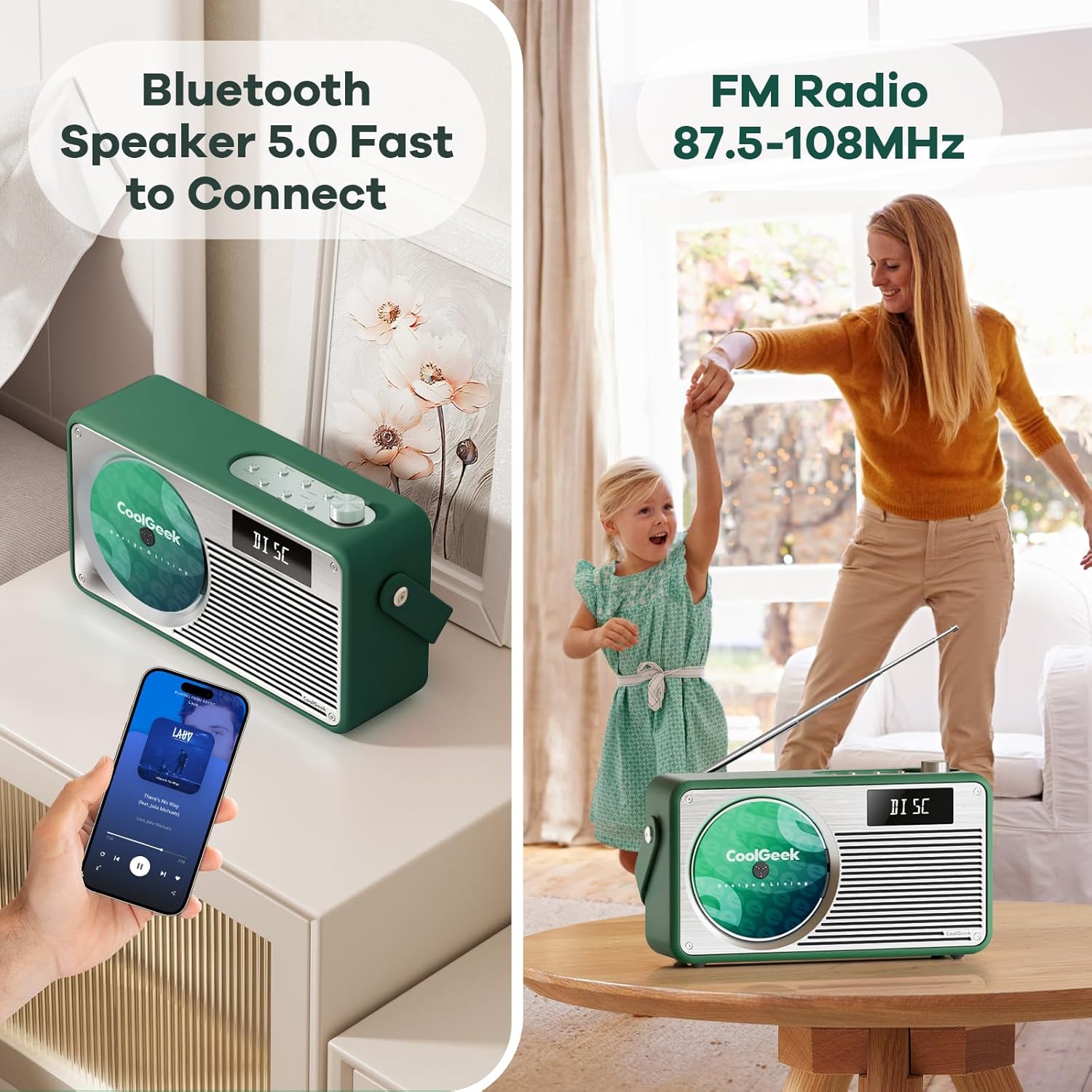
Figure 4.2: The boombox demonstrating its Bluetooth connectivity with a smartphone and its FM radio antenna extended.
Igwe redio FM 4.4
- Họrọ isi mmalite: Press the 'SOURCE' button until 'FM' mode is displayed.
- Ọdụ Tune: Use the 'TUNING' buttons (often combined with 'NEXT SONG'/'PREVIOUS SONG' or a dedicated tuning knob) to scan for radio stations. The frequency range is 87.5 to 108 MHz.
- Antenna: Extend the telescopic antenna on the back of the unit for better reception. Adjust its position for clearer sound.
- Ụlọ atọrọ atọ: Some models allow saving favorite stations. Refer to the specific button (e.g., 'PRESET' or 'PROG') for instructions.
5. Nlekọta
- Nhicha: Use a soft, dry cloth to clean the exterior of the boombox. Do not use liquid cleaners or abrasive materials.
- Nlekọta CD: Jiri ákwà dị nro nke na-enweghị ihe e ji ehicha CD hichaa CD ruru unyi, na-ehicha ya site n'etiti gaa n'ihu.
- Nlekọta batrị: To prolong battery life, avoid fully discharging the battery frequently. If storing the device for an extended period, charge it to about 50% every few months.
- Nchekwa: Chekwaa ngwaọrụ ahụ n'ebe dị jụụ, kpọrọ nkụ na-adịghị na ìhè anyanwụ kpọmkwem na oke okpomọkụ.
6. Nchọpụta nsogbu
| Nsogbu | Ihe nwere ike ime | Ngwọta |
|---|---|---|
| Enweghị ike | Battery drained; Power adapter not connected properly. | Charge the battery; Ensure power adapter is securely connected to both the boombox and the outlet. |
| Enweghị ụda | Volume too low; Incorrect source selected; Device muted. | Increase volume; Press 'SOURCE' to select correct mode (CD, BT, FM); Check if device is muted. |
| Ịwụfe CD ma ọ bụ na ọ naghị egwu egwu | CD is dirty or scratched; CD inserted incorrectly. | Clean the CD; Ensure CD is inserted correctly into the vertical slot. |
| Bluetooth anaghị ejikọ | Boombox not in pairing mode; Device too far; Bluetooth disabled on mobile device. | Ensure boombox is in BT mode and flashing; Move devices closer; Enable Bluetooth on your mobile device. |
| Nnabata FM adịghị mma | Antenna not extended or positioned correctly; Weak signal area. | Fully extend and adjust the telescopic antenna; Try moving the boombox to a different location. |
7. Nkọwapụta
| Njirimara | Nkọwa |
|---|---|
| Akụkụ ngwaahịa (L x W x H) | 17 x 9.5 x 6.7 sentimita asatọ |
| Ibu Ibu | 8.5 pound |
| Nọmba nlereanya (ASIN) | B0DD41WKCH |
| Batrị | 1 batrị lithium ion (gụnyere) |
| Ụdị | COOLGEEK |
| Teknụzụ Njikọta | Bluetooth |
| Agba | Akwụkwọ ndụ akwụkwọ ndụ |
| Ụdị Ọkà Okwu | Stereo |
| Onye nrụpụta | COOLGEEK |
| Ụbọchị mbụ dị | Ọgọst 14, 2024 |
8. Akwụkwọ ikike na nkwado
COOLGEEK is committed to providing excellent customer service. If you encounter any issues with your product or have questions, please contact us directly. We will do our best to resolve any problems you may experience.
For support, please refer to the contact information provided with your purchase or visit the official COOLGEEK websaịtị.
Ask a question about this manual
Ask about setup, troubleshooting, compatibility, parts, safety, or missing instructions. Manuals+ will review the question and use this page’s manual context to help answer it.