
Nnọọ
Thank you for choosing the BYTECH BICONIC True Wireless Earbuds. This manual provides essential information on how to set up, operate, maintain, and troubleshoot your new earbuds. Please read this manual thoroughly before use to ensure optimal performance and longevity of your device.
Ntuziaka nchekwa dị mkpa
- Ekpughela ihe mkpuchi ntị ma ọ bụ ihe mkpuchi chaja n'ebe okpomọkụ dị oke elu, iru mmiri, ma ọ bụ mmiri mmiri dị.
- Zere ịda, ime ka ihe ghara ịdị mma, ma ọ bụ ịgbasa ngwaọrụ ahụ.
- Do not use abrasive cleaners or harsh chemicals to clean the earbuds or case.
- Listen at moderate volume levels to prevent hearing damage. Prolonged exposure to loud sounds can cause irreversible hearing loss.
- Debe ebe ụmụaka na anụ ụlọ na-apụghị iru.
- Dispose of the device responsibly according to local regulations. Do not dispose of with household waste.
Kedu ihe gụnyere
Biko lelee ọdịnaya nke ngwugwu ahụ ka ị hụ na ihe niile dị:
- BYTECH BICONIC True Wireless Earbuds (Left and Right)
- Nchaji case
- Ịchaji eriri
- Akwụkwọ ntuziaka onye ọrụ
Ngwaahịa gafereview
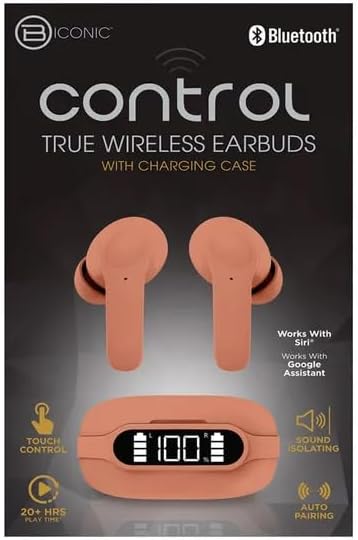
Familiarize yourself with the components of your BYTECH BICONIC True Wireless Earbuds.

Na-amalite
Ịchaji ihe ntị na akpa
The BYTECH BICONIC earbuds come with a rechargeable battery in both the earbuds and the charging case. Ensure both are fully charged before first use.
- Place the earbuds into the charging case, ensuring they are correctly seated in their respective slots (L for left, R for right).
- Connect the provided charging cable to the charging port on the case and the other end to a USB power source (e.g., computer USB port, wall adapter).
- The digital display on the charging case will show the battery level. Allow sufficient time for a full charge.
- Ozugbo chajịrị chaja zuru oke, kwụpụ eriri nchaji.
Njikọ Bluetooth
Follow these steps to pair your earbuds with your Bluetooth-enabled device:
- Gbaa mbọ hụ na a na-akwụ ụgwọ ekwe ntị yana n'ime igbe nchaji.
- Open the charging case. The earbuds will automatically enter pairing mode, and an indicator light on the earbuds will flash.
- On your device (smartphone, tablet, etc.), go to the Bluetooth settings and turn Bluetooth on.
- Chọọ maka available devices. You should see "BYTECH BICONIC" or a similar name appear in the list.
- Select "BYTECH BICONIC" to connect. Once connected, a voice prompt will confirm the successful pairing, and the indicator lights on the earbuds will stop flashing.
- Igwe ntị ntị ga-ejikọta ya na ngwaọrụ ejikọrọ ikpeazụ na-akpaghị aka mgbe ewepụrụ ya na ikpe ahụ, ma ọ bụrụhaala na agbanyere Bluetooth na ngwaọrụ ahụ.
Ntuziaka ọrụ
Njikwa mmetụ
The BYTECH BICONIC earbuds feature intuitive touch controls for easy management of your audio and calls.
| Omume | Ọrụ |
|---|---|
| Otu mgbata (mbọchị ntị akaekpe/aka nri) | Kpọọ/Kwụsịtụ egwu, zaa/Kwụsị oku |
| Pịa ugboro abụọ (mbọchị ntị aka nri) | Track na-esote |
| Pịa ugboro abụọ (mkpọ ntị aka ekpe) | Egwu gara aga |
| Kpatụ ugboro atọ (mkpu ntị aka ekpe/aka nri) | Mee ka onye enyemaka olu rụọ ọrụ (Siri/Google Assistant) |
| Ogologo Pịa (Mkpu ntị aka ekpe/aka nri) | Jụ oku |
Na-agbanye ma gbanyụọ
- Ike Na: Igwe ntị ga-agbanye na-akpaghị aka mgbe ewepụrụ ya na igbe nchaji.
- Gbanyụọ: Tinye ihe ntị ntị n'ime akpa nchaji wee mechie mkpuchi. Ha ga-agbanyụ ozugbo wee malite ịchaji.
Nlekọta na nlekọta
Proper care will extend the life of your BYTECH BICONIC True Wireless Earbuds.
- Nhicha: Use a soft, dry, lint-free cloth to clean the earbuds and charging case. Do not use liquids or aerosol cleaners.
- Nchekwa: Mgbe ejighị ya, na-echekwa earbuds mgbe niile na chaja ha iji chebe ha ma debe ha ebubo.
- Zere Oke Ọnọdụ: Do not expose the device to extreme heat, cold, or direct sunlight.
- Nguzogide mmiri: These earbuds are not waterproof. Avoid contact with water or excessive moisture.
Nchọpụta nsogbu
If you encounter any issues with your earbuds, refer to the following common solutions:
| Nsogbu | Ngwọta |
|---|---|
| Igwe ntị anaghị ejikọta ọnụ | Hụ na e nwere ọkụ eletrik na ntị gị. Gbanyụọ ma gbanye Bluetooth na ngwaọrụ gị. Chefuo ngwaọrụ ahụ na ntọala Bluetooth wee jikọta ya ọzọ. |
| Naanị otu earbud na-arụ ọrụ | Place both earbuds back into the charging case, close the lid, wait a few seconds, then take them out again. Ensure both are charged. |
| Enweghị ụda | Check volume levels on both your device and the earbuds. Ensure earbuds are properly connected. Try playing different audio. |
| Nchaji anaghị akwụ ụgwọ | Ensure the charging cable is securely connected to both the case and the power source. Try a different USB port or power adapter. |
Nkọwa nka nka
Detailed specifications for your BYTECH BICONIC True Wireless Earbuds:
| Njirimara | Nkọwa |
|---|---|
| Nọmba nlereanya | BC-AU-BE-144-TN |
| Teknụzụ Njikọta | Ikuku (Bluetooth) |
| Ụdị Ihe | In-Ear (Intraurales) |
| Agba | Ụlọ oriri na ọṅụṅụ |
| Atụmatụ pụrụ iche | Rechargeable Battery, Touch Control, Sound Isolating, Auto Pairing |
| Ngwa gụnyere | USB |
| Estimated Play Time | 20+ Hours (with charging case) |
Ozi Akwụkwọ ikike na Nkwado Ndị Ahịa
BYTECH products are designed and manufactured to the highest quality standards. For information regarding warranty coverage, please refer to the warranty card included with your purchase or visit the official BYTECH websaịtị.
If you require further assistance or have questions not covered in this manual, please contact BYTECH customer support through their official channels. Please have your model number (BC-AU-BE-144-TN) and purchase details ready when contacting support.