1. Okwu mmalite
Thank you for choosing the Generic T10PRO PLUS Smart Watch. This manual provides essential information for setting up, operating, and maintaining your device. Please read it carefully to ensure optimal performance and longevity of your smartwatch.
2. Ihe ngwugwu
Chọpụta na ihe niile dị na ngwugwu gị:
- T10PRO PLUS Smart Watch
- Igwe Oji Magnetik
- 3 x Additional Straps
- Akwụkwọ ntuziaka (akwụkwọ a)
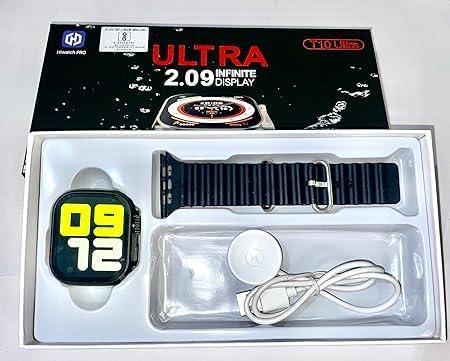
Image: The T10PRO PLUS Smart Watch, magnetic charging cable, and an extra strap neatly arranged within its retail packaging.
3. Ngwaahịa gafereview
The T10PRO PLUS Smart Watch features a 2.30-inch display and offers various functionalities to enhance your daily life. Key features include Bluetooth connectivity for smartphone pairing, notification alerts, and basic health tracking capabilities.

Image: A close-up of the T10PRO PLUS Smart Watch, showcasing ihe ngosi ya dị egwu na imewe mara mma.
4. Nhazi
4.1. Ịchaji smart Watch
- Connect the magnetic charging cable to a USB power adapter (not included) or a computer's USB port.
- Align the magnetic end of the cable with the charging contacts on the back of the smartwatch. The watch will snap into place and display a charging indicator.
- Charge the watch fully before first use. A full charge typically takes 1-2 hours.
4.2. Installing/Changing Straps
The T10PRO PLUS comes with interchangeable straps. To install or change a strap:
- Locate the quick-release pins on the back of the strap.
- Slide the pin inwards and align the strap with the lug on the watch body.
- Release the pin to secure the strap. Gently pull on the strap to ensure it is properly locked.
- Tinyegharịa maka akụkụ nke ọzọ.

Image: Several T10PRO PLUS Smart Watches displayed with different colored straps, illustrating the interchangeable strap feature.
4.3. Ijikọ na ekwentị mkpanaaka gị
- Gbaa mbọ hụ na agbanyere Bluetooth nke ama gị.
- Download the companion app (refer to the watch screen or packaging for app name/QR code) from your phone's app store.
- Open the app and follow the on-screen instructions to create an account and pair your smartwatch.
- Kwenye arịrịọ maka njikọta na ekwentị gị yana smartwatch.
5. Ntuziaka ọrụ
5.1. Nsoro ụzọ
- Ihuenyo mmetụ aka: Tap to select, swipe left/right/up/down to navigate menus and screens.
- Bọtịnụ akụkụ: Typically used to wake the screen, return to the home screen, or access the app menu.
5.2. Atụmatụ igodo
- Amamọkwa: Receive alerts for calls, messages, and app notifications directly on your wrist after pairing with your smartphone.
- Nyocha ahụike: Monitor basic health metrics (e.g., steps, heart rate) through the watch and companion app.
- Ihu elekere nwere ike ịhazi ya: Change the appearance of your watch face through the companion app.
6. Nlekọta
6.1. Nhicha
- Wipe the watch screen and body with a soft, damp, akwa akwa na-enweghị lint.
- Zere iji kemịkalụ siri ike ma ọ bụ ihe na-emebi emebi.
- Gbaa mbọ hụ na kọntaktsị chajị dị ọcha na akpọnwụwo tupu chajịa.
6.2. Nlekọta batrị
- Zere oke okpomọkụ, nke nwere ike imetụta ndụ batrị.
- Do not leave the watch uncharged for extended periods.
7. Nchọpụta nsogbu
- Lelee anaghị agbanye: Ensure the watch is fully charged. Connect it to the magnetic charger and wait a few minutes.
- Enweghị ike ijikọ na smartphone:
- Gbaa mbọ hụ na agbanyere Bluetooth na ekwentị gị.
- Ensure the companion app is installed and running.
- Malitegharịa ekwentị gị na smartwatch.
- Lelee ma elekere ahụ na ngwaọrụ ọzọ ejikọtara.
- Anataghị ọkwa:
- Verify that the watch is successfully paired with your phone.
- Check notification settings in the companion app and on your phone.
- Ensure the app has necessary permissions to access notifications.
8. Nkọwapụta
| Aha ika | N'ozuzu |
| Aha Nlereanya | T10PRO PLUS |
| Nọmba Nlereanya ihe | T10PRP PLUS |
| Nha ihuenyo | 2.30 sentimita asatọ |
| Ụdị ihe | Rectangular |
| Sistemụ nrụọrụ | Smart Watch OS |
| Atụmatụ pụrụ iche | Amamọkwa |
| Teknụzụ Njikọta | Bluetooth |
| Ikuku Communication Standard | Bluetooth |
| Ngwakọta cell batrị | Lithium ion |
| GPS | GPS site na ekwentị mkpanaaka |
| Akụkụ ngwugwu | 21.2 x 11.4 x 2.2 cm; 50 grams |
9. Akwụkwọ ikike na nkwado
For warranty information and customer support, please refer to the retailer where you purchased the product or contact the manufacturer directly. Keep your proof of purchase for any warranty claims.


