
S.M.S.L D10
S.M.S.L D10 Portable Mini Decoder Earphone AmpAkwụkwọ ntuziaka onye ọrụ lifier
:Dị: D10
1. Okwu mmalite
Daalụ maka ịzụrụasing the S.M.S.L D10 Portable Mini Decoder Earphone Amplifier. This device is designed to enhance your audio experience by providing high-fidelity sound from your computer or mobile device. Please read this manual carefully before using the product to ensure proper operation and to maximize its performance.
2. Ngwaahịa gafereview
The S.M.S.L D10 is a compact and powerful audio decoder and earphone amplifier. It features dual Cirrus Logic CS43131 DAC chips for superior sound quality, supporting DSD256 and PCM 32bit/384kHz high-resolution audio formats. With both 3.5mm and 4.4mm balanced headphone jacks, it offers versatile connectivity and robust output power for a wide range of headphones.

Image: S.M.S.L D10 USB Headphone Amplifier gafereview.
3. Atụmatụ igodo
- High-Performance DAC Chips: Utilizes two Cirrus Logic CS43131 audio decoding chips for excellent performance and pure sound.
- Nkwado ọdịyo dị elu: Supports DSD256 hardware decoding and PCM 32bit/384kHz specifications.
- Dual Headphone Outputs: Equipped with a 3.5mm single-ended headphone jack and a 4.4mm balanced headphone jack for broad compatibility.
- Mmepụta dị ike: Delivers up to 500mW@16Ω output power, capable of driving most headphones.
- Ndakọrịta sara mbara: Connects easily to computers and mobile phones, compatible with Windows 7/8/8.1/10/11 (requires driver), Mac OS X 10.6+, Linux, Android, and iOS.
- Nhazi nghọta: Features a transparent window and textured alloy casing, allowing visibility of internal components.
- Side Volume Control: Conveniently located volume button for easy adjustment.

Image: Visual representation of the D10's core features.
4. Ihe ngwugwu
Chọpụta na ihe niile dị na ngwugwu:
- S.M.S.L D10 Unit
- eriri USB
- Akwụkwọ ntuziaka (akwụkwọ a)
5. Ntuziaka Nhazi
5.1 Connecting to a Computer (Windows/Mac/Linux)
- Connect one end of the provided USB cable to the USB input port on the S.M.S.L D10.
- Jikọọ nsọtụ nke ọzọ nke eriri USB na ọdụ USB dị na kọmputa gị.
- For Windows operating systems (7/8/8.1/10/11), a specific driver may be required for optimal performance. Please visit the official S.M.S.L website for the latest driver downloads. Mac OS X 10.6+ and Linux systems typically operate without additional drivers.
- Once connected, select the S.M.S.L D10 as your audio output device in your computer's sound settings.

Image: S.M.S.L D10 connected to a laptop.
5.2 Connecting to a Mobile Phone (Android/iOS)
- Connect one end of the provided USB cable to the USB input port on the S.M.S.L D10.
- Connect the other end of the USB cable to your mobile phone. An adapter (not included) may be required depending on your phone's port type (e.g., USB-C to USB-C, or Lightning to USB-A/C).
- The D10 is generally plug-and-play with Android and iOS devices.
- Ensure the D10 is selected as the audio output device in your phone's audio settings or music player application.
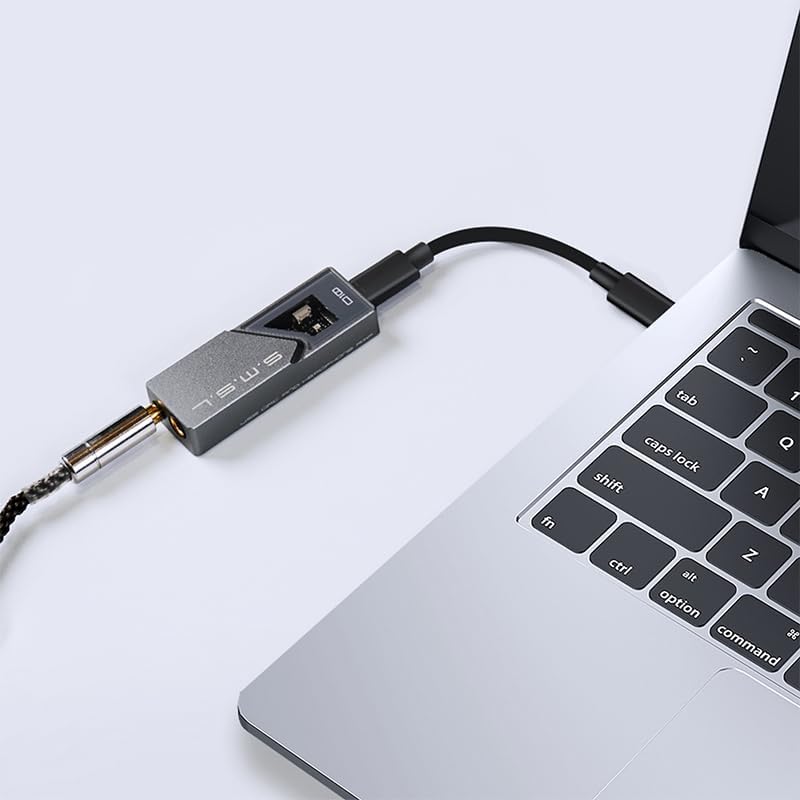
Image: S.M.S.L D10 connected to a mobile phone.
6. Ntuziaka ọrụ
6.1 Ejikọ ekweisi
The S.M.S.L D10 offers two headphone output options:
- Jack ekweisi 3.5mm: For standard single-ended headphones.
- 4.4mm Balanced Headphone Jack: For balanced headphones, offering improved signal separation and power.
Insert your headphone's plug firmly into the corresponding jack on the D10. Ensure you use the correct type of plug for the desired output.

Foto: Top view of the D10 with 3.5mm and 4.4mm headphone jacks.

Image: Port diagram of the S.M.S.L D10.
6.2 Njikwa olu
The D10 features a physical volume button on its side. Use this button to adjust the output volume to a comfortable listening level. It is recommended to start with a lower volume and gradually increase it to prevent sudden loud sounds.

Foto: Akụkụ view of the D10, highlighting the volume control.
6.3 Data Status Indicator
When playing music, the data status indicator light on the D10 will illuminate, confirming active audio processing and high-resolution sound restoration.

Image: D10 connected to a phone, showing the illuminated data status indicator.
7. Nlekọta
- Nhicha: Jiri akwa dị nro dị nro hichaa mpụta ngwaọrụ ahụ. Zere iji kemịkalụ siri ike ma ọ bụ ihe na-emebi emebi.
- Nchekwa: Store the D10 in a cool, dry place away from direct sunlight and extreme temperatures.
- Ijikwa: Jiri nlezianya jikwaa ngwaọrụ ahụ. Zere idobe ya ma ọ bụ tinye ya na mmetụta siri ike.
- Njikọta: Ensure USB and headphone cables are connected securely but without excessive force to prevent damage to ports.
8. Nchọpụta nsogbu
| Nsogbu | Ihe nwere ike ime | Ngwọta |
|---|---|---|
| Enweghị mmepụta ụda |
|
|
| Ụda agbagọ ma ọ bụ adịghị mma |
|
|
| Device feels warm during operation |
|
|
9. Nkọwapụta
| Njirimara | Nkọwa |
|---|---|
| Nlereanya | D10 |
| DAC Chips | 2 x Cirrus Logic CS43131 |
| Ụdị ọdịyo akwadoro | DSD256, PCM 32bit/384kHz |
| Mpụta ekweisi | 3.5mm (Single-ended), 4.4mm (Balanced) |
| Ike Nwepu kacha | 500mW @ 16Ω |
| Ndakọrịta | Windows 7/8/8.1/10/11 (driver required), Mac OS X 10.6+, Linux, Android, iOS |
| Akụkụ ngwugwu | 5.47 x 2.95 x 1.22 sentimita asatọ |
| Ibu Ibu | 1.1 pound |
| Onye nrụpụta | SMSL |
| Ụbọchị mbụ dị | Julaị 24, 2024 |
10. Akwụkwọ ikike na nkwado
S.M.S.L products are covered by a manufacturer's warranty. For specific warranty terms and conditions, please refer to the warranty card included with your product or visit the official S.M.S.L website. For technical support, troubleshooting assistance beyond this manual, or warranty claims, please contact S.M.S.L customer service through their official channels.
Official S.M.S.L Websaịtị: www.smsl-audio.com
Ask a question about this manual
Ask about setup, troubleshooting, compatibility, parts, safety, or missing instructions. Manuals+ will review the question and use this page’s manual context to help answer it.