
Okwu mmalite
This manual provides essential instructions for the safe and efficient operation of your Jocca 2313 Cordless Handheld Vacuum Cleaner. Please read it thoroughly before initial use and retain it for future reference. This appliance is designed for household cleaning tasks, offering convenience and portability.
Ntuziaka nchekwa
Iji belata ihe egwu nke ọkụ, ujo eletrik, ma ọ bụ mmerụ ahụ, na-agbaso nchekwa nchekwa mgbe niile mgbe ị na-eji ngwa eletriki.
- Read all instructions carefully before operating the vacuum cleaner.
- Do not use outdoors or on wet surfaces. This vacuum is intended for indoor use.
- Ekwela ka e jiri igwe nhicha ihe eji egwuri egwu mee ihe dị ka ihe egwuregwu. Ọ dị mkpa ka ụmụaka jiri ya nke ọma ma ọ bụ ndị nọ ya nso.
- Jiri naanị dị ka akọwara n'akwụkwọ ntuziaka a. Jiri naanị mgbakwunye atụnyere ndị nrụpụta.
- Ejikwala aka mmiri jide chaja ma ọ bụ ihe mkpofu.
- Etinyela ihe mkpofu n'ime mmiri ọkụ ma ọ bụ nke na-ere ọkụ, dịka mmanụ ụgbọala, ma ọ bụ jiri ya mee ihe n'ebe ha nwere ike ịdị.
- Ewepụla ihe ọ bụla na-ere ọkụ ma ọ bụ ise siga, dị ka sịga, ọkụ, ma ọ bụ ntụ na-ekpo ọkụ.
- Debe ntutu isi, uwe na-adịghị mma, mkpịsị aka na akụkụ ahụ niile pụọ na oghere na akụkụ ndị na-akpụ akpụ.
- Gbanyụọ njikwa niile tupu ịtọpụ ya.
- Use only the charging cable provided by the manufacturer.
- Do not use with a damaged charging cable or plug. If the appliance is not working as it should, has been dropped, damaged, left outdoors, or dropped into water, return it to a service center.
Ihe ngwugwu
Carefully unpack your new Jocca 2313 Cordless Handheld Vacuum Cleaner and ensure all items are present and in good condition. If any items are missing or damaged, please contact customer support.
- Jocca 2313 Handheld Vacuum Cleaner Unit
- Extendable Tube
- Nozulu ahịhịa
- Nozzle dị larịị
- Ogologo Nozzle dị larịị
- Eriri Nchaji (USB)

Image: The packaging box for the Jocca 2313 Handheld Vacuum Cleaner, showing the product and brand information.
Ngwaahịa gafereview
Familiarize yourself with the components of your Jocca 2313 Cordless Handheld Vacuum Cleaner.
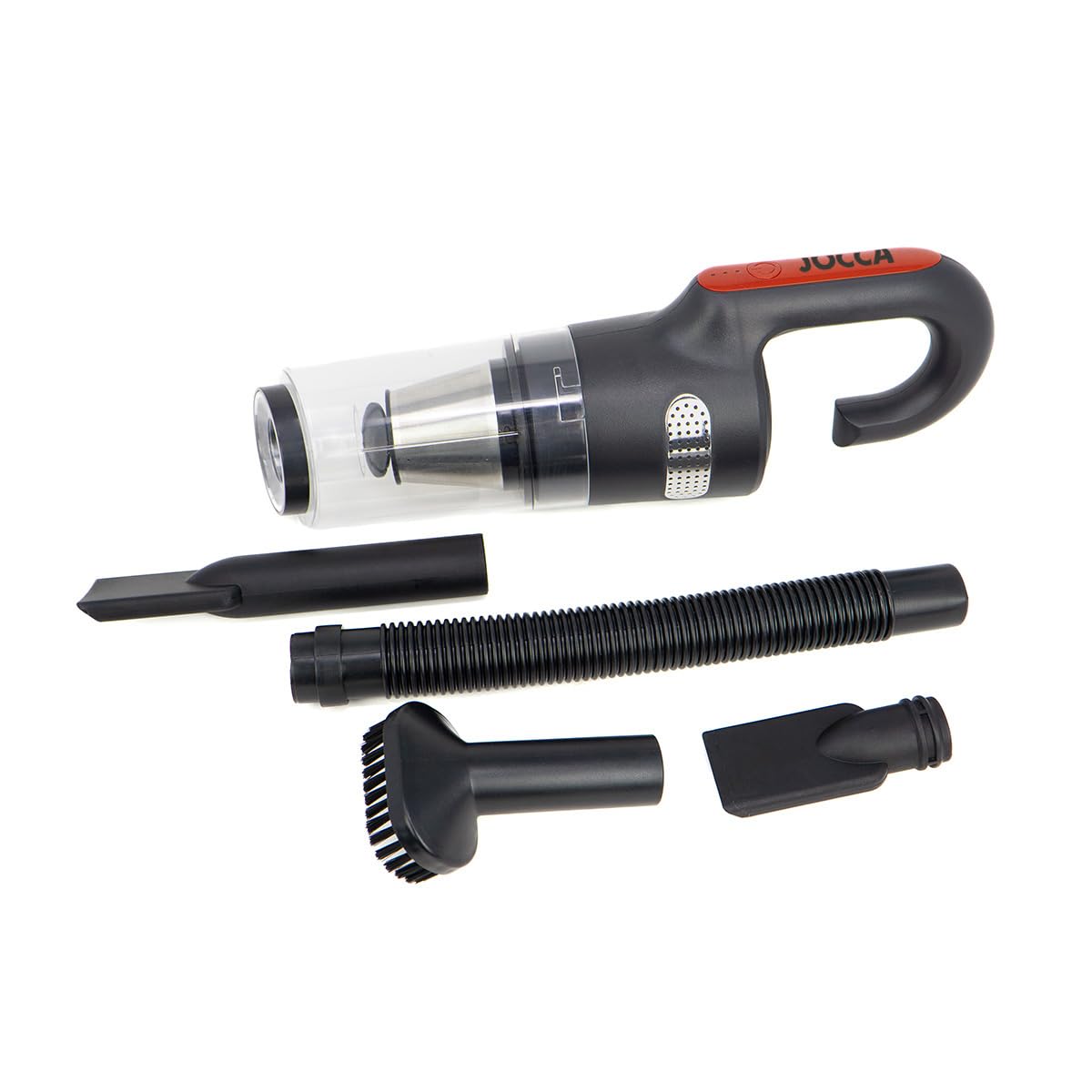
Image: The main unit of the Jocca 2313 Handheld Vacuum Cleaner, showing the handle, dustbin, and filter assembly.
- Jikwaa: Ergonomically designed for comfortable grip and portability.
- Bọtịnụ ike: Located on the handle for easy access to turn the unit on/off and adjust suction modes.
- Dustbin: Transparent, removable, and washable 0.5 L capacity for collecting debris.
- Mgbakọ nzacha: Contains a washable HEPA filter and a stainless steel filter for efficient dust separation.
- Nchaji ọdụ ụgbọ mmiri: Located on the unit for connecting the USB charging cable.
- Suction Port: Where attachments are connected for vacuuming.
Melite
Follow these steps to prepare your vacuum cleaner for use.
- Ịkwapu: Remove the vacuum cleaner and all accessories from the packaging. Dispose of packaging materials responsibly.
- Nchaji batrị: Before first use, fully charge the vacuum cleaner. Refer to the 'Charging' section for detailed instructions.
- Tinye Nozzle: Select the appropriate nozzle for your cleaning task. You can attach the brush nozzle, flat nozzle, or long flat nozzle directly to the vacuum's suction port. For extended reach, connect the extendable tube first, then attach the desired nozzle to the tube.

Image: The vacuum cleaner with the brush nozzle attached, suitable for upholstery and general surfaces.

Image: The vacuum cleaner with the flat nozzle attached, ideal for narrow gaps and edges.
Ịchaji
Ensure your vacuum cleaner is fully charged for optimal performance.
- Locate the charging port on the vacuum cleaner unit.
- Connect the provided USB charging cable to the vacuum's charging port.
- Plug the other end of the USB cable into a suitable USB power adapter (not included) or a powered USB port.
- The LED indicator lights on the handle will illuminate to show the charging status.
- A full charge typically takes approximately 2 hours. Once fully charged, the indicator lights may change or turn off.
- The vacuum provides up to 20 minutes of continuous use on a full charge.

Foto: Top view of the vacuum cleaner, highlighting the power button and LED indicator lights that show battery status during charging and operation.
Ntuziaka ọrụ
Operating your Jocca 2313 Handheld Vacuum Cleaner is straightforward.
- Gbanyụọ/ Gbanyụọ: Pịa bọtịnụ ike dị na aka ahụ iji gbanye ihe nhicha ikuku. Pịa ya ọzọ iji gbanyụọ ya.
- Adjust Suction Mode: The vacuum features two power levels: a weaker mode for light cleaning and a stronger mode for more demanding tasks. Press the power button repeatedly to cycle through the modes.
- Ntupu: Guide the selected nozzle over the area to be cleaned. The vacuum is capable of picking up both dry debris and small liquid spills.
- Mwepu mmiri: When vacuuming liquids, ensure the dustbin is not overfilled. Empty the dustbin immediately after vacuuming liquids to prevent damage and maintain hygiene.

Image: The vacuum cleaner effectively cleaning a liquid spill on a hard surface.

Image: The vacuum cleaner picking up dry debris from a floor.
Nlekọta na nhicha
Nlekọta anya mgbe niile na-eme ka arụ ọrụ kacha mma ma gbasaa ogologo ndụ nke ihe nhicha agụụ gị.
- Na-ekpochapụ Dustbin: When the dustbin is full (0.5 L capacity) or suction power decreases, detach the dustbin from the main unit. Empty the collected debris into a waste bin.
- Ihe nzacha ihicha: The vacuum features a dual-filter system: a washable HEPA filter and a stainless steel filter. Remove both filters from the dustbin. Rinse them under running water until clean. Do not use detergents.
- Drying Filters: Allow both filters to air dry completely for at least 24 hours before reinserting them into the dustbin. Do not use a dryer or direct heat.
- Nchikota: Once the filters are completely dry, place the stainless steel filter back into the dustbin, followed by the HEPA filter. Reattach the dustbin to the main vacuum unit, ensuring it clicks securely into place.
- Nchacha mpụta: Jiri nwayọ hichaa mpụta nke ihe na-ehicha agụụ, damp akwa . Ejila ihe nchacha abrasive ma ọ bụ ihe mgbaze.

Image: The vacuum cleaner's transparent dustbin, clearly showing the internal filter assembly which needs regular cleaning.
Nchọpụta nsogbu
If you encounter any issues with your vacuum cleaner, refer to the following common problems and solutions.
| Nsogbu | Ihe nwere ike ime | Ngwọta |
|---|---|---|
| Vacuum anaghị agbanye. | Batrị agwụla. | Charge the vacuum cleaner fully. |
| Ejikọghị eriri chaja nke ọma. | Ensure the charging cable is securely connected to both the vacuum and the power source. | |
| Ebelata ike mmiri. | Dustbin juru eju. | Wepu ncha akwa. |
| Ihe nzacha ruru unyi ma ọ bụ mechie. | Clean and thoroughly dry the HEPA and stainless steel filters. | |
| Nozzle or tube is blocked. | Remove any blockages from the nozzles, extendable tube, or suction port. | |
| Short battery run time. | Achachabeghị batrị zuru oke. | Ensure the vacuum is charged for the recommended duration (approx. 2 hours). |
| Mmebi batrị ka oge na-aga. | Battery capacity may naturally decrease with extended use. |
Nkọwapụta
Key technical specifications for the Jocca 2313 Cordless Handheld Vacuum Cleaner.
- Akara: Jọka
- Nọmba nlereanya: 2313
- Ike imi: 7500 Pa
- Batrị: 8.4V lithium-ion
- Oge ịgba ọsọ: Ruo nkeji iri abụọ
- Ikike Dustbin: 0.5 L
- Ụdị nzacha: HEPA, Stainless Steel
- Akụkụ (L x W x H): 14 x 11 x 36 cm
- Atụmatụ pụrụ iche: Cordless, Wet & Dry capability, Portable
- Isi mmalite ike: Akwanyere batrị
Akwụkwọ ikike na nkwado
For warranty information, product registration, or technical support, please refer to the documentation included with your purchase or visit the official Jocca websaịtị. Debe ihe akaebe nke ịzụrụ ihe maka akwụkwọ ikike ọ bụla.