
1. Okwu mmalite
Daalụ maka ịzụrụasing the Xiaomi Cordless Vacuum Cleaner G20 Lite. This manual provides essential information for the safe and efficient use, maintenance, and troubleshooting of your new vacuum cleaner. Please read this manual thoroughly before first use and keep it for future reference.
2. Ntuziaka nchekwa
To reduce the risk of fire, electric shock, or injury, always follow basic safety precautions when using your vacuum cleaner:
- Gụọ ntuziaka niile tupu i jiri ngwa.
- Ejila n'èzí ma ọ bụ n'elu mmiri.
- Ekwela ka eji mee ihe egwuregwu ụmụaka. Nlebara anya dị mkpa mgbe ụmụaka na-eji ma ọ bụ nso.
- Jiri naanị dị ka akọwara n'akwụkwọ ntuziaka a. Jiri naanị mgbakwunye atụnyere ndị nrụpụta.
- Ejila eriri ma ọ bụ plọg mebiri emebi. Ọ bụrụ na ngwa anaghị arụ ọrụ ka ọ kwesịrị, atụbagoro, mebie, hapụ ya n'èzí, ma ọ bụ tụba ya na mmiri, weghachite ya na ebe ọrụ.
- Anaghachila ma ọ bụ were ụdọ buru, jiri eriri dị ka aka, mechie ọnụ ụzọ na eriri, ma ọ bụ dọpụta eriri n'akụkụ ọnụ ma ọ bụ nkuku dị nkọ. Ejila ngwa n'elu eriri. Debe eriri n'ebe dị ọkụ.
- Akwụpụla eriri site na ịdọrọ eriri. Iji kwụpụ, jide plọg, ọ bụghị eriri.
- Ejila aka mmiri were jide plọg ma ọ bụ ngwa.
- Etinyela ihe ọ bụla n'ime oghere. Ejila oghere ọ bụla akpọchiri; na-ezere uzuzu, lint, ntutu na ihe ọ bụla nwere ike ibelata ikuku.
- Debe ntutu isi, uwe na-adịghị mma, mkpịsị aka na akụkụ ahụ niile pụọ na oghere na akụkụ ndị na-akpụ akpụ.
- Ewelitela ihe ọ bụla na-ere ọkụ ma ọ bụ ise siga, dị ka sịga, ọkụ, ma ọ bụ ntụ na-ekpo ọkụ.
- Ejila eburu mmiri ọkụ na-ere ọkụ ma ọ bụ ọkụ ọkụ, dị ka mmanụ ụgbọala, ma ọ bụ jiri n'ebe ha nwere ike ịnọ.
- Ewelitela ihe na-egbu egbu, dị ka ịcha ọcha chlorine, amonia, ma ọ bụ ihe nhicha mmiri.
- Ejikwala iko uzuzu na/ma ọ bụ nzacha n'ebe.
- Gbanyụọ njikwa niile tupu ịtọpụ ya.
- Jiri nlezianya mee ihe mgbe ị na-ehicha ihe na steepụ.
- Chekwaa ngwa n'ime ụlọ.
- Akwụnala unit ahụ n'èzí.
- Jiri naanị chaja nke onye nrụpụta kwuru.
3. Ngwaahịa gafereview
The Xiaomi Cordless Vacuum Cleaner G20 Lite is designed for efficient cleaning with its powerful suction and versatile attachments. Key features include:
- Maximum 18,000Pa suction power for thorough cleaning.
- Integrated white LED light on the brush head to illuminate dark areas.
- 5-s dị elutage powerful filter system to prevent secondary pollution.
- Large capacity 2200mAh battery providing up to 45 minutes of runtime.
- One-touch dust disposal for easy and hygienic emptying.
- 2-way brush nozzle and extension rod for versatile cleaning.
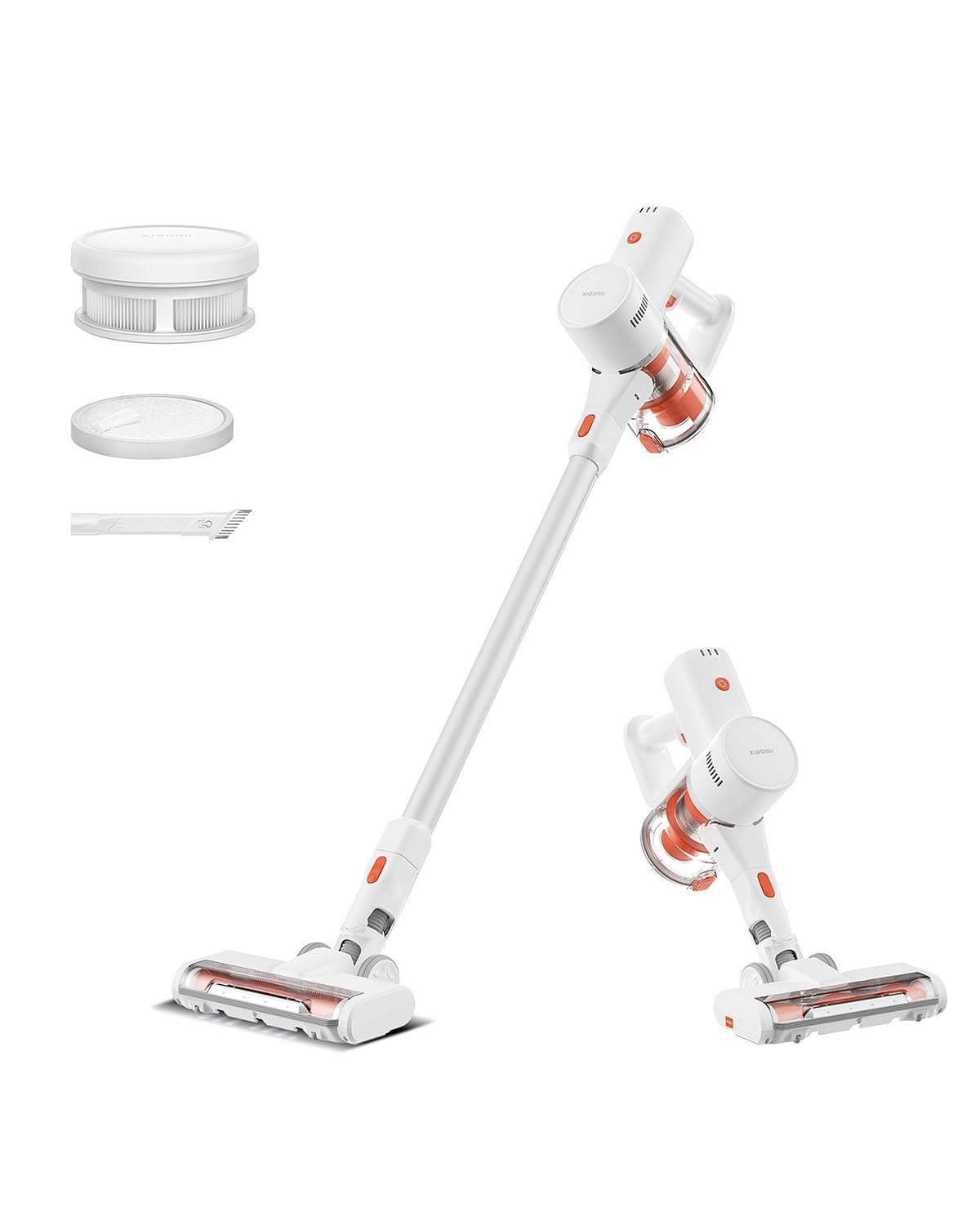
Image: Xiaomi Cordless Vacuum Cleaner G20 Lite, showing the full product assembly.

Image: Illustration of the vacuum cleaner's internal motor, highlighting its 18,000Pa suction power.
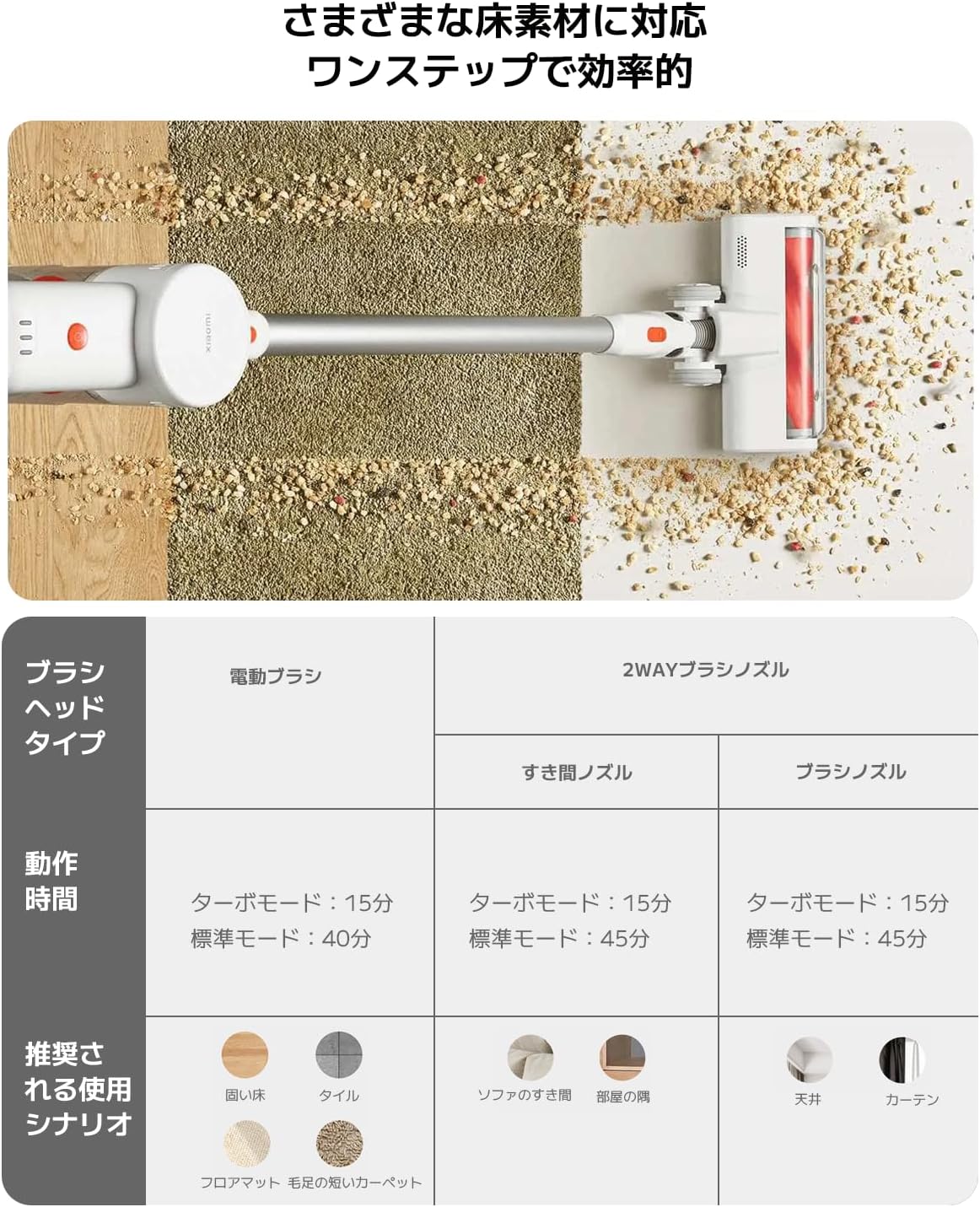
Foto: Ihe ngosi view of the vacuum cleaner's handle, showing the internal large-capacity battery cells.
4. Nhazi
Soro usoro ndị a iji chịkọta vacuum Cleaner gị:
- Wepu akụrụngwa: Carefully remove all parts from the packaging. Ensure all accessories (main unit, extension rod, motorized brush head, 2-way brush nozzle, crevice nozzle, adapter) are present.
- Attach Extension Rod: Connect the extension rod to the main unit until it clicks into place.
- Tinye Isi ahịhịa: Connect the desired brush head (motorized brush or 2-way brush nozzle) to the other end of the extension rod. For handheld use, attach the 2-way brush nozzle or crevice nozzle directly to the main unit.
- Nchaji batrị: Before first use, fully charge the vacuum cleaner. Connect the adapter to the charging port on the main unit and plug it into a power outlet. The power indicator lights will show the charging status.

Image: The vacuum cleaner being stored on a wall-mounted charging dock, illustrating convenient storage and charging.
5. Ntuziaka ọrụ
Your Xiaomi Cordless Vacuum Cleaner G20 Lite offers versatile cleaning options:
Power On/Off and Suction Modes
Press the power button to turn the vacuum on. Press the mode button to cycle through different suction power levels (Standard, Turbo). The power indicator lights will show the current mode and battery level.
Video: A short demonstration of turning the vacuum cleaner on and cycling through its suction modes using the power and mode buttons.
Iji Mgbakwụnye
Select the appropriate brush head for your cleaning task:
| Ụdị isi ahịhịa | Operating Time (Standard/Turbo) | Recommended Use Scenario |
|---|---|---|
| Ahịhịa ụgbọala | Nkeji 40/15 nkeji | Hard Floor, Tile, Floor Mat, Short Pile Carpet |
| 2-Way Brush Nozzle (Crevice) | Nkeji 45/15 nkeji | Sofa Crevices, Room Corners |
| 2-Way Brush Nozzle (Brush) | Nkeji 45/15 nkeji | Ceiling, Curtains |

Image: Close-up of the vacuum cleaner's motorized brush head, showing the integrated white LED lights illuminating the floor.

Image: A person using the vacuum cleaner with the extension rod to clean high areas, and with a specialized nozzle for narrow gaps and desk surfaces.
6. Nlekọta
Nlekọta anya mgbe niile na-eme ka arụ ọrụ kacha mma ma gbasaa ogologo ndụ nke ihe nhicha agụụ gị.
Na-ekpochapụ Dustbin
The vacuum cleaner features a one-touch dust disposal system. Simply press the release button on the dustbin to open the bottom flap and empty collected debris directly into a trash can. Empty the dustbin regularly to maintain suction power.

Image: A hand demonstrating the one-touch dust disposal mechanism, showing debris falling from the dustbin. Also visible is the power indicator light on the handle.
Na-ehicha ihe nzacha
Nke 5-stage powerful filter system requires periodic cleaning. Refer to the diagram below for filter components. Remove the dustbin and separate the filter components. Tap off loose dirt and rinse washable parts under running water. Ensure all filter components are completely dry before reassembling them into the vacuum cleaner.

Foto: gbawara view of the vacuum cleaner's main unit, illustrating the components of the 5-stage filter system.
Cleaning Brush Heads
Periodically check brush heads for tangled hair or debris. Use scissors to cut away any tangled hair and remove any obstructions to ensure smooth operation.
7. Nchọpụta nsogbu
Ọ bụrụ na ị na-ezute nsogbu na igwe nhicha gị, rụtụ aka na nsogbu na ngwọta ndị a na-ahụkarị:
- Enweghị ike:
- Check if the battery is charged. Recharge if necessary.
- Gbaa mbọ hụ na ịpịrị bọtịnụ ike nke ọma.
- Ike Mmiri Dị Ala:
- Wepu ncha akwa.
- Clean the filters. Ensure they are dry before reinstallation.
- Check for blockages in the brush head, extension rod, or main unit.
- Isi ahịhịa anaghị agbagharị:
- Check for tangled hair or debris obstructing the brush roll.
- Ensure the brush head is correctly attached.
- Mkpọtụ na-adịghị ahụkebe:
- Check for any foreign objects caught in the brush head or suction path.
- Gbaa mbọ hụ na agbakọtara akụkụ niile nke ọma.
Ọ bụrụ na nsogbu ahụ ka dị, biko kpọtụrụ nkwado ndị ahịa.
8. Nkọwapụta
| Nkọwapụta | Nkọwa |
|---|---|
| Ụdị | Xiaomi |
| Nọmba nlereanya | BHR8232US |
| Ụdị ngwaahịa | Ihe nhicha osisi |
| Atụmatụ | Enweghị eriri |
| Ụdị nzacha | HEPA nzacha |
| Akwadoro ojiji | Carpet, Hard Floors, Sofa, Curtains, Beds, Tiles, Blankets |
| Isi Iyi Ike | Battery Powered (Charges via power cord) |
| Ike | 0.55 lita |
| Agba | Ọcha |
| Enwere ike ibugharị | Ee |
| Ojiji ime ime/n'èzí | Ime ụlọ |
| Nrụ ọrụ Voltage | 21.6 volts |
| Ike batrị | 215 Watt-hours (2200mAh) |
| Ụdị njikwa | Njikwa aka |
| Njikọta | Bluetooth (for potential smart features) |
| Ngwa gụnyere | Accessory kit, Adapter |
| Mba onye si | China |
| Ibu ngwaahịa | 2.4 kilogram |
| Akụkụ ihe (L x W x H) | 66.2 cm x 32 cm x 13.2 cm |
9. Akwụkwọ ikike na nkwado
Xiaomi products are designed with quality and reliability in mind. For warranty information and customer support, please refer to the details below:
Ozi akwụkwọ ikike
This product comes with a standard manufacturer's warranty. Please retain your proof of purchase for warranty claims. For specific warranty terms and conditions, refer to the documentation included with your product or visit the official Xiaomi websaịtị.
Nkwado ndị ahịa
For technical assistance, troubleshooting, or service inquiries, please contact the Xiaomi Customer Service Center:
- Ekwentị: 0120-767-378 (Reception hours: 9:00 - 18:00, excluding year-end and New Year holidays)
- Email: service.jp@support.mi.com
Xiaomi Service Center (Akihabara Store)
For in-person support or repairs, you may visit our service center:
- adreesị: 4-6-7 Kanda Sakumacho, Chiyoda-ku, Tokyo
- Oge ọrụ: 10:00 - 19:00
- Emechiri: Wenezde
- Last Reception: 18:00