
1. Okwu mmalite
This manual provides detailed instructions for the safe and effective use of your pxton 666S two-way radio. Please read this manual thoroughly before operating the device and retain it for future reference. The pxton 666S is a reliable communication device designed for various applications, featuring 16 memory channels, privacy codes, and multiple functions such as VOX, noise reduction, and a flashlight.
FCC ID: 2AX68GTR8. This device complies with Part 15 of the FCC Rules. Operation is subject to the condition that this device does not cause harmful interference.

Image 1.1: A set of ten pxton 666S two-way radios, each with its charging dock and an earphone, illustrating the complete package.
2. Ihe ngwugwu
Chọpụta na ihe niile dị na ngwugwu gị:
- 10 x pxton 666S Two-Way Radios
- 10 x USB Charging Docks
- 10 x 1500mAh Lithium Batteries
- 10 x Mpekere eriri
- 10 x Igwe ntị
- 5 x Akwụkwọ ntuziaka onye ọrụ

Image 2.1: An illustration of the individual components included in the pxton 666S package: the radio unit, charging dock, battery, belt clip, earphone, and user manual.
3. Ngwaahịa gafereview
3.1 Atụmatụ
- 16 Oghere Nchekwa
- Koodu Nzuzo 165 (50 CTCSS / 210 DCS)
- 5 Levels of VOX Sensitivity Adjustment
- Ngụ oge agwụla (TOT)
- Mkpu
- Mbelata mkpọtụ
- Squelch akpaaka
- Nlebanya batrị dị ala
- Ụdị Nchekwa Ike
- Ọrụ ịgụ isiokwu
- Ọrụ nlekota oru
- Igwe ọkụ ọkụ LED
- Durable PC+ABS material construction
3.2 Radio Components
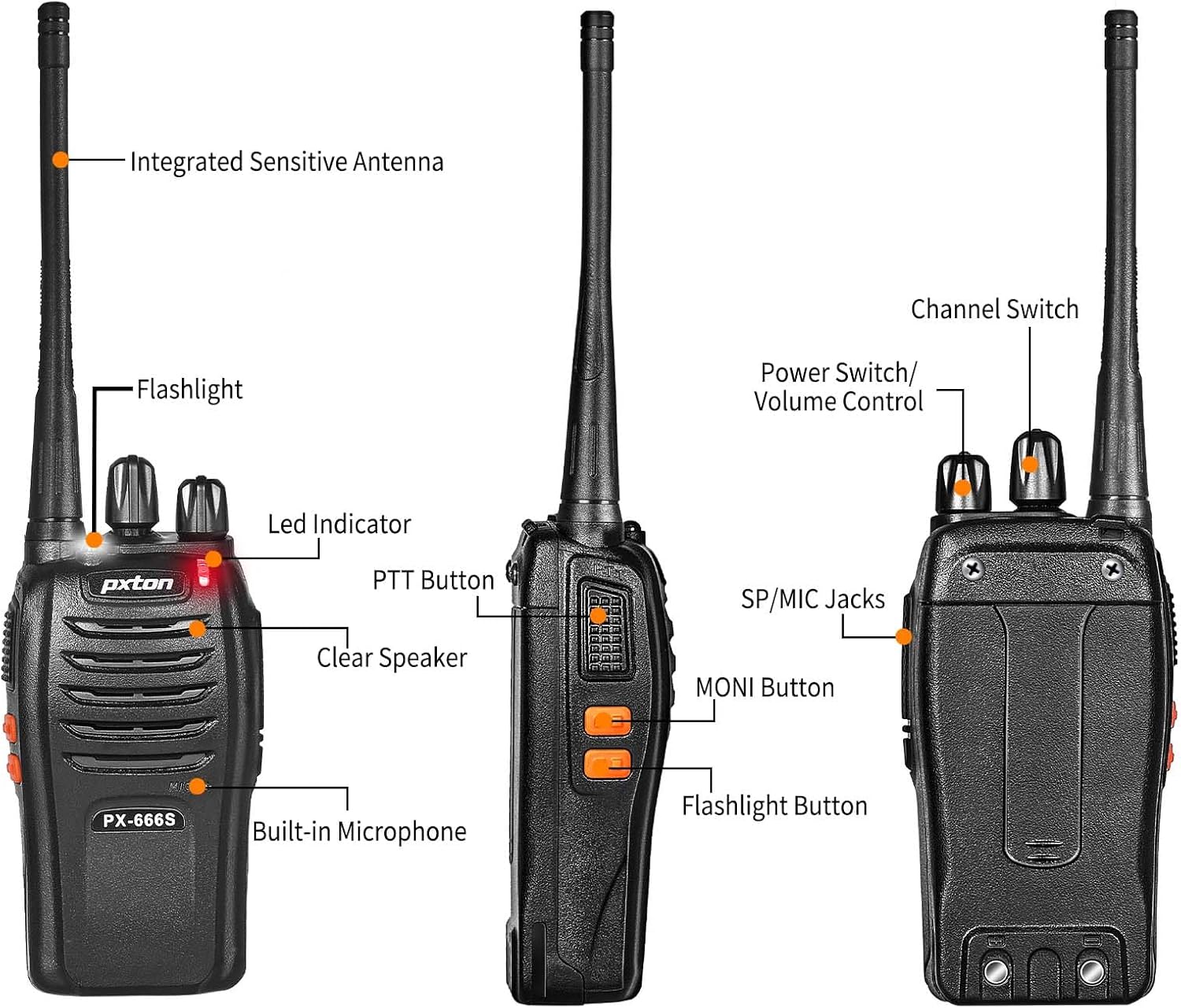
Image 3.1: Detailed diagram labeling the external components of the pxton 666S radio, including the integrated sensitive antenna, flashlight, LED indicator, PTT button, clear speaker, built-in microphone, SP/MIC jacks, MONI button, flashlight button, channel switch, and power switch/volume control.
- Integrated Sensitive Antenna: Maka ịnyefe na ịnata akara.
- Igwe ọkụ: Na-enye ọkụ.
- Ihe ngosi LED: Displays status (e.g., transmitting, receiving, low battery).
- Bọtịnụ PTT (Push-to- Talk): Press to transmit, release to receive.
- Clear Speaker: Maka mmepụta ọdịyo.
- Igwe okwu arụnyere n'ime ya: Maka ntinye ọdịyo.
- SP/MIC Jacks: For connecting external earphones or microphones.
- MONI Button (Monitor): Temporarily disables squelch to hear weak signals.
- Bọtịnụ ọkụ ọkụ: Activates the LED flashlight.
- Mgbanwe ọwa: Rotates to select desired communication channel.
- Mgbanwe ọkụ/ Njikwa olu: Na-atụgharị iji gbanye/ gbanyụọ redio wee mezie olu.

Image 3.2: The pxton 666S radio resting on rocks, emphasizing its rugged PC+ABS durable material, anti-fall, and anti-vibration design for extended service life.
4. Nhazi
4.1 Ntinye batrị
- Hazie ngwugwu batrị ahụ na oghere dị n'azụ redio.
- Malite ngwungwu batrị elu ruo mgbe ọ pịrị na ya.
- To remove, press the release latch (if present) and slide the battery downwards.
4.2 Ịchaji batrị
The pxton 666S uses a 1500mAh Li-ion battery. A full charge takes approximately 3-4 hours.
- Connect the USB charging dock to a power source.
- Tinye redio (nke etinyere batrị) n'ime ọdụ ụgbọ mmiri ịchaji.
- The LED indicator on the radio or charger will show charging status (e.g., red for charging, green for fully charged).

Image 4.1: Two pxton 666S radios placed in their respective charging docks, with earphones connected, demonstrating the charging setup.
4.3 Na-ejikọta Clip Belt
Secure the belt clip to the back of the radio using the provided screws for convenient carrying.
4.4 Ijikọ ekwe ntị
Insert the earphone plug into the SP/MIC jacks on the side of the radio. Ensure it is fully inserted for proper audio transmission and reception.
5. Ntuziaka ọrụ
5.1 Gbanyụọ/ Gbanyụọ na njikwa olu
- Ka ịgbanwuo redio, tụgharịa ya Mgbanwe ọkụ/ Njikwa olu knob clockwise. You will hear a "click" and a tone.
- To turn off the radio, rotate the knob counter-clockwise until you hear a "click".
- To adjust the volume, rotate the Mgbanwe ọkụ/ Njikwa olu Pịa aka n'akụkụ aka nri iji mee ka olu dịkwuo elu ma jiri aka ekpe pịa ya iji belata ya.
5.2 Nhọrọ ọwa
Tugharia ihe Channel Gbanye knob to select one of the 16 available channels. Ensure all radios in your group are set to the same channel for communication.
5.3 Nyefee na ịnata
- Ka ịnyefe, pịa ma jide Igodo PTT. Speak clearly into the microphone. The LED indicator will typically glow red.
- To receive, release the Igodo PTT. The LED indicator will typically glow green when receiving a signal.
5.4 VOX Function (Voice Operated Transmission)
The VOX function allows hands-free operation. When activated, the radio will automatically transmit when it detects your voice, without needing to press the PTT button. The pxton 666S offers 5 levels of VOX sensitivity adjustment.

Image 5.1: A security guard using the pxton 666S radio, illustrating the VOX/Handsfree function for clear and bright sound quality, allowing hands-free communication.
5.5 Igwe ọkụ
Pịa Bọtịnụ ọkụ ọkụ to turn the LED flashlight on or off. This feature is useful in low-light conditions.

Image 5.2: The pxton 666S radio's flashlight feature in use, illuminating a campsite at night, demonstrating its utility in dark environments.
5.6 Monitoring Function
Pịa ma jide MONI Button to temporarily disable the squelch function. This allows you to hear very weak signals that might otherwise be blocked by the squelch, or to check if a channel is clear before transmitting.
5.7 Ọrụ nyocha
The scanning function allows the radio to automatically scan through all programmed channels to detect activity. Refer to the full user manual (if provided separately) for specific instructions on activating and managing the scanning feature.
5.8 Akụkụ ndị ọzọ
- Mbelata mkpọtụ: Enhances audio clarity by reducing background noise.
- Mkpu ihe mberede: Activates an audible alarm to signal for help.
- Ngụ oge akwụsị (TOT): Prevents accidental prolonged transmissions by limiting the duration of each transmission.
- Ụdị Nchekwa Ike: Automatically reduces power consumption when no activity is detected, extending battery life.
- Nti mkpu batrị dị ala: Provides an audible or visual warning when the battery level is low, indicating it's time to recharge.
6. Oke Nkwurịta Okwu
The actual communication range of the pxton 666S can vary significantly based on environmental factors, terrain, and obstructions. General estimates are:
- Open Areas (flat terrain, mountain peaks): Up to 3 miles.
- Suburban/Countryside Areas: Approximately 1.2 miles.
- City Limits (with buildings and obstructions): Around 0.6 miles.

Image 6.1: Visual representation of the pxton 666S communication range, indicating up to 1-3 miles in open areas, 1.2 miles in rural settings, and 0.6 miles in urban environments.
7. Ozi batrị
The pxton 666S is powered by a rechargeable 1500mAh Lithium-Ion battery (Model: BL-1, 5.55Wh, Voltagihe: 3.7V).
- Ojiji a na-ejikarị: Up to 12 hours of continuous talk time.
- Oge njikere: Up to 120 hours (5-7 days).
- Oge Nchaji zuru oke: Ihe dị ka awa 3-4.
Important Battery Safety Information:
- Akwụsịla batrị ahụ.
- Ejila ọkụ tụfuo ya.
- Jiri naanị chaja akọwapụtara.
- Emegharịala ọnụ ọnụ ọnụ ụzọ mkpirisi.
- Chekwaa n'ebe dị jụụ, kpọrọ nkụ.

Image 7.1: The pxton 666S radio alongside its 1500mAh Li-ion battery, detailing battery model (BL-1), capacity (1500mAh), voltage (3.7V), and safety warnings.
8. Nkọwapụta
| Njirimara | Nkọwapụta |
|---|---|
| Nọmba nlereanya | PX-666S-0004 |
| Ụdị | pxton |
| Ọnụọgụ nke ọwa | 16 |
| Oke ugboro ugboro | UHF |
| Oke Okwu Kachasị | 3 Miles (line of sight) |
| Ụdị batrị | 1500mAh Lithium Ion (gụnyere) |
| Voltage | 3.7 volts |
| Ibu Ibu | 7.05 pound (maka 10-mkpọ) |
| Akụkụ ngwaahịa | 9.9 x 11 x 6.9 inch (akụkụ ngwugwu) |
| Ọkwa Nguzogide mmiri | Mmiri na-eguzogide |
| Atụmatụ pụrụ iche | Automatic Squelch, Battery Saver Mode, Long Range, Rechargeable, Voice Operated Transmission (VOX) |

Image 8.1: A size comparison of the pxton 666S radio next to a smartphone (iPhone 14 Pro), illustrating its compact dimensions for portability.
9. Nchọpụta nsogbu
If you encounter issues with your pxton 666S radio, please refer to the following common problems and solutions:
| Nsogbu | Ihe nwere ike ime | Ngwọta |
|---|---|---|
| Enweghị ike | Awụnyeghị batrị nke ọma ma ọ bụ hapụ ya. | Hụ na batrị ahụ dị n'ọnọdụ kwesịrị ekwesị. Chajie batrị ahụ nke ọma. |
| Enweghị ike ịnyefe ma ọ bụ nata | Incorrect channel, out of range, low battery, squelch too high. | Verify all radios are on the same channel. Move closer to other radios. Recharge battery. Press MONI button to check for weak signals. |
| Ogo ọdịyo adịghị mma / Static | Weak signal, interference, radio too far apart. | Move to an area with fewer obstructions. Adjust volume. Ensure antenna is clear. |
| VOX anaghị arụ ọrụ | VOX sensitivity too low, feature disabled. | Adjust VOX sensitivity to a higher level. Ensure VOX is enabled (refer to full manual for programming). |
| Ndụ batrị dị mkpụmkpụ | Frequent transmission, battery degradation, power-saving mode off. | Reduce transmission time. Ensure power-saving mode is active. Consider replacing old batteries. |
For further assistance, please contact pxton customer support.
10. Nlekọta
- Nhicha: Jiri nwayọọ, damp akwa iji hichaa mputa redio. Ejila kemịkalụ siri ike ma ọ bụ ihe mkpocha abrasive.
- Nchekwa: When not in use for extended periods, remove the battery and store the radio in a cool, dry place.
- Nlekọta batrị: Fully charge batteries before long-term storage and recharge them every 3-6 months to maintain optimal performance.
- Antenna: Ehulata ma ọ bụ gbanwee antenna, n'ihi na nke a nwere ike imetụta arụmọrụ.
- Nguzogide mmiri: While water-resistant, avoid submerging the radio in water. Ensure all covers (e.g., earphone jack cover) are securely closed.
11. Akwụkwọ ikike na nkwado
pxton offers a 30-day no-questions-asked replacement and refund policy from the date of purchase. Additionally, the product comes with ọrụ ndụ mgbe ire ere gasịrị.
If you encounter any issues or require support, please contact pxton customer service. They are committed to assisting you with any concerns.
Ndebanye aha ndakọrịta: The pxton 666S walkie talkie is compatible with PX-888S, PX-777S, and PX-888S Pro models. They can utilize the same programming tools and cables (programming cable sold separately).